
DOWNLOAD THE APP


Customer Services
Copyright © 2025 Desertcart Holdings Limited
DOWNLOAD THE APP

🚀 Triple your screens, triple your power, triple your productivity!
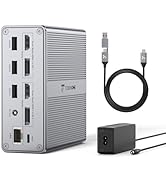
The TobenONE DisplayLink Docking Station is a professional-grade 14-in-1 USB-C hub designed for M1-M4 MacBooks, Windows, and Chrome OS laptops. It supports triple monitors with 4K and 1920x1200 resolutions, delivers a robust 100W charging output, and offers extensive connectivity including 5 USB ports and Ethernet. Engineered for seamless multi-device management, it boosts productivity by enabling expansive workspaces and reliable power and network connections.




| ASIN | B0DSP9K3QR |
| Best Sellers Rank | #26,089 in Computers ( See Top 100 in Computers ) #167 in Laptop Docking Stations |
| Item model number | K1211-2006000D |
| Manufacturer | Tobenone |
| Product Dimensions | 3.81 x 10.82 x 10.92 cm; 1.03 kg |
A**R
Great Product
The product is absolutely functioning fine. But I am unable to register for warranty as it returns error ""you can't find your order ID" 🥺
S**D
After struggling with limited connectivity on my MacBook, this TobenONE docking station has been a complete game-changer. Here's what impressed me most: Triple Monitor Setup: The 3-monitor capability works flawlessly - crystal clear 4K output on my main display and sharp 1920x1200 on the other two. Setup was straightforward after installing the DisplayLink drivers (which took about 5 minutes). My productivity has honestly doubled with this expanded workspace. Charging Power: The 100W charging keeps my MacBook fully powered even with all peripherals connected. No more battery anxiety during long work sessions - it charges as fast as my original Apple charger. Build Quality & Ports: Solid construction that feels premium, not flimsy like some cheaper alternatives. All 5 USB ports work perfectly for my external drives, keyboard, and mouse. The Ethernet port provides rock-solid internet that's much more reliable than my WiFi. Mac Compatibility: Works seamlessly with my M2 MacBook Pro running macOS Monterey. No glitches, no random disconnects - just consistent performance day after day. Customer Service: Whatever questions I have their support team responded within a day with clear, helpful instructions. Genuinely friendly and knowledgeable. The convenience factor is huge - I can connect/disconnect my entire workstation with a single USB-C cable. Perfect for anyone who works both at a desk and on-the-go. Bottom line: This docking station delivers on every promise. If you need reliable triple monitor support for your Mac, don't hesitate - this is the one to get. Worth every penny for the productivity boost alone.
R**A
Excelente produto. Estou muito satisfeita. Tem várias portas e é resistente , pequeno e bem bonito.
P**X
I’m very picky about my desk setup, especially when it comes to cable management and performance—and this docking station absolutely delivers. I’m using it with my MacBook Pro (lid closed) and running three external monitors without a hitch. Why I love it: One Cable Wonder: Just a single USB-C cable to my MacBook Pro handles all displays, data, and power. It’s a dream for a clean setup. Plenty of Ports: Tons of USB-A and USB-C ports, plus Ethernet, SD/microSD, and 3 HDMI outputs. Everything I need, all in one place. DisplayLink Software: Yes, you need to install it—but it’s super easy and works flawlessly. Professional Look: Keeps my workspace tidy and efficient, exactly how I like it. If you’re looking to simplify your desk, power multiple monitors, and eliminate cable chaos, this dock is a no-brainer. Highly recommend for Mac users, especially those with M1–M4 chips who want full multi-display support.
C**S
The dock is compact and well-designed - it's a very good product with a reasonable price point. The multi monitor support is solid and there are sufficient USB ports for my various peripherals. I hardly know it's there, and when I need to plug in a peripheral, it's simple. That's what I'm looking for in a dock - something that works and stays out of my way. Setup is simple,, though the Synaptics Displaylink driver download is required to support the multiple monitors functionality on my M1 MacBook, which will ask for some permissions to process the video through the unit. The provided instructions are simple and clear on the process. It's worked well for daily use over the past three weeks that I've used it. I've purchased two Tobenone docks in the past - and I've been very happy with them Customer service has been helpful and fastI required a replacement part. Disclosure: Tobenone provided me this particular unit at no charge for user testing and feedback. This review was not required as part of that feedback. I am posting this review because I'm very satisfied with the dock.
R**Z
This is my third TobenONE device and it works flawlessly. I moved to this DisplayLink 14-in-1 dock to simplify a triple monitor setup on a MacBook Pro. With my previous dock I used 2 HDMI plus 1 DisplayPort. With this version I run all three monitors over HDMI, which keeps cabling simple and it just works. Setup was straightforward: plug in the 120W power supply, connect USB C, install DisplayLink Manager on macOS, and you are ready. No hiccups so far. What stands out: * Three HDMI outputs for 3 external monitors on Apple silicon * Better heat dissipation than my older TobenONE dock; it stays cooler under load * Stable network and peripherals through Ethernet and five USB ports * SD and microSD slots for quick transfers * Reliable power from the included supply Daily use has been smooth with no random disconnects or flicker. Sleep and wake are consistent, and the dock restores my layout quickly. It is my daily driver now. I like both the older and newer versions, but this update fits my needs better. Thank you TobenONE team.
Trustpilot
1 month ago
5 days ago