
DOWNLOAD THE APP


Customer Services
Copyright © 2025 Desertcart Holdings Limited
DOWNLOAD THE APP


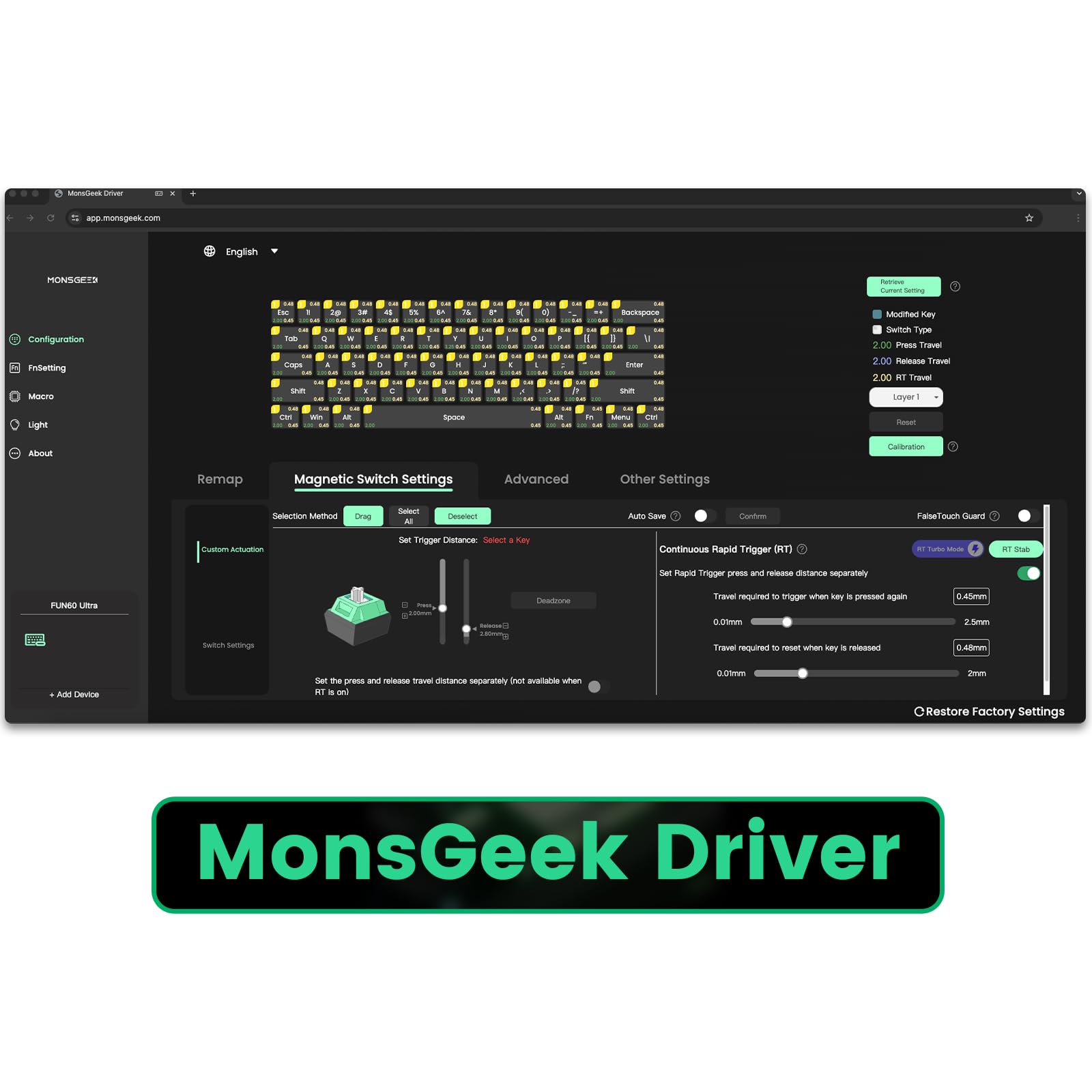
⚡ Trigger Precision. Game Dominance. Style Unmatched.
The MONSGEEK FUN60 Ultra is a premium 61-key gaming keyboard featuring ultra-precise 0.01mm adjustable actuation with TMR magnetic switches, an industry-leading 8,000Hz polling rate for near-zero latency, and customizable ARGB lighting with a 500Hz refresh rate. Crafted from durable aluminum, it supports both wired USB-C and 2.4G wireless connectivity, offering gamers and professionals a sleek, responsive, and highly customizable typing experience.




| ASIN | B0DQXC38BZ |
| Additional Features | Ultra Rapid Trigger, 8k Magnetic Switch, Multi-Modes, ARGB with 500Hz refresh rate |
| Antenna Location | Gaming |
| Best Sellers Rank | #350 in Computer Keyboards |
| Brand | MONSGEEK |
| Color | Shine-through Black |
| Compatible Devices | PC, Laptop |
| Connectivity Technology | USB-C |
| Customer Reviews | 4.2 out of 5 stars 162 Reviews |
| Enclosure Material | Aluminum |
| Hand Orientation | Ambidextrous |
| Keyboard Description | Gaming |
| Keyboard Layout | QWERTY |
| Manufacturer | MONSGEEK |
| Number of Keys | 61 |
| Power Source | Wired |
| Recommended Uses For Product | Gaming |
| Special Feature | Ultra Rapid Trigger, 8k Magnetic Switch, Multi-Modes, ARGB with 500Hz refresh rate |
| Switch Type | Magnetic and Mechanical |
| Theme | Rainbow |
| Water Resistance Level | Not Water Resistant |
H**R
Game CHANGER!!!!
've been using the white MonsGeek Fun 60 for a while now, and honestly, it's one of the best keyboards I've ever typed on. The durability is solid-feels like it'll last forever with that sturdy aluminum build. Connectivity's flawless, no lag or drops, and it's super comfortable for long sessions, thanks to the low-profile design. I love the look-clean, minimalist, and that white finish looks sharp on my desk. It's dead easy to use, no fussing with software, and the sound quality? So satisfying-crisp and not too loud. The TMR magnetic switches are a game-changer-super responsive, adjustable actuation makes it perfect for both typing and gaming. I use it every day and just really enjoy it. Highly recommend picking one up! Also, FYI- comes with switch and key puller!! The value here is absurd! Do it. PS- the web app is a real bonus-super user-friendly, lets you tweak those Hall effect switches with pinpoint precision, no bloatware, just clean sliders for actuation, rapid trigger settings, and key remapping. It's a huge plus for folks who love customizing their setup without the hassle. Best part no installation!
A**S
Perfect Budget Hall Effect Keyboard
For the price, this keyboard is actually pretty good. It sounds great and, although it feels a bit plasticky in hand and is lighter than some other keyboards, it performs exceptionally well. It's a really solid budget option. The performance is impressive, it's totally stable even at lower actuation points and feels super responsive, both when connected via cable and when used wirelessly. I personally prefer using it wirelessly since it helps keep my desktop setup cleaner and cable-free. The software is actually quite good, it's complete and offers plenty of features. It might be a bit confusing at first, but once you get the hang of it, it's very easy to use. The only downside is that I wish the FN layer could be customized more freely. Unfortunately, some keys are locked in and can't be modified.
M**Y
The Best 60% Keyboard / Best Keyboard Under $100
This is an amazing keyboard for the price. I ordered the Ultra - 8k/Dual-Mode Aluminum (non-TMR). I believe this is the best value keyboard under $100, and it has been professionally reviewed to have performance near or equal to brands like Wooting and NuPhy. The software is slightly obtuse - just language, you have to read a little carefully to understand what the settings do. Nothing unusual and it's actually quite good - works perfect. The keyboard is astonishingly nice. The aluminum body is weighty and stable. The keycaps (not pictured) are actually pretty legit caps, it feels nice to type on stock. Performance is insane, you can set the actuation down to 0.10mm distance travel - I can feather gentle type on it. You will see this keyboard on a professional review site or two as one of the top boards - exchanging blows with the most expensive brands. The value proposition here is unmatched. You get the best performance, at the price of a cheapie. For all intents and purposes this board is just as good if not better than the two major brands I listed. Performance is insane, price is insane, this is just an amazing little board. Note: I customized it a bit with a strap from Amazon and some cheap keycaps. Looks great, feels great, works like a champ. $17 in upgrades and I feel like I'm ballin'.
A**A
Eh
Well lets start with the good. Keys feel snappy, keyboard looks clean. Wired and wireless functionality. Average cost under $50. Comes with a keycap puller (but no spare keys) Box is okay. packaging included to protect keys in transit. Instructions are in half English, half Chinese. If you are used to this type of setup, likely isn't an issue and just a reference until you get used to it. However would I recommend these instructions for anyone new? Not really. Should print clearer instructions in the intended language and make use of space explaining more of the setup. The keys while snappy still have this dull sound, may come down to personal preference , although if it will bug you, it will be there constantly. Wired capability is there, but did not work out of the box. Cable included cable is just short enough to be out of reach outside of connecting to monitor, docking station, or laptop directly in front of you. Specific key press needed FN+U for wired . Cable does not sit snug, there's a surface around the input, which seems to try and act as additional support, however what it does is leverage against the keyboard, creating disconnections. Annoying. Learning new FN keys isn't so bad, but it throws me off when important keys like directional arrows are not mapped. Shouldn't have to go to any additional software to map to basic keys. Games on rails and many other common functions, need these. Given this also comes down to built in limitations for 60%, but there's enough inconveniences here to get annoying. Ultimately like other reviewers say, keep your original keyboard nearby. May end up finding you switch back.
P**H
Very precise and the performance is great on it.
Now I usually don't buy keyboards, until I was intrigued in analog keyboards in which both hall effect and tmr keyboards are being used as sensors for keyboards, which makes users on certain software's of other keyboard apps imitate a xbox gamepad, providing the user the instantaneous keys of an keyboard and accuracy of a analog joystick. Now I've been hearing reviews of the tmr modules that are in controllers and it got me curious if tmr sensors ever got implemented in keyboards and it did. The MonsGeek Fun 60 ultra tmr keyboard has to be one of the best keyboards and has a lot of potential to become the norm for keyboard and mouse users. I like how sound not to loud, but with a switch that satisfies your ears similar to an hall effect keyboard. The software called the "MonsGeek Driver" allows you to change the actuations of the keyboard to the lowest compared to an hall effect keyboard, making it more sensitive and accurate to an hall effect keyboard. It also has rgb lighting, if you prefer playing in the dark with lights shining around you for feedback and the keyboard at the lowest of the actuation settings detect such an input, making it useful for competitive gamers. I personally think it'd worth it, if you prefer performance since it also goes up to 8000hz of an polling rate, but I also think if an hall effect keyboard has a good deal on it, I would go with that as well, as they are both analog keyboards which provide precise input of the switches. Their both durable and have that satisfying sound, but since I had got this keyboard on sale, it would definitely be my pick as it more precise and just as durable of a hall effect sensor, since they both use magnetics in their sensors.
E**A
Terribly software and terribly designed keyboard
What a buggy keyboard with buggy software and terrible design who puts the on and off switch inside the keyboard because of that the stupid keyboard keeps bugging out with disconnects this is a terrible keyboard for gaming it will ruined you mid-match
O**R
But with confidence
Great keyboard, very responsive, worth every penny.
D**L
Best Budget Wooting Money Can Buy
I've been on the hunt for the Wooting 60HE+, a keyboard often seen as the best available right now. As someone new to the custom keyboard scene and not yet familiar with all the different switches, I took a leap with this one, and I have absolutely no regrets. The build quality is fantastic, the switches are well lubed alongside the stabilizers. I've really enjoyed experimenting with the SOCD and Rapid Trigger settings, which were actually the main reasons I chose this keyboard, in addition to it being my first hall effect experience. I have zero complaints whatsoever. The online portal for configuring settings has a learning curve to use but is easily customizable, and the added Bluetooth connectivity is a great option if you prefer a wireless setup.
Trustpilot
1 month ago
1 month ago