
DOWNLOAD THE APP


Customer Services
Copyright © 2025 Desertcart Holdings Limited
DOWNLOAD THE APP

🌍 Master your home climate with the smartest thermostat on the block!
The Google Nest Learning Thermostat (4th gen) with Nest Temperature Sensor (2nd gen) is a premium, Wi-Fi-enabled smart thermostat designed for effortless energy savings and personalized comfort. Featuring adaptive AI that learns your schedule, a large dynamic display, and compatibility with most HVAC systems without a C wire, it offers remote app control and voice commands via Alexa, Google Assistant, and Siri. The included temperature sensor optimizes comfort in specific rooms, while advanced features like Adaptive Eco and natural heating/cooling adjustments maximize efficiency, helping reduce energy bills by up to 31%.

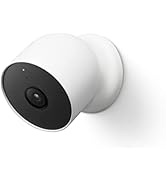
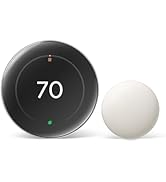


| ASIN | B0D5BBYRJM |
| Backlight | Yes |
| Batteries | 1 CR2 batteries required. (included) |
| Batteries Included? | Yes |
| Batteries Required? | Yes |
| Battery Cell Type | Lithium |
| Best Sellers Rank | #1,070 in Tools & Home Improvement ( See Top 100 in Tools & Home Improvement ) #4 in Home Programmable Thermostats |
| Brand | |
| Color | Polished Obsidian |
| Connectivity Protocol | Wi-Fi |
| Connectivity Technology | Wi-Fi |
| Control Method | App |
| Control Type | Button Control |
| Controller Type | Amazon Alexa, Android, Apple HomeKit, Google Assistant, iOS |
| Customer Reviews | 4.3 4.3 out of 5 stars (1,971) |
| Date First Available | August 6, 2024 |
| Display Type | Touchscreen |
| Included Components | Thermostat Display, Thermostat base, Trim plate, Steal plate, Mounting screws and wiring labels, Nest Temperature Sensor (2nd gen) |
| Item Package Quantity | 1 |
| Item Weight | 5.7 ounces |
| Item model number | CE911542 |
| Manufacturer | |
| Material | Aluminum |
| Model Name | Google Nest Learning Thermostat (4th Gen) |
| Mounting Type | Wall Mount |
| Number of Batteries | 1 CR2 batteries required. (included) |
| Part Number | GA05169-US |
| Power Source | Battery Powered |
| Product Dimensions | 0.04"D x 0.15"W x 0.15"H |
| Shape | Round |
| Size | One Size |
| Smart Home Compatibility | Smart Home Compatible |
| Special Feature | Auto Away Mode, Auto Scheduling, Temperature Display |
| Special Features | Auto Away Mode, Auto Scheduling, Temperature Display |
| Specific Uses For Product | Air Conditioner |
| Style | English |
| Temperature Control Type | Heating,Cooling |
| UPC | 193575038476 193575040189 |
| Voltage | 24 Volts |
G**S
Fantastic, highly recommend!!!
I was trying to determine if I was having an issue with my thermostat, my furnace.. or both (yikes). I had an Ecobee, which had been installed for roughly 10 years. Worked great, then I started having issues with getting heat to turn on in my house as it should. Process of elimination, I opted to try Google Nest. I LOVE this. Massive upgrade to what I had, easy to install, and the issue I was having became clear to be the thermostat and not my furnace. In fairness, it likely just needed to be upgraded, but I have other Google Home items and have heard good things about Nest. I have been very happy with it already. And unlike the Ecobee where I need to set schedules for 'home' vs 'away', etc.. this is a learning thermostat, so it naturally learns when you aren't home and just turns the heat off (within reason - I haven't woken up to my house being below 50 degrees or anything). If I am gone all day, the moment I walk in the door and the Nest "sees" me.. it kicks on to heat. It's also very sleek looking, but super easy to use so it doesn't come off super techy or anything. Highly recommend!
S**S
Game Changer for Home Climate Control
Upgrading to this thermostat has completely changed how I think about home temperature control. It's not just a programmable thermostat – it's actually smart in ways that make a real difference in comfort and energy savings. The learning capability is impressive. After the first week or so, it started anticipating when I wanted the temperature adjusted without me having to do anything. It picks up on your patterns and creates a schedule automatically based on how you actually use your home. That means you don't have to spend time programming complicated schedules or remembering to adjust things manually. It just figures out what you want and does it. The display is gorgeous. It's got this clean, modern look that actually adds to your home's aesthetic rather than being an eyesore like traditional thermostats. The screen is bright and easy to read from across the room, and the interface is incredibly intuitive. When you walk up to it, it lights up and shows you the current temperature. The whole interaction feels polished and well thought out. What sets this apart from other smart thermostats is how well it works with the temperature sensor that's included. You can put the sensor in the room where you spend the most time, and the thermostat will prioritize that room's temperature when making decisions. This is huge if your home has uneven heating or cooling. Instead of managing the temperature based on where the thermostat is mounted, it can focus on keeping comfortable the spaces where you actually are. The energy savings are noticeable. The system is smart about when to heat or cool, and it's not wasting energy when you're not home. It can detect when you've left and automatically adjust to save energy, then bring things back to your preferred temperature before you return. Over time, those savings add up, and you can actually see the impact in your energy bills. Remote control through the app is seamless. Whether you're at work, traveling, or just in another room, you can check and adjust your home's temperature from your phone. The app is well-designed and responsive. It gives you detailed information about your energy usage and even provides reports on how efficiently your system is running. That level of insight is something you just don't get with a traditional thermostat. Installation was straightforward. The instructions are clear, and if you're comfortable with basic DIY projects, you can handle it. There's also a compatibility checker on their website to make sure it'll work with your HVAC system before you buy. Once it's installed and connected to WiFi, the setup wizard walks you through everything step by step. Voice control works perfectly with both Alexa and Google Assistant. Being able to adjust the temperature with voice commands is one of those conveniences that seems small but becomes something you use all the time. "Hey Google, set the temperature to 72" is so much easier than walking over to adjust it manually. The Nest Aware features give you additional insights into your home's environment. You get alerts if there are unusual temperature changes, which can help you catch problems with your HVAC system early. The system also provides tips on how to optimize your settings for better efficiency. Build quality is excellent. This feels like a premium product from the moment you take it out of the box. The materials are high quality, the engineering is solid, and everything about it feels durable and well-made. It's clear this was designed to last and to look good doing it. The fourth generation improvements are noticeable if you've used previous versions. The display is better, the sensor integration is more sophisticated, and the overall performance is smoother. Even if you haven't used an older model, you're getting the benefit of years of refinement and improvements. For anyone serious about smart home technology or just wanting better control over their heating and cooling, this is an investment that pays off. The combination of learning capabilities, energy savings, remote access, and the included temperature sensor makes this a complete solution. It's made managing home temperature effortless while actually reducing energy costs. Really impressed with how well this performs.
J**E
No C-wire needed, works well, & looks nice
Three reasons I like this product: 1) C-Wire: I don't have a c-wire available. There are VERY few modern smart thermostats that claim to work without one. I first tried one of the others, the Sensi. It did not have any apparent easy way to determine in advance if it would work without a c-wire. It didn't work for me. The lack of an easy advance tool cost both of us time and money; a lose/lose. A wrote a well-deserved 1 star review of that product. This product does have a very easy tool to determine in advance if it will work without a c-wire. It took me literally 10 seconds to use that tool & be confident this would work. And, it does, in fact, work great without a c-wire. 2) Functionality: It comes with a remote temp sensor which is a new thing for me and a great idea. I put mine in the bedroom. It was crazy-easy to set up and I really like the simple interface letting you choose when & how you want the thermostat to use it. It says you can add more of these if you want. Programming a daily schedule is incredibly easy as is making quick adjustments to that schedule. It has all sorts of other features such as auto-adjusting based on who is home, learning your patterns & making further auto adjustments, accepting voice commands, and so on. I do not want to use any of those things. They made it very easy for me to just say "no thanks" to all of those things and still have a nice seamless experience. 3) Appearance: I hesitated to buy this product because it is round while my previous thermostat was rectangular and the wall is messed up everywhere behind the area of the old thermostat. Yes, I can patch a wall and paint it - but, no, I don't really want to if I can avoid it. It was a pleasant surprise to me that this thermostat came with an optional large faceplate that is made to cover up the bad wall in exactly my situation. I used it and it is great. Privacy is a concern but that seems to come with just about everything these days so - I don't know - just get over it? I recommend this.
K**N
4 starts only because not compatible with uk 🇬🇧
M**D
جهاز ممتاز يتمتع بمزايا عديدة
R**N
The Google Nest Learning Thermostat (4th Gen) paired with the Nest Temperature Sensor (2nd Gen) has been an excellent upgrade for our home. Installation was straightforward, and the setup through the Google Home app was smooth and intuitive. The thermostat looks sleek and modern, and the display is clear and easy to read. The learning feature works well—after a short adjustment period, it began automatically optimizing our heating and cooling schedule without constant manual input. The temperature sensor is a great addition. It allows us to prioritize comfort in the rooms we actually use, rather than relying solely on the thermostat’s location. This has made a noticeable difference in maintaining consistent temperatures, especially during the night. Energy efficiency is another strong point. We’ve already seen more balanced heating cycles and less unnecessary runtime, which should translate into savings over time. Overall, this is a smart, well-designed product that delivers on both comfort and convenience. Highly recommended for anyone looking to modernize their home climate control system.
H**K
Don’t buy if you live in the UK they work, only designed for the USA market. My installer said they don’t work in the UK
M**D
I bought a Google Nest Thermostat from Amazon, and initially, I wasn’t sure how to install it. I contacted the supplier, Mr. Mumtaz, who was incredibly helpful. He came over and installed it for me and did such a great job that I ended up getting one more thermostat, which he also installed. The devices are now working perfectly, and I’m very satisfied with the performance. Highly recommend both the product and the excellent service!
Trustpilot
3 weeks ago
5 days ago