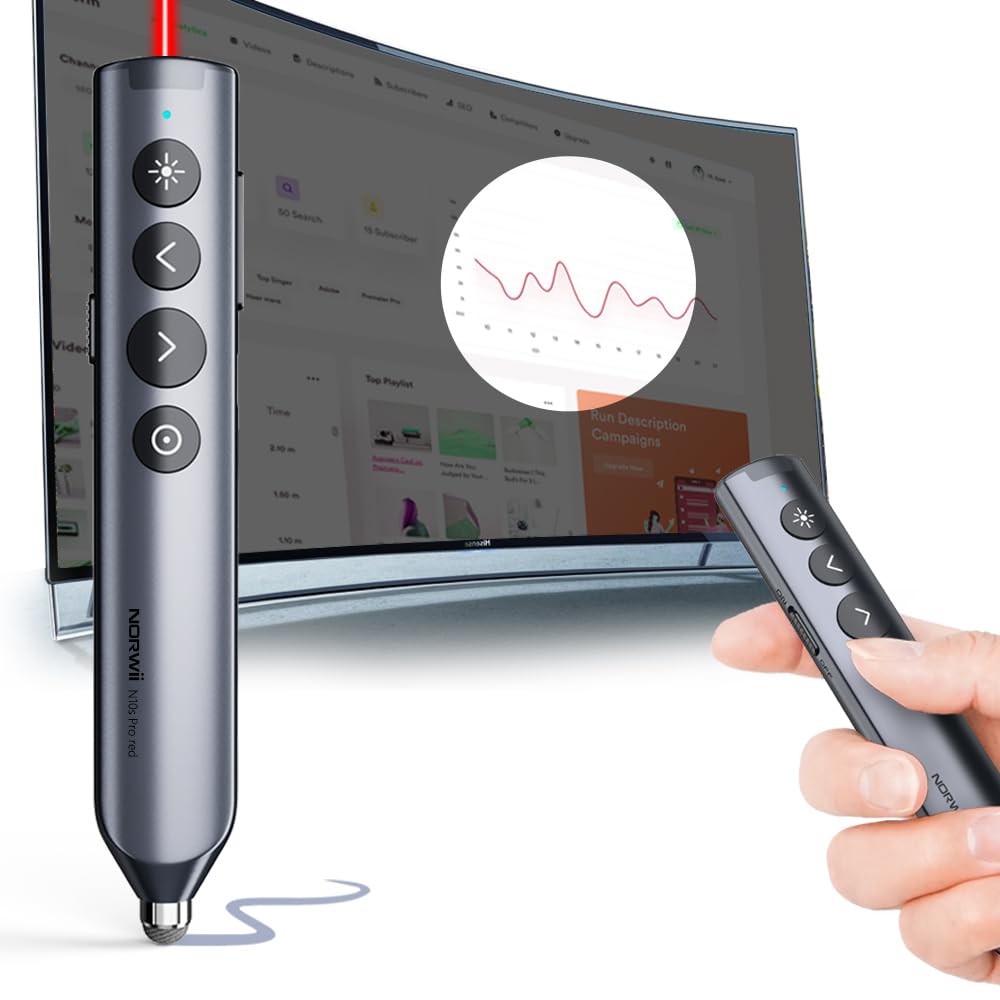
🎤 Own the room with every click — Present like a pro, impress like a boss!
The Norwii N10 is a sleek, metal-shell Bluetooth presentation remote featuring a lag-free stylus for touchscreens, a 50-meter wireless range, and a fully customizable digital pointer. Compatible with Windows, Mac, and all leading presentation platforms, it offers dual Bluetooth/USB connectivity and smart vibration alerts to keep your presentations perfectly timed and engaging.


| ASIN | B0D17PMBS4 |
| Batteries | 1 Nonstandard Battery batteries required. |
| Best Sellers Rank | #134,892 in Office Products ( See Top 100 in Office Products ) #84 in Office Presentation Remotes |
| Customer Reviews | 4.1 4.1 out of 5 stars (58) |
| Date First Available | April 9, 2024 |
| Item Weight | 1.64 ounces |
| Item model number | N10 |
| Manufacturer | Shanghai Norwii Technology Co., LTd. |
| Product Dimensions | 5.4 x 0.54 x 1.2 inches |
K**N
Working great!
Works great, I am enjoying it in my classroom.
M**S
Smoooth operator
I am much happier with the operation of this 'clicker' than my previous basic one! I feel quite fancy and far more professional when I can interact with my presentation! I dont LOVE that I had to download a suspicious app for it.... but so far I feel like its worth it...
S**N
Works great!
Super easy to connect to computer. Using this for powerpoints on my smart board. Love the ease of it.
S**Y
Excellent Bluetooth Presentation Remote
I recently purchased the Bluetooth Presentation Remote with Stylus Pen, and I'm thrilled with its performance! The advanced digital highlighting feature is a game changer for my presentations, allowing me to emphasize key points easily and effectively. The 50M range is impressive, giving me the freedom to move around the room while presenting. The metal shell adds a sleek and professional touch, making it feel durable and high-quality in hand. The stylus pen functionality is also a bonus, allowing me to interact smoothly with touch screens. Setup was incredibly easy, and the remote responds quickly without any lag. If you need a reliable and versatile tool for presentations, I highly recommend this remote—it has made my presentations much more engaging!
J**E
An interesting presenter+
I have owned a couple of presenters in the past and this is definitely an upgrade to all those for several reasons. It has all the functionality that I would expected from a regular presenter such as the ability to connect to the laptop via a dongle, being able to advance and step back on the slides being presented and the presence of a red laser light for pointing to the screen to highlight something on the presentation. I did not find the laser light at first as it is blocked by the dongle for USB connectivity. You have to remove it in order to use the laser. I was using it via Bluetooth because I don't like using the dongle, as I have lost a couple by leaving them connected on computers that I don't own. It is nice that I don't have to use the dongle but it would be even nicer if I did not have to remove it at all and still use the laser light. As I mentioned, the presenter comes with bluetooth functionality which is great. The other nice feature of the item is that it is charged via USB-C so you don't have to carry batteries around all the time. Leaving the presenter on was a nightmare for the life of batteries, but not anymore. The dongle attaches to the top (or bottom, depending on how you see it) of the presenter and it has a magnet that makes it easy to stay in place so you don't drop it by accident. On the opposite side, you have a stylus tip for writing on touchscreens. It is a simple meshed tip but still a nice touch. It comes with a spare one. There is a software that you need to install to interact better with the screen. By using this software, you can magnify areas of the screen, add an electronic "laser light" to the screen and use the presenter as an air mouse. It takes a little getting used to but you can master its use in no time. I think most of these improvements must be very useful on an electronic board, but I don't own one so I cannot really tell. For the function that I use it for works much better than the regular ones.
D**R
Trust the software?
Upfront, I have a security concern about the way the software is configured and delivered. You either directly install it from the included USB dongle included with the product, or download it from a Chinese website. Based on the permissions you may need to give the device to take full advantage of the features (like input monitoring), I'd want to feel more confident about the software. For that reason, I'll be using it with only the basic features available without the software load or dongle. That's my sole reason for dropping it to 3 stars. My review below is using a decommissioned computer removed from my main network. With the software, the presentation controller has lots of features, from changing slides to highlighting areas of your screen, using it as a virtual mouse, and as a timer, alerting you with vibration when your time is up. It even includes a real laser pointer (hidden behind the dongle (it needs to be removed to use it), and a touch screen stylus. It connects by Bluetooth or with the proprietary USB dongle, which also contains the software mentioned above to enable some of the advanced features. While it can do all of this and more when the software is enabled, good luck trying to remember how all of the buttons, gestures, and menus activate the functions. You'll probably use just a few regularly. I couldn't get some of the features to work, but it was probably a combination of user error, poor documentation, and software issues.
J**T
Works without installing software
This remote works without installing the prescribed software. The functionality is limited in that mode. However, many great features work well once you install the drivers and application from Norwii. I scanned it with two antivirus programs before installing and it seemed clear. I like the digital laser. This is an air mouse that can work in just about any orientation. Just remember, the end with the stylus is at the bottom! I thought the device had some inverted settings until I realized my error. The problem was with how I was holding it. The charge, so far, is working well. I've used it for several hour-long sessions with no recharge. I have been able to pair it directly with Bluetooth and I've used it on a work computer with just putting in the dongle receiver.
F**O
Aucun Français sur la notice, c est dommage!!!!!!
G**E
La funzione principale, il puntatore digitale, si bloccava sempre e non permetteva neanche di procedere con la slide successiva. Il servizio assistenza è stato fantastico e mi hanno prontamente inviato un nuovo puntatore. Se questo nuovo puntatore continuerà a funzionare, passerò da 4 a 5 stelle. Sicuramente 10 stelle per disponibilità, gentilezza e prontezza del servizio assistenza.
P**O
Not very user friendly!
N**T
Super Teil. Sehr hochwertig in der Verarbeitung und tolle Haptik.
J**A
Perfecto! Nos gustó mutíssimo
Trustpilot
2 months ago
3 weeks ago



