🚀 Stay connected, stay ahead—your global 4G powerhouse!
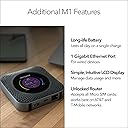
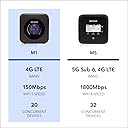
The NETGEAR Nighthawk MR1100 is a portable 4G LTE modem router delivering up to 1 Gbps download speeds with an unlocked SIM slot for worldwide use. It supports up to 20 devices simultaneously and features a 7-hour battery life, a 2.4" color LCD for easy management, and an Ethernet port for wired connections. Ideal for professionals and travelers seeking reliable, high-speed internet on the go.


| ASIN | B079H2LX8X |
| Antenna Location | Home, Travel |
| Antenna Type | Internal |
| Best Sellers Rank | 9,448 in Computers & Accessories ( See Top 100 in Computers & Accessories ) 36 in Mobile Broadband Devices 71 in Routers |
| Box Contents | Nighthawk M1 Mobile Router device and battery, USB type-C cable, Quick Charge AC adapter, Quick start guide, Warranty Card |
| Brand | NETGEAR |
| Brand Name | NETGEAR |
| Colour | black |
| Compatible Devices | Gaming Console, Personal Computer |
| Compatible devices | Gaming Console, Personal Computer |
| Connectivity Technology | 4G LTE, WLAN, Ethernet, USB 2.0, USB Type-C |
| Control Method | App |
| Controller Type | Push Button |
| Coverage | GSM networks (AT&T, T-Mobile) |
| Customer Reviews | 4.2 out of 5 stars 985 Reviews |
| Data Transfer Rate | 1000 Megabits Per Second |
| EU Spare Part Availability Duration | 2 Years |
| Frequency | 2.4 GHz |
| Frequency Band Class | Dual-Band |
| Frequency band class | Dual-Band |
| Global Trade Identification Number | 00606449128666 |
| Is Modem Compatible | Yes |
| Item Dimensions L x W x H | 10.6L x 10.6W x 2H centimetres |
| Item Type Name | NETGEAR Nighthawk Mobile Hotspot Router (MR1110) |
| Item Weight | 8.47 Ounces |
| Item height | 2.03 centimetres |
| LAN Port Bandwidth | 1000 Mbps |
| Manufacturer | NETGEAR |
| Maximum Upstream Data Transfer Rate | 150 Megabits Per Second |
| Model Name | Netgear Nighthawk M1 |
| Model Number | MR1100-100EUS |
| Model name | Netgear Nighthawk M1 |
| Number of Antennas | 1 |
| Number of Ports | 2 |
| Operating System | Linux |
| Other Special Features of the Product | USB Print Server |
| RAM Memory Installed | 16 GB |
| Security Protocol | WPA2, WPA3 |
| Special feature | USB Print Server |
| UPC | 606449128680 606449128666 |
| Unit Count | 1.0 Count |
| Voltage | 220 Volts |
| Wireless Compability | 2.4 GHz Radio Frequency, 5 GHz Radio Frequency |
| Wireless communication standard | 2.4 GHz Radio Frequency , 5 GHz Radio Frequency |
D**E
Works for me
OK so this was second attempt with a Netgear Nighthawk MiFi router. Initially I got the more advanced (and expensive) M2 version but I was unable to get that to work. So it was a toss-up get another M2, M1 or something else entirely, in the end went with the cheaper M1 version. Completely different experience to previous M2. Insert SIM, battery & charge for couple of hours. Use iPhone to connect to it's WiFi network and all was good, iPhone connected and connected onwards to internet straight away with no further intervention. It picked up the APN settings automatically something the M2 failed to do. I was going to deducted a star because I was unable to get the Netgear App designed to manage the device to connect to it. However this isn't essential as once set up you can log into the router through a web browser and manage it there. Just put it's IP address (192.168.1.1) into your browsers address (URL) bar and hit enter. Once into the user interface I finished the set up there. So on balance the App probably doesn't add much anyway... I actually got this for my elderly Dad who's in a care home that dosent provide residents with internet access so this device is to give him internet access on his devices principally Netflix. Pleased to report that it's doing this well and he says there's now no buffering and the picture quality is much improved over previous device. I suspect the provision of a single ethernet port on the device which I used to connect to his TV helps here. In fact the ethernet port was one of the reasons I picked the Netgear Nighthawk M1. Only been in use for a couple of hours but at this point working well, I'll edit this review if anything changes my view on this product. On balance I think the M2 version I ordered first and returned was just a bad copy, unusual but stuff happened and nothing is perfect 100% of the time.
R**J
Works with EE - up to 123mbs!
I work in IT remotely in the Scottish Highlands with local BT broadband delivering insufficient speeds for both download and (increasingly important for zoom/teams calls) upload. Hence the need for a 4G router. This unit, in conjunction with a Poynting 4G-XPOL-A0002 directional antenna is making the most of the two bar signal from the nearest mast on the EE network. Typical download speed is 70 mbs but I’ve seen 123 recently! Upload is consistent at about 10mbs. My work colleagues in different cities/towns in the UK can’t believe it when I screenshare the results of a speedtest (and neither can I). Like some other reviewers it did seem to take a lot more fiddling (and frustration) to setup than I’d expect. It really ought to just be a case of popping in the SIM and away you go, but for some reason it wasn’t straightforward. My top tip, if you’ve just got yourself a new SIM is to put it in your phone and do the initial activation & top up there FIRST to ensure the SIM is fully working. Only once you’re 100% sure that the SIM is working should you then proceed to use that SIM in this device. It’s only a hunch but I think that may have been the cause of some of my initial setup trauma. The unit itself feels really solid & well made. Being battery powered means it will keep working for a number of hours (I think the claim is 7?) without mains power- handy if used at home with possible power cuts. The app that comes with it (or the website used for config) has all of the features you’d expect. I use the unit as effectively our full time home router and have it plugged into the mains at all times, without the battery in place. (The battery is fully charged and just left to one side in case of power cuts - pop it in and within a couple of minutes the router is back up again). Batteries are not meant to have power flowing through them constantly and some users have reported the battery getting too hot (causing the device to shut down) and even becoming misshapen/leaking under prolonged constant charging. So if you’re planning on leaving it on all the time, I’d strongly suggest leaving out the battery. It’s important to realise that the supplied USB charger does NOT provide sufficient power to charge the unit if it is also under heavy active use at the same time. This can lead to the device powering off randomly and I suspect is the cause of some of the dissatisfaction from some users. Simply purchase a decent charger (for about £15) to solve that problem. I bought a “Quick Charge 3.0, Anker 18W 3Amp USB Wall Charger (Quick Charge 2.0 Compatible) Powerport+ 1” device from Amazon. So, ensure you use a SIM that’s already setup, buy a decent charger, and don’t leave the battery in (if you’re leaving it on constantly as a home router) and my experience has been that it’s a cracking little device and worth the extra money over cheaper devices.
U**N
A neat little unit
So, I wanted datq but needed it to be provided into a cat5 plug. Not many choices. I went with the 4G version, yep, more than enough speed for what I needed, but future proofing its usage would have been nice, but the price on a 5G, again, with the cat5 was way above what I could justify spending. So, this was almost a compromise, whilst not being so...bare that in mind. So, how does it do?the prima5use for this is to provide data out in a fairly remote location. It's also in and or around trees..... So yep, great for signal. (There is the ability to add antennas onto this unit, to help with weak signals) I did tests with my phone SIM in a couple of locations....so so results, then I tried with a different network, and yep, 4 bars signal mostly where I was going to use this. Not that it matters, but I ended up using Smarty, and now my phone is with them too. I am only mentioning this so you could choose a low cost with no contract, so if your network 8snt good with this you have an alternative to try, and can easily get out of it if things do t work out. The other network good like this is Giffgaff, so you have a couple of networks you can try out to see what works. And remember if all of them are a bit weak, you can always get better antennas that have better gain, that you can mount higher, outside, if you are inside, and generally improve things. The performance of this unit I would class as good. It has done everything I have asked if it. Yes, primary use is limited and sparadic, but when I moved I ran the house from it for a good chunk of time and yep, all was good. Again, it was handy it had cat5 as I could just plug into my switches and didn't need everything trying to use the WiFi. I didn't hook up everything, but it ran enough things to make things livable. So yeah, once you accept the price, I think you will be happy. It's Netgear, so expect Netgear quality and reliability. This doesn't use an app, almost sadly, but you hook into a web interface and can have a bit of a fiddle with some settings. There isn't so much you need to do in there really, so having an app on the phone now would seem a waste, since it was all at up, I probably haven't looked at it, unlike say the house network, where you are often poking around. If you are going to be moving this around there are some cheap cases you can get for rhese, which I would recommend getting. Do t run it in the case 4goufg, let it have good airflow, especially if planning to run long term. When I did the prolonged use of this I put it on one of those defrost plates, basically a metal plate that helps move the heat away and out of the battery. I had zero issues, but I read some people had, and it sounds like it was due to 5y3 battery becoming hot. I also ran it with the usb connected, so that too probably meant the battery did not see any or not much use, and again that would help with any heat build up. HTH.
P**Z
Unbelievable!!! Worked in a dead spot on deployment
This is one honest review from a guy who travels a lot and always ends up in the worst dead spots with work ARMY ! . I needed to put an end to no signal with any smart phone, after watching several videos online I began to notice a pattern with the devices people chose, and they all recommended The Netgear Nighthawk M1. So I went ahead and purchased one just last week. I was sceptical as I couldn’t even get 4G on my phone without going outside 20- 30 meters or so , and then it was intermittent. So it arrived and I plugged it in and downloaded the Netgear app and followed the instructions and booooooom I got 4G in my room ! Then it sed 4G+ ? I did a quick speed test on my phone and it was far better than my broadband at home !!!!!! I know this is a bit of a read but hopefully Iv helped someone with there issues of no signal dead spot, I have taken this home and tested it against my internet provider which was around 65MBS NETGEAR - 100MBS !! I have now cancelled my broadband ! Thank you Netgear I don’t know how you don it but your devices are epic and I could talk to my family and steam movies in a dead spot for over 3 months deployment!!!!
K**N
Might have received a duff unit..
I tried SIM cards from all 3 of the UK's main mobile operators, none worked, just got a message saying "Install or check SIM" - Gutted! UPDATE: I've now received a working unit - For an LTE Router its OK, fairly easy to setup and the WebGUI is snappy - But for the price, it's not worth it. Saying that, I'll keep it as it has 1 unique feature that makes this stand out - a built-in ethernet port, which allows me to plug it into my home network and use it as a main-router, and provides a proper backup to my main broadband, allowing me to continue to work and my wife to maintain her sanity (as the kids can play XBox) - If you don't need an ethernet port, then look elsewhere, even one of the Aircards, or even a cheap-mobile phone you can use as a hotspot. As somebody who works in Network Security, it's horrifying to see that Netgear is still not taking security seriously, selling flagship products such as this without even adding SSL to the admin interface. If anybody from Netgear reads this, For future versions, please consider the following: 1) Foremost - Add support for dual-sims.. To use this abroad, I'd have to dismantle it and replace the SIM 2) The current SIM slot feels incredibly dangerous, inserting the SIM takes some effort and feels like its scraping against sensitive circuitry or contacts. 2) Do NOT place the SIM card under the battery 3) The SD micro card slot really serves no value
J**Y
Not sure what people complaint about?
Got this one to go full-time broadband replacement at home. Plugged in EE simcard, set-up took about 3 minutes and it is up and flying. On average 4 bars gives us ±50 mbps on Wednesday afternoon (I guess this is when network got throttled at its hardest), so will let it play for week or two and see how it is, if not - I will add external antennas, not a big deal. Solid unit, easy to setup, plenty of settings inside and nice design. Update after 2 weeks of use. I went for external antenna, - getting ~120 mbps depending on weather. Because we use it to connect around 10 devices it was overheating a bit, so after quick Google for solution we took the battery out and sorted more powerful power source for it. End of the story, it does the job behind the computer screen and never been seen again, uptime 1 week and counting.
W**E
It works, Rural, 3x UP and DOWN improvement
I was a bit confused with researching mobile Sim routers, as I guess some purchasers are not as savvy as others. (It is a bit like shopping for water containers with a tap. There is a lot of negative feedback from those, with complaints of “ the tap is useless”which you should read: they didn’t loosen the lid to allow air in. User error, or faulty item ? But, I ‘m delighted to say, I have a 3 x improvement, both in Upload and Downloud, using the same SIM card, same static location, than I had before. And I have done about 30 tests, at different times, before and after. I bought this from Amazon direct, but from Warehouse, used like new. ( it was like new, still sealed). Although it seems a huge outlay, if it is important to you in getting connected with better results , I suggest Buy one! ( you can always return it if it doesn’t live up to your expectations! That’s Amazon, a great return policy. I will add, remember to set up your SIM card to get that communicating with the router. You will find that in the software, under Advanced Setting, Cellular. Click Add. Then you need the info of your SIM provider, APN etc it may be already on your phone if you look hard enough, and just add it to the list. Highly recommended from me! The battery lasts about 8 hours, but you can run it with the battery removed, as long as you have a 12v power supply. And I will add; I wasn’t paid to say this, and the item I paid full price for.
S**E
Great travel router, but has connectivity issues with our rural location
As a travel router, this probably has everything one would want such as a large high capacity battery, on-display data usage, Ethernet and USB connectivity for using a laptop in congested Wi-Fi areas and very good 4G sensitivity. For example, at my rural connection, it delivers much faster speed than my phone in the same spot outside. I intended using this to replace my existing mobile 4G router as it has better carrier aggregation capability. When I swapped the leads from my outdoor antenna over to it, I got a speed tests well over 100Mbps, one close to 170Mbps one morning, compared to 80Mbps maximum with my current Huawei B525. Unfortunately, it was only just a matter of minutes when I ran into connectivity issues. Within a few minutes of turning on the M1, my Internet connection drops. From looking at the M1's web interface status screen, it appears that it is trying to lock on to an out-of-range cell. This became evident when I left a continuous ping test running. As soon as the pings stop replying, the status screen shows the band number change from B20 to B3. When I unplug the antenna leads, it switches back to B20 after a minute and the Internet connection returns along with the ping replies. When I plug the antenna leads back in, it switches back to band 3 and the connection drops again. I tried contacting Netgear about the issue, but received no response. I had no luck finding any setting to prevent the Netgear switching bands. Even without the antenna attached, it still occasionally kept dropping the connection by trying to use that band 3 site. I have now gone back to using my Huawei B525 in a hope that a future firmware update fixes the issue. Otherwise it's still a good travel router. While the Huawei is slower, at least it does not have this problem. As my mobile operator Three operates on both bands for carrier aggregation, I believe the Huawei still uses both bands as it shows '4G+', but using band 20 as the main band and band 3 for carrier aggregation only. The battery life of the M1 seems very good, giving around 6-8 hours based on my usage. As others have mentioned, the Wi-Fi range is very limited on the 'ac' band. I get good connectivity one wall apart, but any further and it drops out. On the 'n' band, it reaches two walls apart and barely usable further out. It also has another issue where if the Ethernet connection is connected when it is powered on, its Wi-Fi does not work, i.e. no Internet connection other than the router's web interface, while the Ethernet connection works fine. However, if I connect at least one device to Wi-Fi after powering on, both the Ethernet and Wi-Fi have Internet access.
Trustpilot
3 days ago
4 days ago