
🚀 Elevate your workspace with ANYOYO’s powerhouse 6-in-1 USB-C hub—because your productivity deserves the best.
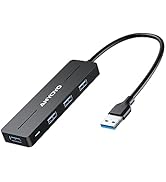
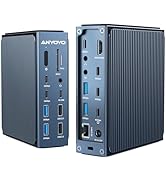
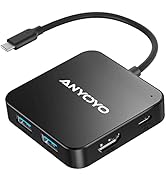
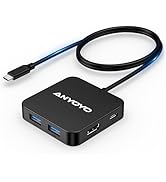
The ANYOYO Dual 4K 60Hz HDMI Docking Station is a versatile 6-in-1 USB-C hub featuring dual 4K HDMI outputs, 100W fast charging, and multiple USB 3.0 ports. Its 2ft extended cable and sturdy design provide a reliable, strain-free connection for MacBooks, iPads, Windows laptops, and more, making it an essential accessory for professionals seeking seamless multitasking and high-speed data transfer.









| ASIN | B0CBR99R1P |
| Best Sellers Rank | 6,224 in Computers & Accessories ( See Top 100 in Computers & Accessories ) 126 in USB Hubs |
| Guaranteed software updates until | unknown |
| Item model number | 6-IN-1(Dual 4K60) |
| Manufacturer | ANYOYO |
| Product Dimensions | 6.1 x 6.1 x 1.27 cm; 40 g |
T**G
Computer adapter
Fantastic product,works well.
L**N
Nice bit of kit
Nice, compact hub - good quality build - sturdy, long flex - much better than the ones that attach to the side of the laptop as those eventually start struggling under the weight of cables and become unreliable. This one sits comfortably on a surface putting no strain on the ports or itself.
A**R
Almost perfect hub
I was looking for something for home office, so I can swap my work and personal laptops with just one cable. As I wanted to keep it clean I needed long cable. So it was either this or more expensive docks. And this one seems to be a very good value for money I've got it in two of my home office setups. It had no problems with FHD monitor. Got it set up straight of the box. I've only had to adjust refresh rate in Windows display settings. It got slightly more tricky with ultra wide monitor. The aspect ratio wasn't automatically detected. I was getting 16:9 instead of 21:9. I've manged to resolve it. I had to first change the refresh rate to the monitor native one. Then I was able to select 21:9 resolutions. From other issues it's loosing the HDMI signal from time to time. It lasts few seconds, and then the signal comes back to the monitor. If it doesn't reconnecting laptop always solves the problem. I didn't identify why that happens and if it's problem of my laptops or the hub. Postives: - 6ft cable allows to hide it under desk. There is not that many other options, especially at this price - power delivery works - small size makes it easy to fit Negatives: - loses the HDMI signal sporadically - not all aspect ratios are automatically detected.
L**N
Easy to use
Works very well and easy to use. Very robust and has many usb ports.value for money.
L**.
Grab n go
Why did you choose this product over others?: Great little charger all different port holes for different sizes.
M**L
Works fine out of the box
A great little device. I wanted to connect my MacBook Air to my monitor and other peripherals. So I plugged the peripherals which I already have on a USB hub into the anyoyo and the hdmi cable from my screen into the anyoyo as well. The power cable (white on the photo) went in too. The MacBook Air has its USB ports only on one side which worked out to be the far side from where the hub is. That is why I got the variant of the anyoyo that has a long cable so it can reach up to there. Once everything was plugged together the MacBook Air automatically used the screen as a secondary screen and got its charge from the anyoyo. And that is what I wanted. The anyoyo has a bright little blue light when it is on which I find a bit annoying. I'll probably cover it with a sticker soon. For fun I also tested this by plugging the anyoyo in the same configuration into my Samsung S21 smart phone. The phone went into DEX mode and I was able to use the screen, mouse and keyboard on the DEX desktop of my phone which was pretty cool.
J**N
Very tempermental
It's a small compact hub, it says its compatible with smart phones. I'm using this hub with a Samsung s24 fe. Unfortunately the hub is very temperamental. When using a power bank or solar panel in PD port, the GPS receiver I'm using in another USBA port just completely shuts down. If I unplug and replug in varied and random orders, occasionally I can achieve a connection between all devices as intended.
D**M
Very handy addition to a laptop setup!
After buying the XPS15, I realised afterwards just how many of my things had USB-A, as well as requiring a HDMI port. This has come in very handy and has worked well for several months. All the ports are good and useful, and it's very lightweight. Taken a while to review this, because I wanted to see how long it would last, as I was skeptical with the low cost. It's done wonders and is still working very well. I'd highly recommend this product to anyone needing additional ports!
H**.
Tres bon produit et tres utile pour les besoins
M**S
Bom!
K**I
Die Dockingstation ist klein und fein. Sie funktioniert super. Einfach ein super Kauf!
G**O
Funziona benissimo ed è completo
A**E
La uso 8 ore al giorno da mesi, semplice, qualità eccezionale, non scalda e non ha mai dato problemi. Ogni tanto occasionalmente non rileva un monitor, ma non è colpa del contatto, piuttosto del PC perché non lo fa con tutti i PC. Il cavo USB-C è abbastanza solido, non è facile da rompere
Trustpilot
1 month ago
1 month ago



