
DOWNLOAD THE APP


Customer Services
Copyright © 2025 Desertcart Holdings Limited
DOWNLOAD THE APP
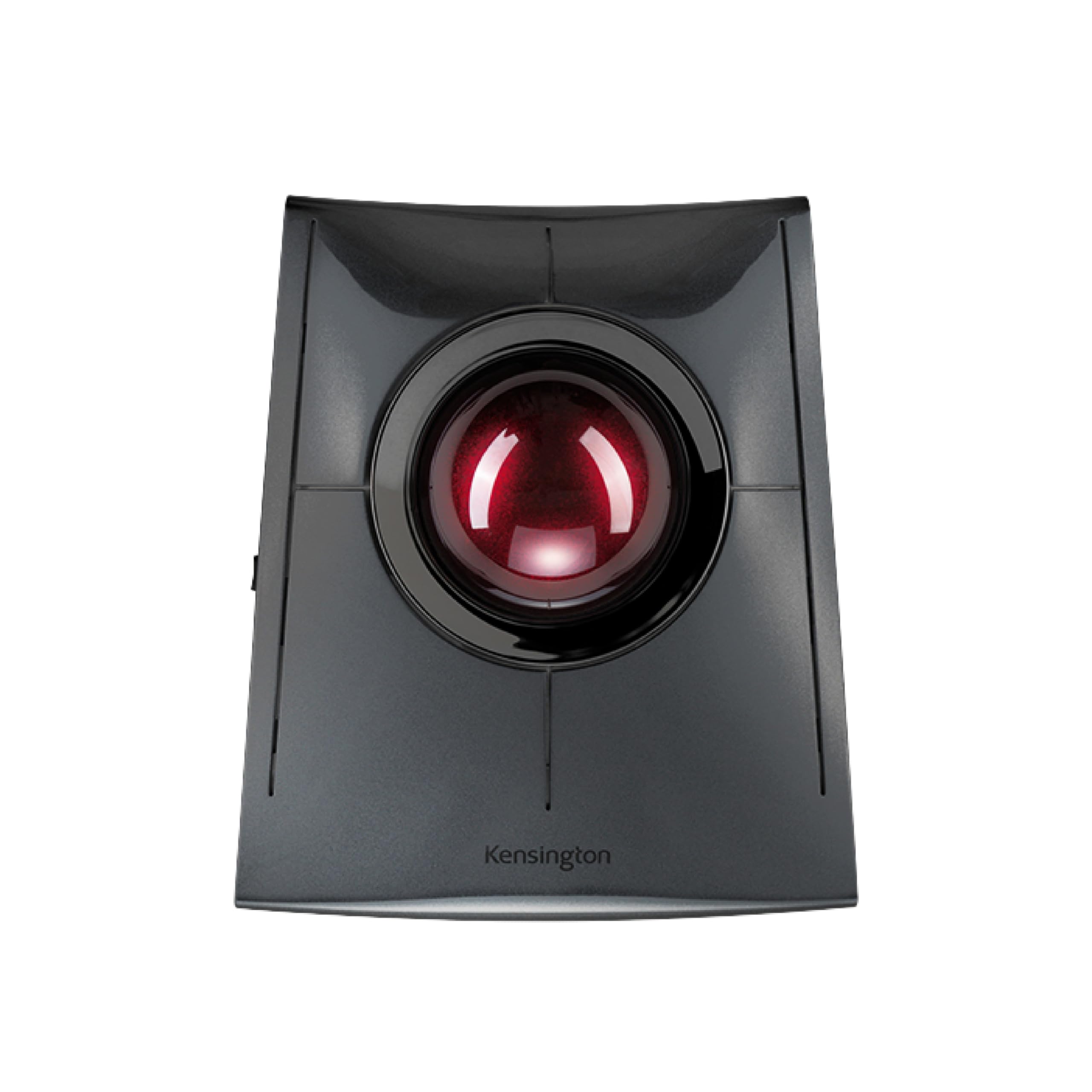
🚀 Elevate your workspace with precision and power — the future of ergonomic control is here!
The Kensington SlimBlade Pro is a rechargeable, ambidextrous ergonomic trackball mouse featuring a large 55mm precision ball and dual optical sensors for accurate cursor control. It offers versatile connectivity with Bluetooth, 2.4GHz wireless, and wired USB-C options, delivering up to 4 months of battery life per charge. Designed for all-day comfort and minimal desk footprint, it supports both Windows and macOS platforms, making it a sleek, durable, and highly functional tool for professionals seeking enhanced productivity and comfort.


| ASIN | B0BLRQ4116 |
| Are Batteries Included | No |
| Average Battery Life (in hours) | 4 months |
| Batteries | 2 AA batteries required. |
| Best Sellers Rank | 6,384 in Computers & Accessories ( See Top 100 in Computers & Accessories ) 255 in Mice |
| Brand | Kensington |
| Colour | Black |
| Computer Memory Type | DIMM |
| Customer Reviews | 4.4 4.4 out of 5 stars (792) |
| Date First Available | 11 Aug. 2023 |
| Delivery information | We cannot deliver certain products outside mainland UK ( Details ). We will only be able to confirm if this product can be delivered to your chosen address when you enter your delivery address at checkout. |
| Guaranteed software updates until | unknown |
| Hardware Platform | Personal Computer |
| Item Weight | 240 g |
| Item model number | K72080WW |
| Manufacturer | Kensington |
| Operating System | Windows, macOS |
| Power Source | Battery Powered |
| Product Dimensions | 13.28 x 15.29 x 5.59 cm; 240 g |
| Series | Kensington SlimBlade Pro |
L**D
Excellent for work and comfort. Looks awesome.
This thing is awesome. Plainly put. My hands are pretty big so this things button layout is great for me. The ball is smooth and works like a charm. There is a bit of a learning curb. But! It's usable for basically any task you want to do, be it work or games. I've even seen people play fast paced FPS games with this thing. Its durable and just kind of sits on the desk. Just make sure to dust the ball/ wipe it down every now and then and you'll be good to go. It looks great. It's like having a tiny space ship on my desk. Overall: Great mouse as long as you're willing to learn how to use it which doesnt take long at all.
M**.
A great alternative to a mouse for limited desk spaces
The 3 fold connection ability is really useful. I can Bluetooth it to my main computer or USB dongle it to any other (or tethered USB when the battery needs charging). It seems well made with a high-quality charging lead. The only thing you have to be careful of is that the ball is not captive so if moving it you need to make sure the ball doesn't fall out. However, this also makes the ball and sensors easy to clean. Unlike traditional ball-type devices with roller sensors, this unit has a pair of optical sensors like an optical mouse to determine motion. They seem to work well and should be easier to keep fluff and dirt away from. As a finger (rather than thumb) operated ball I think its hard to beat. One oddity is that the instructions give details on how to disassemble the unit in order to change the battery and then state that the battery is not user replaceable! Go figure.
J**N
Good portable trackball, but doesn't quite match my old favorite
After years of faithful service from my Kensington Expert trackball, I decided to upgrade to the SlimBlade Pro for its portability and modern features. While it's undeniably a quality device, I find myself missing some aspects of my old reliable Expert. The SlimBlade Pro's biggest strength is definitely its portability - being able to easily slip it into a laptop bag and use it anywhere is fantastic. The dual connectivity (Bluetooth and wireless) works seamlessly, and switching between devices is effortless. Battery life is excellent, easily lasting weeks of regular use. The twist-to-scroll feature works well once you get used to it, and the clicking sound isn't as annoying as I feared it might be. Build quality feels premium and the device looks sleek on any desk setup. However, for some reason it just doesn't feel as comfortable or natural as my old Expert did. Maybe it's the different button layout, or perhaps the ball response feels slightly different - I can't quite put my finger on it, but something about the overall experience feels less satisfying. The Expert just had this perfect "feel" that I haven't quite recaptured with the SlimBlade Pro. The trackball does pick up dust and grime fairly quickly, requiring weekly cleaning to maintain smooth operation. Not a huge issue, but worth noting. It's a very good trackball that does everything it promises, and the portability factor alone makes it worthwhile for anyone who travels with their setup. Just don't expect it to necessarily feel better than whatever quality trackball you might already be used to. Pros: Excellent portability, dual connectivity, long battery life, premium build Cons: Doesn't quite match the comfort of older Kensington models, collects dust quickly
S**N
it's very practical, easy to use and really easy on the wrist!
So easy to use and customisable buttons make this a great upgrade to your system. Sitting with a mouse for several hours gives me cramps in the wrist and fingers, however with this trackball that's no longer an issue. Firstly ( and there's no way around it) it's big. But in this case the bigger the better. My hand can rest across it with my thumb and little finger perfectly placed for left and right clicks. The rotating ball is large and free moving, however accuracy can be set to whatever level you like or need using the downloaded software and the DPI switch . It's Bluetooth, so no trailing leads on this version - I have this one and a wired version (which I have had for several years now) and they are both excellent. By rotating the ball sideways (turning it with your thumb and fore finger) you can control the elevator bars, making moving up and down through large web pages a breeze. There are 4 main buttons (pads) which are programmable in various combinations and can be set to different commands when your using different programs, ie. buttons can be programmed to carry out one command in Word but the same button carries out a different command in Excel. Some music producers are using this trackball in conjunction with their DAWS, setting up recording commands and for zooming in and out of individual tracks etc. And of course it can be used by both left and right handed people equally. It's relatively expensive but like in life, you get what you pay for, quality is usually not cheap. If you've never used a track ball before, why not order it and give it a go for a week or so, before you decide if it's for you, You can always return it if it's not for you, but somehow after a week, I think you might be persuaded to make the change and free that mouse !
U**!
A liberating and superb mouse
Finding this mouse and installing it (which was very easy) has been very liberating. I am 69 years old and suffer from Parkinson's, which effects the way I use keyboards and the mouse on my computer. I use the computer daily, for my work and find the Kensington Slimblade Pro has made a huge difference to my editing and navigation. It has been enlightening. I highly recommend it
M**Ł
Wygląd kosmiczny, niski profil, duża kulka, precyzja użytkowania bardzo duża, a scroll wheel jako Ruch kulą to game changer.
J**S
This trackball is simply top notch, as far as I am concerned ! Very comfortable to use, low profile, ball is so easy to spin and use, I love the way to scroll while spinning on its axis the wheel while my fingers turn around the base, switches are lovely, nice click, nice sound, nice feeling, glossy finish is nice to touch in the hand ... Bluetooth works great for me (better than my previous 2,4GHz dongles for my older trackballs). Everything on it has been well thought out and the result is an excellent product, well worth its price. Highly recommended (for trackball lovers) !
A**K
Recensione riferita al modello Slimblade Pro Wireless (ricaricabile, wifi / bluetooth). Trackball estremamente scorrevole e piacevole da usare: trovando l’equilibrio giusto tra software Kensington, risoluzione dpi e settaggi mouse del computer, si raggiunge un’esperienza d’uso senza pari. I tasti ampi si raggiungono e si cliccano agevolmente, con grande naturalezza: la mano è chiamata a fare movimenti organici, mai forzati. Comoda la possibilità di assegnare funzioni a combinazioni di 2 tasti: non solo tasto Sx + tasto Dx superiori e inferiori, ma anche tasti superiore e inferiore su ciascun lato, per un totale quindi di 8 funzioni assegnabili. Questo è un aspetto che non ho trovato illustrato in modo chiaro mentre valutavo l'acquisto, quindi allego schermate (a rischio di essere ridondante). In qualsiasi momento durante l’uso, ruotando orizzontalmente la sfera si entra nella modalità di scroll (con aggiunta di rumore meccanico sintetico, a simulare il cliccare di una ghiera). Il passaggio tra la modalità di tracciamento e quella di scorrimento è liscio come l’olio, il suono di clic è l’unico segnale che si è passati da una modalità all’altra. Lo scroll ha luogo sia ruotando la sfera con due dita come fosse la manopola di una cassaforte, che facendola scorrere con un solo dito. La naturalezza con cui si torna al tracciamento (e viceversa) è davvero sorprendente, il tutto si svolge nella massima scorrevolezza. Il design forse è un pochino troppo futuristico e al contempo la scocca è molto plasticosa, ma la sfera sembra di ottima qualità, con un bel peso e piacevole sensazione al tocco. Il prezzo è sicuramente elevato (si trova spesso usato se si vuole risparmiare qualcosa), ma sono molto soddisfatto dell’acquisto.
G**C
I’m a Mac user. I don’t like mice or trackpads, and have been using trackballs for decades. Tried various over the years, settled on Kensington’s. I like the large ball. I began with their Expert Mouse, when it died I switched to the wired SlimBlade. Precision, ergonomics (I need no wrist rest with it), and functions are perfect for me. It was recently destroyed, and I now have the newest model, which is even better because it’s now wired, Bluetooth and WiFi. The only thing I don’t much like is Kensington’s software; SteerMouse is much better.
A**O
I compared these trackball mouses: - Kensington Orbit - Kensington SlimBlade - Kensington Expert Also, I compared these to other trackball mouses like the Logitech Ergo 575S, various Nulea 501, 505 and the ProtoArc EM05 NL. But, even though they are all really nice too (Logitech the biggest disappointment) I prefer the design and usability of the Kensingtons, they offer less stress on my arms vs those more hand resting designs. Orbit The Orbit feels cheapest. Yet Its design feels comportable to use, where the other 2 offer more surface around the hand, but that doesn't mean It's desired surface. This one feels more mobile and It's easier to apply various positions during the day. That said. The ball itself didn't flow as smooth as the Slimblade, which is both and up- and downside. To land / stop somewhere It helps being a bit more precise. But moving around doesn't feel as pleasant. The scroll ring feels and works cheap. There's no pleasant feedback, It's really a plastic on plastic rubbing feel, not in a nice premium way, but really cheap and not very accurate either. And Its not a cheap device, even thoug the cheapest of the 3, It feels cheaper than It should / needs to be. Also, with BT3&5, 2.4Ghz + DPI switching It has pretty much all you need, but, the DPI switching location is not very user-friendly (bottom), but you don't need that so often normally, unless you use It for speed switching. Slimblade This is in every way more premium. It's design is slick and futuristic. Even though not as solid or heavy as the Expert, It a nice premium look to It. Shiny though, and quite prone to getting dirty. The ball is super smooth and the way to scroll is very intuitive and natural. But, I do occasionally have some accidental scrolling. So further usage will determine If I can get the hang of It better or whether that stays annoying. It has more 2x more button options as the Orbit. You can do up to 8 quick button actions, 4 directly, and 4 by combining buttons + CMD, CTRL, SHIFT etc modifiers for even more options. Usability is excellent. Also, with BT3&5, 2.4Ghz + DPI switching It has pretty much all you need with a better usability as the Orbit. But, the buttons are very cheap clicky, like plastic, not with a spring feedback like the Expert has. Expert Probably the most durable of them all, more at a diagonal angle, heavy and solid feeling. It looks premium in a different way. This looks more sophisticated with Its more matte materials. The size, weight and angle also gives It a more cockpit like feel. It comes with an optional wrist support, which is nice, the Slimblade doesn't have this, although Its shape is already designed to offer some wrist support. Even though this has the same amount of button options, to combine to buttons is more intuitive with the Slimblade since they are connected and this one has a bridge in between. The buttons clicks feel more premium and better vs the Slimblade. The trackball Is similar to the Orbit, a bit of resistance, not as smooth as the Slimblade, but therefor, also a bit more controlled for precise pointing. Its biggest drawback Is the scrollwheel, like the Orbit It doesn't feel premium or pleasant. It's quite a horrible experience to be honest. A bit better than the Orbit thought, which is even worse. Also, It doesn't have BT5, just 4, and no DPI switching. So, now I'm somewhat on the fence. This one or the Slimblade. The both have clear benefits over the other. I wish the expert came with the scrolling of the Slimblade or the Slimblade with the buttons or and angle of the Expert.
Trustpilot
5 days ago
1 day ago