Desert Online General Trading LLC
Dubai, United Arab Emirates
Desert Online General Trading LLC
Dubai, United Arab Emirates


🚀 Elevate Your Display Game!
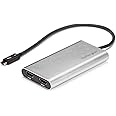
The StarTech.com Thunderbolt 3 to Dual HDMI 2.0 Adapter allows you to connect two 4K displays at 60Hz with a simple plug-and-play setup. Compatible with a wide range of operating systems and devices, this adapter is perfect for professionals in content creation and high-resolution imaging. Its 10-inch cable design ensures a clean workspace while providing robust audio support.
| Unit Count | 1.0 Count |
| Number of Items | 1 |
| Item Weight | 3.68 ounces |
| Package Quantity | 1 |
| Item Dimensions | 4.5 x 2.4 x 0.4 inches |
| Finish Types | Hdmi |
| Color | Silver |
| Warranty Type | Extended |
| Input Voltage | 5 Volts |
| Current Rating | 1.5 Amps |
| Power Plug | No Plug |
| Connector Type Used on Cable | HDMI/Thunderbolt 3 |
| Number of Ports | 1 |
| Compatible Devices | Laptop, Monitor, MacBook Pro, Computer |
| Specific Uses For Product | Computer |
M**N
Great choice for Linux too.
Works perfectly under Linux (Ubuntu 17.10) on a Dell XPS-13-9360. Unlike the 30Hz version of this which worked for a period of time and then seems to cut off one, alternate between them, or both - I guess because it was overheating(?) - this one seems to run very smoothly. I've been using it for a day and a half already and no problems at all. I had been forced to use Windows in order to use my Dell DisplayLink dock (since DisplayLink doesn't work under Linux very well at all, if at all), but now I can stick to Linux - I've not even bothered to try this on Windows because it has been rock solid. Startech don't support Linux, but it works very well indeed - I guess they don't due to a matter of support personnel/training, rather than the device itself.BTW, even though I am using Linux, my config is dual boot, so I can test on Windows too; so I they did support me for the 30Hz version (it had the same behaviour on Windows) - and they give really good customer support.FWIW: xrandr outputScreen 0: minimum 320 x 200, current 6016 x 1440, maximum 8192 x 8192XWAYLAND0 connected 1536x864+1920+0 (normal left inverted right x axis y axis) 290mm x 170mm 1536x864 59.80*+XWAYLAND1 connected 2560x1440+3456+0 (normal left inverted right x axis y axis) 600mm x 340mm 2560x1440 59.91*+XWAYLAND2 connected 1920x1200+0+0 (normal left inverted right x axis y axis) 500mm x 310mm 1920x1200 59.88*+
G**W
Works brilliantly for my home office
I ordered this dual display hub as a cheaper alternative than spending £200-350 on a Dell dock for my home office and could not be happier. I am able to run 2 QHD displays @144hz though DP cables without any issues. As long as you do not need the additional USB ports from a full dock, this is a very good option for multi-display functionality at significantly less cost.
M**M
Amazing product - This works a treat
I have been looking for a while at how to create a duo independant display setup to use with my macbook air 2018 (OS Catalina). I also have 2 Hanns-G 24" screens. Just plug in play around with your screen arrangement, no need to download any drivers either. Works perfectly. No lag between the screens either. I just have to say thank you to the tech people at StarTech.com who guided me through through to which product would be suitable. The price was pretty amazing too. Got it on here for £87.30 RRP £165.59. StarTech website doesnt do it that cheap, but the tech people are amazing.
M**S
Thunderbolt 3
Have given this a 4 because although it works it should have a slot to connect a C-USB cable in addition to the 2 x HDMI slots.Otherwise the HDMI connectors provide you with a duel set of screens which work fine.
F**Z
Does not work with LG Ultrafine 5K
Personal experience with an iMac and LG Ultrafine; absolute shame because it could have been excellent set up.
A**T
It just works, no trouble.
I've had this for a couple of months now, using it with a Dell XPS and two Asus 2k screens via Display Port. It just seems to work fine and solidly for hours on end with no glitches. I'm only using it for regular work so the 60hz on both screens is perfectly fine.
R**S
Works with M1 Max
I got this for an M1 Max Mackbook Pro and it works great to extend my displays. I now have 2 separate DP screens and a HDMI Screen running from 1 device. Great product!
M**N
Works with 2021 MacBook Pro 14" and 16"
For anyone wondering, this will absolutely work with the latest 2021 MacBook Pro's. Instantly outputs 4K at 60Hz to both monitors with no configuration at all.
D**I
It meets my expectation.
I'm using it with to increase monitor capacity for my MacBook Pro.
N**K
Da Macbook Pro 16" 2021 M1 Pro a Dell UP2715K: il video 5K funziona, l'audio no.
Ho collegato un Macbook Pro 16" 2021 M1 Pro allo schermo esterno Dell UP2715K: il video funziona bene ad una risoluzione di 5K. L'audio invece non viene passato.Ho contattato l'assistenza di Startech.com e mi hanno confermato che è un problema noto e che non ci sono soluzioni: con windows (a detta loro) funziona, con questi nuovi mac no.Come alternativa mi hanno consigliato il modello TB32DP14 che dovrebbe risolvere il problema ma che comunque non è stato testato (mah...).Un prodotto di 100 e passa euro che non viene neanche testato: no comment.Le due stelle perché per il video non ci sono problemi ma se nelle specifiche scrivi Audio 7.1 mi aspetto che almeno in modalità base funzioni.Deluso.
N**K
arrived and looked solid didnt work
This was my fault my laptop doesnt support Thunderbolt and i bought the thunderbolt version, i do recommend buying the usb c version if you dont have thunderbolt make sure to check because it wont work otherwise!!
K**R
Works perfectly on Mac Mojave and Windows 10 with 2x 4K 28" monitors
I had an older dual DisplayPort to USB 3 startech adapter that..worked..but not great. The older StarTech USB32DP24K60 (60hz adapter) did ok and was 60hz but it just couldn't keep up with window movements so if I dragged a window across an external monitor over the adapter it would lag behind what my mouse was actually doing. This new StarTech Thunderbolt adapter connected to a Thunderbolt 3 port on both my Dell 2-1 5290 and my 2018 Macbook pro (in both Mojave and Win10 Bootcamp) works PERFECTLY! No lag, just smooth external monitors. This adapter replaced a Lenovo Thunderbolt 3 eGPU dock at work completely, such that I can take the eGPU home and use it for gaming now.Also to note, the Lenovo Thunderbolt 3 eGPU does not work in MacOS because there's no Mac driver/support for nVidia or the protocol the DisplayPorts on the back use. However, if you manually point the "Generic Windows Display Device" in Device Manager from Windows 10 in Bootcamp to the nVidia driver folder manually it picks right up and works great. This requires downloading the nVidia driver and going half-way through the install before it fails saying there's no nVidia in your system. This loads the folder on the C drive which can then be pointed to for manual driver install in the Device Manager. In case any of you were wondering.Back on topic: The Thunderbolt 3 StarTech dual-DisplayPort adapter works perfect. 60hz on two 4K monitors with snappy refresh when moving applications around the external screens.
K**T
Parfait pour un grand bureau étendu sur Mac
Permet d'avoir 2 vrais écrans distincts en supplément d'un iMac par exemple. Plusieurs produits ne permettent pas le bureau étendu et recopient la même chose sur les 2 écrans (ce qui m'est arrivé avec un autre produit acheté précédemment).Le boitier chauffe pas mal, mais pas trop dérangeant car derrière l'écran.
Trustpilot
1 day ago
5 days ago