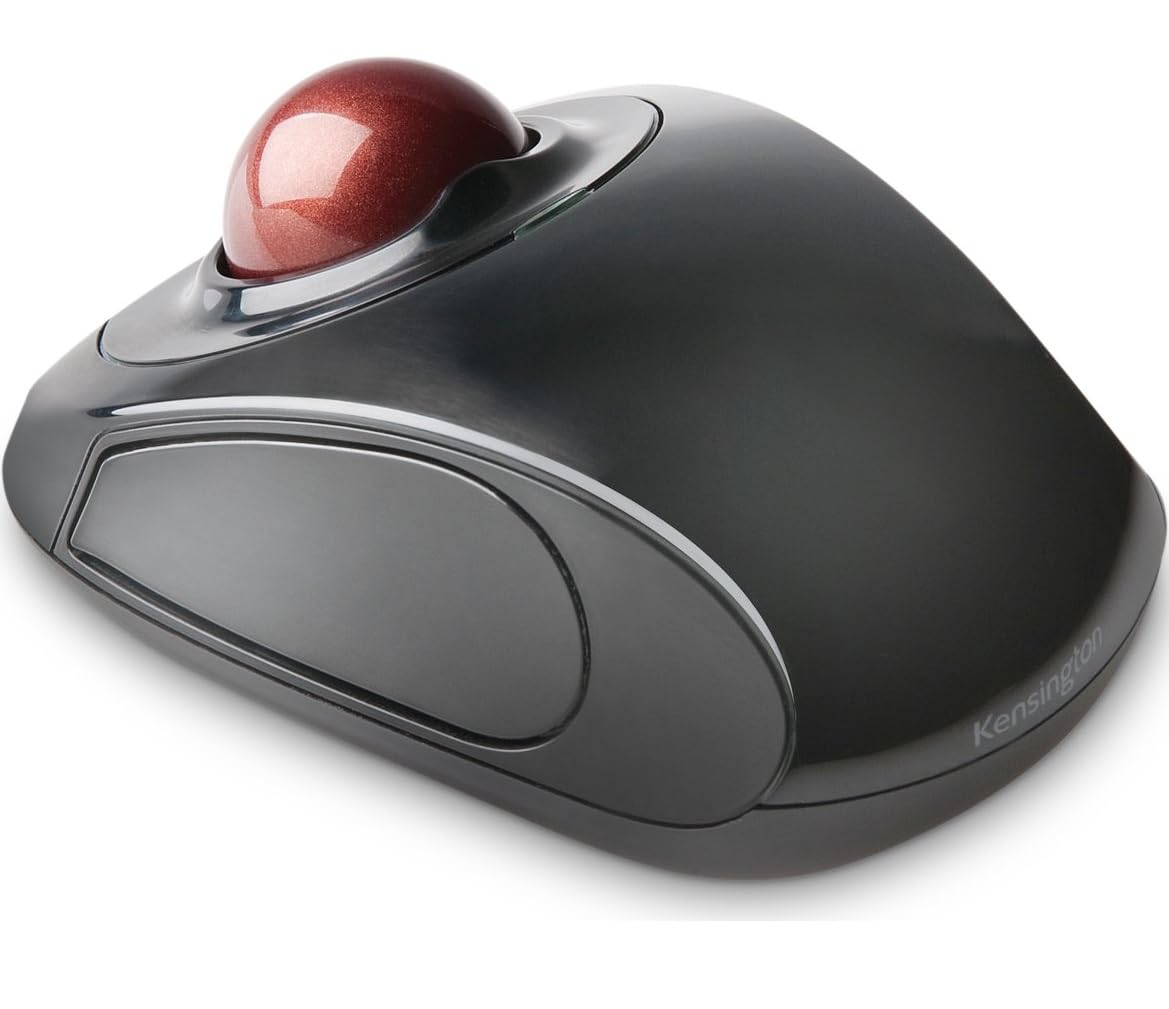
🖱️ Elevate your workflow — precision, comfort, and wireless freedom in one sleek orbit!
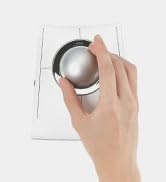
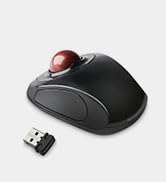
The Kensington Orbit Wireless Trackball Mouse (K72352US) offers a compact 32mm precision ball with a unique touch scroll ring, powered by a 2.4 GHz wireless Nano receiver compatible with Windows and Mac. Designed for mobile professionals, it reduces wrist strain through ergonomic design and stores its receiver inside the device for ultimate portability. Perfect for those seeking a clutter-free, comfortable, and precise navigation experience on the go.







| ASIN | B0050SPZMK |
| Batteries | 2 AA batteries required. (included) |
| Best Sellers Rank | #403 in Computer Mice |
| Brand | Kensington |
| Color | Black |
| Customer Reviews | 4.2 4.2 out of 5 stars (3,753) |
| Date First Available | March 30, 2011 |
| Hardware Platform | Laptop, PC |
| Is Discontinued By Manufacturer | No |
| Item Dimensions LxWxH | 2 x 7 x 6 inches |
| Item Weight | 8.5 ounces |
| Item model number | K72352US |
| Manufacturer | Kensington |
| Operating System | Chrome OS |
| Power Source | Battery Powered |
| Product Dimensions | 2 x 7 x 6 inches |
| Series | K72352US |
R**E
What's not to like!??? w/ Update
Update, 3/28/2014: Nothing major in the review below has changed -- still really love this trackball. But I have noticed that my comment about my "grip" on it is no longer correct. I use exactly the same grip as I did on my Logitech Mouseball. It just took a little usage time to get the feel of the different shape. So -- I suppose you could say it took me several weeks to fully adjust. But I never really noticed it. In the end, you can bump my review to the even "better" side a bit. Updated, 3/12/2014: I'm updating earlier than expected because this trackball is better than I had anticipated. Consider my rating a 5+. I agree with the advise to download the custom software -- it could fix any concerns you have. What I found shortly after my original post was that at times the cursor would unexpectedly jump several lines shifting my point of view in the document. Irritating but not severe. But I eliminated that behavior by customizing. Specifically, I attempted to cancel any action from the right-side scroll pad. Since that, I HAVE NOT HAD ANY PROBLEM AT ALL with the cursor jumping or the file changing perspective. I left the left scroll pad active, but I never really use it. (But it does work.) The other custom fix eliminated my only other "nuisance" issue. I slightly reduced the speed of the ball tracking to the cursor. This makes it almost identical to the Logitech Mouseball action despite the smaller ball. For those who want scrolling, you can set the software to adjust the speed across a wide range from Slow (default) to Fast. There is also an option call Inertial Scroll which I don't even know what it is. BTW, it IS possible to set a "chord" action using the software. Chording is pressing both buttons at the same time. There are 14 different options (example: invoke your browser) plus the default "disable" or "no action". Also, I use the power slider on the bottom to turn the trackball off overnight to extend battery life (and because I sometimes just use my tablet for days instead of the laptop). Other than this, because I have no wire to interfere with my movement, I constantly find myself in a small celebration mode. Just pick the trackball up and get started or quit whichever is right (and think about how great this trackball is). Original post follows: Dimensions: 4 3/8" long, 3 1/2" widest part, 1 1/2" high Ok, I have to admit that I've only had this mouse installed for about 5 minutes, but the only way you'll get it away from me now is to pry it from my cold, dead fingers. I just don't get any of the negative reviews. I'll come back with an update after I've been using it for a few weeks, but here's why I like it so much so quickly. First of all, the toughest thing about starting to use it was getting it unpacked. Not that it was so bad (although the batteries were REALLY held strongly in place). The packaging is great and quite protective. But none of that sealed plastic pack that takes a knife and physically dangerous slicing to get open. All it takes is to break the seals (yes, two), open the top, remove the plastic underlid to free the base, remove the tape and padding, take out the thumbnail transmitter, fight a little with the batteries, insert them, plug in the usb thumb, turn the trackball switch on and you're up and running. (Oh, yeah -- be sure your computer is on.) No, I haven't downloaded the driver -- not sure I know why I want to. But I'll get around to trying it and add that report to my later update. Meantime, I'm functioning BETTER than normal and EXTREMELY happy with this trackball. My configuration is a new (about three weeks old) Lenovo Flex laptop with Win 8.1 configured to my liking (minimal -- mostly just installed my software). For many years (since they came out) I've been using a wired Logitech Mouseball which I think is the best computer trackball made. (I own and have tried the Logitech wireless Mouseball but, while ok, it just doesn't fit me properly and I don't consider that "extra" unit to be "wireless". (I gave one of these things away. Now they are rather scarce and selling for a couple hundred. Go figure!) When I started the Kensington Orbit Wireless Trackball, it took me about 10 seconds to figure it out and adapt. I have NONE of the complaints of others about not having a place to rest my palm or wrist or any need to "clench" the buttons or incorrectly sliding onto the touch scroll pads. (In fact, without the downloaded driver, the scroll pads don't appear to be active.) In other words, as is, out of the box, without the custom driver, this is a basic, precisely functioning trackball. Now the differences -- understand that I'm right-handed. It IS a different shape and slightly shorter than the Logitech Mouseball. Consequently, while my palm rests on the body of the Kensington (K) similarly to the Logitech (L), the base of my hand rests sort of behind it and, frankly, stabilizes it. I have a medium sized hand, so small or large hands may rest differently. With my palm in that position, the tips of my index and middle fingers control the K trackball in exactly the same way as they did the L. The biggest adjustment for me (at least 5 of the 10 seconds) was that the smaller ball makes the cursor track more quickly. But there is no problem with control (and I'm 66 and not as coordinated as I used to be). The second major adjustment (the other 5 seconds) has to do with my grip on the K vs the L. On the L, I used basically a 4 finger grip -- thumb on the left button and 4th (or ring) on the right button. On the K, it is probably going to be more of a 5 finger, with the index and middle still controlling the ball with the ring just "there" and my little finger on the right mouse button. That's working well for me. (This is what changed per the 3/28 update -- same grip.) Mostly the way I operated on the L was to have my palm on the base and my index/middle on the ball and bring the button fingers into play as needed -- a very loose grip around the mouseball. That is exactly how I operate with the K. Ok, I just went to several other applications to see if the scroll pads would operate differently -- they did. Or rather, I figured out how they are supposed to work. (So I guess this means it takes longer than 10 seconds to adjust to the K.) When I read the complaints about the scroll pads doing strange things, I got the impression that they were left/right scroll controls. <shrug> But no, each does the same thing -- scroll the screen or window up and down (get it -- "scrolling"). It doesn't matter which pad you use (right or left) they both cause scrolling up and down. Now how anyone can say that they accidently keep scrolling off into some unknown area of their doc, I have yet to discover. But, hey, maybe it's just me again. I find that the scroll pads are a tad stiff to invoke the scrolling. Something you would want in order to avoid scrolling off into limbo "accidentally". (Now if you were gripping with a tight "clench", maybe something else would happen, but I've never used a trackball that way and don't think I'll start now. Or maybe if you press your fingers all over the base including the scroll pads, you could move or scroll inadvertently. I still don't see how I could "accidentally" touch the scroll pads while rolling the trackball with my index/middle fingers. I control the ball on the top maybe inch of surface maximum -- not the sides of it.) One of the apps I require a trackball for (other than just vastly preferring it to a mouse) is Sketchup -- the former Google now Trimble product for cad/cam-like function. That was one of the apps I used to check out the Kensington. Also, MS Word and a very complex set of spreadsheets in Excel. No problems -- love this trackball. It also does not interfere with the standard touchscreen capabilities of Win8. Not sure what else I can add right now. I am wireless with an excellent trackball. I can use it on the arm of my chair, on a desktop, on my lap and even on the wrist rest of my laptop with no problems. And that d--- cord doesn't get in my way or cause me to pull the trackball off when I forget it. :<)
A**R
VR Mouse!
This is the best mouse I could find to control my phone during VR sessions. I'm able to perform all necessary tasks to operate my phone effectively without touching my screen. The size is comfortable, not too large, so I can hold it in a pocket for mobile use. I'm planning to use this set up as a translation device while traveling.
Q**H
Kinda, sorta not bad
I've been using Logitech Trackman Marbles and keyboards with scroll wheels with my desktops forever and never had a complaint, but on my work and personal laptops with no scroll (if I'm going to scroll with the D pad, I may as well use the D pad) then there's the cord...something had to change. As a Logitech guy, I picked up a M570 thinking I'd get used to the thumb thing...not gonna happen. So I gave one of these a shot. It is a small form factor, I've got bigger hands and I don't see myself working it for an all day session but for a couple 3 hours here and there, no problem. I read a lot of people have issues with the scroll ring, honestly I don't. I tend to roll the ball with my index and middle and use my ring on the scroll. It's low enough that I don't touch it unless I want to. It's PnP and the windows stock mouse driver will give you enough tweaking, so as a limited user on my work laptop I'm good to go without having to install anything, the Kensington software is utilitarian, I like a fast cursor and heavy acceleration, no problem, button mapping is no better or worse than Logitech's and the scroll can be dialed in but like anything "touch", it can be jumpy, not drive you nuts jumpy, but jumpy. One thing I will say, the right click button is in an awkward place, it may just be the way I hold it?, may be the size?, may be the design to keep it ambidextrous? I don't really know...I just don't like it. The ball is small, accuracy suffers because of it, if this was my first trackball I'd be frustrated but it's for my laptops. The whole thing is smallish (which is what I was kind of looking for) so I'll live with it. The ball is pretty stiff out of the package, I just did mu usual break in process and it's now like butter. I'm not real sure if this thing shuts itself off after time, but I'm used to turning off peripherals so meh, Over all, for a wireless trackball with scroll for what you pay...you won't be blown away but you won't have any buyers remorse either...I'm torn between a 3 and a 4 star, right click is irritating but I'll eventually get over it, end of the day, it works pretty good.
P**R
This wireless trackball mouse works very well. Glad I bought it
本**虫
リピートです。 この機種からBluetooth対応と2.4㎓の両方で接続できるようになりました。 海外や出張には欠かせないトラックボールです。 良いものはいつまでたっても良いです。
S**S
Exactly as advertised.
G**N
Kensington makes a good trackball. This isn't Kensington's top notch product so I had some reservations about buying it. I read some bad things about the touch scroll wheel but decided to buy one anyways. My first trackball was the thumb-centric Logitech M570 and I've been using it long enough that I wanted to try out a traditional style trackball. Having used the M570, I can safely say that the Orbit Mobile is a great product. The configuration software is essential; you probably won't be satisfied with its default performance. Personally, I like to crank up sensitivity. Once all the tweaking was done (really, a couple minutes of fine-tuning) I was happy with the feel of the trackball. It feels smooth. The touch scroll wheel works flawlessly for me whether I'm scrolling a page or making short movements. I might even like it more than a standard mouse scroll wheel but it's a bit early to say. It has the essentials: on/off switch, easily removable trackball, and receiver holder in the battery compartment. The mouse itself doesn't have a premium feel but it doesn't necessarily feel cheap either (by comparison the M570 feels like a cheap plastic shell with a ball on it). As far as my gripes go . . . The surface is a dust magnet. Straight out of the package it has a lot of micro-scratches all over the surface. It leaves the mouse with a cheap aesthetic up close but these imperfections aren't noticeable at arms-length. There are two buttons opposing each other on either side of the mouse that function as left and right click. I find it a little awkward to click them because you are using your thumb and ring finger. It might just take some getting used to. That's all I have to say. I'm surprised this product isn't mentioned more often. It is a solid trackball for those just starting out with trackballs or looking for something small. In my opinion, trackballs are much better than traditional computer mice. They feel much more precise and don't require any wrist movement. After using one for a while, you won't go back. --- Update [2018/06/17]: After using this trackball for a year I decided to go back to the M570. The Orbit really is a great trackball but it has its flaws. The touch sensitive pads are easy to touch accidentally. The ball is not as accurate as the M570. It's close, but not quite there for precision work. The built-in software helps remedy this by hotkeying an accurate movement mode (usually to the ALT button). The M570 doesn't need this. It is accurate enough on its own with its slightly larger ball. But the main reason that I decided to switch back was the over-reliance on the index finger for movements. Using the ball and the touch pads are most comfortable with the index finger. When you factor in heavy typing as well this can result in strain over time.
C**J
This is the usual Kensington good quality, and hope it will last a long time. It has a slightly smaller ball than my other track ball, but as this was the travel with it is the perfect size and the scrolling function is great. Supplier was good all arrived well packaged and on time.
Trustpilot
2 weeks ago
2 days ago



