🎧 Elevate your sound game—plug in, play out, and never miss a beat!
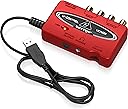
The Behringer U-CONTROL UCA222 is a compact, ultra-low latency 2 In/2 Out USB audio interface designed for seamless PC and Mac integration without driver hassles. It includes a massive software bundle featuring Audacity and over 150 virtual instruments and effects, making it a versatile tool for live recording, podcasting, and music production. Praised for its clear sound quality and plug-and-play simplicity, it’s a budget-friendly powerhouse that transforms your audio experience.


| ASIN | B0023BYDHK |
| Best Sellers Rank | #5,539 in Musical Instruments ( See Top 100 in Musical Instruments ) #47 in Computer Recording Audio Interfaces |
| Color Name | Original Version |
| Color Screen | No |
| Compatible Devices | Personal Computer, Mac |
| Customer Reviews | 4.6 4.6 out of 5 stars (5,733) |
| Date First Available | July 16, 2004 |
| Hardware Interface | USB |
| Is Discontinued By Manufacturer | No |
| Item Weight | 7 ounces |
| Item model number | UCA222 |
| Material Type | Stainless Steel |
| Operating System | Mac |
| Product Dimensions | 7.2 x 5.5 x 1.4 inches |
| Supported Software | Audacity audio editor, |
J**N
Great as a DAC/external sound card.
I bought this with the intention of using it as a DAC/external sound card for my laptop. I expected better sound quality overall, and got exactly what I wanted and then some. I was hoping this just plugs right into a USB port and you can plug headphones right in to the port and that was indeed the case. The I/O is as simple as it looks in the picture. As for the sound quality, don't expect $80 ASUS Xonar quality, as that is specifically a sound card, while this is a DAC. This did preform as good as I hoped it would. It pulled things out of songs I never knew were there...and indirectly revealed how crappy my headphones sounded. With a good pair of cans and a good amp, this should preform very well for the price. I bought this over the UCA202 version for the added software, but apparently it is free for anyone on Behringer's site, good thing it was the same price as the UCA202. Overall, this is worth every penny...this thing works for quite a bit of audio related stuff. I was skeptical at first because it's cheap and it looks to be just another product, but this thing is capable of quite a bit. My only gripe is the plastic is of very cheap quality, but can't expect much for it being so cheap. I haven't used any other feature, so I cannot really say if it does x and y that well, but I can vouch for the sound quality. UPDATE: I didn't realize this at first, but on the back of the unit it claims the device is a UCA202, not that it really matters as the UCA222 and 202 are similar/the same, but thought that was pretty odd. Regardless, I do have an update. I was using this as a DAC/external soundcard and had crackling when using heavy bass...so I decided to try my USB 3.0 port (had it in a 2.0 before) and what happened next simply made my jaw drop. Not only did it fix the problem...but it sounded 10x better. It was good at first, but now it is magical compared to an old ALC269 Realtek on board soundcard. If you have USB 3.0 then use it if you can, it will benefit tremendously. This turned my normally average Numark Electrowaves into a pretty good pair of cans...they sound more open than they were before. The silence was tamed, the bass was bumped up slightly and the vocals now come out so clear it's ridiculous. I am excited to see what these sound like when I get a pair of Fidelio X2s. NOTE: It also does not say that these have a built in amplifier. This only works with the headphone jack, but it's there if you need it. While I'd recommend springing for something better (i.e. A Schiit Magni 2 for desktop, or any FiiO amplifier for portable) it is nice to have when my amplifier runs out of juice. If I could give this 6 stars, I would. This is a great device for the price, don't disregard it because of how cheap it is...I certainly would have if I had not decided to look into it. As a member of Head-Fi, it has my seal of approval for a budget oriented portable DAC.
D**0
Good product for live recording with Windows 7
I record live musical instruments using Audacity on the computer and needed a solution to the problem that Windows 7 has an inherent audio latency defect. When using the Line In audio jacks on a PC with Windows 7 there is about a quarter of a second delay between the time you hit a note on an instrument or sing into a microphone and when you hear the sound come out of your speakers. This makes Windows 7 useless for live recording or karaoke applications. Microsoft's tech support went so far as to suggest that the problem can be solved by using a shorter cable between the mixer and the PC. My rough calculations show that the cable would have to be 46,500 miles long to cause a quarter second delay, but that's getting off the point, which is to review this Behringer USB device and not to criticize, no matter how justly, the arrogance of Microsoft. The UCA 222 is described as an ultra low latency audio interface. Since high latency is the problem I was trying to solve, 30 bucks or so seemed like a reasonable gamble to me. When I received the UCA 222 I first tried to run the driver setup on the provided CD. It didn't work, giving an error message that the setup wasn't functional for Windows 7. I couldn't find any Windows 7 or 64 bit OS version of the setup program on the CD. So I thought, what the heck, I'll just plug it into the PC and see what happens. Voila! Windows said it detected and installed the device with no problem. I thought, hmm, fine, but let's see if it actually works. I hooked up the mixer and my headphones and picked up a guitar for a test. Bingo, no latency problem so far. The notes are coming through as fast as I can play them. The next test was to actually record a new track in Audacity playing along with a pre-recorded track and see if there is any latency. Ugh, the same old quarter of a second delay showed up in the recording. However, Audacity - and most recording software - has a latency control where you can adjust it's latency period. With a little trial and error I found that setting it to -275 resulted in perfect synchronization between recorded and live tracks. THIS SOLUTION DID NOT WORK PRIOR TO GETTING THE UCA222. No latency or buffer adjustment in Audacity was able to eliminate the delay. So.... I'm a happy consumer. This low cost UCA222 gizmo from Behringer did exactly what I hoped it would, and solved a difficult problem which was rendering my expensive new PC more or less useless. Furthermore, no setup was needed. Just plug it in and you're good to go! Speaking of plugs, the USB cable on the UCA222 is about 5 feet long (I haven't actually measured it, just an approximation) so there's plenty of length to route it around from your computer to somewhere else on a typical office-sized desk. The UCA222 is small and light, though, so you might want to use some velcro to keep it in place wherever you locate it. There are, however, a few points to consider before purchasing this product. First of all, when it's plugged into your PC, it routes all of the PC sound through itself, instead of through the Line Out and Headphone jacks of your PC. If you have a 5.1 or 7.1 sound card with analog jacks to a sound system with front, rear, side, and sub-woofer speakers you won't get any sound out of them while the UCA222 is plugged in. (The sound comes back when you unplug it, though.) So if you want to hear sound through speakers you have to hook your sound system up through RCA jacks on the UCA222 and those are only single Left and Right channels. This wasn't a problem for me since I use a different PA system for live monitoring but it could be an issue for someone else. The other thing is that the speakers don't shut off when you plug your headphones into it. Again, this isn't a deal breaker for me since my sound system has a mute button on the remote, so it's not too much effort to just mute the speakers when I want to. The UCA222 comes "massively" bundled with a bunch of audio effects software on a CD, mostly freeware stuff you can download off the net. I looked at it, but there was nothing really of use to me, personally. But I got this thing for the hardware, not the software, anyway. All in all, if you want a very simple low cost solution to the Windows 7 audio latency problem when recording live input from an external mixer, and can live with plain old stereo instead of surround sound output, or with having to unplug the UCA222 when you do want to just listen to your surround sound system, or you don't mind the headphones not automatically muting the speakers, then, like me, you will be very satisfied with the performance, and simplicity of installation, of this product.
C**Y
Awesome interface between your laptop and your PA system!
Behringer makes great products and this one does not disappoint! I run my laptop through my PA for weddings and events and wanted to improve the sound being delivered to the PA. Previously I would plug a small stereo cord (3.5mm) into the headphones out port on the laptop and into the mixer on the PA and play the music. I was always bothered with line noise and low hum. This sound card interface works like a dream! Plug and play for me! Hooked up the USB cord and ran RCA cables on the audio OUT jacks and away we GO! The sound is pristine and there is no low end hum or noise. Clean and quiet and I believe that the audio quality is better. There are more tones regarding EQ as a result, the Laptop Headphone jack seemed a bit "flat" when compared to the Behringer. The red finish is quite cool but the functionality is what I am looking for! I have not tried to record with this interface although I suspect it will be impressive. Great little device for a small amount of money! If you DJ or play computer audio through a PA you should get one of these, will not be disappointed!
V**X
Interfaz básica pero perfecta para sintetizadores, ya que no requiero preamplificadores. La calidad llega hasta 16 bits pero nadie notará la diferencia en trabajo casero. Excelente producto.
ど**え
何世代か古いWindowsでも対応しドライバー要らず、USB接続で直ぐ認識した。壊れたPCIe高音質オーディオカードの代わりを探しこちらの製品コメントを頼って購入。入力端子があるのもポイントだった。視聴してみてこの価格で高音質は驚き。だがASIOはなんちゃってだった。それでもこの高音質。 まず製品のメーカーサイトを検索すると日本語サイトが頭に出るが、ドライバーのリンク先が切れている。改めて英語圏サイトからダウンロードすると、なんと汎用フリーのASIO4ALLで最新版の1つ前。オーディオ編集ソフトで再生するとプチプチノイズが乗るため本家ASIO4ALLから最新版を入手して解消。 コレはアリです!
P**9
Muito boa a placa já uso e essa eu uso para o backup se a outra der problema
A**S
There are two models with similar features: UCA202 and UCA222. Even on their site, the difference is not clearly specified. Researched a lot and finally found there is negligible difference. If you're confused whether to go for this interface or other interfaces or mixer: 1. This has RCA input - go for this if you want to RECORD audio from a mixer, amplifier or any other AV device that has AV output. This can work to record cassette / cd player audio to your computer. Cheapest option with reasonable quality. 2. Few audio interfaces have both mic and line inputs. These are good for recording from AV source and mic input particularly for recording live music performance with instruments. Costlier than 1 above and the cost increases as you look for more inputs sources. 3. You need a mixer, if you've multiple input sources. Do not go for audio interface with many inputs - you'll not get results with desired flexibility. Go for a mixer with as many inputs as you need and add an audio interface. You're good to go for both live performance, recording to PC. There are analog audio mixers with usb interface, but the results of USB output to PC are not as expected unless you go for costly digital mixers. I went for this UCA222 with Yamaha MG10XU that gives best of all possible combinations for a professional quality amateur home studio. The software mentioned in the specs need to be downloaded from their site. The download is trouble-free, but most of the software at their site are old releases of open source software. Get the latest versions directly from the sites. WaveForm 8 available from their site with this is a nice provision for beginners.
R**S
This is a bare-bones, USB, audio interface with analogue inputs and outputs - and it works just fine as one. I appreciate that Behringer chose to use female RCA jacks rather than fiddly 1/8th-inch stereo ins and outs. The addition of an additional digital optical output is a nice feature, as is the dedicated headphone volume control knob (rather than needing to tweak phones volume in software). The option to monitor either input or output through the headphones is another useful feature sometimes lacking on low-cost audio interfaces. Setup is simple - this truly is USB plug and play. Audio quality is fine - maybe not what discerning ears would want for "pro" audio mixing, but professional audio producers wouldn't be using an interface at this price point. It's also super-small, super lightweight, and needs no external power beyond USB connection to a computer - so it's perfect for travel. The only drawbacks are that it does not have any microphone pre-amps - you'd need to spend more on an interface for those, and that's not what this item is meant for - and the accompanying software bundle is outdated and severely lacking in documentation. However, you don't need any of it to use the unit straight out of the box - it's all add-ons for audio production. There's no digital audio input either, but again - that's not what this is for. Overall, this is a simple-to-use, effective, and cheap digital audio interface, from a well-known and trusted brand.
Trustpilot
3 weeks ago
1 day ago