
DOWNLOAD THE APP


Customer Services
Copyright © 2025 Desertcart Holdings Limited
DOWNLOAD THE APP

🚀 Power Your Productivity with Seamless Gigabit Speed!
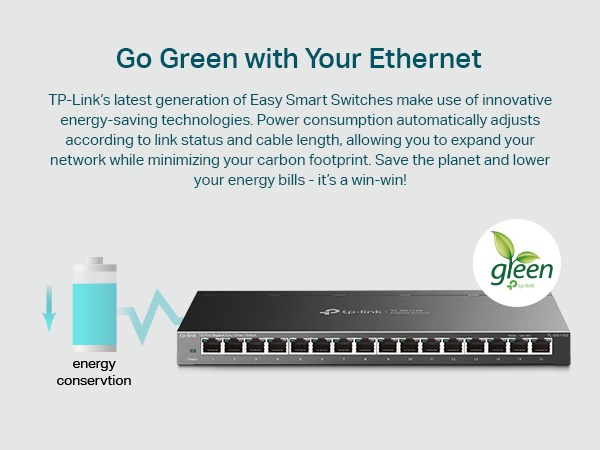
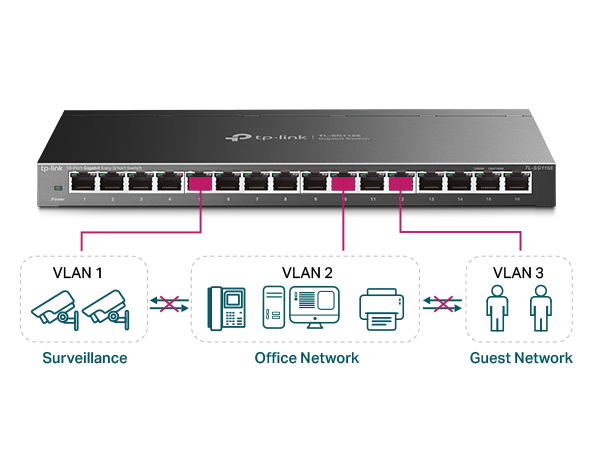
The TP-Link TL-SG116E is a 16-port Gigabit Ethernet switch designed for professionals and small businesses seeking reliable, high-speed wired networking. Featuring plug-and-play simplicity, a sturdy metal build, and advanced traffic management protocols like QoS and VLAN, it delivers low-latency, efficient connectivity. Its energy-saving technology and lifetime protection make it a future-proof upgrade for any wired network setup.





| ASIN | B07GRG63P6 |
| Best Sellers Rank | #1 in Computer Networking Switches |
| Brand | TP-Link |
| Built-In Media | TL-SG116E, Power Cord, Installation Guide, Rubber Feet |
| Case Material Type | Metal |
| Color | Black |
| Compatible Devices | Desktop, Laptop, Printer |
| Current Rating | 1 Amps |
| Customer Reviews | 4.7 out of 5 stars 137,034 Reviews |
| Data Transfer Rate | 1000 Megabits Per Second |
| Global Trade Identification Number | 00845973084301 |
| Interface | RJ45 |
| Item Dimensions L x W x H | 11.26"L x 4.4"W x 1"H |
| Item Type Name | TP-LINK 16 Port Easy Smart Gigabit Ethernet Network Switch (TL-SG116E) |
| Item Weight | 2.1 Pounds |
| Manufacturer | TP-Link |
| Number of Ports | 16 |
| Platform | Not Machine Specific |
| Product Dimensions | 11.26"L x 4.4"W x 1"H |
| Switch Type | Metal |
| UPC | 845973084301 840460604109 |
| Upper Temperature Rating | 40 Degrees Celsius |
| Voltage | 12 Volts (DC) |
| Warranty Description | 3 Year Manufacturer |
B**N
Fast & Easy-To-Use!
Edit 11/21/2025: I periodically like to perform check-ins on my previous reviews. Over 3 years later I am happy to say this thing still works flawlessly. Haven't encountered a single hiccup. Very consumer friendly and is truly "set it and forget it". ----------------- First off I need to mention that Amazon asked me to rate 3 "features": 'WiFi signal', 'Tech Support', and the 'User Interface'. Let me be clear that this device does not use WiFi and it does not have it's own local IP address to let you log into a "User Interface". Just wanted to point this out in case you come across other reviews that have these two "features" rated that could be misleading you. I recently built a house and had it wired for Cat 6 Ethernet, with there being 1 wall port in each room. One room in particular I have a desktop PC and an Xbox that I wanted both to have a wired internet connection to which is what required the purchase of this device. It is extremely easy to set up, and with it being "unmanaged", there was no portal I needed to sign into that would require me to mess with settings. It's a very simple "plug-and-play" set up, you simply need to connect an incoming ethernet cable from your router/modem (in any port) and then you can now share that internet connection to 4 other wired devices - that's all there is to it. One important note is this: if you have a modem-only device (these devices usually only have a single ethernet port on the back) then you are probably needing a router - not a switch. A router is capable of assigning your devices their own internal IP addresses via DHCP - which is important if you don't know how to assign them yourself. It's also what manages your NAT for situations your devices may need to use the same internet port number. While you don't necessarily need to know what all of this means, you need to understand that a switch is not a replacement for a router. If you are a consumer (as opposed to a business) then you're likely considering this switch to extend/add more ports than what your router has (they usually have around 4 or 5). Even the devices that are connected directly to this switch will still be getting their local IP addresses assigned from your router. The benefit of this switch over a "hub" is that it knows how to route your internet traffic to your devices. So even though it's not responsible for assigning IP addresses to your devices, it knows how to route specific traffic to the devices that require it. It does so lightning-fast - I notice absolutely no additional latency (which is great for gaming) and no compromise in speed either. If you're on the market for a small unmanaged switch, then this is an affordable and excellent choice... A hub, on the other hand, will route all traffic it receives to all devices that are connected to it (they do not 'switch' traffic to specific devices), which essentially requires the devices themselves to ignore the traffic it doesn't want. It adds additional overhead and can potentially cause dropped packets and they just essentially add additional network congestion. I could see a hub being used for something like printers or IoT devices where latency isn't critical, but I think it's ultimately beneficial to just not use them at all even though they might look similar to a switch. And as I've said above, this device does not contain WiFi. You cannot connect this wirelessly to any device. You would be able to purchase a separate device that would connect to this to transmit a wifi signal, but this will not do it on its own.
T**S
No complaints, meets all expectations
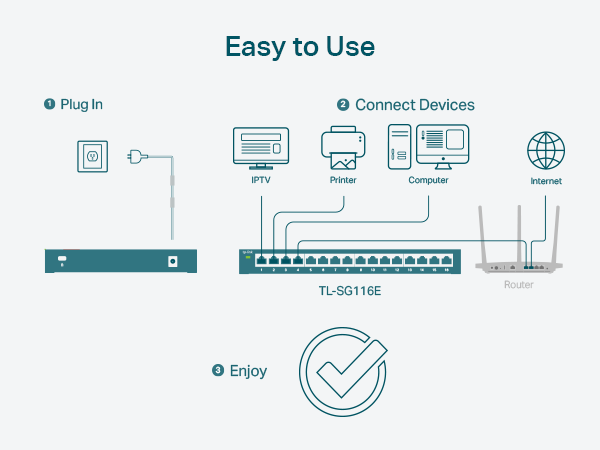
The device works as expected. It is used to split an Ethernet (internet) connection from a router to multiple devices in an entertainment center, efficiently balancing traffic with low latency across all connected devices. Keep in mind that one port serves as the input, while the remaining four function as outputs in this configuration. No setup or configuration is required—the device is truly plug-and-play and works immediately as intended. I recommend this for anyone who wants the accessibility of a network switch without having to program or manage one. This un-managed switch is a great option.
L**S
So far, so good!
I’ve been using this connector several days now, and it’s working as expected. I’m using it plugged into a WiFi extender to hardwire our TV and PlayStation. This is giving us faster and more consistent connection. Even though we have fiber internet, the location it was installed in our house is not central, so we’ve had to do the extensions. And our Sony TV’s internal WiFi won’t keep a connection (a common issue for Sony TVs), and game downloads were taking too long as well as not being able to play a live game while downloading. This little box has fixed the issues. It really is just a plug-and-go item. Super easy and you don’t have to be techy to understand how it works. Keep in mind that one port will be dedicated to the WiFi box or extender, so buy the size you need accordingly. If you’ve got 6 devices to connect, you need at least 7 ports. I didn’t know what “looping” was, so after looking into it, I left that switch to “off.” It was not recommended, and warned of slowing speeds and mixing up devices. It’s working great so far. TV connection hasn’t faltered since switching to the box (and not directly into extender box). And the PlayStation downloaded a game in 5mins that, unwired, estimated 30mins! My husband was very happy. He then downloaded Cyberpunk 2077, which is a huge file. When he tried downloading it unwired, it quoted like half a day, lol. Hardwired, it took less than 1.5hrs, AND, at the same time, he was able to play a college football game that uses the network for live play. One thing to note: this did change our IP address, so when we went into Hulu after getting it connected, we got the “it looks like you’re not at home?” message. We had to “update our home location” even though we didn’t really move. You get 4 of these home changes a year, so just FYI. I’m sure Hulu is familiar with this and would work it out if you don’t have any home address changes left, but the hassle and time would be annoying. Overall, I couldn’t be more pleased. If this box stops working after a time, I’ll update my review. But for $12.50 on sale, it’s a steal. The box itself seems quality and well made. It’s got a weight to it and was packaged well. Definitely recommend.
R**Y
Solid lil' switch.
As per most of my using TP-Link stuff, it's solid and just works. Plug and play, no muss, no fuss and likely will outlast all the computers it will ever have the pleasure of hosting traffic for. And it's small so it fits just about anywhere.
W**N
Solid and reliable little switch.
Plug and play, no setup needed at all. Just connect the cables and it works instantly. The gigabit speeds are stable, and it handles multiple devices without any issues. Build quality is good for the price, runs quietly with no heat problems, and feels very dependable for home or small office use. Overall, great value and does exactly what it’s supposed to do.
T**S
The little Ethernet Switch that could!
I needed an ethernet switch that I could essentially set and forget, this accomplished that goal very well. I've been using TP-Link products for over a decade now for everything from routers to Wi-Fi adapters and their products always come in at a reasonable price point and pretty good performance to boot. TP-Link products always offer a good blend of longevity and durability. I didn't need a ton of ports, really just 3, but this one comes with 5 ports which is just an added bonus. My goal was to hardwire my wall mounted PS5 pro and my TV. After I installed the switch, I tested the speeds for both my PS5 pro and TV and there was zero drop off. I love that it's small enough to mount behind my TV via command strips and thankfully the power supply was also a smaller size. I couldn't be happier with this product.
B**R
Superb performance & build quality, nightmare to mount on walls
Its a switch! Does what it needs to do. Pros: * Runs cold to the touch even when under decent load with multiple devices so its probably very energy efficient. * Seems to be very high performance! No latency or bandwidth changes vs direct CAT6a connection on gigabit ethernet. Tested with up to 3 devices under load. Latency was statistically unchanged and bandwidth/QoS was what you'd expect on paper so overhead is super low and on board protocols are implemented extremely well! Grain of salt though... I haven't formally benchmarked or even really used SOHO switches since the 10/100 days. Maybe all makes/models are similar nowadays, but 20 years ago using switches was only a tad better than a hub in terms collision prevention and simple QoS. * Physical build quality is top notch, with one caveat (see Cons) Cons: * Design of metal casing is probably perfect for mounting on the side of standard 1U or 2U racks, warehouse racks, or anything else with standardized screw hole placement and (ideally) the ability to come in from behind or at least see what you're doing. I needed to mount this to a wall in my home office where I couldn't just screw into a rack with standard mounts and slide the switch in place 5 seconds later. There may be a much better way, but the only solution I could come up with (in order to use the rubber feet as standoffs to allow airflow) was to take the housing apart and unscrew/remove the PCB to see what the correct distance between screws needed to be. In theory this would be the last step but unfortunately problem #2 (really the only roadblock in retrospect) was that when wall mounting, the shape of the mounting cutouts are such that you (or at least me?)don't give you enough "turning radius" to get the switch mounted without the offset from the screw head and the wall surface being stupidly long. The only solution where the standoff distance was both far enough to get the screw heads in there while ALSO getting it to mount securely without flapping around loose was to clip the opening a bit with sheet metal snips. This was a tad challenging but doable, mostly because of the cramped areas for maneuver. My recommended wall mount steps (unless someone has a better way) are: 1. Insert the screws in the mounting holes, and position in the narrower "top" area where they loosely stay in place when held in by hand. This will be the distance when mounted. 2. Gently press the switch and screws into the wall just enough to create 2 small dents so you know where to drill. 3. Drill. I didn't need a drywall screw due to wood paneling, but use drywall screws if bare drywall. If you think you don't need to just do it anyway. Its cheap, easy, and a good best practice to prevent yanks from plugged in devices, etc. 4. Screw the screws in 95% of the way. You may be able to just mount the switch ok. If not, you may need to do step 5... 5. (Optional). If necessary AND you know what you're doing, AND you don't care about warranties, open up the mounting cavity with metal snips, but only after you have unscrewed the device housing and have carefully removed all the (guts). Put them aside in an anti static bag to keep them safe. Start by clipping tiny slivers from the two mounting cavities on the bottom device housing piece. Adjust the screw depth until you can easily mount the housing without it feeling loose. You may need to test/adjust a few times, since the screw head will be blocked by sheet metal. This is the core design flaw, otherwise you could just (at worst) unscrew the top housing cover, remove the "guts", and just screw it in by hand, with the final step being to put everything back together (annoying but simple if you own magnetic screwdrivers). Again, only do this if no viable alternatives exist for you, as I'm sure it voids the warranty. Conclusion? Buy this excellent product, just be prepared for a "project" if this is going on a wall in a SOHO setting.
B**C
Versatile little switch
I got this switch so i could add network ports in my office. The switch is very easy to set up. Just power it up, plug it into a network port, then add upto 4 devices. There is no specific uplink port, just pick one. The small footprint lets you put it almost anywhere and there's no fan noise. The port speed seems as advertised using okla verify performance. I highly recommend getting this.
Trustpilot
1 week ago
1 month ago