


๐ Upgrade your TV gameโstream smarter, not harder!
Google Chromecast transforms any HDMI-enabled TV into a smart entertainment hub, streaming over 2,000 apps in vibrant 1080p HD. With easy plug-and-play setup, dual-band Wi-Fi support, and seamless phone control, itโs the ultimate minimalist upgrade for millennial professionals craving effortless, high-quality streaming and smart home connectivity.
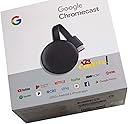
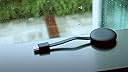
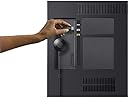


| ASIN | B015UKRNGS |
| Brand | |
| Built-In Media | Google Chromecast |
| Color | Black |
| Compatible Devices | Television |
| Connectivity Technology | Wi-Fi |
| Connector Type | HDMI |
| Controller Type | android |
| Customer Reviews | 4.6 out of 5 stars 88,303 Reviews |
| Form Factor | TV Stick |
| Global Trade Identification Number | 00811571016587, 00842776106131, 10842776106138 |
| Item Dimensions L x W x H | 2.04"L x 0.54"W x 2.04"H |
| Item Weight | 1.41 ounces |
| Manufacturer | Google Inc. |
| Memory Storage Capacity | 16 GB |
| Mfr Part Number | NC2-6A5 |
| Model Name | chromecast |
| Model Number | GA00439-US |
| Number of Items | 1 |
| Other Special Features of the Product | Alcohol-Free |
| Resolution | 1080p |
| Special Feature | Alcohol-Free |
| Supported Internet Services | YouTube, Pandora, Netflix, Amazon Prime Video |
| UPC | 842776106131 811571016587 |
| Unit Count | 41.6 Ounce |
| Video Codec | H.264, H.265/HEVC |
| Video Output Resolution | 1920x1080 pixels |
| Warranty Description | Chromecast limited warranty |
C**W
Great for streaming content but needs a phone/computer/Google Home to work
Really easy to setup using the Google Home app. I have a Google Home mini(smart speaker) that works with this device and allows you to play and pause just by speaking, which is really nice. I like the idea of the Google Chromecast. I think it's a neat idea and it is really reliable (more so than Amazon fire TV). As long as you understand that this IS NOT a standalone device, you should be happy with it. The way it works is-you use your iOS or Android device with a compatible app (look for the cast icon), establish a connection, and then you use your phone as a remote. The Chromecast has no user interface to speak of. You pick what content you want on another device and then cast to the Chromecast. If you are watching a tv series on Netflix for instance, when the episode you are watching finishes, the next one will automatically play. You can also cast from the Chrome web browser which will let you access things like Prime Video which doesn't have casting capabilities in the mobile app. I would recommend using an app over the browser when you can, because it's a smoother experience. There are a few extras like being able to mirror the screen from your mobile device to your tv, if that is something you have a need for. You can also view your google photos in a slideshow while the chromecast is inactive. You can do this in the settings for the chromecast in the google home app. I think this is worth $35, and I would recommend it if you can deal with a slightly less conventional TV/Movie watching experience. After using this a while, I prefer it to an android tv or roku type of OS. I just think they should beef up the Google Assistant features( more like Android TV). Edit: In the time since my original review, Amazon prime video now allows for casting from the iOS and Android mobile apps. Amazon and Google are on better terms now and as a result the fire tv and echo shows now have the YouTube app again and Amazon is selling Google hardware on this site again too. Just wanted to update my review.
D**D
It's the perfect device to stream everything from my phone to my TV
UPDATE: I now have an LG V40 ThinQ with Android 10.0 and the Chromecast is still great. I can send almost anything on my phone to the Chromecast and my TV. It is wonderful. I was looking for a way to send videos from my Android phone to my 2013 Samsung Smart TV. I use Netflix and my TV has an old, outdated version. I also use Prime Video and Kodi which my TV doesn't have. This Chromcast allows me to watch both of these and more on my TV. It was simple to install. I plugged it into my TV's HDMI socket and the power into my home's AC outlet. Then installed Google Home on my phone and followed the instructions. It took some fiddling with the programs but it works great. I read in one of the other reviews that it didn't work plugging the power cable into the TV's USB port. They were right and wrong. The Chromecast uses a 1 amp power supply. My TV has 2 USB ports; a 1 amp and a 0.5 amp. When I used the 1 amp port, it worked the same as plugging it in to an outlet. Now Netflix works simply as per the instructions. However, to get the others to work needs a little ingenuity. I have an HTC 10 phone, but this should work with others. I start Google Home first. Then go into my phone's settings to where the VPN and data exchange settings are. My phone calls the setting "HTC Connect". It tells the phone where to play the media. When you choose it, it lists the Phone, DNLA devices and the Chromecast. When you pick Chromecast, the phone's screen gets played, in real time, on the TV along with the phone. Now, anything you see on your phone gets played on your TV also. It's like using a phone with a 40 inch screen. Along with movies, you can stream music, photos, games, etc. I will be getting a new phone in a few days and will update these instructions when it arrives. UPDATE: I purchased a new LG V40 ThinQ cell phone. And it works with Chromecast just like my HTC phone did. You can stream with supported apps like Netflix or share using settings. The setting is under "Connected Devices". It is called "Screen Sharing" and Chromecast is listed like it was on my HTC. Obviously, I cannot promise that it will work with all phones, but it seems likely that it will.
A**S
Easy streaming, great quality
This is my third Chromecast. The first two were 1st gen units, one of which I still use. On the other 1st gen unit the HDMI port became bent and unusable. This new design seems much more durable. The HDMI port is on a cable, not built directly into the dongle. I decided to buy another Chromecast when I read Amazon Prime Video would no longer be supported on our old Wii U. Streaming with the Chromecast is extremely simple if you have an Android phone. I don't have any Apple devices, so I can't attest to how it works with iPhone. Start out by plugging the Chromecast into the HDMI port on your TV and hook up the USB power cable either to a wall plug using the included wall-wart adapter, or to the USB port on the TV. I used the port on the TV to reduce cable clutter. Turn on the TV and switch the appropriate HDMI port, and you should see the Chromecast startup screen. Download the Google Home app on your phone and have it search for devices. Tell the Chromecast which network to connect to and give it the password. Once it's connected to the network, you can select the cast icon in programs that support it, such as Prime Video, Youtube, Netflix, and many others. Video quality probably depends on your network. On mine, I have no problem with 1080p HD video. This version of the Chromecast doesn't support 4K, you need the Chromecast Ultra for that, but my TV doesn't support it either, so I just went with the non-Ultra unit. If an app doesn't support streaming, you can always share your phone's screen using the Home app, then run your app and it will be mirrored to the Chromecast. The quality isn't as good as an app that natively supports casting, but it works. I believe Chrome on a PC can cast as well, but I haven't tried that.
A**R
If Your On A Budget Get This! If You Can Afford More, Buy The Ultra!
I truly have mixed feelings about this device... These new notebooks and tablets, are made with such a thin bezel design, that they engineer themselves out from having any HDMI ports! We live in a new age of wireless, I guess everybody hates cords now days. This forces us to buy products like this one, so that we can screencast. Again, tell me whats so wrong with an HDMI cable? My old tablet had one, worked fine, is wireless casting really that much better? Lets find out! So I got a new Dragon Touch Max 10 tablet, naturally it don't come with an HDMI port, figures. So I hooked up this Google Chromecast device to my 1080P IPS 24" monitor. The device tells you on screen to download the Google Home app on your device and to follow the instructions to set it up. While it was technically easy to setup, following the instructions, the process took way longer then I expected. If you took one look at that little device, you would think its not a computer, but you would be wrong. There is a little computer in there, and what is a common thing that all computers like to do? Thats right, install updates. So guess why the process took twice as long as it should? Yep, cause it needed updated. So once that was all done, took me a little bit to learn how to screencast this thing. I was able to screencast Youtube, and Netflix with much success, it loads up to full resolution on screen, looks awesome on my IPS display! Occasionally however, I would notice a slight framerate issue from time to time. More on that later. And then I went into the Google Home app in order to mirror cast my tablet so that everything casts. Well, there is first real bit where I am disappointed. When mirror casting, it does not fill up my 1080P monitor. Its more then likely serving the tablet display's resolution, which is a 1920 *1200 16/10 ratio. Using Droid Info, I discovered the tablet is operating at a refresh rate of 48-herts frequency for display, instead of the typical 60-herts that is used in the US. Since there is no display options to change for screen casting resolutions and refresh rate, I am not able to fix that issue. When playing games, I noticed that the occasional framerate issue I talked about, became total lag, and the bitrate dropped terribly, but this was not the Chromcast devices fault. Turns out, this was my tablets fault! I was connected to my WIFI using the 2.4GHZ frequency, the best signal performance I was getting about 8 feet from my router in direct line of sight, was -30DB. Turns out, that is not enough performance to screencast properly! The good news however, is my tablet is also capable of connecting to my routers 5GHZ protocal. What a game changer that was, switching over to 5GHZ! All the sudden my tablets WIFI performance increased exponentially, and my WIFI performance went off the scale. As soon as I switched over to 5GHZ, all the sudden the Chromecast device was operating better with smooth as glass framerate in video casting, and smoother framerate in gaming as well. The amount of horse power in your device matters too. The more better your mobile device can perform, the better the Chromecast will perform. My new tablet runs a 1.6GHZ Octa core CPU with 3GB RAM, so its no slouch. However, higher end Samsung models and Apple model devices, will more then likely perform better with the Chromecast device, due to more horse power in performance, and in higher resolution and refresh rates. When your not screen casting to the Chromecast, then the Chromecast goes into slideshow mode, where it rotates to images from Google, at a time interval that you can set. And without a doubt, I have seen some of the most incredible images displayed, over the Google Chromecast, as a standbye screensaver solution! However, another bad thing about this device, is it will restart without warning, by its own choosing, for reasons unknown. I figured that I would spend less money and get the 3rd generation model, as the monitor is only 1080P to begin with. But, I can't help but to think, that I would have probably gotten a better experience with screencasting, if I had bought the Ultra model, even though my screen is not 4K. If your on a budget, this 3rd generation model is most certainly an option. However, if you can afford to spend more, go for the Ultra. The Chromecast device also gets very warm, even when not actively screencasting. If your not interested in the slideshow standbye mode when not in use, I would just disconnect the power to the device, to save on your power bill. Also, if your device has less then my devices SPECS for performance, you can forget about wireless screencasting. But you will be better off with a device that exceeds mines SPECS. 4 out of 5 stars!
I**P
A useless gift
Got this for my brother, who doesn't have internet besides his phone and spends much of his time immersed in youtube. Was hoping he'd get on board with hooking his phone to it so everyone could be entertained with whatever nonsense he was watching. Connecting his phone to it was simple, and it stayed connected for all of one evening proving that OK quality streaming was possible. The Google Home app made for a decent remote control with all the features you'd need, so I figured maybe he'd be happy with it. Left it there, and he just ignored it until it was almost forgotten. A year or more later another pal messed with it and got it working, and that lasted all of maybe a day. More years passed, and I have no clue what happened to the device. All I can tell ya is that he now uses a USB C to HDMI adapter to share signal to his TV, and whatever he has on is usually just as boring as watching him have thumb relations with his phone in silence. Don't let my bad experience turn you away from this awesome device that makes your dumb TV smart. Perhaps you, your relative or your friend will actually care enough to use it.
B**L
Essential
I've been using chromecast for the past 7 years! The only reason I had to buy a new one is that I accidentally broke it -I was traveling to my parents and didn't know if they had smart TVs so I decided to bring my chromecast just in case and I didn't pack it well and it broke, otherwise I'd still be using the same one as it still worked perfectly. I HIGHLY recommend getting one, they are so convenient and I love being able to use it casting from my phone, tablet, nook, and computer. I don't have cable TV instead I use apps so being able to have something like this is crucial. I tried Amazon's fire stick about 5 years ago and I was super not impressed- the stick kept losing connection to the wifi even though it was literally right on top of the router and even when it was connected it would buffer a ton, never had those issues with my chromecast!!! So it's definitely worth the low price, they last for a super long time even being used pretty much all day, have had no issues being able to stream all the apps I've wanted to, and the screen saving pictures are beautiful....I can't recommend it enough!!!!
E**S
La calidad
Excelente
R**C
Can even be used with your cellular hotspot
I don't have an internet connection where I live yet I stream music, Prime Video, Hulu live, and Netflix on my HDTV using the Chromecast device. This is a great tool in your arsenal for cord cutting. I have 40Gigs of 4GLte hotspot a month between two smartphones and this is enough for me to stream and binge watch while at home or away. 1) Simply download the Google Home app from the Google play store to any android device (I've used this app on my android tablets and phones with hotspots. My tablet only has a 3GLte hotspot and that's ok for streaming music but too sluggish for streaming high quality video). You use the Home app on the device to set up and name the Chromecast device (ex: ChromeLvRm, ChromeMBR, etc). This name is what shows up as attached to your wifi hotspot whenever you turn the hotspot on while in range of the Chromecast. This setup is a one time thing per Chromecast device. Once it's set up, you are good to go. 2) use your tv remote control to switch your input to what ever HDMI you have attached the Chromecast to. 3) (Unlike the Amazon firetv, Chromecast has no apps. The apps are on the device you cast from to the Chromecast device.) Then you use your device to play your streaming app (Hulu, Netflix, etc). When the video starts, you will see the casting symbol in the upper right corner of the video. Press this and you're casting to your Chromecast/HDTV. You use your device to pause, play, control volume, end casting, etc. Your device acts like the remote control. So to recap: you only need three things, your HDTV with HDMI connection, your device with the Google Home and streaming apps you've obtained from the Google play store, and your mobile hotspot...
N**R
Remote not work or google app remote also not work.
Only slideshow.
A**L
Genial
Schnell geliefert. Qualitรคt wie gedacht sehr gut. Funktioniert einwandfrei.
J**A
Excelente!
Excelente producto.
R**N
Very good product
Superb product
J**E
Excelente producto
Funciona muy bien, no es la primera vez que lo pido. Necesitaba otro para cuando voy de viaje y la TV del hotel no es smart.
Trustpilot
3 days ago
2 weeks ago