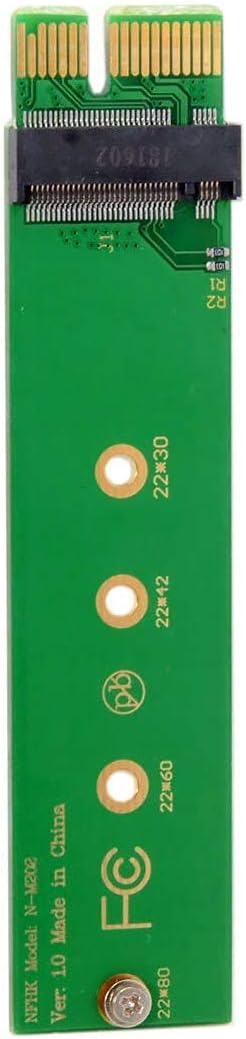


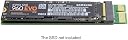
JSER NGFF M-Key NVME AHCI SSD to PCI-E 3.0 1x PCIE4.0 x1 Vertical Adapter Compatible for XP941 SM951 PM951 960 EVO SSD
Product ID: 92037483
⚡M.2 to PCIe X1
🔧No driver needed
🚀Supports 2230-2280 sizes
Buy anything from 5,000+ international stores. One checkout price. No surprise fees. Join 2M+ shoppers on Desertcart.
Desertcart purchases this item on your behalf and handles shipping, customs, and support to Nicaragua.
🚀 Elevate Your Storage Game!
The JSER NGFF M-Key NVME AHCI SSD to PCI-E 3.0 1x Adapter is designed for seamless integration of M.2 SSDs into PCIe X1 slots, supporting various card dimensions without compromising speed. It requires no additional drivers and is compatible with modern motherboards and operating systems, making it an essential upgrade for tech-savvy users.


| ASIN | B07HRLBVXB |
| Best Sellers Rank | #1,862 in Internal Solid State Drives |
| Brand | JSER |
| Color | Green NVME to PCI-E 1x Green |
| Compatible Devices | [Predicted: M.2 NVME AHCI SSDs and compatible systems] |
| Connector Type | PCI-E |
| Customer Reviews | 4.4 out of 5 stars 1,008 Reviews |
| Finish | Matte |
| Finish Type | Matte |
| Item Dimensions | 3.94 x 3.94 x 0.39 inches |
| Item dimensions L x W x H | 3.94 x 3.94 x 0.39 inches |
| Manufacturer | Chenyang |
| Mfr Part Number | SA-002-XY |
| Model Number | SA-002-XY |
| Number of Items | 1 |
| Number of Ports | 1 |
| Package Quantity | 1 |
| Power Plug Type | No Plug |
| Unit Count | 1.0 Count |
D**!
Works for (some - all?) M.2 NVME drives with B & M notches
Product description says these don't work with B/M notched drives but in fact, at least for earlier Optane drives, they do! The B notch can denote either SATA type drives or NVME drives that use only 2 PCIe lanes rather than the more common 4 lanes. Reducing the Optane (815p 60gb) drive from 2 lanes to 1 in my case reduced peak read speeds from over1200 mbps to about 730 mbps (using AIDA64 Read Speed Test Suite), which is still better than any common SATA SSD. Write speeds likely similar. I haven't tried these with my WD SN500 drive which is also 2-lane NVME but I'd expect it would work. As always, YMMV but these are inexpensive enough to try if you have a PCIex2 NVME drive needing to go into an X1 slot! Only ding I'd throw at these is that the screws have rather small heads and require good lighting and manual dexterity to assemble!
G**H
It is inexpensive and works.
Simple little board for NVMe to pcie 1x, At first it was not detected (it is a x470 board), but that was my fault because the slot was disabled due to another NVMe using those lanes. Shifted to another slot and instantly detected on reboot. One must remember this is only a single lane and not 4, so the speed is not full, but I'm getting 581 MB/s write and for around $8 what more could I expect or want?
K**H
Impressive Quality, Effortless Installation, and Value for money.
I am thoroughly impressed with the exceptional quality of the JSER NVME to PCI-E 4.0 Adapter. The installation process was a breeze. I used it to effortlessly install and add a Samsung Nvme, and the performance is nothing short of remarkable. The thermal pad's effectiveness in keeping the Samsung SSD cool is a standout feature, ensuring consistent and reliable operation. This adapter works seamlessly even on older systems like my Dell Studio XPS, breathing new life into them. A truly outstanding product that exceeds expectations!
B**.
Works just as it's supposed to.
Not sure why it's so difficult for some people, but the brass nut pushes against the notch on your m2 drive and is then secured to the board with a screw through the bottom. No cutting or drilling involved. I bought this to take advantage of an unused pci-e 3.0 slot and a spare nvme drive I had laying around. There's nothing to rant and rave about, its cheap and does what it's meant to without any fanfare. Everything lined up, plugged in, and booted right up no problem. No instructions, but with only 3 screws it's self explanatory.
J**E
There are different PCI-e standards? Who knew? This one works in my PC
One of the best upgrades to a Mac or PC that has a PCI-e bus is to add a big M.2 SSD drive attached to a bus adapter card. I just did this for my 2015 gaming PC, and it's now substantially faster. Loading times went from getting up and walking around to just a few seconds. Problem: I bought another bus adapter card elsewhere and was dismayed it didn't fit my PC. After considerable snooping around the inside of my machine, I realized I needed the layout of this card. Installed the M.2 drive and it works great. One problem: the piece of metal that mounts the card to the side of the PC next to the bus is about 1/8" too long, so the PC doesn't close fully. Yeah, all right, it's close enough. And the difference in performance is totally worth. I think this card is a PCI-e 3.0, whereas the card that didn't work was PCI-e 4.0. I had no idea. But these cards are cheap and do the trick, so long as they fit.
O**K
Great way to upgrade your PS5 storage
This worked great for the one time I needed it. I had to upgrade my SSD before I installing it into my PS5. I did not have an extra slot on my computer and was able to use this on my PC to upgrade the firmware on the SSD. I can’t vouch for the longevity of th item as I only used it once.
M**H
Warning! - Screw Retainer Must Be Manually Modified To Fit
I'm giving the Xiwai Low Profile PCI-E 3.0 x1 M.2 Adapter Card one star because the brass screw retainer, which must be pressed into a hole depending upon your M.2 drive length, is too large and doesn't fit. In fact even though I'm a retired embedded systems designer with decades of experience it was difficult for me to modify it to work. So you have two options if you must use this card. One is to use the brass retainer on the back of the card like a nut, however this forces the M.2 drive to actually contact the board. Although I tested this and it worked, it is not advised because there are too many exposed copper areas that might short out if they touch the board. You can use a piece of insulating material between the board and M.2 drive, but this is still going to bend the M.2 drive down and place stress on both it and the connector that they aren't designed for. The other, recommended, way is to file one side of the brass screw retainer so it will fit in the holes. Unfortunately though, this is much harder than it sounds. The brass retainer is very small and can't be held in your hands while filing. So I actually screwed the brass retainer into a corner hole on the board (intended for the PCI bracket), and then used a Dremel tool to file the brass retainer so it would fit (with some light hammering). However this must be done with the utmost care, because if you file it down too far it will be loose and won't stick in the hole, and if it's not enough and you try to hammer it in you might fracture the board. Also please do not use a Dremel tool freehand like this unless you are very, very, experienced because it's quite dangerous. If you're not comfortable with the Dremel tool, or don't have one, just use a regular small file. The only good news is that once I manually resized the retainer and carefully hammered it into the hole the board itself worked perfectly. Read/Write speeds are limited to around 800 MB/s, but that's because it uses one PCIE lane instead of four. However the bottom line is that this card is really not fit for its intended purpose because a casual user would not be able to assemble it correctly. So, really, look for another board unless you know how to work on small electrical/mechanical devices.
M**R
Worked on an Asrock B450
I tried it in a Biostar, no luck. Maybe a conflick w sata 3 PORT. TRIED ON AN aSROCK W A kIOXIA M.2 AND THE BIOS BOOTED TO THAT DRIVE. It's only running like 4000 gps when the drive normally runs like 9k. Does what it is supposed to do.
R**8
Scheda
Ho acquistato questa scheda per usare un ssd m.2 su scheda madre senza il suo slot, il montaggio è semplicissimo, è stata riconosciuta alla prima accensione, e l'installazione del sistema operativo non ha dato problemi, la velocità risulta inferiore a quella del ssd, ma così posso comunque usarlo.
P**S
Works a treat for second SSD under Windows 10
I bought this to put my second 1 Tb SSD into my music studio rack as my motherboard only has one slot to fit one (as with most motherboard). Modern instrument sample libraries need phenomenal access speed and processing resources and even a 7200 rpm disk can't serve the samples quickly enough. Although I've not actually measured the read speed, if happily handles the 900 GB of I've got loaded without a blip. Installation is very simple (I added a heatsink onto the SSD ) and Windows 10 found the drive without intervention from me. All I needed to do was create the partition and format. Basically - it works a treat!!
J**S
Facil y sin problema
Lo instale hace unos meses y ni un solo problema, lee y transmite perfectamente las ssd, facil de instalar.
L**D
No compatible con mac 2013
el producto es lo que anuncian, pero lo compre para una mac book 2013 el cual no me sirvio. igual fue mi error por no leer bien las descripciones.
ケ**ン
ちゃんと使える。
x1だからx1の速度しか出ないけどその速度はちゃんと出てる。 何の問題もないです。
Trustpilot
1 week ago
2 weeks ago