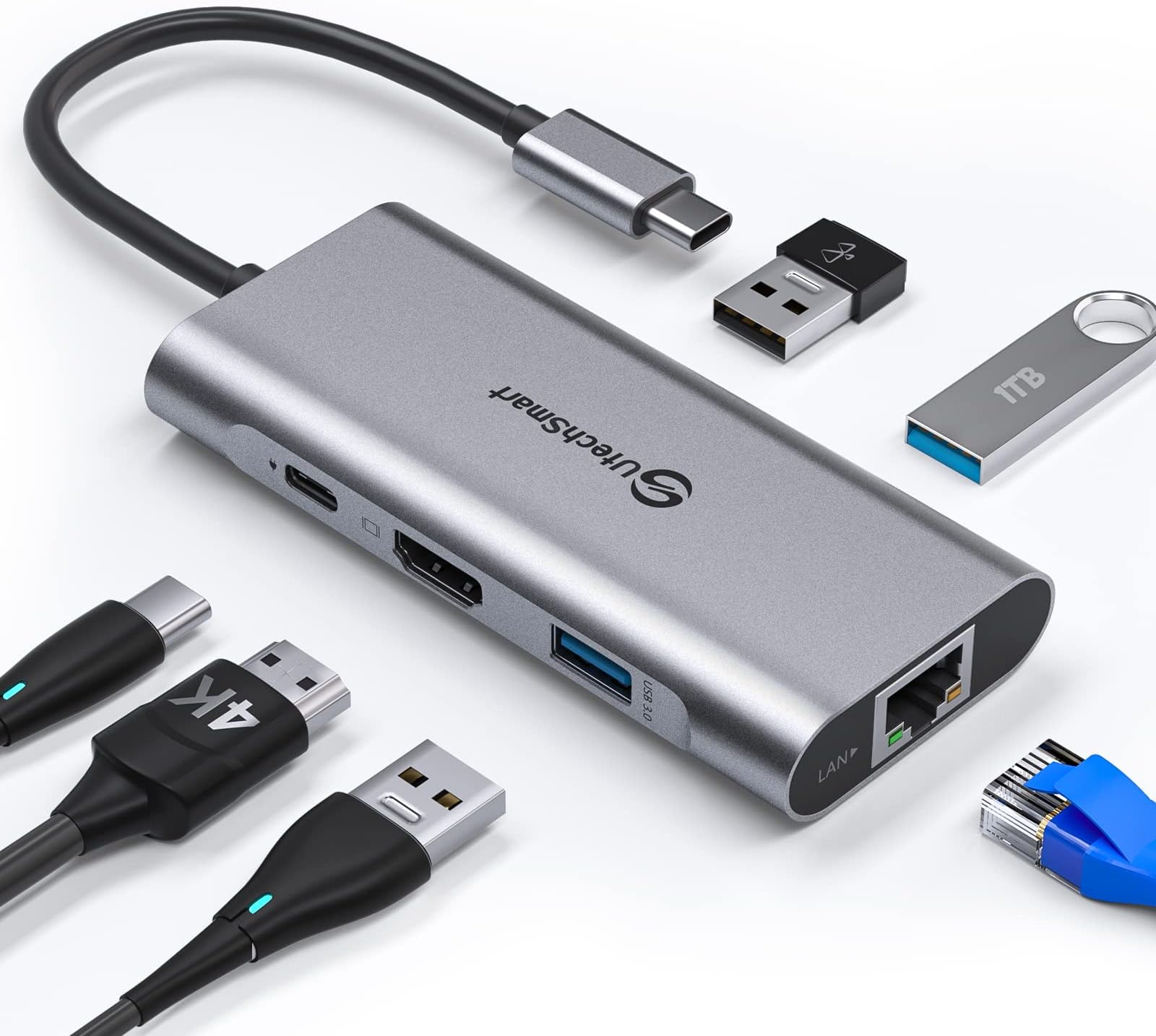
🚀 Power Up Your Productivity with the Ultimate USB-C Hub!
The UtechSmart USB C Hub is a versatile 6-in-1 multiport adapter featuring a 1000Mbps Gigabit Ethernet port, 4K HDMI output, three USB 3.0 ports with 5Gbps data transfer, and a 100W USB-C power delivery port. Compatible with MacBook Pro/Air, Dell XPS, Chromebook, and other USB-C devices, it offers advanced heat dissipation for stable, secure connections and supports plug-and-play functionality without additional drivers. Perfect for professionals seeking a compact, reliable docking solution to streamline connectivity and boost productivity.


| ASIN | B07H2ZS1B5 |
| Best Sellers Rank | #33 in USB Hubs |
| Customer Reviews | 4.4 4.4 out of 5 stars (10,262) |
| Date First Available | September 25, 2018 |
| Is Discontinued By Manufacturer | No |
| Item Weight | 3.03 ounces |
| Item model number | UCN3273 |
| Manufacturer | UtechSmart Technology |
| Product Dimensions | 4.06 x 6.46 x 0.7 inches |
G**N
An excellent companion for my Galaxy Tab S9,
I'm experimenting with replacing my Windows PC with a higher end tablet. so I wanted a docking station (let's call it the DS) to connect it to a mouse, keyboard, and most i importantly, my 28 inch display screen. So Far, So Good! This review is going through the docking station, the S9, and DEX, then displayed on a nice big screen! I REALLY like using a REAL keyboard! Once it was delivered, I rushed to my workstation to see how it worked. And it didn't! Nothing, NOTHING would work. It kept telling me to check the cables. So out of frustration, I had lunch. It turned out that the case I bought for the S9 fooled me into thinking I had the DS plugged into the tablet, but it was not. Once I had figured THAT out, the docking station, and the tablet worked well together. I like that I'm using two different RF Dongles for the keyboard and mouse plugged into the DS. I don't have to use battery power to use Bluetooth for those accessories. Plus, I still have one USB 3.0 port free. The Keyboard and Mouse don't appear to lag, at all. If it does, it is so minor that I am unable to percieve it. I like that I can power the Tablet from the DS. I'm using a 20 watt Amazon charger, and it seems to work just fine. The tablet doesn't give me any messages that I'm on a slow charge and it seems to charge as it does without the DS. The only real negative is that the cable from the DS to the Tab S9 is a bit too short for the tablet to be propped upright. The tablet display remains on, and the S Pen can be used with it. I'm thinking that I might want to use the tablet itself as a sort of touchpad sometimes. I might find applications where I would want the tablet display to remain upright. I don't know, but it MIGHT be a problem, maybe. Build quality seems good. I think the DS case is metal, at least it looks and feels like aluminum. And the cord going to the Tablet seems quite robust. I can't comment yet on reliabiy, It will take some time for that info to appear. But functionally, it is everything the seller claims it is. I am satisfied. Edit: I bought one for my wife.
A**C
Works pretty well with the GPD Pocket 2 (m3-8100Y refresh)
I gave this 5 stars because even though it isn't perfect, I think any issues I've encountered are more likely a result of the hardware, software, and drivers I'm using. TL;DR: It basically works as expected and I can confirm that it doesn't use DisplayLink. I contacted UTechSmart before purchase to confirm if this device used USB-C HDMI Alt-mode instead of a DisplayLink chip. They confirmed it uses the former and said that though they had not tested it with a Pocket 2, if it didn't work I could return it no questions asked. Bonus points to them for that. For reference, I'm using it with a GPD Pocket 2 (late 2018 product refresh using an Intel m3-8100Y CPU), running Windows 10 LTSC 2019 and a mixture of GPD and first-party drivers (mostly direct from Intel and Realtek). This is not how it comes from GPD, and is most definitely NOT a supported configuration by either GPD or Microsoft. I'm using the latest Intel drivers available (26.20.100.7000) from the Intel site. The only persistent issue is that on my device, if second-screen mode default (Win+P) is set to duplicate or extend then neither screen will display when the hub is first plugged in. After a few seconds one of the screens will start working again. If the default is second screen only then it will work immediately. Once external display is working, using the Win+P shortcut to switch to duplicate or extend works correctly. This is most likely a Windows or driver issue. For reference the Pocket 2 has a 1920x1200 screen that I use at 150% scaling and I mostly used 1920x1080 @100% scale monitors for testing. No HDMI adapters were used and I tested with two different known-good cables. Monitors tested were two Dell S2240L, one LG IPS234, and a Panasonic TCP50GT25. I also tested on a 4k Samsung UN50NU6950 and it reported output 4k@30fps, which is close enough to the Intel UHD 615 spec for HDMI 1.4. This hub can function without external power, but if you have problems, try connecting power before you connect it to your computer. When I used it for the first time, it wouldn't appear to work without external power, but after some unrelated software and driver updates, now it does. For me, this issue was definitely on the host side, not the hub side. The network chip is a Realtek RTL8153 USB 3 to gigabit Ethernet adapter. I own several devices that use this chip and it is serviceable, but tends to reset or drop out under sustained gigabit traffic. This is a characteristic of either the chip or Realtek's drivers, and there isn't really anything UTechSmart can do about it. (The other common providers of low cost USB->Ethernet chips (e.g. the ASIX AX88179) often have the same problems.) Below max speed, the 8153 works without any problems. As an aside, if you have one of these chips in a standalone usb adapter, you can plug it into a USB 2 port to get a trouble-free 250-350 Mb/s without having to babysit it. I haven't tried stress-testing how much power you can get from the USB 3.0 ports, nor have I tried to saturate the USB-C link with simultaneous video, network, and USB SSD file transfer traffic. It doesn't really fit my use case for the device, and if doing so didn't work or caused the hub to drop connection it wouldn't necessarily be the hub's fault anyway. One feature of the GPD Pocket 2 is that it can charge from any 5V source, not just from a USB-C PD charger. So I tried to power the hub with a regular USB power bank that can output [email protected] (Soshine E3S). When charging directly, the Pocket 2 increases current draw until the voltage begins to sag below 5V. This is normal behavior and prevents the device from pulling too much current from the charger. But when I power the hub and indirectly charge the device, the power bank's over-current protection immediately trips. For whatever reason, the hub prevents the Pocket 2 from noticing the voltage drop in time to prevent a fault. A higher output 5V source, or a proper USB-C PD power bank would probably work just fine. It's just too much for a smaller power bank. So in summary it works well, the price ($40 at time of purchase) is competitive with other similar products, and if I needed another I would start looking at UTechSmart first.
Q**8
Solid USB C Ethernet Hub!
I was looking for an USB C Ethernet adapter for my new Samsung Galaxy book 2 Pro 360, and the first couple I ordered had the problem of constantly disconnecting and reconnecting. After some digging into the issue, it seems this has been a common problem the plagues USB C adapters, and may be due to the connection being loose, or the hub overheating, and the hub not being able to supply all the power necessary to maintain connection. So I needed a hub that had PD so that power draw would always be sufficient to maintain connection. This hub has worked as advertised, It hasn't disconnected once, and I have plugged 3 external hard drives, in addition to the Ethernet port, and getting very fast speeds, well over 400 Mbps on my 400 Mbps plan, and upload speeds are as advertised as well. So far I am very happy with the purchase, I will update this review once I have used the HDMI port. Update: 7.15.22 My laptop no longer recognizes the USB Hub. I contacted customer service to request a warranty replacement, and they shipped one out within a couple days. After sthinking about why the first hub failed, I believe it could be a heat issue. I have 3 external USB SSDs connected to the hub along with the Ethernet port, and the USB C power delivery port to provide the necessary power. I notice it gets quite warm, so I have been monitoring the heat, and placing it on a cooling pad, which keeps it from getting too hot. I wish I didn't have to use the cooling pad, but I'm pretty sure that was what led to the other hub failing.
S**L
After reading some reviews I purchased this hub to allow a CAT 5+ connection & USB storage for my Google TV. It works perfectly, in fact it works so well that a I ordered a second one. This hub is small enough to easily hide behind your TV & offers all the features that I was looking for. Highly recommend, it simply works.
N**R
I bought this for an Doogee U10 android tablet, mainly for the additional USB ports and for the wired ethernet adapter. Everything works fine except the HDMI, but apparently that's a problem with the tablet not supporting DP Alt mode through USB C. Nothing wrong with this hub.
A**X
Ottima qualità costruttiva funziona molto bene ed è bello solido
A**N
I got it to connect my Nintendo switch which I bought in the US to the tv. Maybe it's good for other things but it didn't work for me. I bought another cheap Amazon's choice one that is less than half the price of this one which is working well
B**R
MacBook Pro cihazımda kullanıyorum 900mbps speed test de gördüm gayet güzel ürün
Trustpilot
3 days ago
2 weeks ago