Buy anything from 5,000+ international stores. One checkout price. No surprise fees. Join 2M+ shoppers on Desertcart.
Desertcart purchases this item on your behalf and handles shipping, customs, and support to Nicaragua.
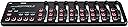
🎶 Elevate your studio game with the ultimate slimline MIDI powerhouse!
The Korg nanoKONTROL2 is a compact, USB-powered MIDI control surface featuring 8 high-quality faders, pan knobs, and illuminated buttons. Designed for professional and home studios alike, it offers deep customization with up to 16 MIDI channels and 24 programmable controls, ensuring seamless integration with popular DAWs like Ableton Live and Reaper. Its slim, durable build and responsive controls make it a top choice for millennial creatives seeking affordable, high-performance music production gear.


| ASIN | B004M8UZS8 |
| Additional Features | Mute Controls |
| Best Sellers Rank | #6,022 in Musical Instruments ( See Top 100 in Musical Instruments ) #28 in Computer Recording MIDI Controllers |
| Brand | KORG |
| Brand Name | KORG |
| Color | Black |
| Compatible Devices | Laptop |
| Connectivity Technology | USB |
| Connector Type | USB |
| Control Method | Touch |
| Control Type | Push Button |
| Customer Reviews | 4.6 out of 5 stars 3,185 Reviews |
| Global Trade Identification Number | 04959112081086 |
| Hardware Interface | USB |
| Hardware Platform | macintosh |
| Human Interface Input | Buttons |
| Included Components | USB Cable |
| Instrument | MIDI Compatible Installation |
| Instrument Key | Any |
| Item Dimensions D x W x H | 12.8"D x 3.27"W x 1.18"H |
| Item Type Name | Midi Controller |
| Item Weight | 293 Grams |
| Keyboard Description | Compact control surface with buttons, no traditional keyboard layout |
| Manufacturer | Korg USA Inc. |
| Manufacturer Part Number | NANOKON2BK |
| Material Type | Stainless Steel |
| Mixer Channel Quantity | 8 |
| Model Name | NANOKON2BK |
| Model Number | NANOKON2BK |
| Model Year | 2017 |
| Noise Control | None |
| Number of Keys | 1 |
| Platform | Mac |
| Product Dimensions | 12.8"D x 3.27"W x 1.18"H |
| Product Style | Slim-Line USB Controller |
| Size | Einheitsgröße |
| Special Feature | Mute Controls |
| Supported Software | Ableton Live |
| Total USB Ports | 1 |
| UPC | 884088605964 |
| Unit Count | 1.0 Count |
| Warranty Description | 1 year manufacturer. |
G**N
Flawless Fl Studio Integration!!! No MIDI programming required!
Bought this to perform live with FL Studio 11 and it worked great! What's cool about the nanoKONTROL (1 or 2) with the latest version of FL is that FL gives you a file that you can just drag and drop into the included KORG software that pre-maps all the transport controls and makes all the other buttons, knobs and faders assignable to ANY button, knob, or fader in FL. I've been using this in live performances to crossfade between tracks with the faders, turn effects on/off or launch samples with the buttons, and use the knobs to control Lo/Hi-pass filters...etc, but like I said: These controls are mappable to ANYTHING! No MIDI programming required! Just right click and tweak. You can even go in further and change the way the software responds to knob tweaks. eg: instead of a smooth rotation, make the parameter increase by increments of 10%. Useful for changing things like LFO speed.... Another great feature of the device itself is its size. This thing can go anywhere! I don't have a lot of desk space but this fit great right in front of my desktop keyboard. It also has small rubber grips on the bottom so that it doesn't slide around when your practicing. I would have liked the extra knob/ fader combo from the nanoKONTROL1, but this one has more buttons and the transport controls seem to be in a more convenient layout than its predecessor. The actual size of the controls is nice too: small enough to have a lot of them, but still chunky enough to make it easy to tweak parameters without looking down. The only con that I have is that there are no markers around the knobs. But all in all: Great product for a great price!!! Thanks KORG!
N**R
BEST BANG FOR BUCK/MUST HAVE FOR TRAVELERS, YOU WON'T GET VELOCITY TRACKING THIS GOOD AT THIS LOW!
Absolutely stunning device, Light-weight and compact but IT DOESNT FEEL CHEAP! Right out of the box i just WORKS, and for usb midi thats actually really good, any keyboard I have bought in the past 2 years I always had to trouble shoot for hours to make it work but nope, Not gonna have that problem AT ALL. My one and ONLY complaint is that the keys wiggle from sides to side a bit (but it kinda helps as you can hit the key from an angle and it will register every time) mind you, It doesn't detract from the experience but it just looks like a point of failure waiting to happen but we shall see! It is just quite simply a midi keyboard and I love it for it, Never have I had a midi that can actually fit your pocket (Albeit sticking out a lil) making this thing a MUST HAVE if you are a musician on the go, Regardless of where you are at and platform (Other reviews indicate successful use on android via otg, and IOS is supported right outta the box) it will JUST WORK. Fantastic stuff, leave it to korg to shake up the market with some ACTUAL competition. Lots of love your software and it look like you put the same care into your hardware as well, Thank you korg for such a fantastic budget option!
J**T
Working great, good price, fast shipping
The Korg nanoKONTROL2 Slim-Line USB Control Surface in black is a fantastic addition to my sound mixing setup. I use it with the Sound Devices Mix Pre II 6 channel sound recorder, and the unit works flawlessly. Its compact and lightweight design makes it incredibly portable, while the responsive sliders, knobs, and buttons provide precise control over my recordings. Setup was straightforward, and it seamlessly integrates with my equipment, significantly enhancing my workflow. Fast shipping and a good price were added bonuses, making the Korg nanoKONTROL2 an excellent investment for any sound mixer who uses Sound Devices Mix Pre II recorders.
V**C
Good All Around Mini Controller - Knobs are NOT Infinite Rotary!
-=Korg NanoKontrol 2=- First my gripes: I read the reviews and looked at the Q&A and somebody specifically answered a question about the knobs if they are infinite rotary encoders. They said yes, but the answer is NO! they are not they are limited range pentameters with a range from about 8 O'Clock to 4 O'Clock. Other gripe, the faders feel kind of cheap but they are functional. Now for the stuff I like: Plug and Play - It has several pre-set modes that you can load upon power on by holding a key combination, but most of all is the fact that you can download software to change the pre-sets or customize as needed. I like the ease and capability of using that software, and that ease of use and customization is the main reason I am keeping this unit around. Also the number of buttons, knobs and faders is really good. One strange thing about the unit is that in its default mode (CC Mode) you can see each and every buttons CC value and easily change it in software. Not just CC values but you can assign notes as well to the buttons. Then you change it to a different "mode" (Cubase, Digital Performer, Ableton Live, Pro Tools, Sonar) and suddenly for some reason the Kontrol Editor software will no longer let you change, or view the values each of the knobs, buttons and sliders have. This is just really strange as some of the other modes give control messages like pitch shift that you can not customize in CC mode. So the unit is capable of sending all sorts of commands but you can only customize a select few, and of all the modes while you can change them on the fly, you can only customize and view the values of the CC mode. This just doesn't make any sense and is clearly just an implementation restriction not a hardware restriction. If the right person saw this they could easily open up the software to show you the values for all the modes and allow you to change the values for the board to be extended beyond just CC and Note values making this even more versatile and capable than it is now. Overall for my purposes it works really well, but I did want infinite rotary encoders so if I had known this ahead of time I might have gone with a different product.
A**R
Great product at on affordable price.
Works perfect. I really dont know why its taken so long for me to get one.
J**X
worth the 59.99 i spent on it! i use it with Reaper 3.76.
I recieved this in the mail 2 days ago, and i must say i am totally impressed with this unit. I programmed Reaper 3.76 using it's Midi CC message mode, and it took time using the action option in Reaper to manually program the NanoKontrol 2, to use it as the transport and mixer functions of the daw. Once i set it up (i got it programmed to 24 faders and pan knobs, plus all solo/mute/record arm buttons and the full transport as well using 3 out of 16 availiable midi channels! But if you like you can max it out at 8 tracks per midi channel, up to 16 midi channels giving you a max of 128 channels/tracks!) it worked smooth as butter. The pan knobs feel really good and not cheap, the faders have a nice feel of resistance to them like mixing boards do. The buttons light up when they are armed to toggle, i am very impressed with the quality of this unit. The pros to this unit is that it is definitely a step up in the construction and build quality of this unit compared to the version 1 of the NanoKontrol. The added transport functions are great , all the solo/mute/record arm buttons, as well as the transport buttons don't feel cheap at all, and feel solid which is a big surprise granted the cost of this unit (59.99 as of 7/3/2011). It has a decent weight to it, around 3/4 of a pound. It looks cool too during use in a session. The controls are very responsive with Reaper 3.76. I use this controller with it's Midi CC Message mode. The cons i have is that the scene button from version one was removed, and instead is now a part of the Korg Kontrol Editor, a program you get from the Korg website after you purchase the unit, and this program allows you to set the functions and switches, from monetary press to toggle mode, as well as set the seperate midi channels (midi channels 1-16) to switch between 8 sets of tracks(per one of the 16 midi channels you can select in the Korg Kontrol Editor) you program the NanoKontrol 2 to use. In order to switch between the midi channels, you must open the Korg Kontrol Editor and write the scene to the NanoKontrol 2 for every time you need to swtich between midi channels in your daw. The Korg Kontrol Editor doesn't take too long to load to make the changes to your NanoKontrol 2, so it isn't a big deal but some might have preferred the scene button on the device itself. But it doesn't bother me much so i like it as is. And if you have no idea how to program midi cc messages to your controller from your daw, it might frustrate a few folk who might see programming midi into a controller a bit frustrating at first. This was my first time ever programming any controller using midi cc messages from Reaper's built in Action Option window, and once i understood how it worked (took me from openeing the package and programming the actions for up to 24 tracks of faders/pan knobs/ solo,mute and record arm buttons, plus full transport controls took me about 2 hrs tops) it was so easy to program, and i got it after seeing how it worked! The second con is the version 1 of NanoKontrol had 9 faders instead of version 2's 8 faders. I wish they would have kept the 9th fader, due to the fact that the 9th fader could have been used as the master volume track and that would've been great. But for what i paid for it, and for what it is worth, i have to truly say the cons aren't so great to me, that it makes me regret my purchase. Matter of fact i will say that this is the best 60.00 i spent on a cheaper piece of gear and i would totally buy another one, that is how great this daw controller is. In short, it is worth your 60 dollars, it has a sturdier build than the first version, it has a nice feel and good resistance on the faders and pan knobs and all toggle switches feel durable and better quality than the cost of this unit. I would HIGHLY reccommend the NanoKontrol 2 usb/midi Daw controller for your home studio, and even pro studio use.
B**N
Super portable
I love this thing. It's good, it's cheap, it's tiny. To start with: it is TINY. I have a Nektar SE25 that I thought was small... It works well and has been sturdy so far. As for actual use, I'm a novice but a pretty good typist, so I actually find these chiclet keys much easier to use. I know they're functionally the same but my fingers are more accurate with this, so I prefer it for working on my general dexterity. I don't know how general this experience is, but if you're struggling with standard keys I'd check this out. If it's something you think might be useful to you, I would say try it. Worst case scenario you can return it, best case scenario you get a new best friend.
W**G
Excellent controller for DMX software
This is such an incredibly useful little tool! I work for our church (watermark.org), and when we needed a simple and affordable lighting controller for a kids space, I decided on the freeware DMX software QLC+ in Kiosk mode. The nanoKONTROL2 works seamlessly with this software, giving our volunteers simple fader control over lighting in the small space and allowing us to recycle outdated Mac's and PC's as lighting controllers. Pros: Quality. This is a professional product up to Korg's usual standards. Usability. It functioned out of the box on 4 different machines, 3 different OS's (OSX 10.6, OSX 10.9.4, and Win7), and multiple free DMX softwares (QLC+, DMXIS, etc). Affordable. At under $50, I couldn't find anything that came remotely close to this level of functionality and quality. The next options were 2-3x the cost with no real difference in function or quality. Cons: Lack of motorized faders isn't so much a con as a feature out of this price range. The next priced option with motorized faders is Behringer's BCF-2000 at $300. From there, pro lighting wings will start in the low thousands, many without motorized faders. The faders have a short, though not prohibitive, travel. This just means you have to get used to shorter faders if you're accustomed to full sized faders.
A**S
Muy cómodo como teclado auxiliar
Un teclado muy cómodo, sobretodo para llevarlo de viaje. Como teclado principal se queda corto al tener solo dos octavas y no tener teclas estándar, pero como teclado auxiliar me gusta mucho. Las teclas, pensaba que serían tipo pad pero se parecen más a las de un teclado de ordenador y no termina de convencerme su tacto, pero son muy sensibles, eso sí. No obstante, como teclado auxiliar lo recomiendo teniendo en cuenta el precio que tiene.
G**L
Um ótimo custo benefício
Eu tava procurando um primeiro controlador pra começar a produzir e o Nanokey 2 atendeu muito bem o que eu precisava. Ele é bem completo, 25 teclas, sobe e desce até 3 oitavas, tem controlador de pitch, sustentação e modificador que acredito ser customizável. É bem pequeno, super leve, muito bonito esteticamente. As teclas ficam levemente balançando, parecem ser levemente mal encaixadas e às vezes parece que não vai clicar do jeito esperado, mas o clique acontece. No geral, achei um ótimo teclado.
M**E
Compatto e Versatile! 🌟🌟🌟🌟🌟
Pro: Compatibilità: Funziona perfettamente con PC, Mac e software come Logic Pro, rendendolo ideale per DJ e produttori musicali. Design compatto: Il design è piccolo e leggero, facile da trasportare e perfetto per setup mobili. Funzionalità: Offre un controllo completo su fader, manopole e pulsanti, permettendo di gestire volume, effetti e parametri MIDI con precisione. Facilità d'uso: Facile da configurare e utilizzare, anche per chi non è esperto di tecnologia. Ci sono molte risorse online per aiutare con l'installazione e la configurazione12. Contro: Costruzione: La plastica potrebbe sembrare un po' fragile, ma con un uso attento dura a lungo. Compatibilità software: Potrebbe richiedere un po' di configurazione iniziale per funzionare perfettamente con alcuni software, ma una volta impostato, funziona senza problemi. In generale, sono molto soddisfatto di questo controller! Perfetto per chi cerca un dispositivo compatto e versatile per le proprie esigenze musicali. 😊🎧🎹
M**S
Melhor custo beneficio para Workflow
Comprei o Korg nanoKONTROL2 para usar no estúdio com foco em produtividade no Cubase, e sinceramente, virou uma peça essencial no workflow. 🎚️ Construção e proposta Ele é extremamente compacto, fino e leve — perfeito pra deixar na frente do teclado ou levar em mochila. Apesar do tamanho, entrega 8 canais completos com fader, knob e botões (solo/mute/rec), além de transporte (play, stop, rec etc.). Não é um equipamento premium em construção (plástico simples), mas dentro da proposta ele cumpre perfeitamente. 🎛️ Funcionamento no Cubase 15 Aqui é onde ele realmente brilha — mas com alguns detalhes: ✔ Reconhecido como controlador MIDI automaticamente ✔ Funciona perfeitamente usando Generic Remote ou Mackie Control ✔ Controle direto de: Volume (faders) Pan (knobs) Solo / Mute / Rec Transporte (play/stop/rec) O Cubase suporta esse tipo de integração tranquilamente, já que o nanoKONTROL2 envia comandos MIDI padrão compatíveis com DAWs profissionais 💡 Dica importante: Para extrair o máximo no Cubase 15, recomendo configurar como Mackie Control ou usar o Generic Remote bem mapeado. Com isso, você praticamente transforma o nanoKONTROL2 em uma mini mesa digital. ⚡ Workflow na prática Depois de configurado: Automação fica MUITO mais rápida (fader físico faz diferença absurda) Mixagem fica mais “musical” e menos mecânica Dá pra controlar vários canais sem depender do mouse Pra quem produz (principalmente metal, eletrônico, trilhas etc.), isso acelera demais o processo. ⚠️ Pontos negativos Faders pequenos (precisão limitada comparado a mesas grandes) Não tem feedback visual avançado (sem display) Configuração inicial pode dar um pouco de trabalho se você nunca mexeu com MIDI mapping 🔥 Conclusão Se você usa Cubase 15 e quer sair do mouse, o nanoKONTROL2 é simplesmente um dos melhores custo-benefício do mercado. ✔ Barato ✔ Funcional ✔ Extremamente útil no dia a dia Não é um controlador “luxo”, mas entrega exatamente o que promete — e faz isso muito bem.
R**D
Usable keyboard if you need an ultra-portable setup.
This is a great little keyboard. I hoped that it would be set up in Windows 7 without drivers needing installing (as a USB composite device) but the Korg software needed installing before my DAW (Reaper) would recognise it. After that it was just a case of letting the DAW know what it was and I was entering MIDI note data into the program literally in minutes. It's obviously nowhere near as lush as a proper controller keyboard, and there's no niceties like aftertouch available, although there is rudimentary velocity sensing, and the small keybed needs careful playing if you're after any kind of subtlety or nuance - but it does try. For me, its a way of entering melodies into the DAW as a kind of MIDI notepad, and it does a grand job of that. It's small enough to slot into your laptop case, probably along with the other Korg nano controllers. So long as you're not expecting to emulate Chopin using this keyboard you'll not be dissappointed. It will be pretty good for entering basic synth elements into club music and electronica - it just won't offer you the expressive capabilities that aftertouch can provide. If you're good with that limitation and need a go-anywhere keybord this is certainly worth a look. Korg also offer a download code for various software components to get you going, together with introductory versions of DAWs like Ableton Live Lite. This bundle isn't quite as good as the one I received with a NanoPad a year or two ago. If you buy this you might want to check what the bundle presently is. It's possible that Korg changes it from time to time, or perhaps there's a different bundle depending on whether you buy the NanoKey, NanoPad or NanoController. I already have a Samson Graphite full-function controller keyboard, and also use a Yamaha digital grand piano (88-key) for playing, but realised I have a need for something that is as portable as possible for a mobile setup. This is that keyboard - basic, useable, sometimes even fun!
Trustpilot
1 week ago
1 month ago