Buy anything from 5,000+ international stores. One checkout price. No surprise fees. Join 2M+ shoppers on Desertcart.
Desertcart purchases this item on your behalf and handles shipping, customs, and support to Nicaragua.
🎨 Elevate your digital art game with precision and vibrant color — don’t just create, captivate!
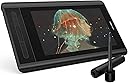
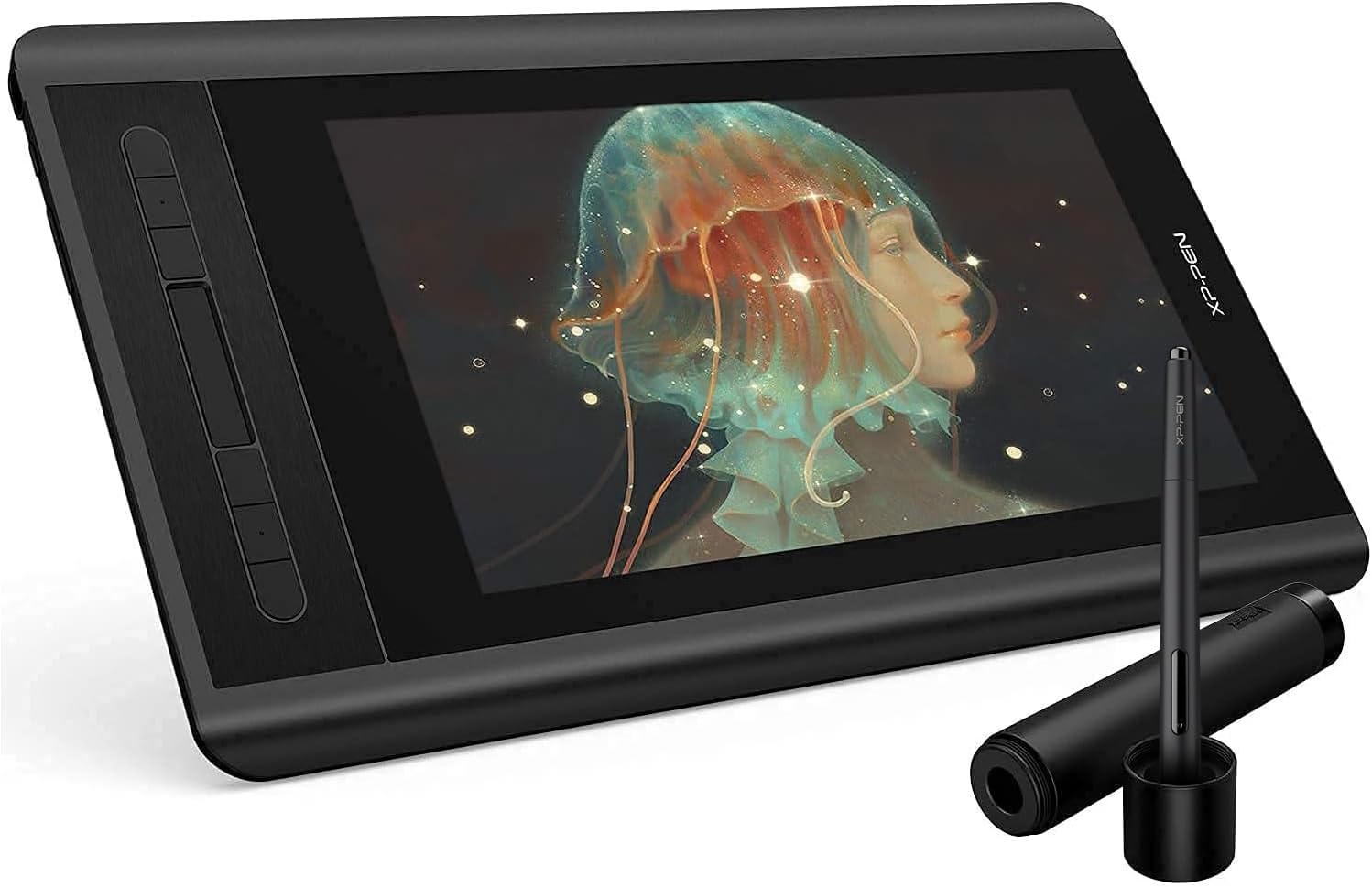
The XP-PEN Artist12 is a compact 11.6-inch FHD drawing monitor featuring an anti-glare IPS display with 72% NTSC color gamut, 8192 levels of pen pressure sensitivity, and a battery-free stylus with eraser. It offers customizable shortcut keys and a touch bar for enhanced workflow, supports Windows, Mac, and Linux, and connects via HDMI and USB. Ideal for digital artists, animators, and remote educators seeking a portable, professional-grade creative tool.


| ASIN | B07GNK18VJ |
| Active Surface Area | 11.6 inches |
| Additional Features | Pen |
| Best Sellers Rank | #20 in Computer Graphics Tablets |
| Brand | XPPen |
| Built-In Media | PN06 Battery-free Multi-Function Pen Holder and Glove |
| Color | Black |
| Compatible Devices | Personal Computer |
| Connectivity Technology | HDMI, USB |
| Customer Reviews | 4.4 4.4 out of 5 stars (12,061) |
| Display Type | LCD |
| EU Spare Part Availability Duration | 1 Years |
| External Testing Certification | nao |
| Item Dimensions L x W | 8.61"L x 14.33"W |
| Item Weight | 907 Grams |
| Manufacturer | XP-PEN |
| Model Name | Artist12 |
| Model Number | Artist 12_SML |
| Native Resolution | 1920x1080 |
| Operating System | It is compatible with Windows system 10/8/7(32/64bit), Mac OS X version 10.10 or later |
| Pressure Sensitivity | 8192 Levels |
| Screen Size | 11.6 Inches |
| Specific Uses For Product | Drawing |
| Target Audience | Student, Teacher |
| UPC | 758232357309 |
| Unit Count | 1 Count |
A**R
Beginners Beware!
This drawing monitor is insanely good for the price. I’ll have to admit that I’ve only used it for a week or so at the time of me writing this. Yet the one thing I wanted to point out was something I found to be quite inconvenient and possibly challenging/ impossible for beginners as they set up their new drawing monitor. I started out by deleting my previous tablet driver and downloaded the one that my computer needed on the XP-PEN website. It was a walk in the park, super simple. The thing was when I rest my computer and connected the cables it wasn’t working. I turned on the monitor and it gave me an error message, then enabled battery saver mode. Long story short I had to fidget around with my cables for about 30 minutes and reset my computer a dozen times to actually get it going. Once inside my program I found that even though the cursor was popping up on screen once it went over the canvas it was going haywire. I went into the driver and calibrated it a bunch, then reset it again. Then I ended up having to change my virtual monitor set up so that the XP-PEN monitor would mirror my main one. After all that I came a across a slight problem, in multiple programs that I had tested I was seeing that the lines were coming out pixel-y. It actually wasn’t a problem with the monitor that time but just the custom DPI settings I had on all my programs, so keep that in mind if you come around a similar issue. Anyways, it took me about 15 resets before it was working functionally, then another one when the stylus went haywire again. Right after reset 16 I started to question my purchase but once I got into the rhythm of things with the touch bar, shortcut keys and the really great screen quality, my doubts just went away. The inclusion of the pen case and smudge guard plus cloth were nice but also incredibly practical. The drawing monitor didn’t give me any problems from then on, the only thing would maybe be that I have to disconnect and reconnect the HDMI to USB adapter cable every time I turn on my computer, this isn’t new to me though, I’ve had similar issues with that adapter when using other monitors, but hey maybe another reset would be necessary! All in all I would consider it easy to use but not easy to set up. There were a few aforementioned issues I encountered which weren’t from the monitor itself but instead as a result of the monitor such as the DPI and HDMI adapter, which is important to differentiate between as it helps better find the solution. If this were my first encounter with drawing virtually then I would love using it but maybe find it impossible to set up. If you’re planning on buying this product specifically for someone who doesn’t know anything about computers, drawing programs, or tablets in the slightest then it’s better to either A. Have it set up for them by someone who either knows about it or has the extreme patience and time to learn about it, or B. Buy a simpler type of drawing TABLET as it would most likely be 10 times easier to set up than a drawing monitor. Though they are XP-PEN’s competition, Wacom, and the Wacom Intuos tablets are really awesome for beginners, I had one starting out and at that time they even included drawing and animation programs ( all be it not very good ones). A Wacom tablet would be a better choice if choice A isn’t possible. Yet I understand the interest with this particular monitor with its size and price point. I highly recommend it regardless of my initial problems.
J**S
Excellent in almost every way
This item has only been a positive impact on my small but satisfying art career. I bought the XP-pen deco tablet before this and after using it for a while decided I could use an upgrade. Boy what an upgrade this was! First things first, the colors on the screen are better than most laptop screens. It was very noticeable to me, and I was actually quite surprised when my background picture looked so much better on the drawing screen than my laptop screen. The pen for this tablet was one of the whole reasons that I bought it. Unlike many other tablets out there, even the high end ones like Wacom tablets tend to have a stylus that is chunky to say the least. I would never see myself EVER writing with an actual pencil with that weird shape and thick profile, but this stylus is sleek and feels exactly like an everyday pencil. This means that I can draw with it for hours on end, and the first thing that stops me is getting tired mentally, not getting tired of holding a chunky pencil. Next is the quality of use. The driver is easy to find and install, and allows for almost endless customizability for the shortcut keys and even the scrolling strip. I may not yet be a very well seasoned digital artist, but for anyone who wants to strreamline their workflow, this tablet has enough options to satisfy someone in at least the intermediate stages of learning. The pen has a good number of pressure levels, and after adjusting the pressure curves (also easily done in the driver) it feels almost effortless to get the right thickness in your lines. The point where the pen draws a line is snappy and will only lag behind the pen tip when moving quickly across the screen, at which point you don't even notice. The resolution might not seem mind blowing at first, but considering that the drawing screen is smaller than most laptop screens, the pixels will be smaller than on most regular computer screens. Maybe you might notice if you have a very high end screen you use. The overall form factor of the tablet is small and easy to carry. I lug mine around in my backpack along with my laptop and notebooks and it doesn't feel too much heavier. It is nice that it comes with a pen case as well, as I doubt the pen would be quite as resilient without it. There is only one or two things that I wish this tablet did better, and they are more a fault of the product that I selected than the quality of the product itself. I wish the screen were just a bit bigger at times. It feels a bit unfortunate that the tablet is the size of a normal laptop, but the screen is noticeably smaller. Then again, this would come at the tradeoff of larger pixel size, so I can live with it. Lastly, the cables that you have to plug in to get the thing working feel like a hassle if you want to be able to draw between classes or in a spare 20 minutes. You have to spend the first 2 minutes plugging the thing in, and then you have to spend the last 4 unplugging everything and packing it all away. This is comparable to most other tablets in this range or slightly higher though, so I can't say that I would expect more. I do hope that with the widespread nature of lightning ports on computers these days, we'll start to see a few more tablets that have some lesser port needs than 2 usb and 1 HDMI cable to work. Overall, if anyone is looking for a drawing tablet that is on the cheaper end but wants to really up their digital art game, I think this is the perfect choice, as it did that very same thing for me.
T**N
Best beginner and intermediate tablet for drawers or animators!
The design, accuracy, comfort and price are genuinely unbeatable. Such a good tablet that I bought it years ago, upgraded, didn't really vibe with the upgrade so I DOWNGRADED back to this one because I like it. Highly recommended
S**E
Good bang for buck
The XP-Pen 12 is a great drawing tablet overall, especially for the price. It offers clean, fine detail and makes digital art feel much more natural thanks to the comfort and precision of using a pen instead of a mouse. The screen is responsive, pressure sensitivity works well, and it’s a solid upgrade for anyone getting serious about digital drawing or design. My only real downside is that I wish it were wireless. I understand that display tablets like this generally aren’t wireless, but it would still be nice to have fewer cables on the desk. That said, it’s a minor complaint compared to the value it delivers. I’d definitely recommend the XP-Pen 12 to anyone on a budget who wants better accuracy, smoother lines, and a more enjoyable drawing experience without spending a fortune.
V**A
Super awesome drawing tablet
My son loves his tablet!!!! Great if your kids loves to draw very easy to set up and your son will thank you every day for buying it for him.
J**Z
Para el precio y calidad, esta bien Lleva el lápiz, puntas, un trapito para la pantalla, un guante, la tableta, cables conectores y manuales Problemas Prisión, siento que debes presionar mucho para que salga la línea lo que da menor naturalidad Pantalla: colores un poco brillantes y brillo de base alto Lapiz: se vuelve un poco inútil el único botón que tiene y que no tiene relieve Puntos buenos Accesos rápidos: Muy cómodos Visualización: obviamente el ver lo que hace ayuda en rapidez Tamaño: No ocupa demasiado espacio en escritorio Pantalla: Practicamente no refleja luz Precio: Barato en comparación a sus competidores además de que es bastante completa Extra: Acostumbradote a los problemas igual se le puede sacar mucho probecho, así que no estamal
J**L
Muito bom, produto perfeitamente embalado e protegido sem nenhum arranhão ou dano, com um tempo de envio bem rápido e um produto que atende suas expectativas
P**J
I am reviewing it after using it for 2 years. Currently I am using as an external display. its screen quality is great and its build quality is superb because it survived an accidental fall. no screen damage at all.
M**O
Ik heb deze tablet gekocht voor mijn vrouw. Ze wilde eigenlijk een "blinde" van Wacom maar tijdens onze zoektocht liepen we tegen deze aan die voor een vergelijkbare prijs een scherm biedt. Ik teken zelf niet, maar kon me voorstellen dat dit veel en veel fijner werkt. Dus we hebben de gok genomen, na wat reviews te hebben bekeken, en deze tablet gekocht. Ik ben niet bekend met de concurenten, ook niet met Wacom, dit is onze eerste tablet voor tekenen maar hij is erg prettig en mijn vrouw is er dolgelukkig mee. Ik raad hem dus ook zonder meer aan voor mensen die een keer willen proberen of digitaal tekenen iets is voor ze. Het werkoppervlak is groot genoeg en het scherm is erg scherp en mooi van kleur (al ben ik geen kenner en zal er natuurlijk voldoende op aan te merken zijn als je gaat kalibreren en zo, maar ok, in deze klasse (zowel van tablet als artiest :+ ) doet dat er niet zo veel toe. De pen zelf ligt lekke rin de hand en zelfs ik kon er prima mee schrijven, het is echt net of je op papier werkt.
L**O
Como usuaria anterior de otras soluciones de tabletas gráficas basadas en monitores (trabajar sobre el dibujo), puedo decir que esta solución de XP-Pen es una opción muy buena para cuando tengas de dibujar en viajes, acabar trabajos en casa o demostraciones en la casa del cliente. Qué recibiremos con el pedido? Dentro de una cuidada caja muy trabajada nos espera la tableta en todo su tamaño, detrás tendremos el cargador con los adaptadores para 3 diferentes enchufes, manuales, garantía y tarjeta de fidelización, puntero dentro de un estuche redondo con varias puntas de repuesto y todos los cables necesarios, a saber: Un complejo cable que, en el extremo de la tableta es conexión USB C y en el otro extremo una conexión triple (HDMI, USB para el táctil y USB para alimentación (para el cargador incluido)). Además un extensor de cable USB para poder tener funcionando la tableta a mayor distancia del enchufe y por último, un adaptador de HDMI a MicroDP (Mac). Os dejo una fotografía (4ª) con el montaje completo ordenado con un par de bridas de velcro. Preguntado al fabricante, no existe la posibilidad de una conexión directa USB C a USB C. La tableta, al ser un monitor de 12" FullHD LED IPS, necesita al menos 5V y 2.5 Amp que no es capaz de alimentarse directamente del portatil. Una vez todo conectado, Windows 10 detectará y dejará funcionar la tableta sin añadir driver alguno, si bien el fabricante insiste en utilizar los últimos drivers descargados de su web, estos nos facilitan la configuración de los botones adicionales (parte izquierda de la tableta) con las funciones que nosotros queramos. Funcionamiento Para Windows 10, la tableta es, y así se comporta, un monitor externo adicional, que podremos configurar a nuestro gusto. Por defecto se configurará con su resolución de 1920x1080 (FullHD) y será el monitor nº 2. Podremos configurarlo a la resolución y posición que nosotros queramos, windows se adaptará a nuestro gusto. El lápiz interactua como un ratón con su botón derecho incluido. También es compatible totalmente con Windows Ink. En las pruebas realizadas con el simple SketchBook Pro (disponible en la Windows Store) hemos sido capaces de probar que el programa reconoce los niveles de presión y escribe más grueso o más fino dependiendo de la fuerza con la que actuemos contra la pantalla. El puntero no necesita alimentación alguna. Con su tamaño de 12" nos cabrá perfectamente en el mismo maletín del portatil, el puntero viaja dentro de su estuche redondo con las puntas adicionales. Tal vez la conexión directa por USB habría simplificado enormemente la complejidad del cableado y el cargador, espero que tomen nota para futuras versiones.
Trustpilot
2 weeks ago
2 months ago