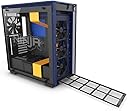
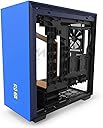
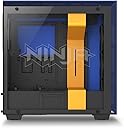
⚔️ Build like a pro, game like Ninja — the ultimate mid-tower for champions!
The NZXT H700i Licensed Ninja Edition is a premium ATX mid-tower PC case featuring a radium-etched Ninja logo on tempered glass, all-steel construction, and a smart device hub for RGB and fan control via CAM software. Designed for serious builders, it offers advanced cable management, adaptive noise reduction, and water-cooling readiness, supporting a wide range of motherboard sizes up to E-ATX. This 2018 model combines iconic esports style with high-performance functionality, making it a must-have for millennial pros who want their rig to look as sharp as it runs.


| ASIN | B07GXF7WMJ |
| Antenna Location | Gaming |
| Brand | NZXT |
| Built-In Media | 1 Computer Case, 1 accessory box |
| Case Type | Mid Tower |
| Color | Yellow/Blue |
| Compatible Devices | Devices using ATX, Micro-ATX, or Mini-ITX motherboards |
| Cooling Method | Air, Water |
| Customer Reviews | 4.6 out of 5 stars 358 Reviews |
| Enclosure Material | Alloy Steel, Tempered Glass |
| Global Trade Identification Number | 00815671014382 |
| Hard Disk Form Factor | 3.5 Inches |
| Item Dimensions D x W x H | 19.88"H |
| Item Type Name | NZXT H700i Ninja Mid Tower (CA-H700W-NJ) |
| Item Weight | 27.11 Pounds |
| Light Color | Blue |
| Manufacturer | NZXT - US PC |
| Material | Alloy Steel, Tempered Glass |
| Mfr Part Number | CA-H700W-NJ |
| Model Name | NZXT H700i - Licensed Ninja Edition |
| Model Number | CA-H700W-NJ |
| Motherboard Compatability | ATX |
| Number of Fans | 2 |
| Other Special Features of the Product | Ninja Edition |
| Power Supply Mounting Type | Mid Tower |
| Recommended Uses For Product | Gaming |
| Supported Motherboard | ATX |
| Total Expansion Slots Quantity | 7 |
| UPC | 815671014382 |
| Warranty Description | 2 Years |
K**E
Great Case!
First things first, I LOVE this case. It looks stunning, the build quality is excellent, features are plentiful, and it was extremely easy to build in. NZXT really has a good product here. That being said, it is a bit pricey for what you get, likely due to the so-called "Smart Device" and "machine learning" features that NZXT crammed in there. Overall, I'm extremely happy with the case and only have a few very minor gripes. PROS: -Great design! The case is beautiful. -Excellent build quality. Nothing broken or scratched out of the box. Everything feels really sturdy. -Hands down the best cable management I've ever seen. Plentiful and well-placed cable channels with plenty of velcro straps and cable tie tie-down points. -Plenty of room for cables behind the motherboard. I had no issues getting the back panel on after routing all my cables. -4 included case fans! The fans perform well and I currently have no plans of swapping them out with something else. -Very easy to build in. All of the panels are easily removed and reinstalled. A removable top radiator bracket is much appreciated. -Top fans/radiator are vented out the side instead of directly up. This is a pro for me because I have a cat that likes warm things and if this was vented directly up, the cat would definitely want to spend a lot of time sitting on top of the case, choking off the airflow and getting cat hair/dust/dirt inside of the case. -Great airflow! Even with front and top airflow being somewhat choked off by being forced to breath through the grid, airflow seems plentiful and I've had no issues getting nice overclocks with good temperatures and minimal noise on my CPU and GPU. -Intake dust filters -Relatively quiet for not being a silence optimized case. -Mounting points for up to 5 SSD's. 2 on the PSU shroud, 1 on the front of the shroud, and 2 behind the motherboard. -Movable 3.5" HDD cages to make more room for cable management or provide more clearance for front-mounted radiators. CONS: -The famous NZXT white bar makes cable routing the 24 pin ATX motherboard connector a bit difficult. I wish the jog at the top started a bit lower. Not a huge issue though. -Pre-installed LED strip only had 3 working LEDs. I didn't RMA it because I wasn't going to use it anyways, but it is worth noting. The second RBG strip seemed to work fine when I tested it just for the heck of it, but I'm not using that one in my final build either. -Expensive. WORTH NOTING: -Only 2 3.5" HDD mounts. Not an issue for me since my primary drive is an SSD and I only have 1 HDD as my data drive. Worth noting though. -No 5.25" in bay, if that matters to you. Not a con for me, because I personally prefer the room for additional intake fans. -CAM software that integrates with the Smart Hub is a little bit buggy, but no major problems. This really is more a critique of CAM than the case itself though. BUILD SPECS: Case: NZXT H700i Motherboard: ASUS Prime Z370-A CPU: Intel i5 8600k (overclocked to 5 GHz) CPU Cooler: NZXT Kraken X62 (top mounted in this case) GPU: Gigabyte GTX 1080 G1 Gaming RAM: G.SKILL TridentZ 16GB (2x 8GB) DDR4 2400 Power Supply: EVGA Supernova G3 750 W Fully-Modular SSD: Samsung 850 Evo 500GB HDD: Seagate Barracuda 3TB MORE ON THE SMART DEVICE: For those who don't know, their Smart Device is kind of a hybrid between a GRID+ (fan hub) and HUE+ (RGB hub) with built in machine learning (NZXT's words, not mine). The intent with this is that using NZXT's CAM software, you can optimize your system cooling and noise. The way it's supposed to work is that you connect all of your fans to the Smart Device and using CAM, put your system under various tests and calibrations and using "machine learning" it will determine the optimal balance of airflow and noise. I can't really comment on this feature because I'm not using it, rather opting to create my own fan curves and optimize noise/cooling/airflow manually. At this price point, I imagine that most buyers will be enthusiasts and experienced PC builders, and in my experience, these kinds of people tend to do things manually anyways. I will say that I am using the Smart Device as just a centralized fan hub and using the CAM software as my fan controller. In that regard, it works well. I'm not using the Smart Device for any RGB, as I prefer a more muted RGB aesthetic and I'm not using any RGB strips (even the included ones). However, I'm using the RBG controls in CAM for the RBG lighting/effects on my Kraken X62 and it works well for this also.
B**.
Clean and minimalistic way to show off your computer guts
I'm an adult now. Mid 30's with kids. Haven't built a new gaming rig in over 5 years. Found it difficult to find a "gaming" tower that didn't look like some version of what I imagine a Michael Bay Transformers case would look like. Never heard of NZXT. Always had Corsair or Cooler Master cases, with Corsair being my nicest quality builds. I eventually went with this one due to its clean and simple look. Have to say, I was VERY impressed with the build quality and cable management. The CAM software seemed like a nice bonus but tbh, it's just ~meh. I still use it because I can though. Because I liked the build of the case so much I went with other NZXT components (cooler and internal USB hub). So far I like everything NZXT...might become a fanboy if I'm not careful. Anywho, here's what I stuck inside it; == GUTS LIST == CPU: Intel Core i9-9900K MOBO: Gigabyte Z390 AORUS ULTRA-CF GPU: NVIDIA GeForce RTX 2080 FTW3 Ultra (triple fans) COOLING: NZXT Kracken X72 PSU: EVGA Supernova 850W G3 RAM: G.SKILL 2x 8GB sticks STORAGE: 4x SSD PROS: - cable management. - cable management.. - high quality material - heavy construction - snapped off all the panel pieces a dozen times while working on this build and they still re-fit nice and tight - tempered glass is awesome (way better than those days of clear plastic mats). Unless you treat it like NOT glass, you should have no problem with it breaking like several reviews I read complained about - plenty of room for my guts list. Though I do not believe I could fit dual RTX 2080 FTW3 Ultras in here if I wanted to due to the PSU cage placement (see image 3 & 4) - Cooling is good during long gaming sessions. All components stay well within safe temp ranges - oh and it has great cable management... CONS: - Might be too tight for dual GPUs depending on the thickness. - The white cable management bar only has two placement options (pic 1 shows the furthest over placement option). Wish I could move it another inch to the right. - CAM software is OK. It loses touch with my Kraken cooler from time to time it won't pick it up in the software. So I have to unplug the internal USB 2.0 cable and plug it back in again for it to pick up. Not sure if this is a bug with the CAM, the Kraken cooler, or the MOBO. But I have heard mixed reviews on the CAM so going with that since I don't have an issue with my other CAM software
A**R
10/10 Would Recommend!
I love this case. I came from a Rosewill Thor v2 Full ATX case, and I don't regret downsizing the case at all. This case is GORGEOUS, especially when paired with some RGB lighting! It feels very solid and is definitely a good quality case! Pros: - Very clean, elegant design that makes a great show piece as well as a great every day use computer. - Really easy to work in. The back panel comes off with a button press, which is really, really nice! - Cable management is VERY easy. The cut outs in the back are very handy, and the extra space in the power supply shroud is great for hiding excess cables. There are tons of tie downs for cables as well. - Good size to build in for the form factor. - Frame is very sturdy, so it won't break under pressure, but can be "disassembled" (with the exception of the base structure) to make building easier. IE if you're top mounting a 240MM radiator, the mount comes off the case to make it easier to work with. - The glass is really strong. I've actually dropped it on a table and managed to kick it while playing with some cables, all without a scratch on it. - Lots of fan mounts. It comes with 3 120mm fans as intake in the front, with a 140mm exhaust in the back. Has enough room to mount 3 120mm fans or 2 140mm fans on the top as well. Cons: - Some of the clips for the front and top plate seem to be a little flimsy, so be careful pulling them off the first time. - The bar, while giving the case a nice aesthetic, is kind of annoying to build around. There's not a whole lot of space between the bar and the back plate, so pushing cables through is kind of a pain. - The airflow on this computer is.... okay. Since the front and top plates are solid, the only airflow comes from the vents around the top and sides. If you're using a GPU that has ACX 2.0 or something of the sort, this case WILL get hot. I would suggest using liquid cooling for your processor. I use the Kraken X62 and it keeps my Ryzen 7 1700X (OC'd to 4GHz) at 50C-60C under 100% load. - It's a little on the heavy side compared with other similar cases. This is due to the metal frame and the glass side. Sorry, I don't have a good picture of the back and I'm not at home at the time of writing this review. I'll try to get a picture of the back panel and cable management for reference when I get home.
K**R
Good, not great, case
I had higher hopes for this case when I bought it. I had some issues, though. First, the instructions are terrible. They are pictures with one sentence in numerous languages on how things work. Not exactly very detailed. Second, there were some fit issues. The 2.5" drive trays are easy to remove and re-install....until you have a drive in them. Then, it seems as if something happens to the tray (possible becoming slightly warped) and they aren't as easy to remove and re-install, especially to the grid above the power supply. The next fit issue had to do with the radiator bracket at the top. Once I got my radiator and fans installed onto the bracket (with very little help from the instructions mind you), I had a very difficult time getting the bracket re-installed. Somehow, it got pretty severely warped. I was able to finally get it back in place by loosening the fan/radiator screws a little (they weren't that tight to begin with, though) and using some elbow grease to get the thumb screws back in place. I have no idea what happened, but it is in and I shouldn't have to remove it very often. Out of sight, out of mind. The last issue I had was with the extra RGB light strip that is included. I wouldn't work when plugged in directly to the plug in the front corner of the case. I had to use the extension cable that came with the case. Not sure why. Small little issue, though to be honest I like the light strip better at the bottom of the case anyway. One design flaw I would like to have been done different is the tempered glass panel. It would have been nice to have a groove, longer rubber tabs, something to hold it in place while you secure it in place. Overall, though, I do like the case. Once I finally got everything installed and up and running, it's extremely clean and nice looking. I actually like the CAM software, too.
J**Z
An amazing case!
I bought the 2018 H700i model for the 4 usb ports on the top panel at the front, and the 2019 model only has two. This is my first NZXT case and I'm a fan for life! This case looks clean, has a ton of room, and the cable management system is both incredible and easy to use. The CAM software is great, and the LED lighting in the I series looks awesome! You may need to uninstall USB drivers and reboot on occasion if the software stops detecting the lighting and fans. A minor and by no means deal breaking issue. I also bought the NZXT USB Header for few extra ports (adds 3 internal and 2 external which are great for wireless receivers). The panels remove easily, and the back panel opens at the push of a button. This is a very large case (bigger than I need for my purposes) but it's very well built, organized, and looks incredible. I highly recommend NZXT products and their customer support is fast and efficient as well.
M**R
Great case get it, or the regular h700
I have a lot to say about this case, First the rgb strips it comes with are awesome and it’s nice to not have to put them on yourself! The smart hub is not nearly as bad as people say, it works well for me, just set your CAM settings and you don’t really have to ever mess with it again. Next the cable management is good but the pre-installed smart box takes up a lot of the cable management positions that you have to deal with I had a modular PSU I have a little bit of difficulties because of how much wiring it took up. Secondly if you’re running a full-size ATX motherboard and you’re going to have a trouble fitting a 360 mm all in one cooler I had to change up my whole build because of this fact. It also had to do with my asus rig Maximus xi hero having huge HeatSinks GPU installation is very easy and the option for the 140 mm fan in the back is a nice touch. Lastly the ability to take out part of the top of the case so you could install fans easier and then place it back into the case is an amazing feature Also the pushbutton release of the back of the case is amazing so easy to take out the back of the case Overall it’s an amazing case and it’s very easy to get cables to the motherboard without having too many cable sticking out I would recommend this case to a friend and to any first time builders or experience builder
S**E
Solid Case For A Sleek Minimalist Look
What can I say. This case was on a ton of top five lists on youtube for a reason. Cable management is made easy with the channels in the back. It comes with all the bells and whistles having zipties, chords, screws, etc. More than what is needed in most cases. The case can handle another full set of three fans even after you hook up an AIO to the smart hub. The only issue I really had with the case is that the screws provided for SSD bays were a really snug fit, and none of the fans/bays seem to be pre-drilled/threaded. This case, while not stated, can handle the 360mm AIOs and has room for both front and top mounting. Pros +Easy cable management +Single button removes back panel +Everything you need and more. Drop a screw? No problem. +Additional RGB strip for those that like lights +Great case for beginners Cons -Some parts are not pre-threaded. May run into issues if you want to mount fans in a different location. -CAM software is annoying to operate.
T**K
Sturdy, sleek, elegant case without all the monster truck exterior gimics.
Excellent Case! I have been a Corsair Snob for the last 8 years or so when it came to PC cases. My work machine is in a Obsidian 800D, my gaming rig in the Graphite 600t and I figured there was no way an NZXT case would even come close to the quality in the Corsair cases. I was wrong. This case is very well made. Every edge is thoughtfully finished with the exception of one external rivet on the rear of the case that has a sharp edge. It only took a few seconds with a file and a dab with a paint pen to finish it out. Cable management is good, CAM is neat, and it fit the bid for a smooth case devoid of any major exterior design features that screamed, "Hey I just drank 2 monsters and want to play COD all night!" I built a X299 platform inside this case with a H105 in the front mount position. Airflow is good. CAM requires a USB header from inside the case, so if your MOBO only has one, you will need an internal hub to get everything working. I used another the NZXT Hub to do that. Nzxt Internal USB Hub Controller, Black (AC-IUSBH-M1)
S**N
Beautiful case of upmost quality, but could be better documented.
This is a great product, with a fantastic cable management. There is only 1 problem I had when I unpacked it: The instructions were inside the case and there was no indication as how to open up the case to retrieve the instruction. There is a very small button that open up the back, but it's very stylish and it's not clear when you don't know it. Also the instruction manual is clear about the button, but you need to open the back to retrieve them....
F**.
Buen gabinete para profesionales.
Compré este case para armar una segunda computadora, desde hace tiempo buscaba adquirir este modelo pero en México era muy difícil de conseguir hace unos años. Lo recomiendo para las personas que arman sus propias estaciones de trabajo, y quieren evitar que su computadora termine pareciendo un juguete de niños con luces y cables colgando que gritan por todos lados "soy gamer". El diseño y los materiales son buenos, el interior viene con muchos espacios para organizar cables, incluye dos tiras leds que, a diferencia de otros gabinetes, le dan buen aspecto al interior del gabinete,.Si no te gustan las luces simplemente no se las pones.
T**Y
Great Product
Easy access , looks great. Quality cabinet :D
C**O
Estética impresionante
Lo que me parece es que quizás falta un poco de desarrollo para el software de cam y el machine learning y tal vez podrían pensar en hacerlo compatible con push-pull en la parte superior ya q con el kraken X62 no cabe. En todo lo demás es un gabinete increible así como el manejo de cables y casi todo es modular
S**L
Good and compact cabinet.
Really sturdy cabinet and good looking. Only problem with my setup is that, I use HDD because of which i dont enough space for wires. Overall its really good. If you have m.2 then just remove hard drive slots.
Trustpilot
4 days ago
2 weeks ago