Desertcart purchases this item on your behalf and handles shipping, customs, and support to Nicaragua.
📚 Scan Smarter, Work Faster, Impress Everywhere!
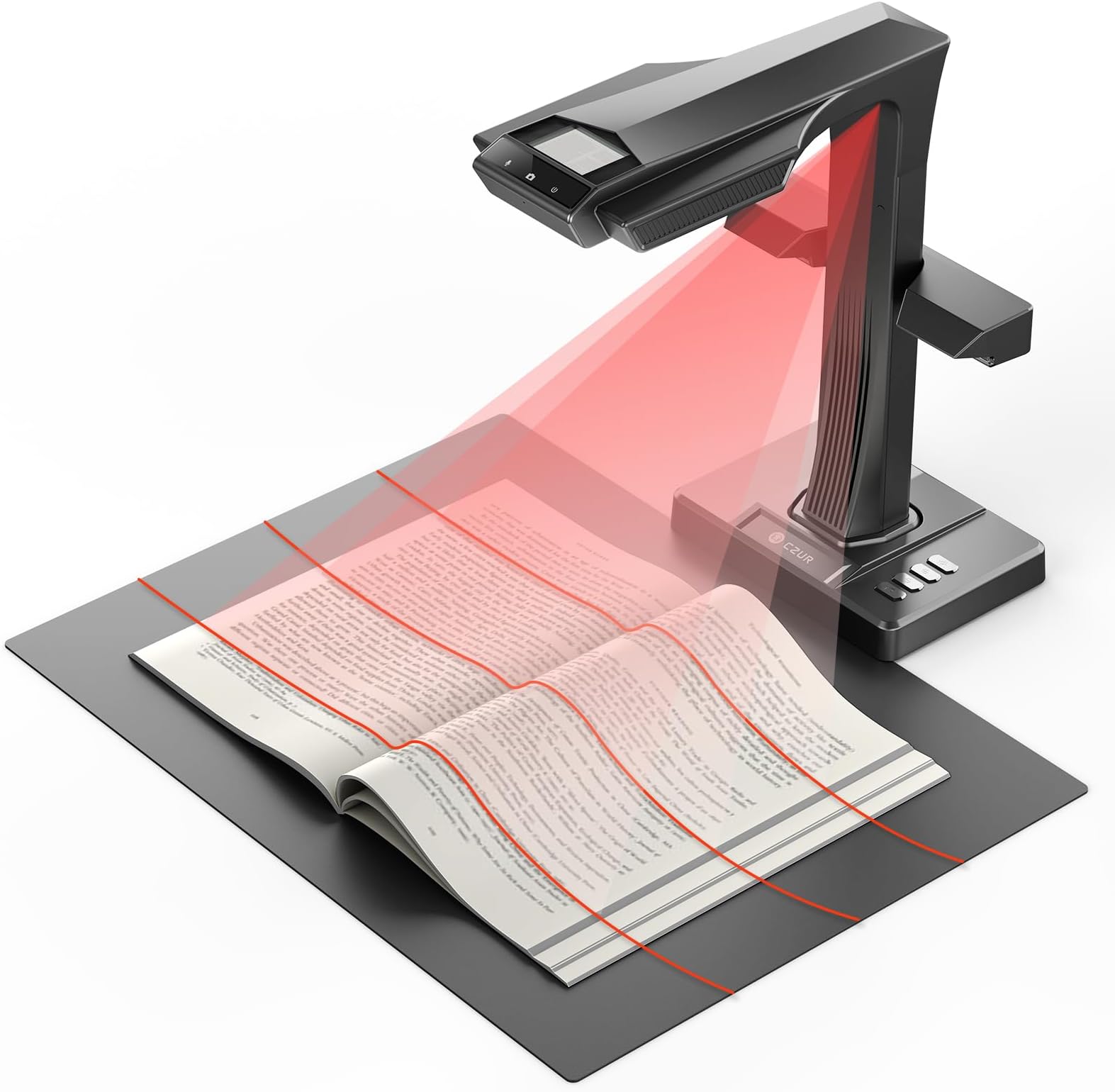
The CZUR ET MAX is a professional-grade book and document scanner featuring a 38MP CMOS sensor for ultra-high resolution scans up to A3 size. Its patented curve-flattening technology ensures distortion-free images from bound books, while lightning-fast 1.5-second scan speeds optimize productivity. Supporting OCR in over 180 languages and compatible with Windows, macOS, and Linux, it also offers HDMI output for real-time display—making it the ultimate tool for managers, archivists, and knowledge workers who demand precision and efficiency.


| ASIN | B0FCBVYMC6 |
| Best Sellers Rank | #54,555 in Computers ( See Top 100 in Computers ) #72 in Document Scanners |
| Brand | CZUR |
| Color Depth | 24 bits_per_pixel |
| Connection Type | USB |
| Connectivity technology | USB |
| Customer Reviews | 4.4 out of 5 stars 39 Reviews |
| Item Weight | 1 Kilograms |
| Item weight | 1 Kilograms |
| Light Source Type | LED |
| Manufacturer | CZUR |
| Media Type | USB |
| Minimum System Requirements | Windows, macOS, Linux (Kubuntu 22.04, Linux mint 21.2, MX-3.1, Ubuntu 16.04, Ubuntu 18.04.2, Ubuntu 20.04, Ubuntu 22.04, TUXEDO-OS-2) |
| Model Name | CZUR ET MAX |
| Model name | CZUR ET MAX |
| Optical Sensor Technology | CMOS |
| Resolution | 7168*5376 |
| Scanner Type | Book, Document |
| Scanner type | Book, Document |
| Unit Count | 1.0 Count |
A**Z
Great
Great scanner
E**O
Absolutely Outstanding Book Scanner — Exceeded All Expectations
The CZUR ET MAX has been a game-changer for my workflow. The 38MP camera captures incredibly sharp images, and the flattening technology works beautifully even with thick books. Scanning is fast, accurate, and consistent, saving me hours compared to traditional flatbed scanners. The software is intuitive, the OCR is surprisingly precise, and the device handles everything from books to loose documents effortlessly. Build quality feels premium, and setup was simple. One small area for improvement: out of five notebooks I scanned, a couple of pages came out slightly tilted. It’s not a major issue, and I’m confident this can be addressed in future software updates. Everything else works flawlessly. Overall, the ET MAX is a professional-grade tool with outstanding value. If you work with books, archives, or documents regularly, this scanner is absolutely worth it. Highly recommended.
R**N
It works!
It works. Last week I completed a 1000+ plus page scan of a Cybersecurity study guide in under three hours. I was able to convert the document to a several searchable pdfs decided by areas of knowledge. It was an absolutely painless experience. I would highly recommend this scanner to anyone in need of a scanner able to go through a high volume of documents. I've been able to successfully input those PDFs into NoteBookLM where I plan to use my AI tool to generate more easily consumable study aids, and use it as a coach to help me better prepare to get certification ready. I give the Czur solution a 10 out of 10.
L**U
Why I Ditched My Flatbed Scanner for CZUR
I had my doubts when I initially purchased the Czur scanner. Previously, I relied on a flatbed scanner to digitize yearbooks and scrapbooks, aiming to save these mementos for my children and grandchildren. Since they’ve never displayed much curiosity about these old keepsakes, I worried they might end up discarded one day. The flatbed method was extremely time-consuming, however, so I hunted for a more efficient alternative and stumbled upon the Czur device. I decided it was a reasonable gamble. Setting it up was straightforward. While the accompanying manual is limited in detail, numerous online guides allowed me to start using it in no time. After roughly 30 minutes of testing, I was astonished: digitizing a full yearbook—something that used to take hours with a flatbed—now took under five minutes. It first captures pages as JPGs, then converts them into multiple formats (PDF, TIFF, Word, searchable PDF, and others) according to your preferences. I tested both the foot pedal and automatic page-turn detection, and both functioned smoothly. For older, warped books, I needed to use the finger cots (I had to watch online tutorials to master their use, but it was simple once I got the hang of it). Each page takes just a second or two to scan, and the quality is excellent. My yearbooks and scrapbooks are filled with photos and handwritten notes, and the Czur reproduced them accurately. To be honest, it doesn’t quite match the photo quality of a specialized scanner like the Epson FF-680, but a major advantage is that I don’t have to take photos out of scrapbooks. For laminated pages or plastic covers that created glare with the overhead light, I simply turned off the default arm lamp and switched on the side lamps (easily done by pressing a button on the back)—this completely got rid of the glare. The scans are more than adequate for archiving purposes; only if you planned to enlarge them into posters would you notice any difference. All in all, the Czur scanner saves an incredible amount of time compared to flatbed scanners. I strongly suggest it to anyone looking to preserve old documents, yearbooks, or scrapbooks.
D**O
Excellent for Scanning Old Books and Documents Clearly
This book scanner ended up being extremely useful for digitizing older books and printed materials while still keeping the text surprisingly clear and readable. I used it specifically for scanning older historical books, and the scans came out much more legible than I expected. One thing I appreciated was how convenient the overhead scanner design made the process compared to trying to force old books onto a traditional flatbed scanner. It felt much safer and easier on older bindings while still capturing clean images of the pages. The image quality was very solid overall, especially for preserving readable text from aging documents. The curve-flattening features also helped improve readability when scanning pages near the center of books. Setup and use were fairly straightforward, and once configured it became a very handy tool for archiving or preserving printed materials digitally. Overall, this worked very well for my use case and exceeded my expectations for scanning older books and documents clearly and efficiently.
M**D
A $199 Scanner Being Sold For $799
Software on Mac OS crashes on 2026 Macbook Air. Scan comprable to the quality of an iPad fixed to an architect's lamp arm. OCR makes enough mistakes to render the pages poor to use in siloed LLMs. Software also introduces an alarming number of artifacts. Don't pull the trigger on this one.
Trustpilot
4 days ago
3 weeks ago