




USB 2.0 Cable
Product ID: 73708399
Details
- BrandLAPLINK
- Cable TypeUSB
- Compatible DevicesLaptop PC
- Connector TypeUsb
- Special FeatureData Transfer
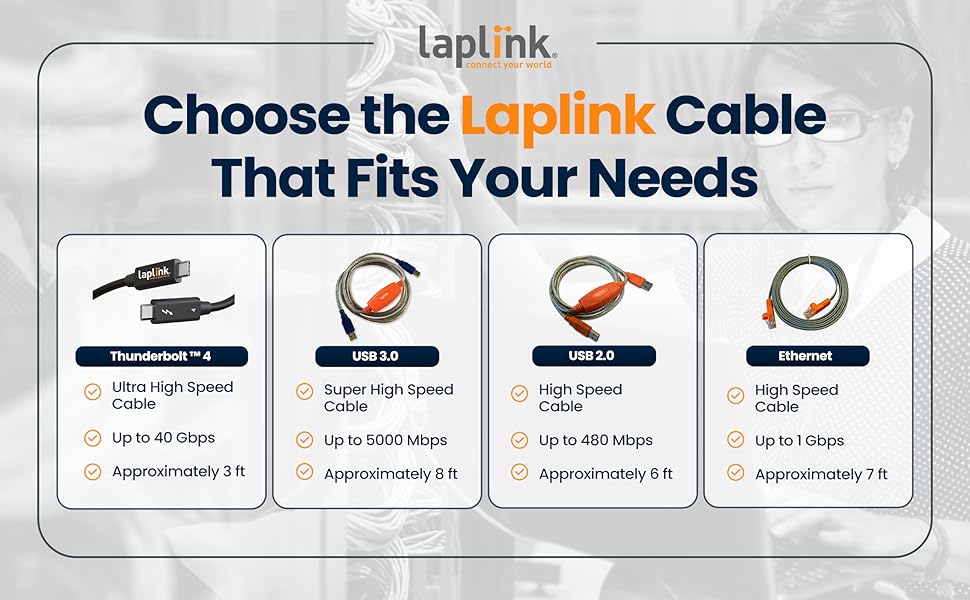
⚡480 Mbps blazing speed
📏6 ft flexible cable length
🔌USB 2.0 male-to-male plug & play
Desertcart purchases this item on your behalf and handles shipping, customs, and support to Nicaragua.
⚡ Upgrade your setup game—transfer like a pro, no tech headaches!
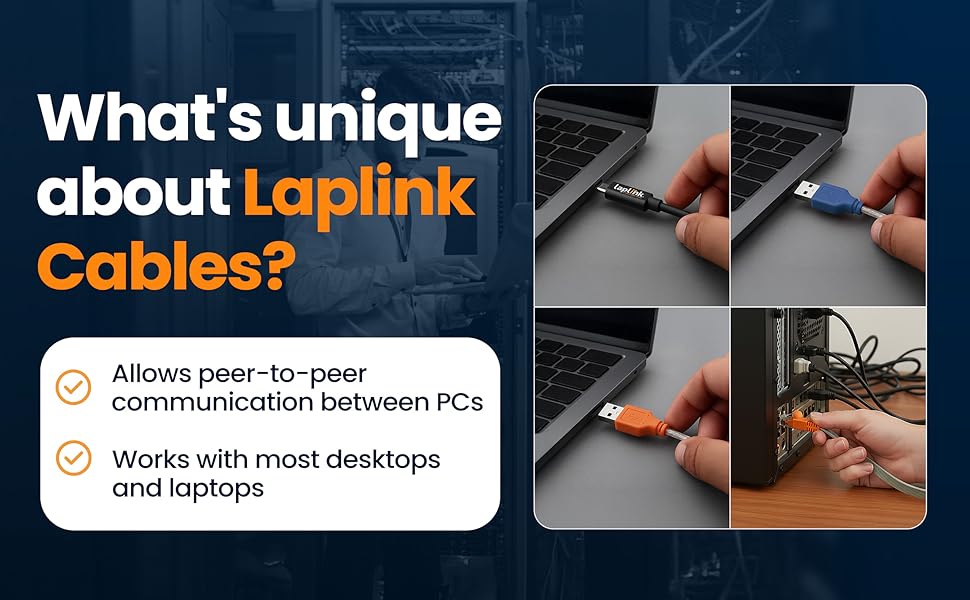
The LAPLINK USB 2.0 High Speed Transfer Cable delivers fast, reliable PC-to-PC data migration at speeds up to 480 Mbps. Featuring USB 2.0 male-to-male connectors and a 6-foot length, it’s designed for seamless plug-and-play use with Laplink’s PCmover software (sold separately). Ideal for professionals upgrading or syncing computers, this cable ensures efficient transfer of large files, photos, and videos without extra drivers or fuss.




| ASIN | B0093H83DW |
| Best Sellers Rank | #3,063 in USB Cables |
| Brand | LAPLINK |
| Brand Name | LAPLINK |
| Cable Type | USB |
| Color | Black |
| Compatible Devices | Laptop, PC |
| Compatible Phone Models | Probably compatible with smartphones, specific models not listed |
| Connectivity Technology | USB |
| Connector Gender | Male-to-Male |
| Connector Type | Usb |
| Customer Package Type | sealed anti-static bag |
| Customer Reviews | 4.1 out of 5 stars 608 Reviews |
| Data Transfer Rate | 0.48 gigabits_per_second |
| Frequency | 480 MHz |
| Included Components | 1 |
| Indoor Outdoor Usage | Outdoor |
| Item Length | 6 feet |
| Item Shape | Round |
| Item Weight | 3.2 ounces |
| Manufacturer | Laplink Software Inc. |
| Maximum Voltage | 5 volts_of_direct_current |
| Model | PACBLUSB02000PBRTPEN |
| Model Name | FBA_PACBLUSB02000PBRTPEN |
| Number of Items | 1 |
| Number of Pins | 4 |
| Other Special Features of the Product | Data Transfer |
| Part Number | FBA_PACBLUSB02000PBRTPEN |
| Recommended Uses For Product | Communication |
| Special Feature | Data Transfer |
| Specification Met | USB-IF |
| UPC | 048296308660 |
| Unit Count | 1 Count |
| Warranty Description | Limited Warranty |
D**~
Easiest, fastest new computer set up ever!
OK, so at first I was upset when I purchased the cable and then when I got around to using it months later (after return date was past) learned I had to purchase software too! BUT MY OH MY!! HOW WONDERFUL THESE FOLKS WERE! First call, I waited on hold for 10 minutes but after that, I called in another 4 times (last time to just say thanks) I only waited less than 2 minutes. The set up of my new computer is done! I didn't have to leave both of my computers with geeks anyplace, it cost less than $100 total and my time was less than 2 hours total! Yes, it did the work over night but how easy is that!? The support staff were all friendly, professional, capable, excellent communicators, and helped get the job done! I hope they can maintain that level of service as they grow. They should be the model for the industry standard! yeah!
S**R
Does the job
I recently bought a new computer and found a quicker way to transfer my old computer to my new computer, it was incredibly easy and fast compared to doing it the old way, the cable was the perfect length and I had no problems with my install , it’s worth the money
D**R
Works with transfer software where wireless connection is not available
Long story short, I fought with the computer manufacturing web site to get this item ordered and an ordering snafu made me get it from Amazon instead. Once I installed the software, the software indicated that the wireless transfer would work quicker so the cord was not needed. I kept the cord, who knows when something like it comes in handy for communicating between units. It's a quality item, certainly, and would work in whatever case a wireless connection is not available when running the software. A side note about the software: Great item. Ran my settings and files transfer seamlessly from one computer to another. Job was done in less than an hour.
D**T
Excellent Customer Service
Had to get a special program from Laplink to make it work, as both computers were saying they were the new one, and couldn't communicate. Customer service had everything working within 30 minutes after contact. Unless you have a super fast internet connection, that never loses it's signal, this is definitely the way to go.
D**A
Don't Buy This Product
I selected only 12 programs from a total of 25 to xfr from windows 10 computer to a new windows 11 computer. Only one program worked after the xfr on windows 11. Dissatisfied I choose to restore windows 11 computer to orginal condition. 5 days later I tried once more this time with only 2 programs to xfr. Only one worked so I gave up and choose to restore windows l1 computer to orginal condition. After inspecting the one drive none of the programs were completly removed. I even had to outlook to get it to work again on the windows 11 completer. Not a happy camper with this product. Even contacted Laplink help desk but they did not provide me with any help either as advertised. The cable to work just fine.
F**R
Performed smoothly and easily
PC Mover only worked well for me with this Laplink Cable. Once connected to both computers my info was moved quickly and smoothly from the old computer to my new one. Great connectivity immediately.
M**0
mare shure you enbel file sharing
nice cheet
G**N
Essential for Laplink, but Laplink may not be necessary
Cable worked perfectly, but software would not install. Support was tremendous, took over computer and installed fixes and got Laplink running. In hindsight I would simply move files over and reload software on new computer rather than moving it over with Laplink - I keep my files in the documents folder, much of the software I use is subscription so it's available off the web, and I had some issues with transferring software that would not load properly and that had to be uninstalled before reloading it from download site. But overall the cable worked as represented - kind of like an electric potato peeler, not really necessary if you know how to peel potatoes or how to move files and reinstall software.
F**O
Cavo USB PCmover
il cavo non ha funzionato, i pc non si collegano e l' app pcmover non riesce a utilizzare la connessione USB ho dovuto ripegare su una connessione wireless costriuta ad och l'applicazione PCmover funziona traferendo bene configurazioni passwoard applicazioni etc ma non è spiegato, acquistando, che attivata su due sistemi operativi di due pc diversi funziona per sempre ma solo su quei due pc
B**.
good
worked great
G**O
Que conecte con el PcMover
No funciona
M**7
A Cable that makes it easier to transfer files
I found it was a solid cable, should last for years. it did the job.
J**A
Erfüllt die Anforderungen
Gut und schnell
Trustpilot
3 weeks ago
2 weeks ago