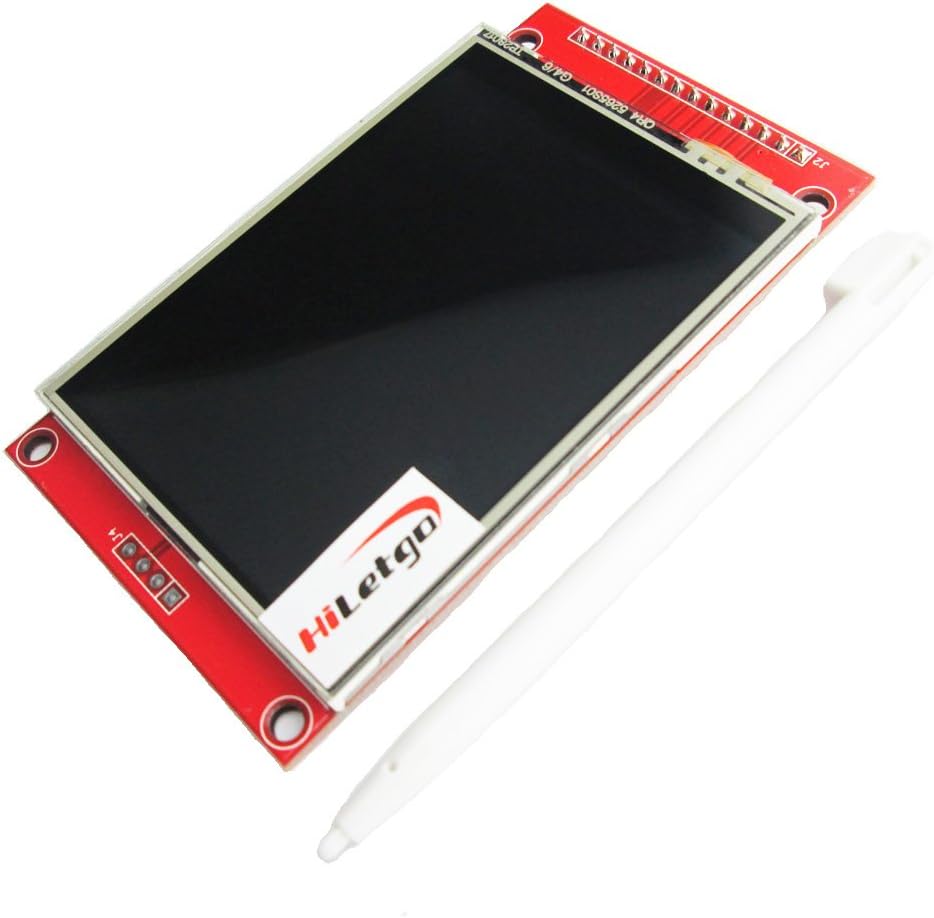


HiLetgo ILI9341 2.8" SPI TFT LCD Display Touch Panel 240X320 with PCB 5V/3.3V STM32
Product ID: 734914184
🎯240x320 crisp resolution
📱2.8" vibrant touchscreen
🔋dual 5V/3.3V power support
Buy anything from 5,000+ international stores. One checkout price. No surprise fees. Join 2M+ shoppers on Desertcart.
Desertcart purchases this item on your behalf and handles shipping, customs, and support to Nicaragua.
🚀 Elevate your projects with a touchscreen that means business!
The HiLetgo ILI9341 2.8" SPI TFT LCD Display offers a sharp 240x320 resolution with a responsive touch panel, supporting both 5V and 3.3V power inputs. Featuring an integrated PCB with power IC and SD card interface, this lightweight 55g module is designed for seamless integration into STM32 and other microcontroller projects, delivering vibrant visuals and reliable performance.
| Are Batteries Included | No |
| Asin | B073R7BH1B |
| Brand | HiLetgo |
| Color | red |
| Customer Reviews | 4.5 4.5 out of 5 stars (306) 4.5 out of 5 stars |
| Date First Available | December 26, 2017 |
| Is Discontinued By Manufacturer | No |
| Item Model Number | 3-01-1433 |
| Item Weight | 55 g |
| Manufacturer | HiLetgo |
| Package Dimensions | 10.2 x 10 x 2.2 cm; 55 g |
| Voltage | 5 Volts |
User
Works with Teensy 3.2 or Arduino - here's how:
I love these displays and use them on all my projects. I've bought about 8 so far and can get them to work with either Teensy 3.2 or an Arduino Nano.For operation with a Teensy 3.21. use the <ILI9341_t3.h> from the PJRC--and this lib is very fast connect directly2. for touch use "UTouch.h"3. for SD I use <SdFat.h>4. no level shifters needed5. you may need to solder J1 (I do on all my displays)4. if you want to use SD, remove the resistors R1, R2, R3 and solder 0 ohm resistorsFor operation with Auduino Nano1. use the <Adafruit_ILI9341.h>2. for touch use "UTouch.h"3. for SD I have yet to get an SD to work with graphics due to not enough memory4. no level shifters needed5. you WILL need to solder J1 (I do on all my displays)EDIT as of 12/29/2019 Usage with Arduino connect as usual but power your Arduino with 3.3 volts (just connect 3.3 to the 5V pin on the arduino). Alternatively you can put a 1K series resistor on all pins to drop the voltage going to the unit (and power with 3v3). THESE UNITS WILL NOT WORK IF POWERED WITH 5 AND IF THE SIGNAL LINES ARE 5 VOLTS.update 2/2/2022 tips on usage to get everything working on a teensy 4.0 (or 3.2)/*This simple program will test1) the display, 2) the SD card, 3) the touch screen, 4) ability to readPixelThe readPixel is only supported by some display driverslike the ILI9341_t3 driver, there is a PrintScreen.h utility that will let yousave your screen to a BMP file and draw the fileif readPixel fails try to adjust speeds above. It's possible the display MISO is not tri stateand will basically own MISO where other devices can't use it. If so, you will need some external buffermagicIf using display with Teensy (3v3) solder J1, replace R1, R2, R3 with 0 ohmpin connectionsDisplay MCUVCC 3v3GND GNDCS 10RESET 3v3 If white screen 1) 8 or 2) use series 1K0 and 10uf to GND to slow chargeDC 9MOSI 11SCK 13LED 3v3 or connect to analog pin and use analogWrite(x) to fade brightnessMISO 12T_CLK 13T_CS 0T_DIN 11T_DO 12T_IRQ 1SD_SCK 13SD_MISO 12SD_MOSI 11SD_CS A3 (other digital pins may work, read data sheet for what pins support CS)*/#include "ILI9341_t3.h" // high speed display that ships with Teensy#include <XPT2046_Touchscreen.h> // touch driver for a TFT display#include <SdFat.h>#include <SPI.h>#define CS_PIN 10#define DC_PIN 9#define T_CS 0#define T_IRQ 1#define SD_CS A3int BtnX, BtnY;// you know the drillILI9341_t3 Display(CS_PIN, DC_PIN);XPT2046_Touchscreen Touch(T_CS, T_IRQ);TS_Point TouchPoint;SdFat sd;SdFile dataFile;void setup() {Serial.begin(9600);while (!Serial) {}Serial.println("Starting...");// start the dispalyDisplay.begin();Display.setRotation(1);// depending on your exact display getting touch + SD + display working// you may need to adjust the clock speed// default is 30 mhz but you may need to slow to 10000000 or set to as high as 100000000//Display.setClock(20000000);// start the touchTouch.begin();Touch.setRotation(1);// start the SD card// depending on your sd card and display, you may need to slow the sd card clock// I find 20 mhz to be pretty reliablebool SDStatus = sd.begin(SD_CS, SD_SCK_MHZ(20));//bool SDStatus = sd.begin(SD_CS);// test SD and write somethingif (SDStatus) {Serial.println("SD OK");dataFile.open("Test.txt", FILE_WRITE);dataFile.print("This is a test");dataFile.close();}else {Serial.println("SD failed");}// test displayDisplay.fillScreen(ILI9341_BLUE);Serial.print("Color of pixel (10,10): ");Serial.println(Display.readPixel(10, 10));delay(4000);Display.fillScreen(ILI9341_BLACK);}void loop() {if (Touch.touched()) {TouchPoint = Touch.getPoint();BtnX = TouchPoint.x;BtnY = TouchPoint.y;// consistency between displays is a mess...// this is some debug code to help show// where you pressed and the resulting map// x = map(x, real left, real right, 0, width);// y = map(y, real bottom, real top, 0, height);// tft with black headers, yellow headers will be differentBtnX = map(BtnX, 3700, 300, 0, 320);BtnY = map(BtnY, 3800, 280, 0, 240);// Serial.print(", Mapped: ");// Serial.print(BtnX);// Serial.print(",");// Serial.println(BtnY);Display.fillCircle(BtnX, BtnY, 3, ILI9341_RED);// delay(5);}}
User
Works well
Works well
User
If a logic level shifter is used these displays work with 5V Arduinos
The easiest and least complicated way to use these displays is to connect them to a device that has 3.3V logic, an ESP32 board for example.I chose to connect this display to an Uno R4 WiFi before reading the fine print and it didn't work. In fact I thought I fried the display. After reading the fine print I tried including logic level shifters in the circuit and discovered my "fried" display was still good. I used https://www.amazon.ca/dp/B074M8TM81?ref=ppx_yo2ov_dt_b_fed_asin_title available here on Amazon.The downside to using logic level shifters are: 1) the additional expense and 2) slower display updates. Again the best way to use these displays is with a 3.3V microcontroller.
User
Great, and it is slow, BUT you can do partial refreshes
Works great. As others have mentioned it's slow doing a full screen refresh. However, it does support doing partial updates, which are significantly faster.For example, using the Adafruit Python Driver, you can call the image function and give it just part of the screen you want to update. This is nearly instantaneous, and has worked well for me.
User
Great value and works well
The display is bright and the colors are well defined. The model I received has a transistor to control the back light LED which is handy if you want to control it from code. It also has the touch screen overlay oriented so the X, Y coordinates align with the LCD display coordinates. It came with a handy white stylus. I bought a similar ILI9341 and it lacked the stylus, the transistor and the overlay orientation was reversed.The SPI pins are broken out separately for the touchscreen and the LCD which is useful because they run at very different speeds. The LCD works well at 50 MHz which is great for fast drawing, but the touchscreen produced errors at speeds exceeding 1 MHz.The touchscreen overlay is resistive. Unlike a modern phone, it requires a very firm press such as with a stylus or your finger tip to get accuracy.
Trustpilot
2 months ago
2 weeks ago