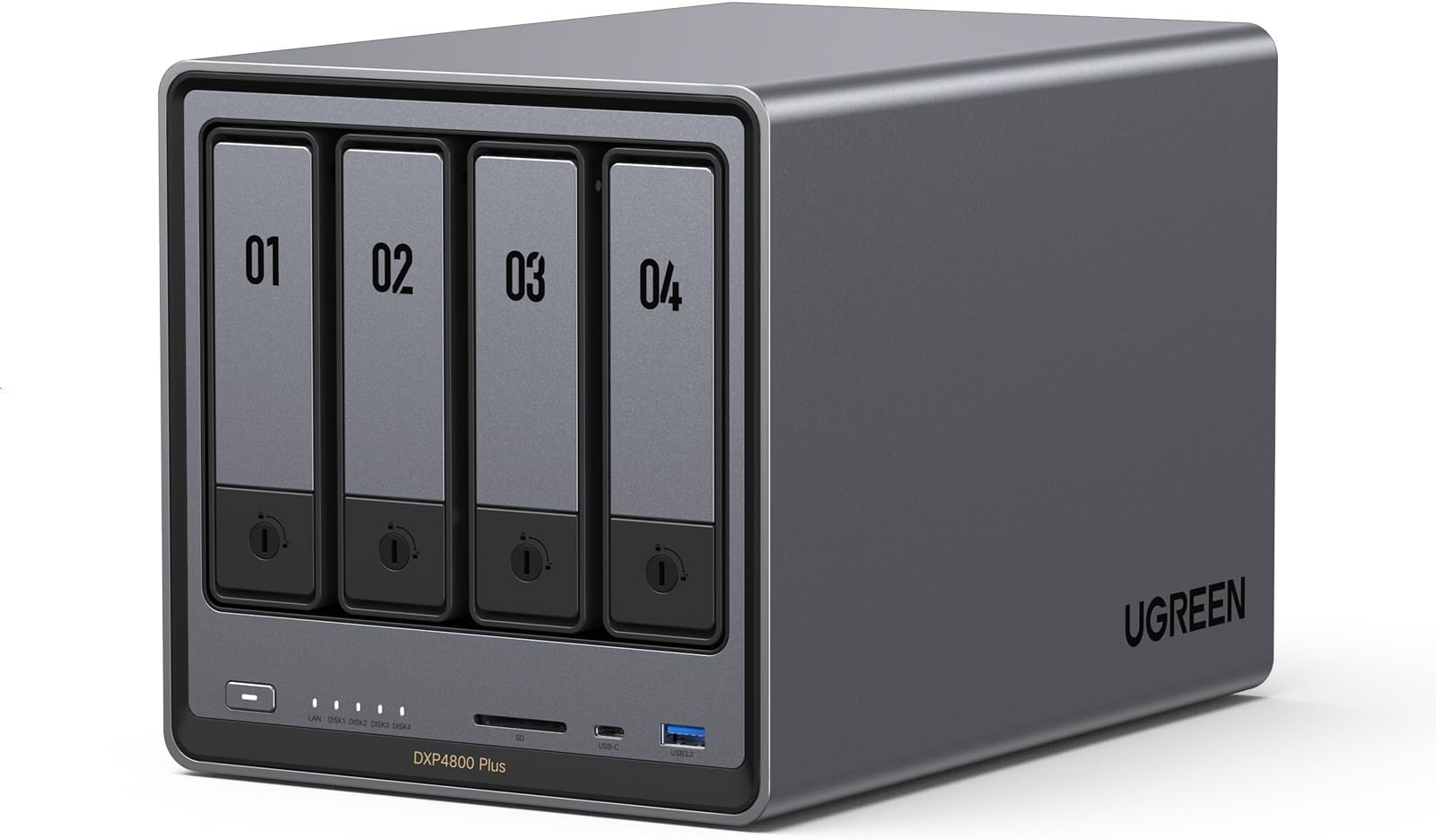


UGREEN NASync DXP4800 Plus 4 Bay NAS
Product ID: 733807973
Details
- BrandUGREEN
- ColourGrey
- Compatible devicesDesktop Laptop
- Digital storage capacity144 TB
- Included componentsDevice
- Item weight3.79 Kilograms
UGREEN NASync DXP4800 Plus 4 Bay NAS Review: This is well worth the money. Minor issue with 2 apps. - I have had this item for a few months now. Initially, I did some upgrades to the unit with no problems. I upgraded the RAM to 32GB (OWC 32GB (2x16GB) DDR5 4800 PC5-38400 CL40) and installed 4 Seagate Exos X18 16TB Enterprise HDD's in RAID-5 for a massive 48GB storage capacity. I also installed a samsung 990 EVO Plus 1TB NV SSD for caching. I decided to give the UGREEN OS a chance and kept it. So far everything seems very stable and for my use, movies, music and phone backup, this is doing the job really well. I also installed a 22TB external drive to backup my data just in case the NAS failed. All of the built-in software for the backup, moves and music are working very well. The noise level of the unit is very low, especially when the drives go to sleep. There is no noise at all that you can hear from about 5 feet away unless it is reading/writing, then you hear the drives but it is a low rumble that you would expect. The system itself is very easy to setup and once you create the online account, you can access your drive from anywhere. The only tricky part is getting the software installed on the desertcart Firesticks but there are instructions for that. I would definitely say that this is worth the spend. UPDATE: Almost a year in. The unit physically still works flawlessly. I have, however, found a few issues with the two main apps that I use. Theater and Music. First, the apps in general are great but there is a small flaw in teh Theater app where it has trouble detecting movies that have numbers in the beginning or end. The quick fix is the ability to go in and manually detect the movie. The Music app is good as well but has one major flaw that the developers have acknowledged but have not fixed. I have loaded a lot of music in folders (each folder is a CD) and the tracks are numbered. The app will ignore the numbers and only show the songs without it and sort based on that. Any mixed tracks that flow from one track to the next will NOT work since it will sort alphabetically without the numbers in the beginning. Also any tracks that have names that begin with numbers also have them hidden and ignored. I am not sure why this would be a feature, especially when you go to the Folder View tab to view the full name. It makes the app pointless for me. If you are planning on using the NAS for Music or Movies and want to use the UGOS Pro operating system, you should reach out to them to see if this has been resolved. Other than these two issues, the OS itself and the rest of the unit and apps work great. Review: Unmatched quality - Built like a tank. Incredible quality inside and out. This is as premium as it gets for the prosumer. It's unbelievable what ugreen offers at the same price point as the competition. Fast, reliable, and built to last. Beautiful unit. The OS is intuitive, polished, and has everything you need to get up and running in a home environment. These units from ugreen are the new standard now. There plastic box competition is going to have to up their game, or fall by the wayside. If you're looking for an Nas, look no further. Ugreen holds the crown.


| ASIN | B0D22JRHZB |
| Box Contents | Device (Dish-Free) |
| Brand | UGREEN |
| Brand Name | UGREEN |
| Color | Grey |
| Compatible Devices | Desktop, Laptop |
| Compatible devices | Desktop, Laptop |
| Connectivity technology | Ethernet, HDMI , SATA , USB |
| Customer Reviews | 4.6 out of 5 stars 564 Reviews |
| Data Transfer Rate | 1250 Megabytes Per Second |
| Digital Storage Capacity | 144 TB |
| Digital storage capacity | 144 TB |
| EU Spare Part Availability Duration | 2 Years |
| Enclosure Material | Metal |
| Form Factor | 4-Bay |
| Hard Disk Form Factor | 3.5 Inches |
| Hard disk form factor | 3.5 Inches |
| Hardware Connectivity | Ethernet, SATA 6.0 Gb/s, USB |
| Hardware Platform | x86_64 |
| Installation Type | Internal Hard Drive |
| Item Weight | 3.79 Kilograms |
| Manufacturer | Ugreen Group Limited |
| Manufacturer Part Number | DXP4800 Plus, 4-Bay |
| Model Name | DXP4800 Plus |
| Model Number | DXP4800 Plus,4-Bay(Diskless) |
| Network Connectivity Technology | Ethernet, HDMI, SATA, USB |
| Number of Items | 1 |
| Product Features | AI-Powered Photo Album, Advanced Encryption, Flexible Permission Management, Wide Range of RAID Options, Massive Storage Capacity, Super-Fast Transfers, Multi-Device Compatibility |
| Read Speed | 1250 Megabytes Per Second |
| Special feature | AI-Powered Photo Album, Advanced Encryption, Flexible Permission Management, Wide Range of RAID Options, Massive Storage Capacity, Super-Fast Transfers, Multi-Device Compatibility Special feature AI-Powered Photo Album, Advanced Encryption, Flexible Permission Management, Wide Range of RAID Options, Massive Storage Capacity, Super-Fast Transfers, Multi-Device Compatibility See more |
| Specific Uses For Product | Office, Network-Attached Storage |
J**D
This is well worth the money. Minor issue with 2 apps.
I have had this item for a few months now. Initially, I did some upgrades to the unit with no problems. I upgraded the RAM to 32GB (OWC 32GB (2x16GB) DDR5 4800 PC5-38400 CL40) and installed 4 Seagate Exos X18 16TB Enterprise HDD's in RAID-5 for a massive 48GB storage capacity. I also installed a samsung 990 EVO Plus 1TB NV SSD for caching. I decided to give the UGREEN OS a chance and kept it. So far everything seems very stable and for my use, movies, music and phone backup, this is doing the job really well. I also installed a 22TB external drive to backup my data just in case the NAS failed. All of the built-in software for the backup, moves and music are working very well. The noise level of the unit is very low, especially when the drives go to sleep. There is no noise at all that you can hear from about 5 feet away unless it is reading/writing, then you hear the drives but it is a low rumble that you would expect. The system itself is very easy to setup and once you create the online account, you can access your drive from anywhere. The only tricky part is getting the software installed on the Amazon Firesticks but there are instructions for that. I would definitely say that this is worth the spend. UPDATE: Almost a year in. The unit physically still works flawlessly. I have, however, found a few issues with the two main apps that I use. Theater and Music. First, the apps in general are great but there is a small flaw in teh Theater app where it has trouble detecting movies that have numbers in the beginning or end. The quick fix is the ability to go in and manually detect the movie. The Music app is good as well but has one major flaw that the developers have acknowledged but have not fixed. I have loaded a lot of music in folders (each folder is a CD) and the tracks are numbered. The app will ignore the numbers and only show the songs without it and sort based on that. Any mixed tracks that flow from one track to the next will NOT work since it will sort alphabetically without the numbers in the beginning. Also any tracks that have names that begin with numbers also have them hidden and ignored. I am not sure why this would be a feature, especially when you go to the Folder View tab to view the full name. It makes the app pointless for me. If you are planning on using the NAS for Music or Movies and want to use the UGOS Pro operating system, you should reach out to them to see if this has been resolved. Other than these two issues, the OS itself and the rest of the unit and apps work great.
A**N
Unmatched quality
Built like a tank. Incredible quality inside and out. This is as premium as it gets for the prosumer. It's unbelievable what ugreen offers at the same price point as the competition. Fast, reliable, and built to last. Beautiful unit. The OS is intuitive, polished, and has everything you need to get up and running in a home environment. These units from ugreen are the new standard now. There plastic box competition is going to have to up their game, or fall by the wayside. If you're looking for an Nas, look no further. Ugreen holds the crown.
W**.
Well built, very good specs for the money, room to grow
I upgraded to this unit coming off a two-bay Synology. I wanted more room for expansion, a bit more headroom on compute capacity, and I was also interested in experimenting with different operating systems. This delivers. Even though it's advertised as four-bay, I would functionally call it a six-bay, because it has two nVME slots, on top of the four hard drive slots. It has relatively good specs (balancing power and energy efficiency, and keeping in mind that most things a NAS does are not compute intensive), has a premium metal case, and noise mostly isn’t an issue (the exception is the dust filter over the fan at the back, it sometimes rattles. I solved that with some double-sided tape to cushion the metal-on-metal contact). Right off the hop, I installed the TrueNAS operating system on this unit, and it was painless. This unit has an HDMI out (an underrated feature) that displays the boot menu when you plug in a bootable USB, and it comes with a writeable SSD drive to which you can install the OS, and keep it hived off from storage. When running TrueNAS, the HDMI out will display the current IP address of the NAS to access its web UI from another device (handy!), and it also has a terminal interface to run various operations with keyboard input. I can't comment on how TrueNAS compares to the UGreen OS (because I never used it), but comparing it with Synology, and having read up on other alternatives like Unraid, my impression is that they're all functionally very similar. Synology has some first-party apps that you won't get anywhere else, but they're not special, there's popular open source alternatives to all of them. Every OS has its library of stock-configured apps (Synology's is relatively small), but to get full utility out of a NAS, you're going to need to figure out how to use Docker (easy if you know what you're doing, immensely confusing *until* you know what you're doing), and every operating system integrates with Docker images in a similar kind of way.
J**N
A Powerful NAS at a very Good Price that Provides Lots of Storage Options
I purchased the UGREEN DXP4800 Plus 4-Bay Desktop NAS because my previous NAS (Drobo 5n2) failed and the manufacturer is no longer in business. What attracted me to the 4800 Plus was the upgradability, especially the RAM. The second factor I considered was price. I have been using the DXP4800 Plus for several months and I have to say I am very, very pleased with it I have a 2.5GPs network and this comes with not only 2.5GPs but also a 10 GPs connection, so belive me when I say file transfers are rapid. In addition, the 4800 Plus has not 1, but 2 slots for M2 drives for file caching purposes (sorry, you can't use the M2 drives as additional storage). The combination of the 4 bays plus the 2 M2 drives (and the 32 GB of RAM I upgraded to over the 8GB it comes with) is really unbeatable for a NAS in this price range. I found setup to be fairly easy, albeit the creation of the share took the better part of a day to configure. The instructions were very clear and the menus were very intuitive. Once I got the share created, I had to migrate multipl TB of data and the machine performed flawlessly. I mainly use this for storing of all of my media for Plex, family photos, movies, etc. and it handles everything I throw with it. The software included to manage the NAS is pretty easy to use, and it has a good variety of apps to enhance your experience. If you've used a NAS before, then you'd see that UGREEN's software functions just like other NAS software, so the learning curve is short. I would remove a 1/2 star for the unintuitive way to have the NAS mapped as a network drive. It took me a few days to figure how to get this accomplished. This is one area Synolgy has UGREEN beat. But once I figured it out (and how to lock the IP address to the 4800 Plus through my internet provider's router), it is now pretty much set and forget. The other big con of this NAS is that for drive sizes of 20TB and above, the number of supported drives is very limited. The final thing I would say is that I like the DXP 4800 Plus so much, I was seriously considering purchasing a second one. I came up with a cheaper, non network option, but I still would buy this again.
S**E
So far, so great.
Very easy to setup. If you use quiet NAS disks, you can definitely hear it when under load, but it's not loud at all, and super easy to drown out with TV or music. Really impressed with the low sound levels. The fan is nearly silent. Setup was very easy. I played with some different configs at first to see how long it took to build a RAID 5, then re-do it as a RAID 0. I'm quite happy with the "stress testing" of the drives. Installing and setting up apps ranges from easy to "huh?". But there is plenty of on-line support, and once you get it configured the way you like, it becomes a part of your home network. Have not tested it as a video server yet, need to get a long HDMI from the NAS to the TV, or move the NAS. I don't want to put it right on the floor because it will just get coated with dust bunnies (very dusty in SoCal), so I have it on a side-table shelf, about 15" off the ground, and have a USB cable plugged in full-time so I can sync to my external disk whenever I need to. I've played with both leaving it on 24x7 and turning it off at night. I think I'm going to just set up a power schedule where it's on all weekend, but not nights on week-days. From the logs, it's totally idle during those times. Works amazingly well as a backup device, super easy to set up backup/sync jobs. Also makes a great music server. Overall, it's been solid, reliable, quiet and fast.
Trustpilot
2 weeks ago
5 days ago