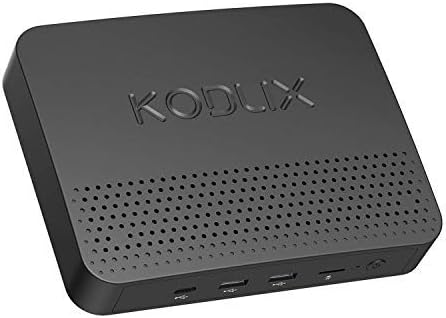





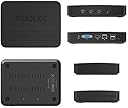
KODLIX GN41
Product ID: 73354707
Details
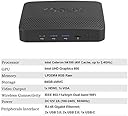
- BrandMINISFORUM
- CPU ModelCeleron
- ColorBlack
- Graphics Card DescriptionIntegrated
- Graphics CoprocessorIntegrated
- Memory Storage Capacity64 GB
desertcart.com: KODLIX GN41 Review: Just what I needed and nothing more - for a great price - I was looking for a small, quiet, home server for running vmware player to spin up OpenStack and Docker container hosts for a home lab. My spec list was: * Windows 10 Pro so I can use the remote desktop feature to access the VMWare console * Celeron family (N4100/J4105) CPU minimum, i3 or i5 preferred. Linux tends to have problems with the Atom line * 6 GB RAM min, 8 GB Preferred. An OpenStack VM requires 4 GB * 32 GB ROM storage min, 64 GB preferred. Windows 10 is know for being storage-hungry during upgrades * Internal SSD hard drive slot * Power consumption < 15W. Living in coastal California, my electricity isn't cheap and power-hungry gear isn't an option * 802.11ac wireless & Gigabit ethernet port The budget was $200-$350 depending on RAM and CPU. The Kodlix actually offers two systems with these specs. I went with the Celeron N4100 version over the i3 because it was $100 less, met all my requirements, and had a smaller form factor. It arrived within 2 days thanks to desertcart prime and powered on with out issue. Windows 10 setup was easy and its updates only took a few minutes. The internal SSD slot made it easy to install a Patriot Burst 120GB SSD for storage expansion. Power consumption is typically 12w. Performance isn't mind-blowing, it is impressive for such a small device. There's been 3 negatives, all relating to power: 1) the power supply connector doesn't secure to the chassis very well, and can slip loose when bumped 2) does not automatically power on after power is re-applied 3) the power indicator light is pin-sized, and difficult to see. All of these have combined for a few scenarios where I thought the thing "died" but it had simply had the power cord bumped loose Biggest thing to bear in mind, based on some of the negative reviews here: this is certainly not a gaming PC. As for streaming, get the N4100 version at minimum and really you're probably better off with the i3. Review: Operating system went right to automatic repair upon first boot - Shipped with corrupt OS. Went right to automatic repair. See below for correspondence with tech support, no phone number to call.. customer: Goes right to repair, Nothing I do can get this computer booted.. tech support: Is it impossible to display? So is his power light on? If you need to exchange, you can contact desertcart Seller Support. Best regards, Huang customer: Reloaded windows 10 with one of our keys.. wasn't expecting a non functioning computer.. tech support: Can you describe your problem? Otherwise I can't help you. Best regards, Huang customer: See initial comment.. PC went right to automatic repair. Nothing I could do gets this to boot.. I cannot make it any more clear than that.. I reloaded operating system, as I do not have time for return etc.
| ASIN | B07FT9MKZN |
| Brand | MINISFORUM |
| Color | Black |
| Connectivity Technology | Bluetooth, USB |
| Customer Reviews | 3.8 3.8 out of 5 stars (43) |
| Graphics Card Interface | Integrated |
| Graphics Coprocessor | Integrated Graphics |
| Graphics Description | Integrated |
| Hardware Interface | HDMI, VGA |
| Human-Interface Input | Buttons, Keyboard |
| Manufacturer | MINISFORUM |
| Memory Storage Capacity | 64 GB |
| Number of Component Outputs | 2 |
| Operating System | Linux, Windows 10 Pro |
| Personal Computer Design Type | Mini PC |
| Processor Brand | Intel |
| Processor Count | 4 |
| Processor Series | Celeron |
| RAM Memory Installed | 64 GB |
| RAM Memory Technology | DDR4 |
| RAM Type | DDR3 SDRAM |
| Screen Size | 2.5 Inches |
| Wireless Compability | 802.11a, 802.11bgn, Bluetooth |
| Wireless Network Technology | Wi-Fi |
| Wireless Technology | Bluetooth |
J**R
Just what I needed and nothing more - for a great price
I was looking for a small, quiet, home server for running vmware player to spin up OpenStack and Docker container hosts for a home lab. My spec list was: * Windows 10 Pro so I can use the remote desktop feature to access the VMWare console * Celeron family (N4100/J4105) CPU minimum, i3 or i5 preferred. Linux tends to have problems with the Atom line * 6 GB RAM min, 8 GB Preferred. An OpenStack VM requires 4 GB * 32 GB ROM storage min, 64 GB preferred. Windows 10 is know for being storage-hungry during upgrades * Internal SSD hard drive slot * Power consumption < 15W. Living in coastal California, my electricity isn't cheap and power-hungry gear isn't an option * 802.11ac wireless & Gigabit ethernet port The budget was $200-$350 depending on RAM and CPU. The Kodlix actually offers two systems with these specs. I went with the Celeron N4100 version over the i3 because it was $100 less, met all my requirements, and had a smaller form factor. It arrived within 2 days thanks to Amazon prime and powered on with out issue. Windows 10 setup was easy and its updates only took a few minutes. The internal SSD slot made it easy to install a Patriot Burst 120GB SSD for storage expansion. Power consumption is typically 12w. Performance isn't mind-blowing, it is impressive for such a small device. There's been 3 negatives, all relating to power: 1) the power supply connector doesn't secure to the chassis very well, and can slip loose when bumped 2) does not automatically power on after power is re-applied 3) the power indicator light is pin-sized, and difficult to see. All of these have combined for a few scenarios where I thought the thing "died" but it had simply had the power cord bumped loose Biggest thing to bear in mind, based on some of the negative reviews here: this is certainly not a gaming PC. As for streaming, get the N4100 version at minimum and really you're probably better off with the i3.
K**Y
Operating system went right to automatic repair upon first boot
Shipped with corrupt OS. Went right to automatic repair. See below for correspondence with tech support, no phone number to call.. customer: Goes right to repair, Nothing I do can get this computer booted.. tech support: Is it impossible to display? So is his power light on? If you need to exchange, you can contact Amazon Seller Support. Best regards, Huang customer: Reloaded windows 10 with one of our keys.. wasn't expecting a non functioning computer.. tech support: Can you describe your problem? Otherwise I can't help you. Best regards, Huang customer: See initial comment.. PC went right to automatic repair. Nothing I could do gets this to boot.. I cannot make it any more clear than that.. I reloaded operating system, as I do not have time for return etc.
M**L
Excellent value for a great product
I needed a second computer for general use including surfing the internet, reading email, and using office applications for word-processing and spreadsheets. This computer is great for all of that. I don't do any gaming so I can't comment there. This is a great value for a mini pc that has a small footprint on the desk, looks sleek, and just works. It also has a bay for connecting a SATA drive and I made use of that. I purchased a SATA SSD drive and installed windows 10 on it. After I installed windows on the SATA drive windows wasn't activated so I contacted support to ask for help and they replied very quickly and sent me the information that I needed to get windows activated. The product works great! The support is excellent! I would highly recommend this PC and this seller.
A**N
It's a good little computer!
This is a great computer value. Dead quiet (unless you put in a HHD in it. I did add a SSD so still quiet) Running Windows 10 Pro allows you to use remote desktop to manage it. It does not have a lot of storage, so I would recommend adding your own storage to it. It is not something you will be running hard-core games on it, but it is powerful enough to run a database and a couple of substantial web applications well enough for me. It has the essential connection options for modern computing. It is not a rack mount server, it is not going to serve large teams or supper intensive applications, but for the home/hobbyist, who has the need for some quiet, out of the way, set and forget computing power, it is perfect.
A**)
Least expensive workable Win10 Pro Solution -- A winner !!
My project needs were as follows: 1) Within the secure data environment of a hospital, I needed access to "prohibited websites" (like Amazon, OneDrive, etc). 2) Physically secure data on computer (HIPAA) and secure login. 3) Sufficient processor capability for mild image processing without significant lag 4) Wireless connectivity (can't use the hospital network) My hardware requirements, therefore, were: 1) At least 2 core (4 processor), reasonably modern CPU 2) Win10 Pro (BitLocker for HIPAA security) with minimum 8GB 3) Minimum 64GB storage (can't run too close to full after Win10 install) 4) SSD for fast boot 5) Wireless connectivity Extra equipment added: Keyboard and mouse Scanner-Printer Assessment: This device has met all my expectations. Setup was flawless, and the usual Win10 updates all were found and installed without error. All my custom software loaded without problem. Response time of the device was slower than my desktop (i7, 16GB, 8TB), duh, but was still very usable. I had no need for the additional HD storage, so I can't review it, but it is nice to have that capability. Overall, I could not have chosen better than this small Windows box.
Trustpilot
1 month ago
1 month ago