Desertcart purchases this item on your behalf and handles shipping, customs, and support to Nicaragua.
๐ฑ๏ธ Master your workspaceโsilent, smart, and always connected.
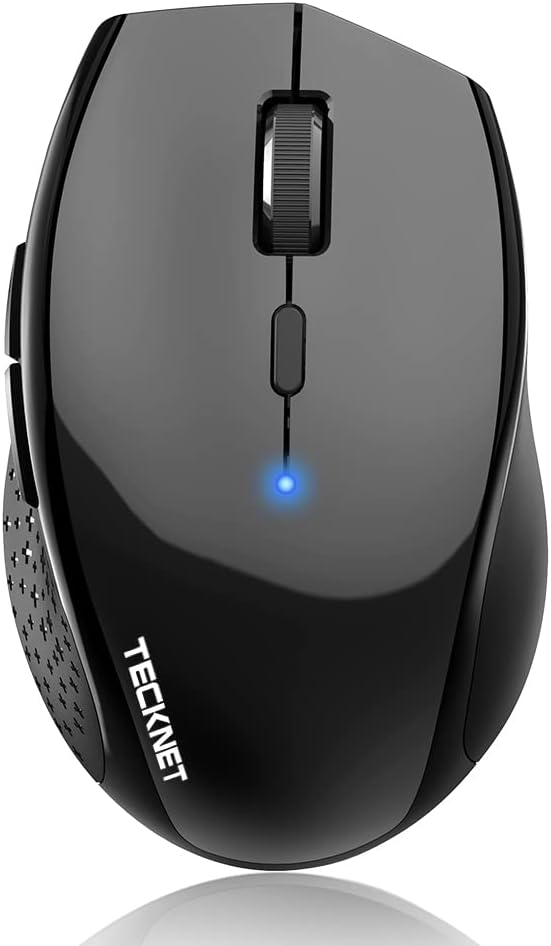
The TECKNET 3-Device Bluetooth Mouse offers seamless multi-device switching, 6 adjustable DPI levels up to 4800 for precision control, and a whisper-quiet click mechanism. Designed for universal compatibility across major operating systems, it features an ergonomic shape for comfortable extended use and boasts an impressive 2-year battery life powered by 2 AA batteries. Ideal for professionals seeking a versatile, reliable, and silent wireless mouse to elevate productivity.


| Additional Features | Ergonomic Design, Wireless |
| Antenna Location | Office |
| Are Batteries Included | No |
| Are Batteries Required | Yes |
| Asin | B07C2NL5HK |
| Battery Average Life | 36 months |
| Best Sellers Rank | #75 in Computer Mice |
| Brand | TECKNET |
| Built In Media | User Manual |
| Button Quantity | 6 |
| Color | Black |
| Compatible Devices | Personal Computer, Tablet |
| Connectivity Technology | Bluetooth |
| Customer Reviews | 4.3 4.3 out of 5 stars (20,045) 4.3 out of 5 stars |
| Embellishment Feature | LED |
| Enclosure Material | Plastic |
| Eu Spare Part Availability Duration | 3 Years |
| Finish | Textured |
| Hand Orientation | Right |
| Hardware Platform | Laptop, PC, Tablet |
| Item Dimensions L X W | 4.4"L x 2.8"W |
| Item Weight | 0.23 Pounds |
| Manufacturer | TECKNET |
| Mfr Part Number | EWM01308BA01 |
| Minimum Required Operating System Version | Windows 11 |
| Model Name | TECKNET Bluetooth Wireless Mouse 6 Levels DPI |
| Model Number | 8541666472 |
| Mouse Maximum Sensitivity | 4800 Dots per Inch |
| Movement Detection | Optical |
| Number Of Batteries | 2 AA batteries required. |
| Operating System | Chrome OS, Linux, Windows 11 |
| Power Source | Battery Powered |
| Range | 10.0 meters |
| Style Name | Modern |
| Theme | Computer Accessory |
| Unit Count | 1.0 Count |
| Warranty Description | 36 Months |
User
Wanted to Turn my Note Pro (12.2") into a little more than a toy
The price is what sold me on it, but it was the size I was worried about. I don't have big hands, but I don't have small hands either (they're in that annoying in between stage of bigger than average, but smaller than large for an adult male). This mouse is great, though was a pain to pair with android, and I thought it was busted. I ended up testing it on my Windows 8 PC and it worked just fine, then I later figured out how to get it to work on my Android Tablet without any issue. I'll go into that a little later.Pros:-Not that small, just slightly smaller than my favorite M510 Logitech mouse. It's the large hump near it's rear that makes it decent fit for my hands without having to change my grip to something uncomfortable and unusable.-On windows, all the buttons work and did something, again I'll go into that later.Cons:-None really, the android connection issue is an Android issue that I solved. If I had to pick one, it would be that the printed manual says it has an 8 month battery life as to the 18 that this page claims, kind of a huge difference in time.Android Connection Fix:1st: Connect the device like you would any other. Go into Settings > Bluetooth > Turn it on > Scan. On initial turn on of the mouse it should go into search mode where it should then be discovered by your tablet/phone. If not press the connect button (top middle) on the underside of the device.2nd: Notice how janky the cursor is, that seems to happen every time you pair this mouse for the first time. Turn off your bluetooth, and then on again to kill the connection with the mouse.3rd: When bluetooth is back on, press "Bluetooth 3.0 Mouse" to initiate re-pairing, and on the bottom of the mouse press the connect button to re-establish a link to the tablet. You should notice now that the cursor is smooth and working as it should.Mouse Buttons Functions (Windows):-Orange side buttons = back and forth (top = forward, bottom = back)-Everything else works like it should, right click, scroll wheel/middle click, left click. Works just fine and is very responsive.Mouse Buttons (Android):-Orange (top): seems to not do anything for me-Orange (bottom) and Left Click: acts as an Android "back" button-Right Click: acts like a one finger touch-Scroll Wheel: scrolls between home screens and drawers in launcher, and then normally in apps like Photo Gallery, and Browser-Middle Button: acts like "home" takes you to your launcher, you can also activate the long press "home" feature (which on my Note Pro launches Google Now)Since I'm writing this on my Tablet using/testing a keyboard I don't know if I can upload pictures from Amazon's Android App. I'll do that when I reconnect with my PC and maybe correct any spelling mistakes I might have made but using an external keyboard doesn't pick up. With that said, I can't be more pleased with my purchase, after solving that Android Mouse issue. It's one of those purchases that luckily doesn't cost much and for me is worth the risk. The manual was in proper English and was rather informative.
User
Who would have thought....
I'm a hard core fan of Logitech mice. My primary mouse is an MX Master 3 and I love it. On my gaming laptop I was using a Targus bluetooth 'travel' mouse, I've had it for many years and its worked well but the clip on back top of the mouse slides back for the batteries access, broke. So I needed a new mouse.Since I wanted an inexpensive mouse that I could use on any of the devices I have that use bluetooth and I wanted it battery powered. How many of you have had a rechargeable device fail when you needed it and then had to wait, sometimes hours, for whatever to recharge when it would have taken seconds to replace the batteries. So I saw this mouse, it was very inexpensive (compared to Logitech or other name brands) and it had a LOT of reviews and had all the things I wanted, so I bought it.So here's the good:- I have large hands and while a little smaller than a full size mouse it's a nice size in my opinion. Not as small as the Targus but not as big as the MX Master 3.- it was very easy to pair with Windows 11 (games only) and my MacBook Pro (mostly work)- the dpi is very easy to adjust and easy to see the effect.- the scroll button work well and is quiet but there is tactile feed back.- the mouse buttons are easy to press and quiet.- the sleep mode works well and I don't know if I'll get 24 months.- 36 month warranty on a $14 mouse. impressive.The maybe not so good:- There is no mouse software for the device. This is good and maybe not so good. I haven't really decided but to be honest I usually don't use it much when it is provided.- The top shell is all one piece and there is a slit cut for the right and left buttons and space for the scroll wheel. I'm not sure if this is good or bad but it is different from every other mouse I have. I guess time will tell.The Bad & the Ugly:- I have not experienced anything that I would label as such.Other observations:- The battery compartment is on the bottom of the mouse.- it had a nice weight. there are no weight adjustments like I've seen on gaming mice but I've never owned a mouse that like that so....- Its worked well for the Steam games that I've played.- The purple is a nice shade and beats the heck out of yet another dark gray/gray/silver mouse.This is a far far better mouse than I ever expected. I would recommend this to anyone with the caveat that these are initial impressions after only a few hours of use and my opinions, over time, may vary.
User
Great buy for home office/student; or on-the-go travel mouse.
Great little mouse for use on the go or for non-detail oriented usage (such as web browsing, email, etc...). I bought this as a replacement for a Microsoft Wireless Mouse 5000 that had started going bad after about ten years. My primary use of a mouse on this computer is audio and video editing, and some light-weight games from time to time.I found that this was not the mouse for me for daily usage, but is great as my backpack/travel mouse. It's gets almost daily usage as my on the go mouse at lunch.Overall- This is a great little mouse for everyday usage. If you are using it for your work (web/email/spreadsheets/etc...) or on a student computer it is a great buy. If you are using it for heavily detailed work (such as photo/video/audio editing) I would suggest going with something a little sturdier. I don't mean this as a knock on this mouse, but as general advice. This is a great mouse for its price point and target.Pros- Nice build quality at the price point- Works out of the box without hassle- Excellent travel mouse- Excellent customer service from the seller. They seem to genuinely care about their customers, which is getting to be a very rare thing these days.Cons- Battery life is shorter than expected. I am a heavy mouse user, and use Duracell Pro-Cell batteries. I am used to a set of batteries lasting 6+ months; but found that these were going dead in under 2 months. To be noted: I am a heavy user, and do not turn the mouse 'off' unless it is in a backpack. I am also used to using a wireless mouse instead of bluetooth, and this may just be a difference- A little shorter (length) and taller (height) than I like (subjective) from an 'ergo' shaped mouse. It felt a little cramped in my hands during longer use sessions.- A small delay/stutter from time to time. Doesn't happen much, and would never be noticeable doing daily tasks like browsing/email/spreadsheets etc.Misc- I found that this does work with OSX. It is currently being used with a MacBook Pro running High Sierra. The only issue I have seen is that it will disconnect/reconnect from time to time.
User
AA batteries for longer life, you provide.
Ergonomic shape for comfort, with scroll wheel.No dongle needed, works with the bluetooth already in my laptop.Windows found the mouse right away.
User
Easy to pair, works good
Great mouse. Bluetooth is fantastic. Best I've had
User
Prefect cheap mouse
This cheap little mouse is impressive and very durable. I have dropped it more times than I can count and it just continues to work. Once connected it just works. I have no issues, it just works every time. The black color is plain and simple, exactly what I was looking for. It was very easy to connect and set up. Works well and is compatible with all my windows laptops Scrolling is very smooth. Overall this is a great mouse and can be relied on every time.
User
Good wireless mouse for the price, but not the best.
Overall I'm pleased for what I paid, but there are some annoying problems with this mouse. Biggest problem is when it goes into sleep mode, you have to literally click a button or toggle the power button to get it to wake up. You can't just move it to wake. This kind of sucks because when you click a button, it wakes up but also sends the click to your computer so whatever your cursor is over gets a click you didn't necessarily want. So I tend to just switch it off when not in use, and back on each time.Battery life claims to be 24-Month. I doubt it. I've had it just a couple months and it's already reporting 50% battery life remains. The claim is probably due to using two AA batteries instead of one like most wireless mice. The problem with 2 batteries is the added weight as well. This mouse is slightly larger than my previous one, and heavier. Not a big deal, and some people may actually like the added weight, but I find it interferes a bit with the way I use a mouse for graphic design and video editing. No idea how well this works for gaming, but I imagine the little annoyances I have in productivity applications probably are even worse in gaming situations where it's critical to be accurate and smooth.I would not recommend this to anyone for gaming, but as an affordable wireless mouse, it works well and I haven't had any signal issues with the Bluetooth connection. My old mouse used to have lots of problems with the usb wireless dongle, and this mouse is a big improvement over that one. Still, I'd probably buy something different next time.
User
Really like this more than name brand, and even has side buttons!
I wasn't expecting to say this, but I love this thing. I had been using a name brand mouse that was my wife's, and it was just too doggone small for my hand. So I wanted something for man hands. I got this as a spare or alternate solution to a large name brand one. Turns out, I like this more than I thought I would. Just fits my hand very well. Bluetooth connection to my Mac. It's really nice and the price is very reasonable for what you get. I don't use the side buttons, but if you do, this has them too. A mouse is like a pair of underwear. You have to find what works for you. You'll only know when you try it, but for someone who has arthritis in my hand, leukemia which gives you bone and joint pain, etc. this feels better than any other mouse I;ve used. It has stayed connected, and runs on 2 AA (not included) batteries so it should last awhile.
User
Great mouse for the price!
The TECKNET Bluetooth mouse is a reliable, versatile option for everyday use. It features six adjustable DPI levels (800-4800), making it easy to customize cursor speed for different tasks. TruWave technology ensures smooth tracking on nearly any surface, whether youโre at home or on the go.Its ergonomic design, with a soft rubber grip, offers comfort during long use, and the compact size makes it portable. Built to last, the mouse has a 10-million click durability rating. Itโs compatible with various Windows versions and devices like laptops, desktops, and Chromebooks, though the side buttons won't work with Mac OS.TECKNET backs this mouse with a 36-month warranty, ensuring reliable customer support. Overall, itโs a solid choice for users who prioritize comfort, adjustability, and durability.
User
overall works nicely
The back and forward button only work while browsing internet. These two buttons do not work in Microsoft apps such as word
User
Works shockingly well
I didn't want to spend a ton on a new mouse for my home office, this had good reviews so I gave it a go. Very happy with the purchase. Connected instantly via Bluetooth, easy to change the speed and a good feel in your hand. It is a bit heavy with the 2 batteries, but I'm not carrying it around the house, and my wrist is not weak.... so I'm not sure why that's an issue. The only thing is I wish you could customize the side buttons (forward back I don't use) but if that is a deal breaker, spend the cash on a fancier one. For the price? Great mouse.
User
One little mouse with cheap price tag and hefty quality
Hello fellow tech lover, if you are about to purchase this item and are a bit dubious as to why it's so cheap, I hope I will put your doubts at rest. After all, I was in your shoes as well. After buying an expensive bluetooth Logitech for over ยฃ50 which caused me enormous amount of headaches and frustration with Logitech Support I threw it in a drawer and started looking again. After a few considerations between Microsoft and other makes I came across this product and I have to say I was very surprised by it's reviews. Considering the price tag I thought I'll give it a go and have not been disappointed. As soon as I got the product, it synced beautifully with both my Macbook Pro and my Surface 3 (Windows). Mind you, I could only sync it with one device at any given time, i.e. if I sync it with Macbook, I have to re-sync it with Surface 3 and vice versa. It doesn't remember more than one device - but that's not a problem. I use it mainly at work anyway. The feel of the mouse is amazing, it's not too small, it's not too big, perfect for carrying around and saving that one extra USB port as it's Bluetooth. I use it every day for 9 hours and the battery has lasted so far without changing - bought it beginning of August. Once I disabled in the Bluetooth settings that annoying feature where the laptop cuts of power for the bluetooth device to conserve power, the mouse works flawlessly.I'm well please with this little and cheap product, if only everything was as good and cheap.
User
A good option
A decent mouse for my MacBook. Able to connect quickly. It seems to have a decent build quality.
Trustpilot
1 month ago
3 weeks ago