

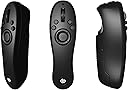




CLIP STUDIO TABMATE
Product ID: 69985421
Buy anything from 5,000+ international stores. One checkout price. No surprise fees. Join 2M+ shoppers on Desertcart.
Desertcart purchases this item on your behalf and handles shipping, customs, and support to Nicaragua.
Review: AMAZING! I CANNOT LIVE WITHOUT IT! - I am a professional freelance illustrator. I bought this for my Surface Pro 4 Tablet and my Clip Studio EX program I installed on it. Was skeptical but was tired of trying to touch tiny icons on my screen. It comes with 4 different "modes" which you can extensively customize. You can: - Assign select keystroke modifiers (alt, shift, ctrl, etc.), - Assign tools and their subsets (so you can select the mapping pen with one and the g pen with another or use the same button to cycle through the subsets) - Change between modes with the press of one button - Use the wheel to either scroll through layers, adjust your brush size, or even scroll through colors. - Assign buttons to navigate color palettes efficiently I was using a Large Wacom Intuos Pro tablet (no screen) on my desktop pc. It has a wheel and like 6 buttons. The buttons reset like once a week for some reason. I never have this problem with the Tabmate. The Intuous Pro also has a noticable delay. The Tabmate does not. I find the sheer quantity of options to be the greatest asset. It's also really nice being able to rest my hand wherever I want when I draw. I no longer have to keep it poised on my tablet. I have yet to try this on my PC because I'm actually no longer working on my Intuos tablet since the Surface Pro 4 and the Tabmate are just too great not to use them. Finding ways to set it up so I can connect my Surface Pro 4 to the PC for streaming. Biggest drawback is that it runs on batteries. I recommend turning it off if you're stepping away for like 2-5 minutes. If you don't, it is still technically "on" and uses the batteries. When I wasn't turning it off for bathroom breaks or to get a drink, I went through the batteries in 2 weeks. Since I started turning it off, it's been nearly a month and I haven't had to replace them. This is perfect for hobbyists, professionals, and students. I honestly cannot work in Clip Studio without it anymore. It has greatly reduced the amount of time I spend on each piece of art and has made working so much easier. Highly recommend! Review: Needs improvement. - I love love tabmate but this is the THIRD time I've bought it, its so flimsy and cheaply made that even if its the best shortcut tool for me, it is annoying that I have to scavenge the internet to find ANOTHER one. Easily each of them has lasted me a year or a year and a half. Simply ridiculous.
| ASIN | B07BQCQBLZ |
| Batteries | 1 AA batteries required. |
| Best Sellers Rank | #514 in Software ( See Top 100 in Software ) #80 in Photography & Graphic Design #146 in Mac Software |
| Customer Reviews | 3.8 3.8 out of 5 stars (393) |
| Date First Available | April 3, 2018 |
| Is Discontinued By Manufacturer | No |
| Item model number | CES50006 |
| Manufacturer | CELSYS |
R**R
AMAZING! I CANNOT LIVE WITHOUT IT!
I am a professional freelance illustrator. I bought this for my Surface Pro 4 Tablet and my Clip Studio EX program I installed on it. Was skeptical but was tired of trying to touch tiny icons on my screen. It comes with 4 different "modes" which you can extensively customize. You can: - Assign select keystroke modifiers (alt, shift, ctrl, etc.), - Assign tools and their subsets (so you can select the mapping pen with one and the g pen with another or use the same button to cycle through the subsets) - Change between modes with the press of one button - Use the wheel to either scroll through layers, adjust your brush size, or even scroll through colors. - Assign buttons to navigate color palettes efficiently I was using a Large Wacom Intuos Pro tablet (no screen) on my desktop pc. It has a wheel and like 6 buttons. The buttons reset like once a week for some reason. I never have this problem with the Tabmate. The Intuous Pro also has a noticable delay. The Tabmate does not. I find the sheer quantity of options to be the greatest asset. It's also really nice being able to rest my hand wherever I want when I draw. I no longer have to keep it poised on my tablet. I have yet to try this on my PC because I'm actually no longer working on my Intuos tablet since the Surface Pro 4 and the Tabmate are just too great not to use them. Finding ways to set it up so I can connect my Surface Pro 4 to the PC for streaming. Biggest drawback is that it runs on batteries. I recommend turning it off if you're stepping away for like 2-5 minutes. If you don't, it is still technically "on" and uses the batteries. When I wasn't turning it off for bathroom breaks or to get a drink, I went through the batteries in 2 weeks. Since I started turning it off, it's been nearly a month and I haven't had to replace them. This is perfect for hobbyists, professionals, and students. I honestly cannot work in Clip Studio without it anymore. It has greatly reduced the amount of time I spend on each piece of art and has made working so much easier. Highly recommend!
K**I
Needs improvement.
I love love tabmate but this is the THIRD time I've bought it, its so flimsy and cheaply made that even if its the best shortcut tool for me, it is annoying that I have to scavenge the internet to find ANOTHER one. Easily each of them has lasted me a year or a year and a half. Simply ridiculous.
A**R
Extremely versatile little tool
This works brilliantly with CSP. As one would hope - it's ergonomic, feels nice to hold, has 4 setups you can switch between while using it, and doesn't devour batteries quickly. It works with the mobile variant as well which is where I find it the most useful - and many of the shortcuts are in places that feel natural by default. You can tweak every single button and shortcut operation though so if it isn't great for you out of the box you can set it just how you like it. Now here comes the best part - it recognizes just like any other standard controller device. You can set this up using software such as JoyToKey and use it with any software you please. I found this out while poking around to see if I could also use this with Krita. Amazing product and I would recommend!
C**N
Horrible quality.
This is the second one that I've had. The first one lasted more than a year. The latest one only lasted 7 months before the scroll wheel broke again. It is such a shame too. I loved using it, but it is just not a well-built product. These things are just not built to handle daily use as a professional art tool.
S**S
Loved it, but the wheel broke after a year
I use Photoshop and Clip Studio equal amounts, so buying this was a gamble as it only works with Clip and it's not cheap. However, I loved it so much that I started using Clip more - the multiple modes allowed me to have separate shortcuts for when I'm animating or illustrating, and I found it very comfortable to hold and use for extended periods. I would have given it a perfect rating... except for the fact that it broke after just a year! The wheel appears to have snapped off and doesn't work; while the other buttons do still work, not having the wheel is enough of a hinderance that it's easier to just not use it at all. I found other users having the same issue with the wheel breaking. I'm sad to part with it, but I'm opting to buy a different controller to use with my art programs - one that won't break as quickly, I hope.
K**A
Perfect for Clip Studio Paint!
I have to agree with the, "Can't Live Without It" review I read before. I do a lot of comic art hence why I use clip studio paint. To counter the reviewer who complained about it turning off automatically, honestly, if you're working on art that doesn't really happen and it just saves battery when not using it. You have to legit not be using it awhile for it to turn off. And if you get lazy watching youtube videos or something and it turns of, just turn it back on! Not a big deal at all. I read another review about someone complaining about it being a strain to hold constantly and have to counter that as well. My left hand is just sitting in my lap while I press the buttons on it and so it's not straining or anything. It's very ergonomic to hold. It's so comfortable you will forget you're even using it after a few minutes. If you take at least 2 minutes to adjust the hot key buttons it will make things so easy for you. I was able to fit enough shortcuts for everything I do from sketching, inking, and coloring into one preset. Though you can easily switch between 4 sets of presets if you want to, though I haven't found the need just yet. Going to be using it every time I do art now and I absolutely love it! (If you use both Clip Studio and Photoshop I have to ask why? Photoshop is like MS Paint compared to clip studio. I'm never using Photoshop again.)
A**R
Wish there was multiple size options
Set up was super easy, setting the controls is pretty easy, and it works like a charm. My only issue with it is even though i have pretty average sized hands, almost immediately i was get that pre-cramp ache in my fingers trying to contort them in the right way to get at all the close together buttons. If the control was a little bigger and more spread out, where i didn't have to reach "in" to get them it'd be perfect
K**E
Getting to work has been HELL. Hopefully it's worth it...
(Editing my review now that I've fixed things) I have FINALLY figured out how to get this thing to work on my Mac so I feel obligated to let others know what happened. The short version: Make sure you're running the latest version of Clip Studio Paint. The longer version: I got this tabmate a couple days ago and immediately went to set it up. I was able to pair it with my Mac after 1 failed attempt—and since then it's immediately paired every time. If only everything else was that easy. I didn't realize I was running an old version of Clip Studio Paint, so when I tried to use the tabmate nothing but the pairing button worked. And it couldn't be used with other programs either. In contrast, the Wacom EK remote can immediately be used with basically any program you want! Even something as silly as web browsers (like Chrome and Firefox) can be used with the EK remote. Not the case with the Tabmate. It doesn't come with it's own settings program like the EK remote, so if you want to change anything, you have to open CSP and click File (or "Clip Studio Paint" if you're on Mac like me) then hover over the "Clip Studio Tabmate" button......but it doesn't even exist if you're running an old version of CSP. Even after I updated CSP it still didn't work, but I eventually found out that the program's shortcut I was clicking to launch Clip Studio Paint wasn't launching the updated version of CSP. I had to go into my applications to find the "new" CSP shortcut and click that for it to finally update everything and fix the issue. I could continue to rant about this whole ordeal (including the shipping fiasco that also happened) for hours but I won't. Moral of the story: It's not a plug-n-play remote. You have to make sure your computer can detect it THEN ALSO make sure your version of CSP is recent enough to be compatible. After that make sure you're launching that newly updated version of CSP—cause you might not be! All of that stuff in mind, it appears to be leaps and bounds better than the EK remote I mentioned above. Way more ergonomic and all the buttons are easily in reach! Hopefully this is the last problem I have with it!
A**ー
Zbrush用に購入!!素晴らしいリモコンである!!
CLIP STUDIO用ではなく3DモデリングソフトであるZBRUSHの為に購入しました。 もちろん、CLIP STUDIO専用の製品なのですが、【JoyToKey】という有料ソフトを使えば、このリモコンをなににだって使えてしまいます。 いろいろと便利そうな左手用デバイスを長い間探し回りましたが、【CLIP STUDIO TABMATEリモコン】が最も優秀で値段もお手頃だと判断しました。 実際に軽くて握りやすくてとても操作がしやすくてリラックスして作業が出来ると実感しました。 とても優秀な製品だと判断したので、このようにCLIP STUDIO以外での使用方法をこちらに参考として書いて置きます。 このリモコンをZbrushでも使用可能にするには【JoyToKey】という別のソフトで使用可能となります。 テンキーとかでも使えちゃいますけどね、興味がある方はJoyToKeyをダウンロードしてテンキーとかで試してみて下さい。 *ブラシサイズをホイールで変更、 *方向キー左右でズーム調整、 *スムーズ機能とマスク機能には反転モードがありますが、それをそのままボタンに設定するのではなくて、二つの違うボタンの同時押しで反転モードになるように設定しました。 *例えば、Shiftボタンはスムーズ機能ですが、Shifと同時にAltボタンを押すとスムーズの反転モードが起動します。 *マスクであるCtrlボタンもAltボタンの同時押しではマスクの反転モードになり、通常のブラシでの盛り付け時にもAltボタンでモードが反転するので、扱いやすいようにスムーズとマスクは親指の丁度いい位置のボタンに設定しておいて、反転モードを起動するAltボタンは後ろのトリガーボタンに設定することでとても楽に作業が出来て、しかもボタン位置が覚えやすくなりました。 *色塗りのスポイトボタンも設定。 *ホイールボタンの押し込みではドローモードとギズモ移動モードの切り替えを設定した。 *ファイルを名付けて保存できるようにボタンも設置した。 Zbrush用の為にTabMateを購入検討中の人は是非こちらの設定を参考にしてみて下さい。 作業がすごく楽になると思います。 使用を開始してから1年になりますが、他の低評価しているレビューのような接続が切れるってのは発生していません、むしろPC側のBluetoothの問題なのでは?って思います。 耐久性の問題?? 自分は何度も作業中に眠ってしまい、タブメイトをしょっちゅう手から地面に落としていますが、故障も無ければヒビとか損傷もありません、地面が硬すぎるのでは?自分の家の床は木材のフローリングだけど。 低評価のレビューには驚かされます、何度も最強の左手デバイスを検索し続けてきましたが、安くて多機能で使いやすいのはタブメイト以外には存在しないでしょう。 自分がこのページに戻ってきた理由、それはタブメイトをもう一つ予備として購入するためだったが、在庫がないらしい。本当にタブメイトはとても役に立ってくれている。
S**N
Must Have for Any Serious Clip Studio User
This is an easily held small, replacement for the keyboard when using Clip Studio Paint. It can be programmed with four different profiles and 13 different controls per profile. It can be held in the left or right hand and is intended to be used in conjunction with your graphic tablet. Anyone using Clip Studio must have this control. Excellent product with excellent functionality.
ク**ー
クリスタ使いにはオススメの一品
ちょうど1年前に購入し、壊れました。耐久性に問題があります。 しかし、価格は安く、Bluetoothで接続できるメリットが大きいです。 他のデバイスは価格が高かったり、有線だったり、体勢が強制されるというデメリットがあります。それと比べると、タブメイトで妥協するのが良いと思いました。リピート済みです。 放置で接続がすぐ切れる問題もありますが、起動が早いので、私はそこまで問題視していません。 耐久性がせめて2年あれば文句なしの星5でした。これからのブラッシュアップに期待します。
海**ウ
板タブ向きではないかも
頑張ってショートカットを設定しても結局使わなくなりました。 板タブ使用のため、無線のデバイス持っているより左手用キーボードのほうが有用でした。 ホイール1個では足りないので、3つ付けてほしいです。 ボタンの押し心地も軽くて頼りない感じです。
栗**。
新しいロットでは、問題点が解決されているかも
とりあえず、不具合等々が改善されたと思われる部分から。 おそらく購入日等々が出ていると思うので、以降買う方の参考に。 まずはボタン類。 硬かったと言われていたボタンは、現在自分が触っている感じだと誤動作しない良い感じの硬さで、非常に押しやすいです。ボタン類は全部良い感じの硬さなので、これは改善されているかと。 ホイールはまだ長時間触っていないのでわからないです。ただ、Youtubeで紹介されているかたの動画を見ると、ある時期から改善されているような感じがあるそう。 次にbluetooth接続。Macbook Proで使用していますが、現在まで不安定な挙動をしたことは一切ありません。これもおそらく改善されていると思われます。 使用感ですが、すごく使いやすいです。とりあえずボタンの数が結構あって、クリエイターのことをわかってるなぁと思います。トリガーボタンがあるのも、ショートカットの組み合わせが一気に容易になるため嬉しいですね。 ボタン配置も全部使つかえる位置にあるため、数があっても問題ないです。押せないとかなると意味がないですからね。 あと、重量が軽く、作業時のポジショニングも自由なので楽です。ハンドグリップ型の利点が潰れていなくて良いです。 耐久性はまだわかりませんが、使用感は非常に満足です。
Trustpilot
1 month ago
2 days ago