Desertcart purchases this item on your behalf and handles shipping, customs, and support to Nicaragua.
🎬 Master your media kingdom with one remote to rule them all!
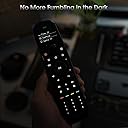
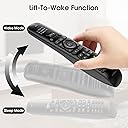
The SofaBaton U2 Universal Remote is a cutting-edge all-in-one controller designed for busy professionals who demand seamless smart home entertainment. It replaces over 15 remotes, supports 500,000+ devices, and features customizable macros, backlit buttons, and an OLED display with raise-to-wake functionality. Controlled via the SofaBaton app, it offers effortless setup, firmware updates, and unmatched IR signal strength up to 35 feet, making it the ultimate tool to simplify and elevate your home theater experience.


| Additional Features | Backlit, Digital Display, Ergonomic, Pre Programmed, Universal |
| Asin | B0DRP8MJ87 |
| Battery Type | AAA Alkaline |
| Best Sellers Rank | #34,878 in Electronics (See Top 100 in Electronics) #1,572 in Remote Controls (Electronics) |
| Brand | SofaBaton |
| Color | Black |
| Compatible Devices | DVD/Blu-ray Player, Home Theater, Projector, Set Top Box, Television |
| Connectivity Technology | Bluetooth, Infrared |
| Controller Type | Button Control |
| Customer Reviews | 3.7 3.7 out of 5 stars (227) 3.7 out of 5 stars |
| Item Weight | 0.31 Kilograms |
| Manufacturer | SofaBaton |
| Maximum Number Of Supported Devices | 15 |
| Maximum Range | 35 Feet |
| Mfr Part Number | U2 |
| Model Name | SofaBaton U2 Universal Remote |
| Model Number | U2 |
| Number Of Batteries | 2 AAA batteries required. (included) |
| Unit Count | 1.0 Count |
| Upc | 741421609891 |
| Warranty Description | 1 Year |
User
Impressive capability without complexity
As a former harmony enthusiast, when that company was eaten by Logitech and failed to update their product, I was pretty pessimistic about the future of universal remotes. For years, I just went back to having multiple remotes and with the advent of HDMI control. It wasn’t that bad however, whenever I wanted to change the settings of the picture or sound, which I do quite a bit, I was back to remote flipping.I honestly didn’t think a general universal remote could come close to what Harmony did so. I waited and waited. And then came the ultra expensive options (yikes). I knew that as good as those were, the amount of time would take to program them and set them up was going to be exhausting.I started to see positive reviews on sofa batons U1 so when the U2 came out, I still waited but eventually I just picked one up. With the improved back lighting and standard AA batteries, I knew they were on the right track. It only took me one session to get everything set up. My initial thought was “no activities”!? But I realized there was macros, and you could assign any button to any device Overriding any function on a set of custom remotes, which is honestly better in some ways and, more important, simpler.It’s really up to you to decide how you want to use things. One thing I will recommend is Define one button cross all devices (I use the input button) to use as a “fix it button” that will reapply the proper inputs and your preferred sound mode in case things get messed up or don’t complete. I was able to do that and many more things, even with the simpler architecture of the SofaBaton.As far as device button database is exhaustive, but fairly easy to search and find your devices as long as you know the model numbers. The remote supports infrared, unfortunately many devices nowadays use some form of RF and this just isn’t supported also with Bluetooth now becoming a standard in remote control that can make things a little bit difficult. So it will depend on how many of your devices use traditional infrared control, but I was able to get Apple TV working with Bluetooth and all my other devices through infrared very wellAs far as improvements, it would be nice to back up not only your device buttons, but your macros and everything but at least they have a backup function in case you need to reset the remote. But without the macros being saved, it seems kind of half solution. The only other improvement I could think of would be Support for a wider range, remote control like the aforementioned RF remotes and more than one blue Ray remote. That’s probably a bit too much to ask for and such as a simple device. But as far as infrared controls, it really seems complete and I couldn’t think of any major improvements.
User
False advertising
I purchased this remote to control both my Bluetooth Chromecast as well as my TV volume (via IR). The Bluetooth works great, and the IR works ok, so long as you're close enough to the device you are controlling. This is advertised as having a 35ft range. I found that the actual range is, at best, 20ft. So if you are looking for a product that actually works as advertised, then this is not the product for you.
User
Sony TV Owners - Don't Buy This Product
This product is, on the surface, very nice. It has a Bluetooth connected App on your iPhone for setup, a display that actually tells you what mode it is in when you pick it up, feels well made and is feature rich.Then why did I return it to Amazon for a refund?I have a TV, a TIVO Over The Air DVR and a multi-channel amplifier for surround sound. The TV talks to the Amplifier over the HDMI port, so it passes on the Volume control settings and switches modes seamlessly, between TIVO and it's internal streaming services. We were using just two remotes, the supplied TIVO one to watch regular TV channels, and a second for the TV itself, which we only picked up and used when we decided we wanted to Netflix or Amazon something.Then I rediscovered DVDs and my tidy world fell apart. We found streaming services were coming with a lot of constraints and shows we wanted to watch were now 'sublet' by other companies you have to sign up for additional monthly fees to watch. But, we also found Amazon sold DVDs containing entire series of shows at very reasonable prices. No contracts, no bleeding down our bank accounts month by month. Purchase and Done.Except to do this we now had to use the DVD remote to play DVDs and the Amplifier Remote to switch between the TIVO box and the DVD box. This is too complex.I bought the SofaBaton remote to solve this and was immediately enamored by it. To program it via the iPhone App you can actually choose the model number of your specific Sony TV and it finds the best code set. Gone was the challenge of paging through the instruction book to find the TVs section, then the Sony TV codes, only to discover there are 25 different codes for Sony TVs and you have to try each one at a time to determine which one comes closest to emulating ALL the keys on the original remote. I love this new concept of App programming, it was way overdue.So I chose my TV, my DVD player, my Amplifier. This was so neat!Except when I started using it. For some reason the SofaBaton remote handles powering the Sony TV poorly. It sends out repeat codes to the TV. When I switched off the TV with my SofaBaton the TV went off. Then barely two seconds later it turned back on again. This is the most stressful thing you can do to a piece of electronics. Power it down, and then power it back up before the electronics has had time to discharge fully and reset properly. It offers the greatest chance of breaking the electronics because it is caught in an intermediary state that is undefined. I lost and expensive TV due to a power brownout a few years back, that is a very similar stress event.It did it twice, and I was releived my TV was still operational after the ordeal. I didn't try it again. After calming down, I figured the remote is good but for this one flaw and tried to use its' Learning Feature to teach it how to behave properly by using the reliable remote that came with the Sony TV. So I successfully taught the Power Button for the TV on the SofaBaton and tried it again. And got the same stressful result.That was extremely frustrating and a real rookie mistake by SofaBaton that forced me to return the remote to Amazon for a full refund. Thank you Amazon for having a good return policy for defective products.If you don't have a Sony TV this is probably a very good remote, which is why I didn't give it just one star. This remote has a lot of potential. Just not in my house....
User
Works Well For IR/BT Components
I bought this to replace a Logi 665 Harmony IR remote as the newer electronics are not in the discontinued Logitech database. The U2 takes a little bit of getting used to compared to the Harmony remote (using the wheel, programing macro keys, setting delays within the macros, etc.). If you don't need to set up macros (i.e. turn on tv, then soundbar, then bluray player by only pressing one button) you can do this manually by using the wheel and choosing the equipment individually.The remote connects via BT to the phone app. I've only had to program ("learn") a few keys on the U2 for commands not included in the Sofabaton database. Programing the remote was easy--using the app you put in the model name/number to access the database. This is downloaded to the remote via the phone app. You can then change or add commands on the assigned buttons and set up macros if desired. Your settings can be backed up thru the app to the account you initially set up.Overall I am very pleased with the remote. I have a simple IR and BT equipment setup with several A/V components (two bluray players, streamer, soundbar, AVR, LG TV), so the U2 works well for my needs. The line of sight IR commands work from a fairly good distance (~20 ft or so) even for equipment behind cabinet glass doors.
User
Some pros, lots of cons....you get what you pay for with this remote
Pros and cons with this successor to the good 'ole days when Logitech Harmony dominated this universal remote world.Pros:• Clean button layout and connectivity to SOME devices• This model is very inexpensiveCons:• The app is LOUSY and has a 2.4 App Store rating....I'm a Day1 iPhone user and can't remember having to be forced to use an app with such a low rating...the ratings don't lie !• The devices display is wildly dim and hard to see in even a moderately lit room• Macros/Activities have to be connected to a single device, which is not intuitive to many less tech savvy users like family members...I had to create a how-to for my spouse and kids• Unlike the Harmony app/system, there are no remote codes for anything like AV receivers (e.g. Yamaha) for higher end users who need more options besides some simple soundbar etc BUT it was easy to manually configure/'learn' the commands from my AV receive that I needed• The macros are not 'smart' meaning if one of the controlled devices are already on, things get wonky immediatelyI'm curious if the next model up (twice the price) solves any of these issues...it works, but it's kind of meh if you're used to a much more dynamic and annoyance free experience.
User
Great replacement for my Logitech Harmony, but works with IR/bluetooth only
I was looking for a replacement for my Logitech Harmony, which isn't supported anymore. This was the least expensive option I could find that had a large database of codes and was programmable from the remote and included "macro" capabilities. Note that it supports IR/Bluetooth only, so RF type products (like new Roku streamers) won't work. I knew that going in, so it didn't impact my ability to control all my equipment -- note that the U3 now supports RF. I have been able to program the controller for my exercise room, which includes a TV, sound bar and fan. With the macro feature, I can execute multiple actions (i.e., turn on TV, sound bar, and fan) with one button. When I couldn't find codes for a piece of equipment (my fan), I had the controller "learn" from the remote. I highly recommend this product.
User
From 4 remotes to 1 in 5-10 minutes!
I’m very impressed with how easy it was to configure this remote for a new LG C5 TV (IR), Bose Sound Bar (IR), Apple TV (BT) and Amazon Fire Stick (BT).I inserted the 2 included AA batteries, downloaded the SofaBaton app and followed the app prompts. Within 5-10 minutes I had all of the above working without reading any instructions or watching any videos. Everything just worked from the get go with the exception of one minor issue with the Fire Stick configuration. Initially, I had to switch to TV mode to adjust the volume for that device. I had the SofaBaton remote learn the volumes up and down from the Fire Stick remote. Problem solved.The only additional info I needed was the exact model number for my TV and sound bar, and the knowledge that Apple TV and Amazon Fire Stick communicate with remotes via Bluetooth rather than IR.My goal when researching universal remotes was to find something that intuitively worked with all my devices, was backlit, and had rechargeable batteries. This Sofabaton U2 remote ticked those boxes with the exception of the rechargeable batteries. I’ll just use rechargeable batteries with a separate external charger. The raise-to-wake feature is a really nice bonus!I tried several other universal remotes before I found the U2, but those other remotes wouldn’t work with my LG TV, which wouldn’t pair with them.The build quality of the U2 remote appears to be excellent. It feels really good in the hand and has a good selection of buttons. It’s an impressive device.
User
Universal remote for IR use only.
U2 uses only Infrared interactions with TV, Cable box, Roku, and AV receiver. It was inconsistent in controlling equipment after set-up. The remote equipment data base at Sofabaton did not include info on the equipment I own, so I had to force U2 to learn directly from the equipment remote, which did not always work. I spent 2 weeks, ans bought two IR extenders trying to makew it work. I am giving up and returning it to Amazon.
User
Un control remoto universal increíble que remplazo muchos controles en mi sala de entretenimiento.
Es una maravilla de control remoto universal. Reemplazó muchos controles remoto que tenía en mi sala de entretenimiento.Por ahora controla mi Sofabaton U2: TV Samsung, Amplificador Stereo Rotel, Amplificador 5.1 Yamaha, Reproductor CD Onkyo, Reproductor Bluray Sony, Chromecast y Nvidia Shield. Que tengo en mi sala de entretenimiento.Al principio cuesta un poco de trabajo como programarlo, una vez que entiendes la ropa facilisimo lo programas incluso también las macros. Yo para mí Chromecast hice una macro (Encender TV Samsung en HDMI 1) y lo hace. Estoy encantado.
Trustpilot
1 week ago
2 months ago