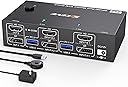
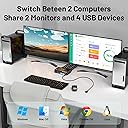
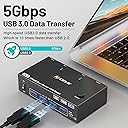
🚀 Elevate your workspace: Dual monitors, dual computers, zero hassle.
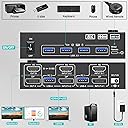
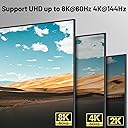
The MLEEDA 4K@144Hz & 8K@60Hz Dual Monitor KVM Switch empowers professionals to seamlessly manage two computers with two ultra-high-definition monitors. Featuring HDMI 2.1 and DisplayPort 1.4 inputs, four USB 3.0 ports for peripherals, and a wired remote for instant switching, it delivers ultra-fast 5Gbps data transfer and broad OS compatibility. Designed for streamlined multitasking, this compact device enhances productivity and workspace efficiency with stable power delivery and versatile display modes.


| ASIN | B0DD3WF36H |
| Actuator Type | Push Button |
| Best Sellers Rank | #87 in KVM Switches |
| Brand | MLEEDA |
| Circuit Type | 6-way |
| Compatible Devices | Computers (PC, Laptop), Monitors, TV Box, Wireless Keyboard and Mouse, Windows, Mac OS, Linux, Chrome OS |
| Connector Type | Plug In |
| Contact Material | Metal |
| Contact Type | Normally Open |
| Control Method | Remote |
| Control Type | remote |
| Current Rating | 2 Amps |
| Date First Available | August 14, 2024 |
| International Protection Rating | IP54 |
| Item Weight | 8.5 ounces |
| Item dimensions L x W x H | 3.94 x 2.56 x 1.26 inches |
| Item model number | 8K Dual monitor KVM Switch |
| Manufacturer | MLEEDA |
| Number of Items | 1 |
| Number of Positions | 2 |
| Operating Voltage | 5 Volts |
| Operation Mode | ON-OFF |
| Product Dimensions | 3.94 x 2.56 x 1.26 inches |
| Terminal | Solder |
| UPC | 027685246257 |
| Unit Count | 1.0 Count |
| Upper Temperature Rating | 70 Degrees Celsius |
| Wattage | 10 watts |
A**R
Neat, but small issues and no longer use (edit: issue fixed, using 2 of these two now)
(older review: 4 stars, scroll down for my latest update) I work from home and have two monitors. My macbook has an HDMI port, but only one. Since I don't want the two monitors to mirror each other, I can't simply split the HDMI port into two HDMI connections. So I use a USB-C to HDMI cable. This works great on my macbook for personal use. Then I also have my work computer. Previously I was using a second macbook for work, but more recently, since I moved companies, I use a Windows laptop for work. Same issue: only one HDMI port. So I use another USB-C to HDMI cable. In order to swap, I grabbed two LG monitors. The LG monitor in question allows multiple HDMI inputs, and I can use the monitor's settings interface to swap between input sources. This is what I have been doing for a while. I got sick of it, so I did some googling and found out about KVM switches. So I gave this thing a shot. I love the switch thingy. It does add a bunch of wires to my setup, but maybe worth it for the nice switcher which is amazing. Although then I do need to see an LED on all the time, which is kind of annoying since I sleep in the same room. Minor issues at first. Gave this thing a chance for a while. It was working pretty good. One of the first things I noticed is because it swaps both computers at once, I lose the functionality to swap one monitor to my work laptop and one monitor to my personal laptop. I was missing this functionality, but it wasn't too bad. A bigger annoyance, is when switching, it would very often confuse which HDMI is the left screen and which HDMI is the right screen. It was very inconsistent regarding this and became a large issue that was eating a lot of time when I need to work and don't have time to fuss with monitor issues. I need to be able to just turn my monitor on when it's time to work and have the thing work. But instead it would have monitors swapped, and I'd need to swap over, then swap back to fix. Another issue I noticed is that on my personal computer it was began flickering, where it goes black, then comes back to normal again. It would do this a little, then work. Then over time the issue became more prominent where this flickering would go on for longer durations. It could just be the USB-C to HDMI cable. But when I go direct, I don't have this issue. When going direct, I sometimes might see it flicker once, when turning on the screen for the first time, then it's on, and stays on. But when I go through this box thingy, it keeps on flickering, and takes away from the experience I'm used to when using my personal laptop. I'm sure this box has better usages. I know the mouse and keyboard switcher would be great, but since I'm on Mac and on Windows, I don't want to use the same keyboard for both, so I just use it for the monitor swapping. I've read that using an USB-C to HDMI cable can amplify these sort of flickering issues. If laptops only provide one HDMI port, I'm not quite sure how to use this thing correctly without amplifying flickering issues. There's also the monitor confusion issues, where it would frequently confuse the left and right monitors. This might just be due to swapping both HDMI's at once. This doesn't usually happen to me when I swap one monitor at a time when I go direct through the LG input source switcher. Also my whole reason for having a switcher to begin with is to re-use my monitors for both work and personal use, due to limited desk space. And when we add more wires into the equation, along with finding a place to put this box, it takes up more room. I ended up just settling with my current LG HDMI input swapping built-in feature, when going direct. I'm sure there's better ways to achieve my optimal desired setup. But this thing was a fun ride which taught me a lot, and fun while it lasted. It's very possible one of my USB-C to HDMI cables is the real culprit, but I think the final straw for me it was just too many wires, and seeing an LED on all the time is too distracting when I need to focus on my work, and also when I need to sleep. I'm not totally upset or anything, I might give this thing a shot again another time when I want to do some more experimenting. But yeah, I think it was worth the learning experience for me and having something cool like this to play around with. It did mostly work though. Would I recommend this thing? Maybe. Definitely a cool factor about it. I don't think this is optimal setup for me, but I don't think the product is bad or anything, and I can see it being optimal for someone else. === Edit / Update === (newer review: 5 stars) While I encountered a small issue initially, I solved the issue and found out it actually wasn't the KVM's fault. Currently using two of these. I solved the flicker issue. That was because I needed a Mac dongle rather than a more standard general-purpose one. I wound up using Apple USB-C Digital AV Multiport Adapter This allows me to turn the Mac's USB-C into an HDMI, then together with Mac's HDMI port, I'm able to have two HDMI ports to work with for this KVM. I recently swapped out my LG monitors, and grabbed DoubleSight monitors with dual monitor stand. This doesn't have the input switcher, so I'm using the KVM switcher. This is working really well. My small issue now is a Mac issue where it doesn't seem to always remember which is the main monitor and which is the extended monitor. But I realize now that this has nothing to do with the KVM. This thing is really good. And the external wired controller button for swapping between monitors is a game-changer and really makes my setup work for toggling between my work and home computers. Although keep in mind there's a newer version of this product available. You might give that one a shot.
F**E
This KVM is awesome!
This KVM has worked flawlessly, I'm very impressed. It's very compact and fits under my desk out of the way. It handles my low-resolution monitors with ease (1440p@120Hz). I got this to make working from home easier, letting me switch my dual-monitor setup between gaming PC and my work laptop dock. In searching for similar KVMs, I found much more expensive ones and this was the first that was affordable, so I was skeptical that it'd work... it has surpassed my expectations. It has more USB ports than just Keyboard and Mouse, so I can swing my USB audio output and webcam between PCs too. DisplayPort is great, many alternatives I saw have HDMI only or do some HDMI conversion inside; passing full DisplayPort between PC and monitors gives optimal compatibility for gaming resolutions and speeds. Sometimes when switching between PCs, the keyboard doesn't come up properly (the PC shows on the monitors, but keypresses don't work) but switching to the other PC and back again resolves this. It's a pretty standard issue with other KVMs I've used and I don't mind this at all. Overall, I love it.
L**N
Good for light use
It does the job for a fraction of the price of other KVMs. The tradeoffs are: 1) No PCI passthrough, so if you switch the KVM to another HDMI input, whatever's connected to the other HDMI won't know it's not connected to a monitor anymore. I found this annoying when using 2 laptops connected to a single monitor through -- windows would remain off-screen on the laptop that wasn't using the monitor. 2) Slow and sometimes janky switching -- occasionally switching inputs would result in a noisy image or peripherals not working. I'd have to switch back and forth again to fix it -- which is slow, because it can take about 10 seconds for everything to come online after switching. If you need a KVM for fast and frequent switching, consider other models. If you want a KVM for infrequent switching (like using your computer monitor for a gaming console), this does the job at a good price.
M**N
Exactly What I Needed for My Setup
Having two computers and two monitors hooked up to a KVM switch is 10x easier than having to swap cables on the computers, or trying to dual-boot your pc. With the press of a button, I can switch between my desktop and my laptop pretty easily. A couple useful things to note to help you make your decision about this switch: 1. This switch doesn't support HDMI or HDMI to DisplayPort adapters/converters. It will support HDMI to DP cables, USB-C to DP cables and adapters, as well as mini-DP to DP. 2. There are 4 USB slots on the front to connect your peripherals. I have a mouse, keyboard, and webcam plugged in, so I have one USB slot open which I'll probably use for a USB thumb drive, and then I won't have any open. You'll want a bigger switch if you plan to use more USBs between two devices, but if you're not sure, assume 4 is enough. 3. I bought this switch specifically because my desktop has two DP ports, but no HDMI ports. I bought a second monitor, and many of them have DP, but not all of them. You will also need six DP cables depending on your setup (1 from each monitor to the switch, and then 2 from each computer to the switch), so be aware of your hardware limitations. This is the first KVM switch I've ever used, but it works seamlessly and I had no troubles setting it up; it's just plug-and-play, and I hope if I buy more switches in the future, they work as well as this one.
I**L
L'adattatore switch USB si è rivelato un investimento eccellente per ottimizzare la gestione delle periferiche su quattro diversi computer. La transizione tra i dispositivi è sorprendentemente veloce, persino quando si utilizzano periferiche con LED, senza la necessità di ricorrere a un'alimentazione supplementare per lo switch. Una delle caratteristiche più impressionanti è la stabilità del segnale, che si traduce in un funzionamento impeccabile della tastiera, del mouse (senza alcuna perdita di polling), della webcam e del microfono. Questo aspetto è fondamentale per chiunque richieda una connessione affidabile per svariate periferiche senza compromettere la qualità. La facilità d'uso è un altro punto a favore, rendendo l'adattatore accessibile anche per utenti meno esperti. L'interfaccia intuitiva semplifica la commutazione tra i computer, migliorando notevolmente l'efficienza nell'ambiente di lavoro o di gioco. In sintesi, sono estremamente soddisfatto di questo switch USB che ha superato le aspettative in termini di prestazioni, affidabilità e facilità d'uso. Consiglio vivamente questo prodotto a chiunque cerchi una soluzione pratica e efficiente per gestire multiple periferiche su diversi computer.
E**O
Fonctionne bien, ça commutate! Cependant il ne faut pas utiliser d'équipements Bluetooth (souris dans mon cas), car il y a une latence fort désagréable!
J**B
Funciona suficientemente bien, pero uno de los cables llegó dañado
M**O
Es lo que se explica. Admite usar un hub para poder conectar los dos monitores. Es decir, del ordenador al KV. Solo viene con dos cables Hdmi, por lo que si quieres conectar 2 ordenadores a 2 monitores necesitas comprar otros 2 cables. Yo uso un teclado y un ratón que me permite conectarme a varios ordenadores cambiando de uno al otro directamente desde el teclado y ratón, por tanto no he realizado la conexión USB. Estoy contento, funciona bien y el equipo es lo que dice la descripción y enseñan las fotografías.
S**M
Works well, but uses USB micro for power cable.
Trustpilot
3 days ago
2 days ago