🎧 Level up your game audio—wireless, lag-free, and totally in control!
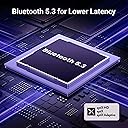
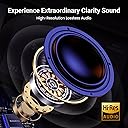
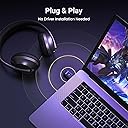
The UGREEN USB-C Bluetooth Adapter for PS5 leverages Bluetooth 5.3 and Qualcomm’s aptX Adaptive codec to deliver high-fidelity, low-latency wireless audio. Designed for plug-and-play use with PS5, Switch, Windows, and macOS, it supports multiple codecs with visible LED indicators for codec status. This compact transmitter ensures synchronized audio-video experience under 100ms latency, perfect for immersive gaming and media consumption without the hassle of wires or software installation.


| ASIN | B0D7CKV1J8 |
| Best Sellers Rank | #292 in Video Games ( See Top 100 in Video Games ) #5 in Playstation 5 Accessory Kits |
| Brand | UGREEN |
| Color | Green |
| Compatible Devices | Gaming Console, Headphone, Laptop, Speaker |
| Connector Type | USB Type C |
| Customer Reviews | 4.3 out of 5 stars 1,907 Reviews |
| Finish | Matte |
| Finish Type | Matte |
| Item Dimensions | 1.24 x 0.63 x 0.28 inches |
| Item Weight | 4 Grams |
| Item dimensions L x W x H | 1.24 x 0.63 x 0.28 inches |
| Manufacturer | Ugreen Group Limited |
| Model Number | 45008 |
| Number of Items | 1 |
| Number of Ports | 1 |
| Package Quantity | 1 |
| Power Plug Type | No Plug |
| Unit Count | 1.0 Count |
B**K
Great CODEC Control for the Price
Absolutely fantastic BT audio adapter. Heads up, this is only for connecting bluetooth headphones, speakers, etc. It won't work with mice, keyboards, or the like. However, it's functionality as a bluetooth audio adapter is FANTASTIC, especially for the price. See, unlike a regular bluetooth adapter, it does not show up as bluetooth in Windows. Instead, Windows sees it as an audio output, like a soundcard. All the bluetooth functionality is handled between the adapter and the audio device (headphones, speakers, etc). Most bluetooth audio adapters work like this. What makes the UGREEN stand out is that you can SEE and CONTROL what codec is being used. By default, it's going to connect at the best quality that it can. Each time you press the button on the adapter, it goes one step down on that codec quality ladder. 1. aptX Adaptive-HQ (High Quality) 2. aptX Adaptive-LL (Low Latency, good for gaming & audio/video sync) 3. aptX HD (previous generation of aptX than Adaptive, so a little lower quality than Adaptive-HQ) 4. aptX 5. SBC (The old school bluetooth audio codec that almost everything is compatible with but has such a low bitrate that it sounds tinny and bad) Cool, right? You can also SEE what mode it's using. The light on the adapter glows depending on what mode you're in. 1. Green = aptX Adaptive-HQ 2. Cyan = aptX Adaptive-LL (like a pale greenish-blue) 3. Purple = aptX HD 4. Yellow = aptX 5. Blue = SBC (like a deep blue, it's easy to see and hear the difference in this and the aptX Adaptive-LL's cyan) This feature alone, being able to switch the coded and the color showing so you KNOW which codec you're using, letting you peer into the black box so you KNOW which codec is being used is what makes the UGREEN adapter the best bang for the buck. Sure, the Creative BT-W6 has an app that lets you set and control this, but it's more than 2x the cost.
K**E
Seamless Bluetooth Connection for PS5 — Works Perfectly!
The UGREEN USB-C Bluetooth Adapter for PS5 (Bluetooth 5.3 Audio Adapter) is a fantastic accessory that delivers exactly what it promises — smooth, lag-free wireless audio. Setup was completely plug-and-play, connecting instantly to my Bluetooth headphones without any hassle or extra software. The sound quality is crystal clear with zero noticeable delay, even during fast-paced gaming sessions. The compact design looks great on the console and doesn’t get in the way of other ports. It’s reliable, easy to use, and a great value for anyone wanting to enjoy wireless audio on their PS5. UGREEN really nailed it with this one!
L**K
Worth it.
Works great. No noticeable lag. The sound is just as good as through my sound bar. Very easy to install and setup.
V**X
#HonestTake
Works as intended; I use it for the PS5 works okay with my AirPod Pros there's slight audio lag. The lag can vary upon the devices Bluetooth capability. Fairly easy to pair and setup. Air Pods mic does not work. Have use an external device for a mic. Comparable with a lot of different headsets. The lag holds it back. The lack of being able use your mic on your headset holds it back.
Y**O
Greatt for fixing Windows 11 headset driver issues
After switching from windows 10 to windows 11 i had a lot of issues trying to get my head set to work properly where i could not only speak but hear from the same headset. Essentially using slack or zoom i could only speak but i couldnt hear through my head set as windows 11 was defaulting to a stereo/output device other than my mic/input device. It was driving me crazy but Teams was working, i presume due to some internal codec/driver change it does automatically that allowed my headset to work there. After spending hours messing with settings to no avail i gave up and bought this. Lo and behold this deivce fixed my problems in about 10 minutes of me tinkering with it. It probably would have taken my 1 minute had i just used it but before i realized how it worked i tried to connect my head set to both the computer and the device to try and rig it to where the sound and mic would work for both meetings and media, this caused issues however. I was able to get my headset to work properly after disconnecting my headset from windows, plugging in this device and setting it up with windows, then i paired my headset with the new device and its all working, You may need to set the new device as the default for the input/mic on your sound settings but it works like a charm in mic mode, double press the device button, i can now listen to media and do meetings properly, however, the audio does suffer in this mode. When using the default audio mode i can use my headset for media with much better quality but i do lose the ability to use it as a mic/headset for meetings so bear this in mind Im about 30 minutes - 1 hour in with it and its working great, i dont really notice too much if any lag between the sound and the video of the media i watch. Highly recommend if you have the same windows 11 driver issues or if you need a good quality bluetooth receiver for your device.
X**O
Frustrating to say the least
This product was an absolute nightmare from start to finish. I bought it hoping for an easy Bluetooth solution to connect my wireless headphones to my PS5, desktop, and phone, but it failed spectacularly on every single front. First of all, the instructions are barebones and completely unhelpful. After following them step-by-step, I got the device to blink red and blue, which should indicate it’s in pairing mode. It detected my AirPods and Bose earbuds, but no sound ever came through. The device picks up the microphone volume for some reason, but it refuses to transmit actual audio. It just sits there blinking, doing nothing. I spent hours troubleshooting—reading the manual, watching tutorial videos, testing it across multiple devices (PS5, desktop, phone, Xbox)—and none of them could get this thing to work. On my computer, it threw a driver error that blocked the connection. On my PS5, it connected for game audio only, but wouldn’t allow any microphone input for voice chat. Essentially, you can listen, but you can’t speak. The PS5 still defaults to the built-in controller mic, which defeats the whole purpose of using a high-quality Bluetooth headset. There’s no option to select this device as an input source. It’s incredibly misleading that the product description implies you can use any Bluetooth headset for both game audio and voice chat. I also wanted this adapter to help improve Bluetooth latency on my Windows 10 PC, but the device didn’t function at all. It never established a stable connection, and after a while, I just gave up. If you’re looking for a low-latency Bluetooth adapter, skip this product entirely—it’s useless. On top of all that, when I tried using it with my phone, it made no difference whatsoever. I connected the device, played music, and even after unplugging it, the audio didn’t so much as skip. It’s like the device wasn’t even part of the chain. It does nothing. And to make matters worse, some people seem to be receiving empty boxes! I was lucky enough to actually get the product, but given how it performs, I’m not sure if I’m the lucky one here. The box is the best thing about this purchase—clean, sleek, professional-looking packaging—but the device inside is completely non-functional. In summary, this product is a total scam. It’s not user-friendly, it doesn’t work as advertised, and it's filled with compatibility issues that the seller conveniently fails to mention. If you’re thinking of buying this for PS5, Windows 10, or even your phone, don’t waste your time or money. You’re better off getting a reliable USB Bluetooth adapter from a reputable brand. I wish I had read more honest reviews before purchasing. Avoid this at all costs.
L**.
Easy for anyone to install.
Excellent product!!! Step 1- I opened the box and briefly read the instructions. Step 2- I plugged the adapter into the c-port on my PS5( the adapter had a blue light that turned on to show it had connected literally in less than 10 secs). Step 3- I went into the settings for sound and followed the neccassary steps to connect my head phones and earbuds. 1st: Sony - WH-1000XM3 Wireless Noise Cancelling Over-the-Ear Headphones with Google Assistant - Black An older model yet still compatible with many devices and working as well as the day I bought them in 2019. 2nd: Tozo-10 wireless noise cancelling earbuds. Very affordable and you definitely get your bang for your buck. I mentioned these items because they work seamlessly, and were easily connected with my PS5 and the UGREEN USB-C Bluetooth Adapter for PS5.
A**D
Bluetooth connection.
It works well with any bluetooth device. I had a headphones that were not Sony and it worked with my Ps5. Great product.
Trustpilot
3 weeks ago
1 week ago