We remain fully operational. Our teams are working around the clock to ensure your deliveries continue safely.

DOWNLOAD THE APP


Customer Services
Copyright © 2025 Desertcart Holdings Limited
DOWNLOAD THE APP


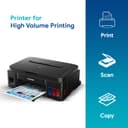
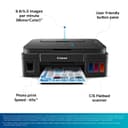


🖨️ Print More, Stress Less — The Ultimate InkTank Powerhouse for Home & Office
The Canon PIXMA MegaTank G3000 is a versatile all-in-one inkjet printer designed for home and office use, featuring high-resolution color printing at 4800x1200 dpi, fast monochrome print speeds of 8.8 ppm, and seamless WiFi and USB connectivity. It includes refillable ink tanks with an impressive yield of up to 7,000 color and 6,000 black pages, plus scanning and copying capabilities, making it a cost-effective, reliable choice for professionals seeking quality and efficiency.


| ASIN | B01H25A1AE |
| Additional Printer Functions | Copy, Scan |
| B&W Pages per Minute | 8.8 ppm |
| Best Sellers Rank | #3,167 in Electronics ( See Top 100 in Electronics ) #6 in Ink Tank Printers |
| Box Contents | Printer with Ink Tank and Cartridge Unit Set;USB Cable, Power Cable, Print Head x2/2N;Manual and Driver, Ink Bottle x6/6N,,,,, |
| Brand | Canon |
| Brand Name | Canon |
| Color Pages per Minute | 5 ppm |
| Colour | Black |
| Compatible Cartridge | GI-790 (Black), GI-790 (Cyan, Magenta, Yellow) Ink Bottles |
| Compatible Devices | Smartphones |
| Control Method | App |
| Controller Type | Push Button |
| Country of Origin | Vietnam |
| Customer Reviews | 4.0 out of 5 stars 12,867 Reviews |
| Display Type | LCD |
| Dual-sided printing | No |
| Duplex | Manual |
| Hardware Interface | USB |
| Importer Contact Information | Canon India Pvt Limited.214-218, 2nd floor, Narain Manzil, Barakhamba Road, Connaught Place, New Delhi-110001, India |
| Ink Color | Black;Cyan;Magenta;Yellow |
| Item Dimensions D x W x H | 33D x 44.5W x 16.3H Centimeters |
| Item Type Name | Inkjet Printer |
| Item Weight | 6 Kilograms |
| Manufacturer | Avail free installation on this model from Canon : contact brand customer care on: [1800 180 3366 ][1800 208 3366] Timings: 8:30am-5:30pm post receipt of product to book and schedule free installation and support, Canon |
| Manufacturer Contact Information | Avail free installation on this model from Canon : contact brand customer care on: [1800 180 3366 ][1800 208 3366] Timings: 8:30am-5:30pm post receipt of product to book and schedule free installation and support |
| Max PrintResolution Color | 4800 x 1200 |
| Max PrintSpeed BlackWhite | 4800 x 1200 |
| Maximum Copy Resolution Black and White | 4800 x 1200 |
| Maximum Copy Resolution Color | 4800 x 1200 dpi |
| Maximum Copy Speed Black and White | 8.8 ppm |
| Maximum Media Size | 4.0"x6.0" till A4 / Letter / Legal / A5 / B5 |
| Maximum Sheet Capacity | 100 |
| Model Name | Pixma |
| Model Number | G3000 |
| Model Series | Pixma |
| Number Of Trays | 1 |
| Other Special Features of the Product | *Warranty – One Year onsite or 15000 Prints whichever is earlier. *Warranty is subject to Terms & Conditions. For details, please visit Canon India website |
| Output sheet capacity | 100.0 |
| Packer Contact Information | Canon Inc., 3-30-2, Shimomaruko, Ohta-ku, Tokyo 146-8501, Japan |
| Paper Size | 11.7 L x 8.3 W inches |
| Power Consumption | 1.7 Watts |
| Printer Output | Colour |
| Printer Output Type | Colour |
| Printer Resolution Horizontal in Black and White | 1889 Centimeters |
| Printer Type | Inkjet |
| Printing Media Type | Envelopes, Paper (plain) |
| Printing Technology | Inkjet |
| Resolution | 4800 x 1200 |
| Scanner Type | Flatbed |
| Special Feature | *Warranty – One Year onsite or 15000 Prints whichever is earlier. *Warranty is subject to Terms & Conditions. For details, please visit Canon India website Special Feature *Warranty – One Year onsite or 15000 Prints whichever is earlier. *Warranty is subject to Terms & Conditions. For details, please visit Canon India website See more |
| Specific Uses For Product | Home, Office |
| Total USB Ports | 1 |
| Unit Count | 11 Count |
| Warranty Description | 1 year or 15000 prints, whichever is earlier from the date of purchase- On-site warranty. |
| Warranty Type | Limited |
| Wattage | 1.7 Watts |
N**N
Review after using this printer for over an year
I am writing this review on this printer after using it for over a year. In this year, I printed about 2000+ pages both color and black&white. So my review is based on observations on them. === Print Quality === This is definitely the brightest point with this printer. I used Epson ink tank printer earlier and were not satisfied with the results of it. But this Canon printer makes the cut. I am amazed to see the results of the printing both color and B&W. I printed many photos on photo papers and the results were better than the inkjet printers. === Ink Longevity === This is another biggest selling point of this printer. The printer came with 4 ink bottles - Black, Cyan, Magenta, Yellow. After printing over 2000 pages so far (photos and documents) I still see 50% of the ink left. === Ease of Use === I can connect this to my wifi router and get started in 5 minutes. All I need is to read the instructions carefully. And voila, all my devices - Computer, Laptop, Mobile and iPad - can print without any hassles. They can detect the printer and starts printing just in minute. === Paper Feeding === In my more than one year experience with this printer, I never faced a single paper jam. If at all something happens, check paper feeder if any small objects stuck accidentally. === Scanner === Not used much but overall quality was ok. If you want crystal clear scans, this is not for you. === Copier === Its just a click of button. Keep your document inside the scanner and click on blabk or color button. Your document copy is ready. === Issues === So far I came across only one issue. The printer orange light starts blinking and the messages shows that the ink cleaner bed was overflown and needs a service. But I followed the instructions on Youtube videos, cleaned the ink cleaning bed and cartridges for 4 to 5 times and then the printer came back to normal. But this took over 4 hours to understand and solve the issue. === Advice === 1. Do not perform system cleaning too many times. This will cause overflowing of tank on ink cleaner bed and malfunction your primter. 2. Do not use cheap paper, use paper such as JK Sparkle etc. 3. Do not print photo prints on normal paper, use photo paper or thick paper. 4. Make sure to print few papers at least once a week with all colors. This will reduce color logging inside the tubes. Overall, I am very satisfied with this printer and the quality of prints it gives you. Update 11/11/19 I faced one more issue after long time. The printer unable to feed the paper and I couldn't find any object inside the feed. After two days of struggling I came up with an idea of reverse feeding the paper from inside the printer, i.e. open the top box to see printer inside and switch off and onthe printer. While stopping, it reverses spinning wheel and load paper manually to it just in time. Voila, it started.
A**Y
Good printer but difficult to configure for wireless connection
Printer: It's meant for regular and perhaps heavy use. The amount of ink provided wouldn't be utilised even in many years with occasional use. It stopped working after about two and half years, perhaps because of low use (ink dried in the line and/or printer head). I would suggest to use the printer head cleaning software option once every few months if you are not using it regularly, to avoid having printer issues due to clogged lines due to dried ink. It doesn't print on both sides of the pages on its own. You have to print one page then feed it again manually if you want to print on both the sides, which is cumbersome. So, consider a printer with feature of duplex printing if you intend to print large no. of pages on regular basis, to avoid wasting paper by leaving one side unused. Photo printing: I tried it only for a few photos. Quality seems okay but not great. But I am no expert on this and I don't have much experience with photo printing at home. Scanner: it's good, no complaint about resolution/performance. However, S/w is not very user friendly. If the document is faded, it's difficult to choose the best mode from many scan modes available. Photocopier: works well - both colour and black & White modes. OnsiteGo Warranty (purchased along with printer) I had taken extended warranty for 2 years from OnsiteGo which repaired it free of any charges. Their service was very smooth and convenient as they picked it and delivered to my home after a day or two. So, it was a quick and convenient service. The only issue I came across with OnsiteGo is that their pick up guy didn't have any Identity card or authorisation letter from the company, so it was difficult to ascertain the authenticity of the service person whlle allowing him to take the printer away. It caused some inconvenience but I handed over the unit after some phone calls and email exchanges with the support team. I would recommend to go for OnsiteGo warranty particularly for items like printers, so that you get door step service in case of need. Overall, it was good experience with them.
C**N
Very Good Printer for Home and Office
I am very happy with this Canon PIXMA G3000 printer. It prints fast and the quality is very clear. The WiFi feature is easy to use and helpful. I can print from my phone and laptop without any wire. The ink lasts long and I got two extra black ink bottles, which is great. It is perfect for both home and office use. Setup was simple and everything works well. I strongly recommend this printer to everyone.
T**Y
Canon: Money Drain-on!
Writing this review after just 13 months of purchasing this printer. Over these 13 months I probably printed around 100 color pages for school projects. Prints were OK. But what the product details don't tell you are: 🚩 If you don't use this printer almost daily or at least on weekly basis, this will generate periodic problem with its printer heads 🚩 So, be prepared to face the dreaded B204 error (or some variation of it) 🚩 B204 basically indicates a communication failure from printer head. But guess what - heads are almost 3 - 4K (yes, almost 40% of the printer cost). 🚩 Over this period of 13 months (& print of ~100 pages), I came across this B204 issue 3 times. First time, I lodged a complaint over Canon app - where technician closed the ticket without any reason or communication. 🚩 After some serious attempt a technician was finally put to work - who called and advised to put the printer on service mode and do a deep cleaning of print heads. Thankfully that trick worked and printer was back in action. 🚩 The second time when this error happened I followed the same trick of rebooting post service mode and it worked again. 🚩 Unfortunately now it is no longer working and since it's beyond 12 months, Canon technician asks for Rs. 649/- for visit. And I know they will eventually change the head and charge another 3-4K. So, what's the point in buying such a printer? Which can't even last a year. Really shame on Canon to even sell such a shabby product in the first place. Conclusion: 🚩 If you have regular usage, this may be ok. But I will still recommend NOT to buy ink tank printers. Rather buy printers with cartridges (not ink tank). 🚩 If you have infrequent usage, buy laser jets (well, yes - you will mostly be stuck with Monochrome for lower price band - but it's still worth it) I am going to dump this sob printer for good! Such a waste!!! Update March 2022: Had to pay 649/- for a service inspection and it was found that the PCB (the motherboard) went bad! 🤕 A replacement ordered and had my purse lightened by ~4K. Be cautious!!!
N**A
Canon surely brings life to colors. Excellent scanner too. Made the right choice.
Chose canon over others due to its mega reputation and Classy size & shape.Its all-in-one ability supersedes all contemporary brands. Here are my few observations of the product : 1.) Its an ink tank printer that comes with separate ink tanks to be filled with ink red , yellow , blue & black .Its always considered to be more economical for per page printing and should be chosen if you have bulk work on a routine basis. In these ink tank printers, it is also required to take prints on a minimum weekly basis or prolonged non-usage may lead to drying of heads . 2.) The construction of the printer is very elegant and solid and the ink tanks are absorbed in the regular chassis of the printer unlike HP brand, however it is my personal preference. Solid doesn't mean you can afford to drop it , it means the plastic used for construction feels very premium and rigid. 3.) Regarding functionality - It can scan and print documents very fast .Page size supported is from 4.0"x 6.0" photo paper to A4 ,Letter ,Legal , A5 , B5 . I purchased glossy kodak photo papers 280 GSM & paperone A4 100 GSM papers and the print quality was excellent. For pictures , it takes few minutes but its worth the wait .If you choose the right paper the photos are bound to be very good ,However at few places i found the shade of green slightly dark in print than in actual photo that was scanned. Resolution is good for both photos and documents. Printing makes slight noise but is tolerable , its not like neighbour or even other room person will be disturbed. 4.) Got it with additional warranty for onsite repair for next 2 years. 5.) I bought it first then realized i don't have that much work to use it on daily basis so i would ask my readers to buy only if you have routine works or make use of shops.
N**S
Good quality printer
Good quality print and working. I write review after 6 months used.
R**R
Great
Good product
S**I
Not really a helping one....
After having frustrating experience with HP printer with its expensive cost of printing (70Rs/ print) we have chosen Canon G3000 printer after carefully reviewing the feedback on choices we have i.e. Brother, Epson and Canon; however disappointed with the performance. Whatever the product is i must accept it, this is only to share my views and not in any negative sense. Starting with Pros: - Printer comes with plenty of Ink and that will probably provide ROI with in 2 years considering cost of printing with HP. - Tech support is too fast, they sent an engineer within 2 hours placing request. What is not working: - This is not a simple plug-n-play printer, the behavior of the printer requires good knowledge of how this works. For e.g. you have to leave the printer on for 5 minutes before you start printing. My exp previous printer is almost flawless and smooth. - Print quality is pale, dull. What you see on screen is not what you get; this conclusion is after comparing printouts taken from earlier printer. However a good point is that the text is sharp. - Software is difficult to trace, operate and use. Not sure why the software is provided in first place when you can directly fire printout without installing this software. - Very difficult to understand error codes. The power on light is blinking indicating that there is no paper, however the problem is some thing else. The above issues i have mentioned are some thing you cant understand/ check when you purchase online.
Trustpilot
2 weeks ago
2 weeks ago