Buy anything from 5,000+ international stores. One checkout price. No surprise fees. Join 2M+ shoppers on Desertcart.
Desertcart purchases this item on your behalf and handles shipping, customs, and support to Nicaragua.
๐ฏ Master your multi-device setup with one sleek switchโbecause your desk deserves the best.
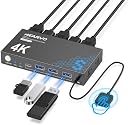
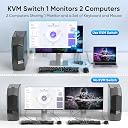
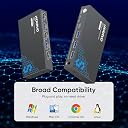
The Hearvo USB 3.0 HDMI KVM Switch S7232H empowers professionals to effortlessly toggle between two computers using a single 4K@60Hz monitor, keyboard, and mouse setup. Featuring four USB 3.0 ports for rapid peripheral sharing, HDCP 2.2 support for protected content, and dual switching options including a wired remote, it streamlines workspace efficiency with plug-and-play ease and adaptive EDID for optimal display performance.


| ASIN | B0D5D4FK1H |
| Best Sellers Rank | #3 in KVM Switches |
| Brand | Hearvo |
| Brand Name | Hearvo |
| Circuit Type | 2-way |
| Color | Black |
| Compatible Devices | PCs, Laptops, PS4, and other devices with USB and HDMI capabilities that meet the switch's requirements |
| Connector Type | Hdmi |
| Contact Material | Aluminum |
| Contact Type | Normally Open |
| Control Method | Remote |
| Control Type | switching |
| Current Rating | 1 Amps |
| Customer Reviews | 4.2 out of 5 stars 607 Reviews |
| Included Components | kvm Switch๏ผUSB 3.0 cable๏ผController๏ผUser manual |
| International Protection Rating | IP20 |
| Item Dimensions | 6 x 5 x 1 inches |
| Manufacturer | Hearvo |
| Material Type | Aluminum |
| Model | S7232H |
| Mounting Type | Surface Mount |
| Number of Items | 1 |
| Number of Positions | 1 |
| Operating Voltage | 5 Volts (DC) |
| Operation Mode | ON-ON-ON |
| Part Number | STK-S7232H-08081 |
| Smart Home Compatibility | Not Smart Home Compatible |
| Specification Met | Hdmi |
| Switch Type | Push Button |
| Terminal | Hdmi |
| Unit Count | 1.0 Count |
| Upper Temperature Rating | 80 Degrees Fahrenheit |
M**T
The ultimate desk cleanerโSwitch between work and play with one button
As a remote worker, I needed a way to share my peripherals between my work laptop and my personal PC without a mess of cables. This KVM switch has been a game-changer. Itโs incredibly simple to set up and does exactly what itโs supposed to do: let me switch my entire setup with a single button press. Pros: Seamless Switching: I use this to move my monitor, mouse, keyboard, webcam, and speakers between two machines. It handles the transition flawlessly. Easy Setup: It was unbelievably simple to get everything plugged in and running right out of the box. Expandable with a Hub: A huge plus is that you can plug a USB dongle/hub into one of the ports. I was able to connect multiple items to one hub and only use a single USB slot on the KVM, which really helped manage my devices. Compact & Effective: It has a small footprint but handles a lot of "heavy lifting" for a dual-computer desk. Cons: 60Hz Refresh Limit: A major pointer for gamers: this unit is capped at 60Hz. If your personal machine is a high-end gaming rig, you might want to look for a KVM that can push a higher refresh rate to avoid a drop in performance. Audio Limitation: I ended up getting a second Bluetooth headset (one for each machine) to keep things simple, as switching a single headset through the unit was the only thing that didn't fit my specific workflow. The Verdict: If you are tired of unplugging and replugging cables every time you clock out for the day, this is a fantastic value. Itโs reliable and easy to useโjust keep the 60Hz limit in mind if youโre a competitive gamer. For a standard work-from-home and casual gaming setup, it makes the daily transition so much faster and cleaner.
J**L
A simple KVM Switch that actually works!
I have a simple setup: Dell desktop and Dell laptop both running Window 11, a LG monior, a wired keyboard and a wired mouse. All I need to do is switch monitors between the two computers. I bought this KVM switch to replace a different one (simialr price, also HDMI based) that was causing a lot of "pain" - slow switching time - sometimes it just hung; ocassionally jittery screen - basically a real pain to use. The Hearvo switch works great. The only downside is it doesn't come with HDMI cables, but for me that was not an issue - I just reused the cable setup I already had. I like that the monitor HDMI cable comes in from the back (unlike the unit it repalace that had the monitor cable come in from the front). I also like having the remote switch button. Bottom line, I like this unit, it does the job, and the price was reasonable.
T**N
Great KVM! Just buy it!!
Finally! An affordable KVM that does not lag or scramble windows when switch between computers! I tried at least 5 others at different price points, but here was my issue: I have a PC using 1 screen, and a laptop using 3 screens. When I would switch between machines, there would be a 3-4 second lag during the switch where the laptop would close or relocate any open windows from 3 screens on to 2, and it would not maintain focus on the main open window. This little beauty works like a charm... no delay, no shuffling of windows, and everything stays where it should! The only thing to know is the while the switch comes with USB cables for your mouse/keyboard, they are a little short and you will need your own HDMI cables... but this is a great deal, and works better the KVMs costing 3x as much!!
A**Z
It works very well
This device works as advertised! Anyone can set it up in a few minutes.
R**G
Could have been awesome, but no audio?
Last update after complete testing: 5/24/26 - Tried it out with a wireless Microsoft Ergo Keyboard and mouse. Does NOT work. Tried it with a wireless Logi MX Master ergo keyboard and mouse. Works only on the keyboard, but NOT the mouse. Trying to use it on the Logi K470 and it works OK. As a test I'm running it on 2 very simple boxes (a 7 year old Intel i7 10700 based system with an ASUS ROG Strix 470 motherboard with 128Gb RAM), and an iProda i7 12400 w/16Gb RAM)To reduce any RF issues, I am running both systems hardwired to my network switch, and have wifi and any available BT turned off as well. The only Bluetooth device I'm running in any situation is the dongle for the respective keyboard/mouse combinations. The K470 is my backup keyboard/mouse and I hate the standard layout (your mileage will vary). Again, switching between systems is very slow (4-6 seconds). All things in perspective, this will help a common user if they want 2 systems and don't care about sound, but your generic Bestbuy/Amazon/Walmart customer will never run 2 systems, unless one is a desktop (like mine) and a laptop (largely Windows base - and while a laptop might work, why?). I run a M4 Macbook Pro as my belly driver, and could test it with that as well, but I see no appreciable value in doing so. Second review - 5/23/2026 Changed my mind on the plugging it in. I did and have two systems connected. It is SLOW to make changes, but it does swap the systems with the single display. The control did not initially work, so I unplugged the displays, the USB and my USB keyboard dongle. Plugged it all back in and made sure the 1/8" din's were properly seated, and it works. Still a big issue with the absence of audio, and the need for yet another desktop device to enhance the clutter. Original review: What computer in the last 40 years has not had audio out? As such, why would you manufacture a KVM without audio in and outputs? Not going to plug it in, because without that audio, I'd have to host a separate audio switch.
A**R
Exactly what I was looking for
Perfect little KVM! Easy to set up and works like a charm! It does not come with additional HDMI cables, so make sure you have some availalbe.
P**G
KVM Switch working as advertised
Working as expected for last 2 months. No issues. Setup was moderate easy. Switches between two computers/monitor with different resolution without any issues.
A**R
Excellent tech gadget!
If you need to work off of 2laptops and connect to one monitor and one keyboard mouse combo. This is the greatest gadget ever made. Bought a vertical laptop holder that holds them open (think- like a tent)under my desk and I can simply push the little button to toggle between the two computers/laptops without unplugging the keyboard/mouse comboโs usb. Really allows for a much more streamlined workflow. Wish I knew this device existed earlier.
S**R
KVM SWITCH
Change over between the laptops is very slow.Most of the times it does not work.
Trustpilot
2 weeks ago
3 weeks ago