Buy anything from 5,000+ international stores. One checkout price. No surprise fees. Join 2M+ shoppers on Desertcart.
Desertcart purchases this item on your behalf and handles shipping, customs, and support to Nicaragua.
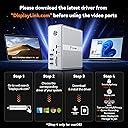
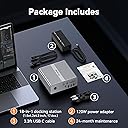
Somehow, to "simplify" our lives, we get more and more attachments for our laptops. Setting up and tearing down often take several minutes. TobenONE believes that many people fantasized about a docking station that could be the CENTER of docking everything, and this UDS033B fits the bill. Review: I have the Macbook Pro M4 pro and this works perfectly well with it. I am able to connect my mouse, keyboard, headphones and other devices using USB, and it powers it perfectly and it has a solid metal build. The reason why I can't give it 5 stars is because it uses DisplayLink to connect your monitors. If you aren't tech-savvy, then this won't be an issue for you, but for someone like me who is a software engineer and on my computer 24/7, you notice that it is really laggy due to the latency of DisplayLink. To fix this, I just connect my two monitors directly into my MacBook using a separate dock with two HDMI cables. This works like a charm, and my monitors are at their maximum performance. I am just happy that this dock is able to support all my USB devices. Suppose you are someone like me and don't want the hassle of unplugging and plugging in a bunch of cables when you need to take your MacBook elsewhere. I recommend you invest in the higher-end docks such as the TS4 or the Ivanky FusionDock Max 1. These aren't cheap, but they are worth the price if you want to buy something that'll never fail you and last you years. You only need to plug one cable connecting your MacBook to the dock, and everything works like a charm. But for me, I'm happy to save hundreds of dollars with the tradeoff that I have to connect and reconnect the HDMI cables directly to my Macbook. Review: Gostei muito do dispositivo. Ele me permite conectar várias telas, que era o meu objetivo principal, e tem entradas pra outros periféricos também. Estou com 4 telas, incluindo a do notebook, e pretendo adicionar mais uma. Como trabalho com programação usar muitas telas é essencial. Um único ponto que observei é que ele esquenta bem, então é importante manter em ambiente refrigerado.


| ASIN | B0CSFVR97V |
| Best Sellers Rank | #10,820 in Electronics ( See Top 100 in Electronics ) #174 in Laptop Docking Stations |
| Brand | Tobenone |
| Color | Grey-MacBook Docking Station Triple Monitor |
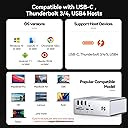
| Compatible Devices | Apple M1/M2/M3/M4,MacBook Neo and Intel Macs (MacBook Pro, MacBook Air with macOS 10.14 or later), such as MacBook Air Retina 12" (2016, Intel chip), MacBook Air Retina 13" (2018/2019/2020, Intel chip), MacBook Pro 13" (2016/2017/2018/2019/2020, Intel chip), MacBook Pro 14" (2021, M1 Pro or M1 Max chip), MacBook Pro 14" (2023, M2 Pro or M2 Max chip), MacBook Pro 14" (2023, M3 Pro or M3 Max chip), MacBook Pro 14" (2024, M4 Pro or M4 Max chip), MacBook Pro 15" (2016/2017/2018/2019, Intel chip), MacBook Pro 16" (2019, Intel chip), MacBook Pro 16" (2021, M1 Pro or M1 Max chip), MacBook Pro 16" (2023, M2 Pro or M2 Max chip), MacBook Pro 16" (2023, M3 Pro or M3 Max chip), MacBook Pro 16" (2024, M4 Pro or M4 Max chip), MacBook Air 13" (2020/2021, M1 chip), MacBook Pro 13" (2020, M1 chip), MacBook Air 13" (2022/2023, M2 chip), MacBook Pro 13" (2022, M2 chip), MacBook Pro 14" (2023, M3 chip), MacBook Air 15" (2023, M2 chip), Need to install driver before use, Windows 10 / 11 & macOS 10.15.x and later, ChromeOS 100.x. Thunderbolt 3/ Thunderbolt 4/ Thunderbolt 5/ USB4/ full-featured USB-C Microsoft Surface line/HP Spectre x360 series, Dell XPS 13 / XPS 15 / Latitude series, Lenovo Thinkpad T series. Such as Microsoft Surface Book 2, Surface Go, Surface Laptop 3, Surface Pro 7; Dell XPS 13/XPS 15 9300/ 9310/ 9350/ 9360/ 9370/ 9380/ 9550/ 9560/ 9570/ 7390 +more) / Latitude 5310/ 5580/ 7490 +more); HP Spectre x360 13t, Specter x369, Elitebook 840 G5 series, Elitebook X2, Elitebook x360 1030 G3, Elitebook 745 G6, Elitebook 830 G6, 2018 HP Elite 800 G4, Envy x360 Laptop (15z-ds100), Zbook 17 G4; Lenovo Yoga 730/ Yoga 910/ Yoga 920/ Yoga 930, Yoga15 Thinkpad Ultrabook Pro, Thinkpad E590/ Thinkpad P72, Thinkpad T470/ T480/ T490; Thinkpad X1 Carbon; Legion Y530, Lenovo C930/ T480s; Huawei Macbook Mate10 or later; Google Slate (2019); Pixel book go 2019/2020, LG Gram, Samsung Galaxy TabPro S Compatible Devices Apple M1/M2/M3/M4,MacBook Neo and Intel Macs (MacBook Pro, MacBook Air with macOS 10.14 or later), such as MacBook Air Retina 12" (2016, Intel chip), MacBook Air Retina 13" (2018/2019/2020, Intel chip), MacBook Pro 13" (2016/2017/2018/2019/2020, Intel chip), MacBook Pro 14" (2021, M1 Pro or M1 Max chip), MacBook Pro 14" (2023, M2 Pro or M2 Max chip), MacBook Pro 14" (2023, M3 Pro or M3 Max chip), MacBook Pro 14" (2024, M4 Pro or M4 Max chip), MacBook Pro 15" (2016/2017/2018/2019, Intel chip), MacBook Pro 16" (2019, Intel chip), MacBook Pro 16" (2021, M1 Pro or M1 Max chip), MacBook Pro 16" (2023, M2 Pro or M2 Max chip), MacBook Pro 16" (2023, M3 Pro or M3 Max chip), MacBook Pro 16" (2024, M4 Pro or M4 Max chip), MacBook Air 13" (2020/2021, M1 chip), MacBook Pro 13" (2020, M1 chip), MacBook Air 13" (2022/2023, M2 chip), MacBook Pro 13" (2022, M2 chip), MacBook Pro 14" (2023, M3 chip), MacBook Air 15" (2023, M2 chip), Need to install driver before use, Windows 10 / 11 & macOS 10.15.x and later, ChromeOS 100.x. Thunderbolt 3/ Thunderbolt 4/ Thunderbolt 5/ USB4/ full-featured USB-C Microsoft Surface line/HP Spectre x360 series, Dell XPS 13 / XPS 15 / Latitude series, Lenovo Thinkpad T series. Such as Microsoft Surface Book 2, Surface Go, Surface Laptop 3, Surface Pro 7; Dell XPS 13/XPS 15 9300/ 9310/ 9350/ 9360/ 9370/ 9380/ 9550/ 9560/ 9570/ 7390 +more) / Latitude 5310/ 5580/ 7490 +more); HP Spectre x360 13t, Specter x369, Elitebook 840 G5 series, Elitebook X2, Elitebook x360 1030 G3, Elitebook 745 G6, Elitebook 830 G6, 2018 HP Elite 800 G4, Envy x360 Laptop (15z-ds100), Zbook 17 G4; Lenovo Yoga 730/ Yoga 910/ Yoga 920/ Yoga 930, Yoga15 Thinkpad Ultrabook Pro, Thinkpad E590/ Thinkpad P72, Thinkpad T470/ T480/ T490; Thinkpad X1 Carbon; Legion Y530, Lenovo C930/ T480s; Huawei Macbook Mate10 or later; Google Slate (2019); Pixel book go 2019/2020, LG Gram, Samsung Galaxy TabPro S See more |
| Customer Reviews | 4.6 out of 5 stars 305 Reviews |
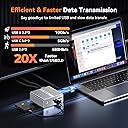
| Hardware Interface | DisplayPort , Ethernet, HDMI , MicroSD, USB 3.0, USB 3.2 Gen 2, USB Type C |
| Input Voltage | 120 Volts |
| Item Dimensions L x W x H | 1.7"L x 4.31"W x 4.5"H |
| Item Weight | 17.6 Ounces |
| Manufacturer | TobenONE |
| Mfr Part Number | UDS033B |
| Model Number | UDS033B |
| Number of Ports | 18 |
| Product Dimensions | 1.7"L x 4.31"W x 4.5"H |
| Total Number of HDMI Ports | 4 |
| Total USB Ports | 6 |
| Total Usb Ports | 6 |
| Warranty Description | 24 Months |
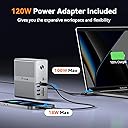
| Wattage | 100.00 |
J**K
I have the Macbook Pro M4 pro and this works perfectly well with it. I am able to connect my mouse, keyboard, headphones and other devices using USB, and it powers it perfectly and it has a solid metal build. The reason why I can't give it 5 stars is because it uses DisplayLink to connect your monitors. If you aren't tech-savvy, then this won't be an issue for you, but for someone like me who is a software engineer and on my computer 24/7, you notice that it is really laggy due to the latency of DisplayLink. To fix this, I just connect my two monitors directly into my MacBook using a separate dock with two HDMI cables. This works like a charm, and my monitors are at their maximum performance. I am just happy that this dock is able to support all my USB devices. Suppose you are someone like me and don't want the hassle of unplugging and plugging in a bunch of cables when you need to take your MacBook elsewhere. I recommend you invest in the higher-end docks such as the TS4 or the Ivanky FusionDock Max 1. These aren't cheap, but they are worth the price if you want to buy something that'll never fail you and last you years. You only need to plug one cable connecting your MacBook to the dock, and everything works like a charm. But for me, I'm happy to save hundreds of dollars with the tradeoff that I have to connect and reconnect the HDMI cables directly to my Macbook.
L**O
Gostei muito do dispositivo. Ele me permite conectar várias telas, que era o meu objetivo principal, e tem entradas pra outros periféricos também. Estou com 4 telas, incluindo a do notebook, e pretendo adicionar mais uma. Como trabalho com programação usar muitas telas é essencial. Um único ponto que observei é que ele esquenta bem, então é importante manter em ambiente refrigerado.
R**S
Excelente
A**R
Bom.
D**T
Podem comprar sem medo. Sei que o preço assusta um pouco, mas o aparelho cumpre o que promete. Tenho um Macbook Air M1 e o único cabo que preciso conectar nele é o USB-C incluso no Docking Station. Ele alimenta a energia e transfere dados rapidamente. Simples assim. Quando preciso utilizar outro computador (utilizo também em um MacMini M4), basta conectar este único cabo e tudo funciona instantaneamente. Vale demais à pena. Eu já havia comprado alguns Hubs e outra boa Docking Station (mas sem DisplayLink), mas nada se compara a esta aqui. Hoje utilizo as três portas USB 3.0, uma porta USB-C frontal, dois HDMI e uma USB-C traseira (ver imagem). Facilita demais a vida... câmera, microfone, certificado digital, monitores, "pen drive". Se houvesse 6 estrelas, este equipamento mereceria.
Trustpilot
1 month ago
1 month ago