Desertcart purchases this item on your behalf and handles shipping, customs, and support to Nicaragua.
🎨 Elevate your art game—create like a pro, anywhere, anytime!
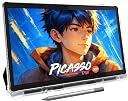
The PicassoTab X11 is an 11-inch standalone drawing tablet featuring a 2K laminated display and a 4096-level pressure-sensitive stylus for natural, precise drawing. Powered by an octa-core processor with 6GB RAM and 128GB expandable storage, it runs 5 preloaded creative apps including lifetime Pro and VIP upgrades. Designed for beginners and pros alike, it offers guided tutorials and a paper-like drawing experience without needing a computer.


| ASIN | B0D1BYSYLH |
| Active Surface Area | 95.04 square inches |
| Best Sellers Rank | 18,415 in Computers & Accessories ( See Top 100 in Computers & Accessories ) 51 in Graphic Tablets |
| Box Contents | Stylus |
| Brand | PicassoTab |
| Brand Name | PicassoTab |
| Colour | Teal |
| Compatible Devices | Tablet |
| Connectivity technology | Wi-Fi |
| Country of Origin | China |
| Customer Reviews | 4.4 out of 5 stars 686 Reviews |
| Display Type | LED |
| Item Dimensions L x W | 27.9L x 27.9W centimetres |
| Manufacturer | Simbans |
| Manufacturer Contact Information | Tsuen Wan, NT, HK |
| Manufacturer Part Number | PCX11 |
| Model Name | PicassoTab X11 |
| Model Number | PX11 |
| Model name | PicassoTab X11 |
| Native Resolution | 2560x1440 |
| Network Connectivity Technology | Wi-Fi |
| Number of Items | 1 |
| Operating System | Custom Graphics Tablet OS |
| Operating system | Custom Graphics Tablet OS |
| Pressure Sensitivity | 4096 Levels |
| Pressure sensitivity | 4096 Levels |
| Product Features | Multi-Touch Screen |
| Product Warranty | 1 Year |
| Screen Size | 11 Inches |
| Special feature | Multi-Touch Screen |
| Specific Uses For Product | Drawing, Painting, Animation |
| Target Audience | Digital Artists |
P**P
Superb, affordable, tablet and pen package
I am NOT an artist. I bought this tablet with pen to try my hand at sketching as a pastime, because it was a good price, good spec. and came with some nice apps to get started. With that in mind, I can honestly say I am loving it immensly. I use it every day for an hour or so. The pen writes on the screen smoothly, the drawing apps are lovely and varied, the tablet is Android based a bit like a smartphone so it is as simple to charge, etc. If you're a beginner like me, this is ideal.
A**.
Better Than Expected.
HI, this tablet, for £200, is exceptional value for money. The accuracy of the stylus is 100% which as a digital artist is very important and all the other features were as advertised. Highly Recommended.
S**E
Great product
Bought as a gift for my daughter , she loves it , great starter artist tab, the only problem being the pen is very temperamental, have to remove battery every 5 minutes or so to get it to work.
P**R
Customer service at it's best!!
I've just had THE BEST customer service experience I've had in a long time! I reached out to Simbans as my tablet wasn't behaving and I couldn't be happier with the outcome. I was given a couple of different options and very clear instructions, from beginning to end, of what I needed to do. It really couldn't have been any better! Thanks so much Simbans.
K**E
Brilliant
Suitable for my 10year old birthday. She loves it. Worth the money. Highly recommended
J**E
Made my partner very happy
My disabled partner has less capabilities to do her artwork but this tablet has really helped her to continue making art without all the effort of setting up and putting away the materials. Great battery life, the pen is responsive and the apps are fantastic. I think my only criticism would be that the glove supplied isn't great but you can easily get a cheap one with slightly more padding. Overall though, no complaints and seems like really good value for money.
O**A
The worst tablet I've ever had
Update: Customer support was responsive and efficient, which was a positive experience. They offered to replace the tablet, and I paid an additional £13+ to return my original one. I’ve received the replacement, but I haven’t fully tested all the issues yet. However, one major problem is that it still lacks palm rejection, making the glove ineffective. I honestly don’t understand how this tablet has so many positive reviews—it’s simply not suitable for drawing. Unfortunately, I cannot attach more than one video here to show all the problems. It's terrible in many different ways. I don't know why it has so many good reviews. I bought it for writing and drawing, but neither experience was great. I used it for just a few days. Pros: - It looks nice. - It's fine for watching YouTube, Netflix, or reading books. That's about it. Cons: - It has obvious bugs, like issues with the interface (see photos). - It's slow and won't handle anything heavy. Krita almost killed it. - It's hard to press small icons. I'm not sure if it's because it's too slow and I have to press several times, or if the click precision is poor. Either way, it's super annoying. - The glove doesn't work at all. Paper and thicker textiles don't work either. The screen is overly sensitive when drawing, while I need to click several times on small buttons to make them work. I was only able to draw after I used a thick, rigid piece of cardboard under my hand (free lifehack). - The default configuration is bad. I had to change a lot of default settings. The worst was the auto-adjusting screen brightness. While drawing, the screen would change from bright to dull and back every few seconds. If I tried to adjust it manually, it would ignore my choice and continue changing on its own. - It doesn't properly support a physical keyboard (connected via USB-C). I had issues with basic shortcuts like Ctrl+C and Ctrl+V. I had to install languages separately from the on-screen keyboard. The shortcut for changing languages (from their list) doesn't work—you can only change it manually in settings. Sometimes, while typing, the cursor jumps to the location where you last typed on the on-screen keyboard, creating a complete mess. Conclusion: I do not recommend it. It's not like I expected rocket science, but I struggle with the most basic features.
S**E
Great value for money
From what I've seen it looks pretty good haven't used as it's a christmas present. It is great value for money it's a good size she will love it.
M**Y
Buena tablet para dibujo
A mí niña y a mi nos ha encantado, se be robusta y el forro queda bien protegida, también el lapiz es bueno y las aplicaciones de dibujo sin geniales.
N**A
zoon heel blij
kwaliteit top
D**A
Top tablet für Kinder
Meine Tochter ist total begeistert, man kann es ohne PC nutzen und Videos erstellen, malen auch mit eigenen Bildern und es genauso nutzen wie ein anderes tablet. Vielen Dank
M**U
Great tablet and outstanding customer service!
Short story... Both the tablet and the customer service are outstanding... Can't recommend highly enough. Longer story... I started learning Japanese, and---quickly realizing that my phone wasn't going to cut it--- needed a tablet to get a larger screen. Also needed a stylus to practice writing. This tablet has been absolutely great... Again, can't recommend it highly enough. I also tried a Samsung tablet that was almost twice the price, and wound up returning the latter because it wasn't nearly as good as the Picasso Tabb. The screen on the supposedely better Samsung tablet was VERY reflective... If there was any light shining on it would reflect images to one degree or another. The pen on the Samsung tablet was also terrible... Overall, the effect was that using the Samsung wasn't anything like writing on paper. I found it to be kind of a chore. As I say, I returned the Samsung tablet and kept this one... Apart from being about half , the price, this just wound up being much better in terms of feeling and looking like I'm actually writing Japanese on paper. But, to my surprise, I even found that I liked surfing the web and watching videos on the Picasso Tab more than the Samsung. I'm not an expert on any of this stuff, so all I can say is that the colors on the Picasso Tab just seemed a lot nicer and, hence, the overall experience more immersive. Though I only expected to be using the Picasso Tab for Japanese, I wound up using it for literally everything---haven't opened either of my laptops since I bought the Picasso Tab. Which brings us to the customer service... So I wound up using the thing A LOT... Like I was on it 8 to 10 hours a day, frequently doing Japanese while walking my dog. The result was that the poor tablet took one hell of a beating in terms of wear and tear. My dog is blind, and I have to carry her out of the house... So I wound up dropping it more times than I can count while trying to open the door and carrying her. The unfortunate but inevitable result was a screen full of cracks. Around 10 months post-purchase, I also started having troubles with the USB port... It got to the point where I couldn't charge the tablet. I didn't think either of these issues would be covered by the warranty... figured they'd count as "ordinary wear and tear"... So I contacted Simbans and asked how much it would cost to repair the USB port and cracked screen. They requested some info from me along some photos of the tablet. When they got back to me the next day, I had another pleasant surprise. They offered to fix the tablet for free and pay the cost of shipping it back to me.. All I had to do was pay for getting it to them. But that's not the best part. They also gave me another option that was even better! If I didn't want to get the old one fixed for free, I could pay $30 and they would send have Amazon ship me a brand new one. That's what I did. So for $30, I not only got a brand new tablet, I also got a brand new pen and lilkewise for all the other accessories. All in all, this is a great product at a reasonable price and, importantly, one that the manufacturer is willing to stand by. Based on my experience, can't recommend highly enough.
A**N
Apenas configurandola
Apenas la acabo de configurar con mi teléfono, todo va bien hasta el momento, ya más adelante les hablaré de su uso a la hora de dibujpor el momento todo bien apenas la termine de configurar, más adelante hablaré de su uso al dibujar
Trustpilot
1 week ago
1 week ago