🖱️ Elevate your workflow with ergonomic precision and seamless connectivity!
The ProtoArc EM11 NL is a sleek, rechargeable vertical mouse engineered for professionals who demand comfort and efficiency. Featuring multi-device Bluetooth and 2.4GHz wireless connectivity, adjustable DPI up to 2400 for precise tracking, and a 500mAh battery with USB-C recharge, it reduces wrist strain with its ergonomic design while supporting Windows, Mac OS, and Android platforms. Ideal for millennial managers seeking productivity without compromise.


| ASIN | B0CX18LHWS |
| Additional Features | Ergonomic Design, Multi-Device, Rechargeable, Vertical Design, Wireless |
| Antenna Location | Office |
| Are Batteries Included | Yes |
| Are Batteries Required | Yes |
| Battery Average Life | 1 months |
| Best Sellers Rank | #11 in Computer Mice |
| Brand | ProtoArc |
| Built-In Media | 1 x 2.4G USB Receiver, 1 x ProtoArc Rechargeable Bluetooth Ergonomic Mouse, 1 x Type-C Charging Cable, 1 x User Manual |
| Button Quantity | 7 |
| Color | Black |
| Compatible Devices | Personal Computer, Smartphone, Tablet |
| Connectivity Technology | USB |
| Customer Reviews | 4.4 out of 5 stars 3,785 Reviews |
| Enclosure Material | Plastic |
| Finish | Glossy |
| Hand Orientation | Right |
| Hardware Platform | Windows,Linux |
| Item Dimensions L x W | 5.43"L x 2.72"W |
| Item Height | 0.1 centimeters |
| Item Weight | 250 Grams |
| Manufacturer | ProtoArc |
| Model Name | EM11 NL |
| Model Number | EM11 NL |
| Mouse Maximum Sensitivity | 2400 Dots per Inch |
| Movement Detection | Optical |
| Movement Detection Technology | Optical |
| Number of Batteries | 1 Lithium Ion batteries required. (included) |
| Number of Buttons | 7 |
| Operating System | Android 4.3 or higher, Mac OS X 10.12 or higher, Windows 8, Windows 10 or higher |
| Power Source | Battery Powered |
| Range | 10 Meters |
| Special Feature | Ergonomic Design, Multi-Device, Rechargeable, Vertical Design, Wireless |
| Style Name | Modern |
| Theme | Ergonomics, Computing |
| Unit Count | 1.0 Count |
| Warranty Description | 2 YEAR |
C**S
Simply one of the best I/O Mice on the market...
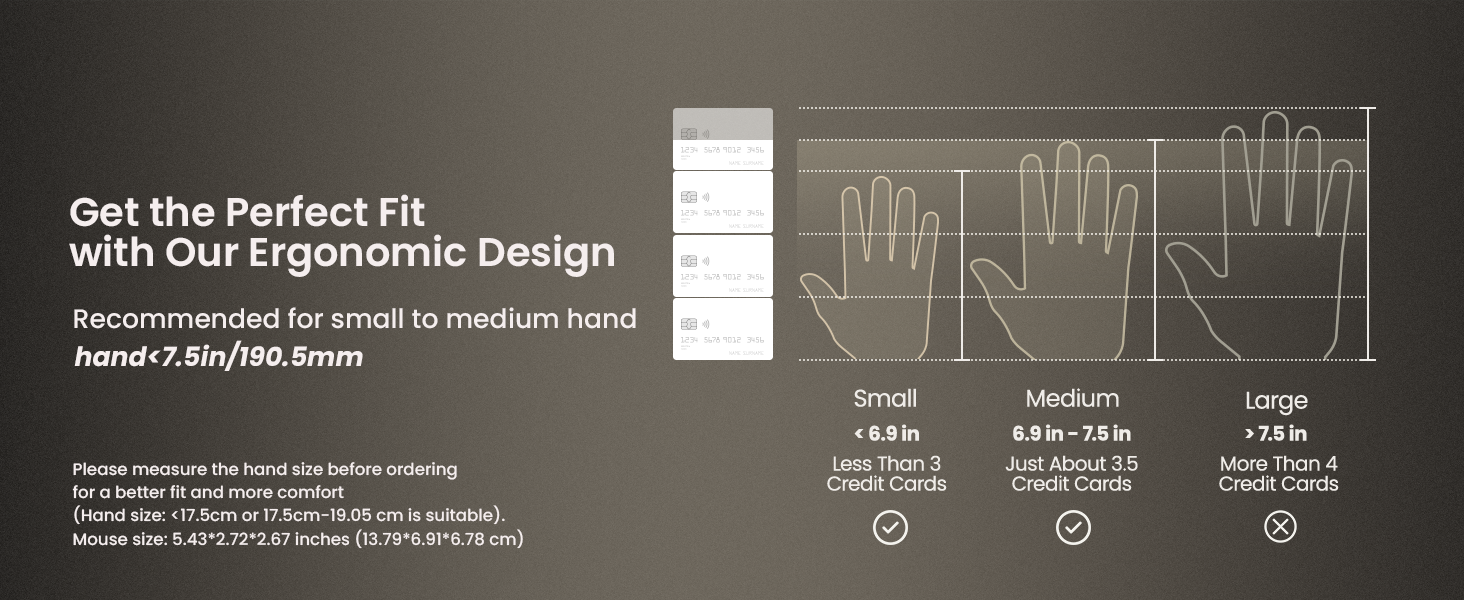
I didn't want to believe it, but... I bought it on sale, and WOW! Yup, a mouse did that. The initial quality and boxing are as good as you will find from any manufacturer. I do wish manufacturers would work towards the most sustainable packaging, but what is provided is very well done. Mouse: -- Soft touch outer "skin" that is very comfortable -- Dreamy, silent buttons and scroll wheel attenuated silently and with soft, accurate positioning -- Excellent 5-button + configuration and connection options making it a fantastic full-sized mobile ergonomic mouse. My hand measures 7.6" on A axis, and I feel the mouse is adequate, but understand I am at its limit. Still, it feels great and performs as expected, and reliably as expected. I have always taken a light touch to mice and this shape encourages that relaxation for my hand at finger length. As a vertical ergonomic mouse, I have used several from Logi, Anker, and others… this is by far and away the mouse that checks all the boxes, and for an incredibly reasonable price. Super-easy setup (either Bluetooth, or wireless adapter included), and the battery has outlasted expectations for its first charge so far, in writing this early review. Cheers - Nguyen should be proud of this. I'm an old-time user from the East Coast USA, and have mice that date over 30 years old, and no one has really ever put together a complete ergonomic mouse that works ubiquitously*. This is the winner. *I use "Mouse Fix" on macOS for button programming - but it runs natively on both macOS and Windows just fine. **I would also like to see a vertical measurement on vertical ergo-mice - wider hands need the height, but even at the limits of this mouse, I feel okay and relaxed on this mouse with my long-time HandStands bean-bag wrist-wrest.
K**N
Comfortable, Smooth, and a Game-Changer for Long Workdays
The ProtoArc EM11 vertical ergonomic mouse has been a fantastic upgrade for my workspace. I spend long hours at the computer, and this mouse has made a noticeable difference in reducing wrist strain. The vertical design feels natural from the moment you start using it, and within a day or two, it becomes second nature. The Bluetooth connection is reliable and quick with no lag, and I love that I can switch between devices effortlessly. The mouse glides smoothly, tracks accurately, and feels incredibly responsive whether I’m working, browsing, or doing basic editing. Battery life has been excellent as well. A single charge lasts much longer than I expected, and the rechargeable feature makes it even more convenient. The overall build quality feels solid, and the matte finish gives it a premium feel. If you’re looking to ease wrist discomfort or simply want a more ergonomic setup, this mouse is absolutely worth it. It’s comfortable, efficient, and a noticeable improvement over a standard mouse. Highly recommended!
S**3
HIGHLY RECOMMEND!!
When I tell you that this is a game changer...immediately you feel how much more comfortable it is from the original mouse. Your hand sits in a more natural position. It feels really durable. Connectivity was super easy - hard press on the button on the bottom until it flashes, pull up the bluetooth devices on your laptop/desktop, choose the ProtoArc...DONE. I chose the black one but it looks like they've got all kinds of different colors. Functionally it works great...no latency and it moves really smooth on my mouse pad. I'm a professional photographer and hours of photo editing are going to feel just that much better now without my hand getting sore. I definitely love the look of it as well. I would highly recommend to anyone especially for those that do lots with the mouse.
C**V
Not a large mouse, but still good
I bought this mouse as I need an ergonomic mouse for my home laptop, that meet a couple of criteria: - Bluetooth capable ( I don't like dongles) - Relatively inexpensive (I was aiming for sub $50) - Comfortable for large hands ( I am over 6' tall) This mouse does well at all 3 of these. The bluetooth works well it is responsive and the mouse has no issue working on Windows 11 or Linux Ubuntu. Expense wise this is one of the cheaper options, this is why I was willing to risk the purchase even though I am unfamiliar with ProtoArc as a brand. Size wise at best I would call this a "medium" sized mouse. I have a Logitech vertical ergonomic mouse at work that is very well sized, and I was hoping this one was similar. unfortunately it is not. At this time this is not a deal breaker as, at home, I am not on my computer for hours at a time, unlike at work. Due to the low cost of the item I can forgive it not fitting my hand , but I am casually looking for a replacement. So would I buy this know what I know now: probably not. I would try something else as I would rather have a larger mouse and other than the cost savings there is nothing that stands out. I still gave it four stars as the product is good, it just doesn't fit me, and that is not the products fault. Note: it would be nice if amazon had a built in reviewer that showed real life size that was independent of the manufacturer presentation for products like these (keyboards, mice headphones, headphones, etc).
B**N
I LOVE This Mouse!
This is such a great mouse! I have been struggling with wrist pain for a while from using a mouse all day for work. I was recommended to get a vertical mouse by my doctor. He said they keep your wrist in a more natural position. I spent a while looking for one that I like, and I basically narrowed it down to either this or the Keychron M5. The only other ones that seemed appealing were the 2 Logitech models, but they were both far too expensive. I have also heard horror stories about their durability. Finally, I saw this model on sale for $19, so I pulled the trigger. I am very happy I did. Even after just a few days my wrist pain improved. The grip feels very natural. The way they describe it like a handshake is very accurate. I am happy that I don't have to deal with so much pain in my wrist anymore after a long day sitting at my PC. I think the multiple connection methods are nice too. I can keep the USB dongle plugged into my desktop workstation and switch to the Bluetooth whenever I need to use it with my laptop. I don't use it with my laptop that often, but I do have a Thunderbolt dock at my desk that I use occasionally. Switching input methods works well. I have not noticed any input latency or lagging. Nor have I had connection drop-outs. There are no drivers or software to install. That is greatly appreciated because I can't stand having peripherals that need to install special drivers and applications to configure the settings. This has none of that crap. You just connect it and you are good to go. I'm a Linux user as well, and I've had no issues. The DPI switch is nice to be able to change the sensitivity. I was worried the silent buttons would feel mushy, but they don't at all. Somehow they have a very tactile click without making any noise. The noise isn't an issue for me, but I can imagine anyone working around a bunch of other people would appreciate it. The scroll wheel feels really nice too. It has a nice soft-touch finish and smooth operation. The forward and back buttons feel nice, but they are not silent like the left and right click. It's not that big of a deal, but it would have been a nice touch. For those who are gamers, I don't think this would make a great gaming mouse. For that I will probably hang on to my ultra lightweight mouse that has a honeycomb shell for ventilation and weight reduction. This mouse is by no means the heaviest mouse I have used, but it is nowhere near as light as my gaming mouse. I cannot speak on the battery life since I have not had it that long, but I will say after a week I have not had to charge it. at all. I just pulled it out of the box and started using it. Perhaps if I have an issue with the battery life I will update this review in the future. You really cannot go wrong with this ergonomic mouse.
A**T
I tried ... I REALLY did !
Okay, let me start by saying that I have used Logitech Marble pointing devices, or something similar almost exclusively for the last 20 years, And I love them ! But LogiTech Marbles are getting scarce (and expensive) and I have had varying success with pretenders, so I thought I would give this a try. And while I have gotten used to it, I still DON'T like it. And I know that alot of that has to do with my prejudices & use case, so keep that in mind. First of all, I am not sure if this is a sensitivity issue, a communications one, or just the battery - but it is very jumpy. I used to have my old, corded pointer at a level BELOW my computer cuz that's where I had space. And it worked fine. But for some reason this CANNOT get a clear signal from there. So I rearranged things so it's on an even level now. It's better, but still iffy. So I tried charging it again. It improved, but started getting jumpy again. So I LEFT it plugged in (keep in mind it does not work corded, so I still have to use the dongle) and same problem. And I tried using both BT channels as well and it's no better. On top of all this. now my desktop is too crowded. Like I said, I usded a Masrble for 20 years and my desk was setup accordingly. I didn't NEED space for a traditional mouse. So I am relegating this as a spare pointer, and getting another Marble copycat. It just does not work for my day to day use ! NEW UPDATE: I wanted to be sure I shared something regarding this review. The Vendor (Proto Arc) reached out to me directly & offered me a full refund. They did not HAVE to do so, but I appreciate the offer ... even though I did NOT accept it. I do like Proto Arc products & I still use their version of the LogiTech marble in my work office. And while my situation did not make using this vertical mouse viable, it would probably be fine elsewhere. And as I said previously, I will keep this in my bag for when I needd a spare/emergency pointer. Still, it was very nice of them to offer me a refund. Thank You for that ! FINAL Update: Just thought I would tack this on in regards to my experience with this. My main complaint was that I was not getting a consistent wireless signal. And that was why I am NOT using this with my home PC. Now, it just so happens that I ordered a pair of Wireless Earbuds for my youngest, but she was not happy with how they fit her ears. So I decided I would try them out. I paired them with my Home PC .... and I had the same issue with the earbuds that I had with the Vertical Mouse. They failed to maintain a consistent connection via BlueTooth. So the issue is not with the Mouse OR the Earbuds ... it's with MY PC. and it's placement. So I will reiterate ... this is a good vertical mouse & a great value. It just doesn't work in my situation.
K**T
Comfortable & Competent Ergonomic Vertical Mouse
This is the second vertical mouse I've owned. It replaces my previous model whose left click button was getting overactive for some reason. Anyway, I like the hand feel of my previous mouse just a little better, but they are very similar, and this one is growing on me. The only slight niggle I can find is that the ProtoArc feels like the grip is slightly slicker but it hasn't affected functionality in any way. Buttons are responsive and well-placed and mechanical function is good also. It is silent and does what it is supposed to do with no fuss or muss. It's easy to charge but I can't tell you how long it lasts at this point. This ergonomic mouse fits my medium sized hand well. I think it would be hard to beat at the current price point. ~ Kort
J**R
Excellent Mouse for S to M Hands
I have Med-Large hands which I think is important to remember when you read this review. Hand size is very important when you're considering vertical mice. For me, I switched to vertical mice due to carpal tunnel a couple years ago, and it really helped to eliminate it. I went to Best Buy and tried both the Logitech Lift and MX Vertical. The Lift is for smaller hands and I didn't like the feel of it. So I bought the larger MX Vertical despite the $100 pricetag with the hope that it'd help my carpal tunnel. It did, but unfortunately, now its suffering from the double click issue that apparently is a feature of Logitech mice. So I began the hunt for another vertical mouse that didn't cost +$100. I knew I wanted one that was for Medium to Large hands, so I tried 3 different ones that said they were for larger hands or had similar measurements to the MX Vertical. None of them I ended up keeping for various reasons. So I bought another one hoping for better luck. Pros: This mouse feels great in the hand with a nicely textured surface. It also has some of the most satisfying buttons of any mouse I've tried with a very tactile yet soft, quiet click. The scroll wheel is nice much like the MX Vertical. The shape was exactly as described and felt like a hand shake. Despite the smaller size, I really enjoyed holding this mouse and my wrist did not drag on the mouse pad. Finally it has a rechargeable battery (which can be a con for some) and was under $20. It also comes in different colors. Cons: The con is that my hands are too big. They recommend this mouse for S-M hands vs the M-L of the others I tried, and I definitely agree. My little finger drags horribly if i put my hand in the "correct" placement. I got around this by putting my 1st finger on the left side of the first button and my 2nd finger on the right, and then use my 3rd finger as the right click, which gave my pinky room on the mouse. It worked okay but wasn't ideal. I really wish ProtoArc made a super sized version of this mouse. (Side note: I saw a knock off version of this mouse with the exact same measurements that said it was for M-L hands. Thank you ProtoArc for an accurate description) Ultimately I ended up returning it due to my hand size, but I really wish either my hands were smaller or the mouse was larger so that I could have kept it. Please ProtoArc, make a larger version for those of us with larger hands. If you did that, I'd buy it immediately.
Trustpilot
1 month ago
3 days ago