

Desertcart purchases this item on your behalf and handles shipping, customs, and support to Nicaragua.
🚗 Cut the cords, not the drive—wireless CarPlay freedom awaits!
The Carlinkit 5.0 Wireless CarPlay/Android Auto Adapter transforms your factory-installed wired system (2015-2026 models) into a wireless experience. Featuring USB 2.0 plug-and-play connectivity, broad smartphone compatibility, and advanced Bluetooth/Wi-Fi for stable, low-latency performance, it offers hassle-free installation and future-proof OTA updates. Ideal for professionals seeking a sleek, cable-free in-car interface without replacing their head unit.
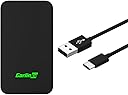


| ASIN | B0CYZQJ37J |
| Best Sellers Rank | #88 in Car Audio & Video Accessories |
| Brand | Carlinkit |
| Built-In Media | Packing box*1, product*1, data cable*2, product manual*1 |
| Color | Black |
| Compatible Devices | For car with factory-installed wired CarPlay or wired Android Auto system, iPhone 6+(iOS 10+); Android phone(Android 11+) Compatible Devices For car with factory-installed wired CarPlay or wired Android Auto system, iPhone 6+(iOS 10+); Android phone(Android 11+) See more |
| Compatible Phone Models | for iPhone & for Android phone |
| Connectivity Technology | USB |
| Connector Type | USB |
| Current | DC |
| Customer Reviews | 3.5 out of 5 stars 1,500 Reviews |
| Enclosure Material | Acrylonitrile Butadiene Styrene, Polycarbonate |
| Form Factor | Compact |
| Included Components | Packing box*1, product*1, data cable*2, product manual*1 |
| Item Weight | 35 g |
| Manufacturer | Carlinkit |
| Mfr Part Number | CPC200-C2Air |
| Model Name | CPC200-C2Air |
| Model Number | CPC200-C2Air |
| Mounting Type | Travel/Portable |
| Number of Items | 1 |
| Number of Power Levels | 1 |
| Output Current | 0.15 A |
| Output Voltage | 5 volts_of_direct_current |
| Power Plug | No Plug |
| Power Source | DC |
| Special Feature | wireless carplay & Wireless Android Auto |
| Special Features | wireless carplay & Wireless Android Auto |
| Specification Met | FCC |
| Total USB 2.0 Ports | 1 |
| Total Usb Ports | 1 |
| Unit Count | 1 Count |
| Warranty Description | 1 year |
M**Y
Version 5 is a fine upgrade over version 3.
I have a 2007 Mercedes in which I replaced the head unit with a 2015 Kenwood, which gave me (wired) CarPlay. In 2021 I bought a Carlinkit 3 which gave me wireless carplay. This was great but there were three big problems: 1. about once a week the carlinkit unit would hang and have to be power-cycled 2. about once a month the negotiation between the carlinkit and the kenwood would hang, and the kenwood would have to be power-cycled 3. from starting the car to hearing carplay audio out of the kenwood took longer than I liked. A few months ago I took the plunge to buy a carlinkit 5 hoping it would fix these three problems. The good news is that it does seem to, enough so that I don't regret the purchase. I have so far not encountered problems 1 & 2. Let's talk about problem 3. Installing the carlinkit 5 is much more painful than it should be. Superficially it seems easy - connect the carlinkit to the head unit via USB cable - give the car power, so the head unit starts - expect some sort of guidance as to what to do next Unfortunately while this last step does eventually happen, it happens after a frighteningly long time (like three to five minutes) of apparently nothing. During this time I was frantically screwing around on my iPhone, trying to get the device recognized first in Bluetooth, then in Carplay. There may be a fast path to this installation, but the manual doesn't describe it, and this stupidity is probably responsible for most of the returns of the device. It works REALLY well -- but only once you have figured out how to connect it, which is far from obvious. I can't give the fast path because, like any normal person, I was trying one thing after another, and I'm not going to reset the carlinkit and my iPhone to try to recreate the optimal setup path! Once you have connected, the next non-obvious thing is to optimally set up the carlinkit. Once again the documentation is basically useless! What you want to do is, once carplay is active (meaning that your phone is connected to the carlinkit via the in-car wifi network created by the carlinkit) open Safari and go to the web address: 192.168.50.2, which will connect you to the config page for the carlinkit 5. Now we have various options. Here's my understanding of what they do and how to use them: Auto Connect: I set this to CarPlay so it doesn't waste any startup time trying to negotiate an Android Auto connection. Video Resolution I didn't touch; whatever it chooses is correct for my head unit. Likewise for FPS. Media Delay you are supposed to change if the audio seems out of sync with the video. I'm not sure why that matters (I don't think CarPlay allows video apps!) but some people seem to feel the audio on their system lags relative to play/pause, so maybe changing this would help? Start Delay is, I THINK, if your head unit is really slow, so that the carlinkit is read and trying to talk to it before the head unit can answer. I set this to 1 (I think 0 means auto, so I wanted the fastest possible, without whatever delay auto imposes). GPS switches between using GPS from the phone and the GPS antenna of the head unit. Whether this works well or not depends on details of your system... In principle the car can have a much larger GPS antenna with better visibility. Or it might be a head unit like mine with no GPS antenna... Try it either way and see which seems better. For WiFi I chose the fastest option (again no wasting time negotiating). With all the above set, what's the situation? On the plus side the carlinkit 5, unlike the 3, has a bright led that changes colors to show you the steps as it is powering up. On the minus side, no actual improvement in start up time compared to the carlinkit 3 :-( Both take about a minute to get to audio. That seems like a failure BUT it's not as bad as it looks! The reason for the slowness is that the carlinkit gets power from the head unit. So the startup sequence looks like - car powers on - a few seconds later head unit powers on - after about 30 seconds (ridiculously slow, but what can you do) the head unit has booted up at which point (and only then, so stupid!) it supplies power to the USB cable that's the CarPlay input - this power starts the carlinkit which takes its own 30 seconds to start up. So how can we fix this? My solution was to buy this cable: xiwai Type-C USB-C to USB 3.0 Male & USB 2.0 Dual Power Data Y Cable for Laptop & Hard Disk https://www.amazon.com/dp/B07VPNSMN8?ref=ppx_yo2ov_dt_b_fed_asin_title and plug the power USB-A connector into a USB-power jack (standard cigarette lighter to multiple USB ports thing that we all have) and to plug the data USB-A connector (the blue one) into the head unit CarPlay connector. Now when the car switches on - the head unit powers on - the carlinkit simultaneously powers on - the two pretty much simultaneously both reach a state of actually working, and time to audio is now 30 seconds rather than a minute! I might have been able to get this same speedup with the Y-cable and my old carlinkit 3. But the 5 does give me the colored LED status, it's slightly smaller, and the not-having to power cycle it and/or the head unit every so often is a nice bonus. I don't know how well the Android Auto part works, I've never needed that. But the CarPlay part is great! Just a shame that the manual is so awful and useless regarding first setup, and then detailed setup via the web page. (Oh, and quick hint. You can use Contact velcro strips to place it somewhere handy on the dashboard so it's out of the way but the led is still visible, nd you can still pull it off the dashboard every so often if you do need to move it.)
J**B
Drops connection to phone constantly to where you can't even enjoy your music.
Bought after changing out the USB port in my 2016 F-150 to the updated version that can actually use carplay. Don't want to plug and uplug my phone all the time so I figured "let's get a wireless adapter". This had pretty decent reviews, and worked pretty good initially but then it just started dropping signal so I'd be in my car jamming out to a song and then the song stops and then picks back up a few seconds later and just rinse and repeat. If this happened once per trip then whatever, but it started to do it constantly. Anyway I ended up getting gifted randomly a different wireless carplay adapter (one of the ones that has Netflix and YouTube and stuff) that I've been using for a couple months now and it works 1000x better than this ever did since it doesn't ever lose connection. So don't even bother with this product, find a different one to spend your money on unless you really just want to be driving and be pissed off that you can't even listen to a full song without being interrupted by a dropped connection multiple times per song.
I**E
Still gauging
It’s an interesting piece of tech. It does what it should. I tried this because I had some issues on my CX-30 with phones connecting and disconnecting when wired. I like that it auto connects. That part is generally pretty seamless. The first few times it was a pleasant surprise and then I got used to it. I didn’t notice until it didn’t happen once and I’m pretty sure it was me and weird Bluetooth/wireless configurations. In fact, I started by giving this four stars but on reflection, I think any issues I have with it are my own and the device works as it should. I’m a ridiculous techie and have a tendency to have several Bluetooth connections to my phone at once while driving: watch, some pogo catcher of sorts, driving devices, etc. Also I have two passengers who have several Bluetooth connections crossing paths not to mention the car’s WiFi. There’s a lot happening in my car. Again, I changed my review because awhile back, I had the same initial connection issues when I introduced the Spotify Bluetooth device they discontinued. I can say with confidence that my specific use case is not covered under most situations. Lots of beta devices. Never have an issue with a reasonable amount of Bluetooth devices connected to my phone simultaneously (and even unreasonable). Ok, so sound. It’s not lousy. I have stock speakers and they’re meh to begin with. I’d venture to guess if you had the Bose option speakers that you might notice a quality difference but I can’t speak to that. If there is a sound quality difference, I’d say it’s minimal but I’m also older now and am happy the tech works. It is also seamless with calls. No issues. I have only used this with iOS 17 and 18 beta. Have not tried switching to the android and mostly because I don’t want to create issues if there are any. I doubt it would but I’m set it and forget. On my stock CarPlay, I’d annoy myself by adding all of my devices and forgetting to change the hierarchy and it connecting to another random device so I just avoided that altogether for now. If I ever test it, will update comment with results. It’s been awhile but I recall set up being simple. Something about connecting to its WiFi me thinks. Oh this might mean that if you use your car WiFi you might have complications but can’t see why you’d do that with cellular often. Your hot spot uses cellular too so switching to it usually doesn’t help. I think I only noticed this because I tried to jump on it on my phone to share the password and a message pops up saying if you switch WiFi the device would disconnect. Connecting briefly pops up a menu screen on the console, I’m guessing to choose if you have multiple connections but since I only have one, it auto connects and moves on to the CarPlay screen.
C**Z
Decent Device
I purchased 2 of these devices; one for my 2018 Chevy Camaro and one for my wife's 2016 Buick Encore. For the Encore it unfortunately did not work at all so I returned it for a refund since the vehicle has to have carplay. I did reach out to the tech/sales and 48 hours later there was no response. For my Camaro, it took a few tries before getting it to connect for the first time. After doing so I followed the directions to update the software. Being able to carplay from my Iphone 13 wirelessly is a nice tough for once. Especially since my wired carplay doesn't always work. There is about a 2 second lag when skipping forward on music or restarting a song. Other than that it works great. However, this device has the same features as the wired carplay, it does not allow for video playing on the screen or true screen mirroring. The reason for the 4 stars and not 5 is because this devices only works/connects half the time. I got in my car today, 09/27/23 a total of 5 times from the car being completely off and it only connected twice. I unplugged the device, waited at least 10 seconds and plugged back in and still no connections. I might return the second device since it can't connect than more than 50% of the time the car gets turned on. If you're a person that doesn't care about trying to have movies/shows playing on your car's screen, then this device is for you. It gives you the same features as a wired carplay connection which is pretty awesome if you don't always want to take your phone out of your pocket or purse/bag or don't need to charge your phone and just want carplay features present. It's also great for getting rid of additional charging cables if you happen to have some form of wireless charging in your car.
S**!
So so works….
It works most of the time and then when it does connect sometimes you don’t get a screen. I use it for car play. Seems like if you shut off your car but leave your phone in the car it has trouble connecting again. I was fooled by misleading marketing on this one… I does work a lot of the time though.
R**2
Works pretty well, compact size, LED indicator light is helpful, does have delay on start up
This is a pretty compact device and makes it so that I can use apple play without plugging your phone into the car directly. It is just one less wire I have to worry about. I am able to now just pop my phone into the wireless charger and it works. This works well for my truck but there are some hiccups. Depending on the person this can be annoying. For the most part, I am able to connect my apple iphone to my dash without needing to plug in. The cable is relatively short so you are able to cable manage easily. This device can just remain plugged in at all times. This is great as I do not have to unplug and replug my phone in when I leave and come back. That being said, the instructions to connect and use the device were okay. For the most part, it is pretty straight forward on what you need to do. The LED indicators definitely help when setting up and trouble shooting. It turns red means no connect, green means solid connect, blue means searching for bluetooth. It is a nice thing to have. The light does stay on so that may not be what someone may want but you can just turn the device over. This device is essentially just trying to pair it via bluetooth and connect your device to your car without needing a direct cable. The cables that are provide for powering the device are okay and you can replace it as needed. It does not have to be a super long cable as you do not need to press anything to power the device on. The overall build of the carplay adapter is simple and compact. For the most part, it does connect every time. It does have moment where it actually disconnects and I have to basically unplug it and plug it back in. It says no delays once connected but it does take time to connect to your actual airplay in comparison to just connecting your phone directly to it. It can be a bit annoying if you are on a time crunch. Also if you turn your car on and off right away it sometimes does not even connect at all which is a bit annoying. That being said, you are able to use your GPS and play music. Again this does require a phone connection of some kind to work. It is not it's own separate until with it's own OS. This device does not work with android unfortunately. I am able to answer my calls and such without much issue Overall I think this is a good device to have if you want to be able to do carplay without always needing to plug your phone in. I really enjoy the fact I can just start my car and it will connect automatically without me having to plug in my phone. The down side is that it does take time to connect when you start your car when compared to say just plugging in my phone directly. There 10 second delay there. Regardless, it is just one less wire for me to grab. Also I can now charge my phone wirelessly on the charge and not have to worry about figuring out a way to connect my phone to the wire and onto the holder. The connection is solid most of the time but I do get some disconnects and errors from time to time. The device is pretty small and does not get super hot which is great for storing. It does not have a built in battery so it does require you to plug into the car at all times. It will automatically shut off when you turn the car off. It also does not require a very long cable.
K**N
When it works, it is a game changer.
I’ve had this product for over a year. Initially, it was terrific. It would automatically connect and I rarely had an issue. For the last six months, it is completely sporadic. Some days it connects with no problem other days it will spend hours attempting to connect and never make a connection. I’m not found the secret sauce, between rebooting my phone, restarting my car, I was hopeful there might be an updated version that it may be compatibility with newer, iPhone upgrades, but there are no updates and there are no other versions. I would happily purchase a different brand, but unfortunately, I don’t know of another one that is more consistent. I’m not saying don’t buy it, I’m just saying before warned, it will make you want to blow your brains out. Especially, if it works seamlessly in the beginning, it will insidiously lol you into an expectation and leave you stranded without the ability to track your navigation on long trips or take phone calls via Bluetooth.. if it would automatically switch back to my traditional phone, Bluetooth, that would be super helpful. But once this begins to have a problem, he must completely remove the car link device for your car to respond consistently to your built-in Bluetooth.
W**A
Keep on looking!!!
I originally ordered an Ottocast Mini Cube and really well for around 6 months until it didn’t. Amazon was gracious enough to refund my purchase even though it was out of the return window. I did a lot of research to see what autocast would work the best with my car and the Carlinkit 5.0 was overwhelmingly it. I went through 3 different units trying to find one that worked. The first wouldn’t pair, the second one had the same problem with pairing. The third I was able to finally get it to pair with my phone and car! It worked great for a day and then the music would cut in and out. I would unplug and replug it and seemed to help a little, so I figured it was a connection issue, so I bought a new and better quality cord. That seemed to take care of the problem and then on phone calls I was getting delays. I emailed the Catlinkit and they recommended that I download new firmware and upload it to the dongle. I was over it, and decided to return it and find a different carplay that wouldn’t be so much hassle to update firmware.
A**U
Frequently disconnected
The item is very handy and it does exactly as per description... but there is a major flaw...it keeps disconnecting. Ten days after started using it disconnected 4 times in one day.
K**R
Très décevant, je déconseille
Acheté pour l'utiliser avec Android Auto et CarPlay. L'installation est relativement simple bien que la procédure de mise à jour décrite dans le petit manuel ne fonctionne pas du tout (de plus elle nécessite un mot de passe qui n'est même pas fourni, j'ai dû chercher sur internet...). Android Auto : - La connexion avec le téléphone fonctionne une fois sur deux, parfois la connexion est directe en mettant le contact, d'autres fois c'est juste impossible. Exemple vous allez faire une course rapide, à l'aller ça fonctionne très bien mais sur le chemin retour, pas de connexion, et rien à faire : dissocier l'appareil, réappairer, ça ne fonctionne pas. - Quand ça fonctionne, régulièrement on a des micro coupures de la musique de 1 ou 2 secondes, l'appareil semble très sensible aux moindres vibrations. CarPlay: - Il semblerait qu'il y ait moins de problèmes de connexion aléatoire mais par contre le problème est encore pire : avec un iPhone 14 Pro on observe très souvent des latences énormes d'affichage et de réactivité aux commandes. Exemple au bout de quelques minutes, Waze affiche avec un retard de 15 à 20 secondes, les appuis sur un bouton répondent au bout de 30 secondes. C'est vraiment inutilisable. - Même problèmes observés de micro coupures de la musique. Bref, je regrette cet achat et donc je le déconseille. Mieux vaut rester sur le câble USB.
A**R
Works with Kenwood head unit!
I can confirm that this works with my Kenwood head unit that only has wired CarPlay. Hooked it up to the USB cable running to the deck for power, paired it with iPhone and wireless CarPlay works. There is a slight lag when advancing to next track but really not a bid deal. Would recommend!
F**7
Per il momento ottimo
Dopo una settimana di utilizzo devo dire che funziona perfettamente. Il Telefono si collega automaticamente e parte car play. Funzionano tutti i comandi come Siri comandi al volante ecc. Ovviamente ha un po’ di latenza dall’imputato del comando (2 secondi) Dopo una settimana molto soddisfatto!
E**Z
Excelentes productos
Es lo que pedĂ en todos los productos
Trustpilot
1 month ago
3 weeks ago