Desertcart purchases this item on your behalf and handles shipping, customs, and support to Nicaragua.
⚡ Power up smart, charge fast, and control effortlessly — your outlet’s glow-up starts here!
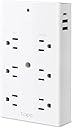
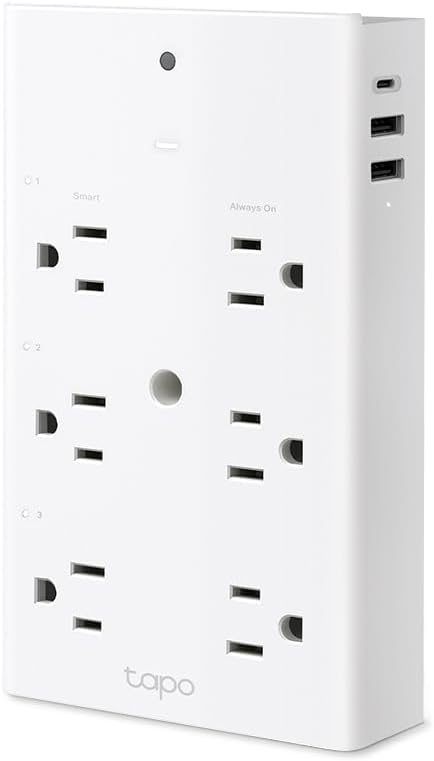
The TP-Link Tapo P306 Smart Plug Outlet Extender revolutionizes your power setup with 9 versatile outlets including 3 individually smart-controlled AC sockets and 3 smart USB ports with 18W fast charging. Designed for convenience and safety, it features wide-spaced outlets, surge protection, and compatibility with Apple HomeKit, Alexa, and Google Home. Its smart night light and secure wall mounting make it an essential upgrade for any modern workspace or home, delivering seamless automation and rapid device charging in one sleek package.


| ASIN | B0CYGSFFFW |
| Best Sellers Rank | #8,639 in Tools & Home Improvement ( See Top 100 in Tools & Home Improvement ) #10 in Home Automation Hubs & Controllers |
| Brand | Tapo |
| Built-In Media | 1 x Tapo P306; 1 x set screw; 1 x Quick Installation Guide |
| Color | White |
| Compatible Devices | Smartphone, Tablet |
| Customer Reviews | 4.5 out of 5 stars 628 Reviews |
| Enclosure Material | Polycarbonate |
| Item Weight | 0.34 kg |
| Manufacturer | TP-Link |
| Mfr Part Number | Tapo P306 |
| Model Number | Tapo P306 |
| Number of Outlets | 9 |
| Number of Ports | 9 |
| Other Special Features of the Product | Surge Protection, Usb Slot |
| Plug Type | Type A & Type C |
| Power Plug Type | Type A - 2 pin (North American), Type C |
| Recommended Uses For Product | Indoor, Office, College Dorm Room, Hotel, School, Cabinet, TV Cabinet, Restaurant, Travel |
| Shape | Rectangle |
| Special Feature | Surge Protection, Usb Slot |
| Surge Protection Rating | 900 Joules |
| Total Power Outlets | 9 |
| Total Usb Ports | 3 |
| UPC | 840030707469 |
| Unit Count | 1 Count |
| Voltage | 127 volts |
| Warranty Description | 2 Years Warranty |
L**T
Provides Automation, Tames a Crowded Outlet, and More!
I got started with home automation last year after went shopping for a conventional lamp timer and found that when purchased in multi-packs, TP-Link Kasa smart plugs actually cost less apiece. I came to appreciate the relative ease of use, versatility and accuracy of the smart plugs, so when the need arose for another timer of some sort, I went shopping for more smart plugs, either Kasa or Tapo, since both work with the Tapo app on my phone. That's when Amazon's AI offered what turned out to be a brilliant suggestion - this smart six-outlet extender, with 3 smart plugs, smart USB charge ports and even a night light. It cost more than I had originally planned to spend, but the moment I saw it, I started thinking about the crowded outlet next to my bed, where I had a couple of outlet splitters to accommodate a window fan, an air conditioner, a cell phone charger and more. I thought of how nice it would be to lose the flimsy outlet splitters, tame all those plugs, free up the smartphone wall wart, provide a little nighttime safety when it gets dark outside before I have a chance to run upstairs and turn the lights on, and save some money by having some of those items on timers. I already had one smart plug in that outlet, and that smart plug would go where I originally thought to put the new timer. This turned out to be a terrific plan. Some of the published specifications are a bit vague, though, so part of what I hope to accomplish in this review is to answer some of the questions that I could only get answered by buying my outlet extender. Let's start with how this extender fastens to the outlet. I do recommend that you fasten it to the outlet, if at all possible, because the extender is large and relatively heavy, and with up to six typical electrical appliances plus USB cables plugged in, there will be a fair amount of force trying to pull this extender out of the wall outlet. If you have a standard wall outlet, the most secure way to install the extender is to use the provided replacement for the center screw that holds the outlet cover on. If you have a Decora style outlet, you will have to rely on the provided ground stud, which is removable and adjustable so you can make it reach the second outlet's ground hole. Each smart plug/device on this outlet extender can be controlled and scheduled separately in the Tapo app, so you can automate up to 7 devices. Three standard electrical outlets on one side of the extender are smart, all three USB ports (two USB type A, one USB type C) are smart, and the night light is smart. Note that the USB ports are controlled together; you can schedule them separately from the smart plugs and the night light, but all three USB ports go on and off together; you can't program them separately. The remaining three standard outlets, on the opposite side of the extender, are always-on. Everything on this extender is protected against surges. The smart outlets have manual switch buttons that let you turn them on or off at unscheduled times. The smart plugs in this extender are even smarter than the individual Kasa smart plugs that I bought last year. For example, my Kasa smart plugs can be set to go on or off up to 59 minutes before or after sunrise or sunset. The smart plugs, USB ports and night light on this extender can be scheduled to go on or off up to 5 hours and 59 minutes before or after sunrise or sunset. That can be very convenient for fine-tuning control of appliances that you want to go on or off based on when it gets light in the morning or dark in the evening. The extender gets the time of day, as well as the time of sunrise and sunset, from TP-Link's Tapo cloud on the Internet, which presumably determines this based on the location of your cell phone at the time you set your Kasa and Tapo devices up. The USB ports support fast charging at up to 18W for devices that support it. That should be compatible with most cell phones, tablets and other small USB-powered items, but it will not charge your USB-C charged laptop. The night light is the most interesting, as well as the trickiest, to program. As the specifications say, you can set the night light to switch on at dusk and off at dawn, based on the ambient light level in the room, and you can specify what that ambient light level is, anywhere from 0 lux (completely dark) to 160 lux. You can also schedule when the night light will go on and off, and you can base that schedule on specific times or base it on sunrise and sunset (the exact time of sunrise and sunset, or up to 5 hours and 59 minutes before or after). You can also set the brightness level of the night light for each block of time that it's on. However, you cannot mix the dawn/dusk sensor control of the night light with scheduling. If you want to mix those functionalities, use the scheduling feature instead of the Smart Control feature (setting a schedule will automatically disable the Smart Control feature), and schedule on and off times based on sunrise and sunset, along with any other times you want your night light to be on or off. I made use of all this as follows: I set my night light to go on at sunset at 100% brightness, off when my wife usually goes to sleep, on at 25% brightness a little later, when I usually start getting ready for bed, I turn it off manually (with with the app) when I get into bed, on at 100% when my alarm sounds in the morning, and off about an hour later. The outlet extender is rated at up to 1850W, which is the maximum draw of a 15A wall outlet. It should be able to control an air conditioner or a space heater, but those are high-draw devices, so be judicious. A 500 BTU room air conditioner can draw 720W all by itself, and might spike a little higher when the compressor kicks in, so I wouldn't recommend trying to control more than one such high-draw appliance with this outlet extender. Finally, a few shortcomings: - As mentioned above, there are manual override buttons for the three smart outlets, but none for the USB ports and the night light. I really wish there was one for the night light, as it's a bit inconvenient to turn the night light off with the app. - There are white LEDs next to each programmable item on the extender - the three smart outlets and the USB ports - although not next to the night light, because that IS a light. It would be nice if those could be set to shut off when the room is dark, as these LEDs are rather bright and may make it difficult for some people to sleep. The extender already has an ambient light sensor for the night light, so it shouldn't be that hard to add this feature. - The outlets are spaced 1.57" apart, 3 on one side and 3 on the other, in perfect symmetry, and that is a potential problem. Power bricks are insidious, but they're part of everybody's life in 2024. Alas, there is no standard for their size, shape and plug orientation, so even with the relatively wide spacing, a long, thin or bulky power brick may still block an outlet adjacent to the one it's plugged into. It might help if the outlet orientation and placement could be varied or staggered a bit. However, these are very minor shortcomings, at least for me. I'm very happy with my outlet extender, and I'm eyeing another one for a living room outlet that could use some taming.
E**A
I love this smart outlet extender!
I am a smartphone user, and I am fairly tech savvy, but I had not yet ventured into the world of smart home electronics or devices. I don't have an Alexa or Google Home. I'm still a bit wary about smart devices. I've seen too many sci-fi movies, I suppose, or I am too drawn to minimalism to want another device. However, even someone like me will love this outlet extender. First of all, it comes with what you need to secure the outlet extender safely and securely to the wall. Second, it works. Within minutes of plugging it in and switching on your Bluetooth and Wi-Fi, you will have this extender all set up. You'll set up an app on your phone (mine is an iPhone), and just like that, you'll be all set to program the items you plug in. I like that once set up, you can switch off your Bluetooth. I set up one of these in our living room, and I bought a second one for my home office. You can label each device to make it simple to tell them apart using the app. In my living room, I plugged a Wi-Fi extender into it and a lamp on a schedule. In my office, I plugged pretty much everything into it, and I have had zero problems with any of our devices or the Wi-Fi in the house. Lastly, I love the nightlights that are adjustable in brightness and programmable. This has been a game-changer in our home. In the living room, we were always trying to remember to switch on a small lamp for our elderly cat, but she really didn't need that much light; she just needed to see the floor and her water bowl. In my office, I share the space with our young, part Bengal cat. He has great vision, but he sleeps in there at night, and the room gets pitch black. So, on that extender, we have the night light at about 10% (it is fully adjustable). Not having to think about switching on and off these lights every day for the cats has been wonderful, and they seem calmer, as well. Cats love predictable routines. So, our family, plus our furry friends, give this TAPO five stars! It is reliable and worth it!
J**D
Soooo much better than a power strip
This nifty little gadget offers lots of control in a small package, and I love that I can turn off the USB ports! A few months ago, I bought some Kasa smart plugs. I'm kinda paranoid about things like forgetting to unplug the toaster, like it's going to turn itself on and burn the place down while I'm at work. Smart plugs ease that anxiety, but they also make a lot of other things much simpler. I soon had smart plugs controlling lamps and fans through Alexa and running my little tabletop dehumidifiers on a schedule. But when I found yet another use for smart plugs, I ran into a little problem. Even Kasa Mini smartplugs are bulky, and with as many (low-power) things as I have plugged in, there just wasn't room to smarten-up any more devices. So I went looking for a power strip with individually controlled outlets, and that's when I came across this Tapo outlet extender. It solved all my problems at once! First, it's easy to anchor this directly to the outlet with the included screw, so no risk of knocking it loose or having a couple of heavy plugs slowly pull it out. The 6 outlets on it are sideways and widely spaced, which made it easy to plug in two 15w square-ish adapters right next to each other. Of those 6 outlets, only 3 are smart, but that's exactly what I needed. Plus, the 3 USB ports on the side (2 USB-A & 1 USB-C) are also smart, which isn't too common with devices like this one. THat was actually a huge selling point for me, since one of the things I hate to leave on all the time is my phone charger. Now I can skip the brick, plug it directly into the USB-C, and I don't have to unplug it to turn it off. Everything is controlled through the Tapo app, which I already use for some of my wifi cameras. Set-up was simple, and connectivity has been great. When I first set up my little individual Kasa smart plugs, it took 2 or 3 tries each to get them paired and connected, but I had no such problems with this Tapo device. And it certainly doesn't hurt that the Alexa app was quick to recognize it. Overall, this is an awesome device. I love having more smart plugs without all the bulk, and being able to control the USB ports is awesome. I was able to ditch the big power strip and plug in and control everything I need to without bigger plugs overlapping some of the outlets. This outlet extender was exactly the solution I needed.
S**L
Very handy
I liked this enough that I bought a second. Easy to control with the app, it has 3 standard outlets, and 3 that can be programmed. You can add multiple timers easily. They come with grounding screws as well if the outlet you’re plugging it into isn’t stable enough. And each outlet on the device will give you some room to work with larger plugs. Power is good - I had a minor outage and didn’t have to rest anything. Better than other cheaper options I’ve tried in the past, too
S**S
Seamless Smart Control with Siri – A Must-Have Outlet Upgrade!
The TAPO Smart Wi-Fi Wall Outlet Extender has been a valuable addition to my smart home setup. Its three individually controllable smart outlets, combined with three standard outlets and three fast-charging USB ports, offer exceptional versatility for managing multiple devices. Integration with Apple’s Home app is seamless, allowing me to control connected devices effortlessly through my iPhone or via Siri voice commands. The setup process was straightforward, and the device has maintained a reliable connection. The built-in nightlight is a thoughtful touch, adding convenience in dark spaces. While the surge protection is limited to 205 joules and lacks an indicator when compromised , the TAPO remains a solid choice for expanding smart control in your home.
A**O
It is absolutely perfect and works exactly as expected. Highly recommended!
Great functionality, just two minor design tweaks needed I am giving this a great rating because it has been working perfectly for me. However, there are two specific things I would change in future versions: Rotating plug: The only thing I would change about the physical design is making the part that plugs into the wall rotatable. This would allow the extender to be placed at different angles or degrees depending on the outlet space. Light control: I wish there was an option to completely turn off the indicator lights. At night in a dark bedroom, they are very noticeable and bright. Other than that
B**M
Rock Solid Performance
A reliable smart plug has been something of an impossible to find item. Regardless of brand or connectivity (wifi vs thread) most every plug I have tried developed some flaky “not responding” behavior with Apple HomeKit. Also, most develop some type of lag even if frequently reset. It seemed like a rock solid “set it and forget” solution did not exist. Then I stumbled on the Tapo P306. Not just a smart plug, but a smart outlet dongle that provides 3 controllable plugs, 3 always on plugs, USB power and a night light. Way overkill for some locations I was planning to replace less reliable single outlet smart plugs, but well worth it despite the large size of the unit and the price. The P306 was simple to set up in HomeKit. Just plug it in, scan the code with your phone, and it appears in your home menu! Easy peasy! And once setup, it just works. I have had several of these running in my house for about several months and all have been rock solid with ZERO dropouts or “no connection” responses. In addition, these units have been lightning fast with no lag whatsoever! I can’t say enough good things as far as their reliability and performance goes. The only real negative is the fact that these are wifi devices instead of thread. Not a deal breaker but it would have been nice to have always powered thread devices scattered around the house in order to make a strong thread network instead of more devices cluttering up my wifi router. Overall, I am more than pleased with these smart plugs and have no problem recommending them to anyone looking for a solution that won’t fail.
S**3
Almost but not quite perfect
While I liked this outlet, it could be improved. For example: all 6 outlets should be switchable, the USB ports should be 65W and also be switchable since switchable USB ports are now available, it should be matter compatible, and have the option of Zigbee or Thread control to get devices like this off Wifi. Save WiFi for heavy data users like phones, cameras, vacuums, PCs, etc. Edit: Also, there should be energy monitoring for individual outlets like on the P316M. I monitor the power of several devices to help reduce my electricity bill by creating a routine to turn devices off when a limit is exceeded.
J**O
Super buenos
Tengo 3 y funcionan super bien. No duden. Tapo es calidad.
J**A
Excelente
Muy bueno y muy funcional.
J**S
Excelente producto
Me funciona muy bien excelente compra
@**Y
Funcional
Funciona muy bien, tiene opción para aquellos contactos que pueden estar apagados y otros que no, como el modem
N**A
Muy fácil de usar
funciona excelente hasta ahora,y es fácil de instalar
Trustpilot
2 weeks ago
2 months ago