🚀 Scout your world with Moorebot — the smart, splash-proof robot that’s always on your team!
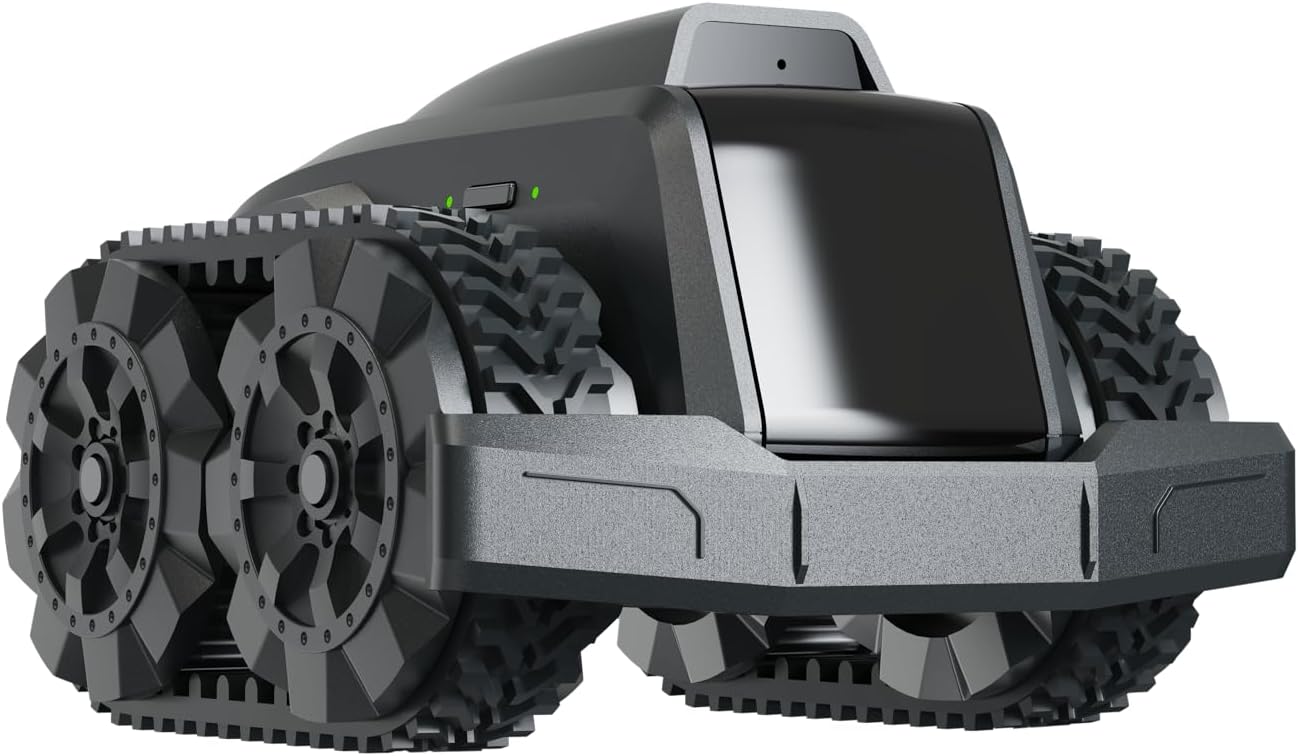
The Moorebot Scout Model E is a compact, waterproof mobile camera robot designed for versatile indoor and outdoor monitoring, inspection, and robotic learning. Controlled via smartphone, it supports Scratch and ROS programming, ensuring a customizable experience for hobbyists and professionals alike. With privacy-focused peer-to-peer security and adaptive wheel/track locomotion, it offers reliable remote surveillance and interactive fun for tech-savvy users.


| ASIN | B0CQ6QTXH1 |
| Additional Features | Waterproof |
| Age Range Description | Teen & adult |
| Animal Theme | Raupe |
| Are Batteries Required | Yes |
| Best Sellers Rank | #214,280 in Toys & Games ( See Top 100 in Toys & Games ) #306 in Remote- & App-Controlled Robots #2,617 in Kids' Electronics |
| Brand Name | Moorebot |
| Collection Name | Robot |
| Color | Black |
| Customer Reviews | 3.9 out of 5 stars 576 Reviews |
| Edition | E edition |
| Educational Objective | Teach programming, robotics, and creative problem-solving |
| Finish Type | Matte |
| Inner Material | Plastic |
| Is Assembly Required | No |
| Is Autographed | No |
| Item Dimensions | 5 x 5 x 4 inches |
| Item Dimensions L x W x H | 5"L x 5"W x 4"H |
| Item Weight | 0.84 Pounds |
| Language | English |
| Manufacturer | Moorebot |
| Manufacturer Maximum Age (MONTHS) | 600 |
| Manufacturer Minimum Age (MONTHS) | 120 |
| Manufacturer Part Number | SC3100B |
| Material Type | Plastic |
| Model Name | Scout E |
| Model Number | SC3100B |
| Number of Batteries | 1 Lithium Ion batteries required. (included) |
| Number of Pieces | 1 |
| Number of Players | 1 |
| Occasion | Birthday |
| Operation Mode | Automatic |
| Outer Material | Plastic |
| Play Activity Location | Floor |
| Power Source | Battery Powered |
| Recommended Uses For Product | Indoor Security |
| Scale | Mini |
| Set Name | False |
| Size | 5 inches x 5 inches x 4 inches |
| Style | Track |
| Supported Battery Types | Lithium-ion |
| Theme | Robot |
| Toy Figure Type | Play Figure |
| UPC | 726172189908 |
| Unit Count | 1.0 Count |
| character | Generic Robot, Scout E |
D**A
An inexpensive neat little multi role robot
It's smaller than you think. White bottle cap in the pics is for scale. It's a normal sized cap you'd get from a bottled water or whatever. Up front, this product is still new to me. I have not tried any programming. Think of it as more of a neat mobile camera tech toy, not a roving security guide for your home. More on that below. Think of this a a cool remote camera toy. Seems to be built well. I was able to connect to it from my phone over at another house. It has some adjustable settings. The auto on option on the IR nightvision is fun. The auto off doesn't off as well as it should IMO, and the only adjustment for those settings is high or low. This is fun, and I love it. I consider this a cool tech toy for children ages 8-90. Seems safe enough for youger kids. I've actively tried finding pinch points and the like, but I haven't found any. The only safety issue might be hair getting stuck around the axels (kind of like your vacuum cleaner!), so don't drive it on your head, or over your little sisters hair while she's coloring. I haven't done more than basic pathing to try it out. The more turns in you do in a route, the more off it looks like it becomes. Whatever "AI" they say is in here, is not what I would call AI. It seems like it's just trying to match the distances and turns by using "muscle memory". It doesn't have anything more than the most basic accident avoidance. Mine some how routed into a door frame. One side a wall, one side an open doorway. It turned right, wall. Turned left sees open door way. So it knows at the very least, it has an obstruction right in from of it, but just to the left is a wide open space. What it should do is back away from the object it's pressing it's nose too, reassess the options with the camera(it's pretty limited in sensors and such), then proceed through the open door and gt back on route. In reality, it wiggles around a bit more, then calls out to you to help unstuck it. It has almost no obstacle avoidance. It wont know what to do if someone put a box down along it's path, it won't avoid the chew toy. It does have some avoidance, which I found amusing. It can detect people and pets, and I'm assuming smaller people too, don't have one here to test it on. You can set it to follow you, or your pet. It doesn't work great, but it does work some. I thought it was fun and cute. Just don't try to walk towards it or pick it up when it's looking at you. I backs away in robo-terror, trying to escape the giant coming at it so it doesn't get stomped on. It really did throw it in reverse and back away at full speed until it found the wall Mine has connected to the charger 100% of the time, on both mecanum wheels and the tracks. I think the key is a solid bright(not shiney) surface behind the charger to give it more contrast. A couple times it will do some wiggles, or one time it pulled away about a foot, turned around to scope out the scene another time, and then backed in again. Nailed it that time. So sometimes it reconnects quick, sometimes it needs to have a think, but it's always managed to dock at the charger for me Remember, this is a budget robot. They say that it doesn't have auto mapping or navigation because of "privacy issues". Which is mostly bs. You could always add them with on/off options, or make another model that can do it. That excuse seems like it came from the Public Relations department. I think the real reason it doesn't have those features isn't because of privacy. It's because more sensors and better programing is means higher production costs, meaning higher retail price. Which is fine! I'm happy to have this relatively inexpensive little dood rolling around my place. But make another model that DOES have your features. They already offer to store the pics and vids from it on the cloud, but personally if I'm already sending pictures of my family and the layout of my house off to a remote cloud, it's not that far of a stretch to just allow it map and navigate itself. It has programming which I haven't looked at. It has pathing, which I've barely touched. I suppose you could make a path and a schedule to run it so it can do security sweeps around your house. Might work for you, might not from what I've read. Also, this thing isn't loud, but it's not a "Stealth Device". Unless you have a lot going on around you, you'll here it creeping up on you. What you can do to check on your house, is drive it yourself from your phone, anywhere you have cell service. Play with the animals while you're at work. Use the audio function to ask your significant other to start a bath for you so it's ready when your home, because texting is so 2023. Some other review said he was using it to check under his cars and stuff, so he could check the undercarriage without lifting the car. Someone else had said he was away from home and used it to shut a door the kids left open. I've tested this. It is torquey enough to shut interior doors. It can move my front door, but I doubt it could do it with enough force or fast enough to shut it. Finally... Some other reviewer said "it wont dock with the base station with the tracks on because it can't crab walk now. It tries to move sideways but can and just sits there"....... Bruh, you need to switch it from wheel to track mode on the controller. Same if your putting the wheels back on, put it back in wheeled mode. It changes how the bot moves, and it's smart enough to adapt to either choice of locomotion. You can tell right on the controller what you have the setting on. If the left thumb stick only offers forward and reverse, you're in tracked mode. If it has 4 direction indicators on it, it means it's still in wheeled mode.
P**S
Good for tech geek
Awesome little robot, it is fun and really easy to use. The setup was very easy as well, it connects to my phone and wifi no problem. Controlling the robot is also easy, it’s very fun because I can make it drift lol. Into the security part of this, I think this is very sophisticated. I setup a path for the robot to go through every time I ask it to, I can also set it as a motion sensor and have the siren rings when it detects motion (you can actually set it to exclude different motions such as your pets). Speaking of pets, our dogs are very curious about this little robot and would try to play with it every time the robot is moving. Overall, I think the image recognition on the robot is very nice because it can automatically return to it’s home once it detects the checkered label on the home. I haven’t tried this feature yet, but it looks like you can setup your own automation by using the drag and drop feature from the software. :)
B**E
Extremely Dissatisfied and Unsafe for Children
I recently purchased the Moorebot Scout - Tiny AI-Powered Smart Camera Mobile Robot with high hopes of enhancing home security and monitoring capabilities. Unfortunately, this product turned out to be a major disappointment, and I would strongly advise against purchasing it, especially if you have children in your household. First and foremost, the so-called "smart" AI capabilities of this robot are severely lacking. The human and pets recognition feature is incredibly unreliable and often fails to accurately identify individuals or animals. This undermines the very purpose of having a monitoring device in the first place, as it cannot be trusted to reliably alert you to potential threats or activities. Additionally, the integration with popular voice assistants like Alexa and Google Home is clunky and inconsistent. The promised seamless compatibility is nothing but false advertising. Setting up the device to work with these assistants is a frustrating and time-consuming process, and even when successfully connected, the commands are frequently misunderstood or ignored. One of the most concerning aspects of the Moorebot Scout is its lack of safety features, particularly when it comes to children. The FWD Mecanum Wheels, while touted as a selling point, actually pose a significant risk in a household with young kids. The robot's unpredictable movements and lack of obstacle detection make it a hazard, as it can inadvertently collide with furniture or, worse, cause harm to a child who might be in its path. Moreover, the night vision capability of this smart camera is extremely disappointing. The quality of the recorded footage in low-light conditions is grainy, blurry, and practically unusable. Considering that a significant portion of monitoring and security needs arise during nighttime, the poor night vision renders the device almost useless in those situations. Lastly, the auto patrol and docking feature, which is supposed to provide convenience and efficiency, falls far short of expectations. The robot frequently gets stuck or disoriented, often failing to return to its charging dock or losing its way during scheduled patrols. This unreliability defeats the purpose of having an autonomous monitoring device and leaves you questioning its overall effectiveness. In conclusion, I strongly advise against purchasing the Moorebot Scout - Tiny AI-Powered Smart Camera Mobile Robot. Its unreliable AI capabilities, lackluster integration with voice assistants, absence of safety features for children, poor night vision, and overall unreliability make it an incredibly frustrating and potentially hazardous product. Look elsewhere for a more reliable and child-friendly home monitoring solution.
H**R
Fun toy for tech minded adults
I had some trouble connecting directly to the robot. It's quite complex and the instructions could be better. Here are the detailed steps for an Android cell phone or tablet. 1. Fully charge the robot until you have four solid blue LEDs. Very important - don't be impatient like me 2. Download and install the Moorebot app while you're waiting for the robot to charge 3. Turn the scout on by holding the power button until the power light comes on 4. Wait for it to boot - about 30 seconds. It makes a cute ready sound when it has booted. 5. Make sure it is in direct connect mode. Press the button on the opposite side from the power button so the left LED is lit. It should be lit by default. It has a rectangular icon next to it. 5. Open the app and click on [Connect to the Scout's WiFi]. This opens the WiFi settings app. 6. The WiFi settings app lists available networks, find and select the one called robot-scout-xxxxx. The default password is r0123456 7. The connection should say "Connected, no internet" 8. If your device won't connect, try turning your phone's WiFi off and back on again. I had to do this. 9. Close settings and return to the Scout App. You see a message that says the Scout network is running 10. Click [Next] 11. This takes you to a page with [Monitor], [Patrol], and [Program] buttons. You now have direct control of the robot over short distances with line-of-sight. This page has a book icon in the top left corner which opens the user manual. This page also has a settings icon in the top right corner. Click this to enable control over your WiFi network. 1. On the settings page, click on Set up WiFi Router Mode 2. Chose the WiFi connection you want to use 3. Enter the WiFi password (yes, I know, I don't like it either. It has a camera, why can't I just point it at my router's bar code?) 4. Click [Next] 5. The robot now connects to the selected WiFi. It works better on my 2.4GHz network than my 5GHz one. You can now control the robot from anywhere as long as it stays in range of your router. Hope this helps. Oh yes - it's a lot of fun. But it has the AI capabilities of a jelly bean. Watching it try to dock is a laugh. Patrol mode is a joke too. It can only start a patrol from the charging station. But as it can never dock with the charging station you can't do a second patrol. The charging pins are on the back of the robot so it visually tries to line up with the charger, then turns around and backs up. The turn-around maneuver is not accurate enough, so it always misses. It's hilarious. Why aren't the charging contacts on the front?
L**R
BEST TECH-Security Cam
I was reluctant to purchase this product based on some of the reviews I read but decided to give it a shot after performing my due diligence on the company itself. Like in most cases, there is a small learning curve when it comes to programing but this device works AMAZINGLY well and has a lot of the same type of technology of some of my more expensive drones. Some complaints I read, in my opinion, have more to do with lack of knowledge, and poor internet infrastructure, than the device itself. I am using this for added security in my home and I have performed numerous tests in which ALL have been extremely successful and passed with flying colors. What else can I say, GREAT PRODUCT INNOVATION !
M**K
Excellent start. Not worth the money yet.
App is well made and logically laid out. App control of rover is iffy. Need to have 1 dot to control direction and speed. Rover rotation is not easy to control when driving. One side of bot spins very fast and makes it hard to control. Rover quickly loses accuracy Not a very capable rover due to its size. Tracks need to be shipped off of the rover and kept round, and or possibly made much thinner. The tracks become stiff and oval after manufacturing/installation on rover and get memory/ flat spots in them consuming more power and causing the rover to jerk while driving, This affects accuracy of patrol feature. Nice concept...the bad tracks and its tiny size make it unsuitable for anything much other than a toy IMO.
C**F
I like this alot - but needs some tweaks
This does work and it is really cool but it could use some design changes. Most notably I found that my unit doesn't dock properly. It either has to do with the height of the dock or maybe one of the contacts on the robot is too recessed - not sure will experiment. The robot when docking has to turn 180 degrees and back into the dock. If the two power contacts don't engage the robot continually pivots back and forth hoping to connect which it hasn't yet after 3 tries. I've had to manually position it on the dock in order for it to connect to the power contacts. Might just be a matter of adding tape on the floor adjacent to the dock - not sure at this point. Another thing: don't drive your robot off somewhere into the house and expect it to dock automatically. In order to dock you have to drive the unit back to the dock so it's clearly visible on your cellphone otherwise it simply won't find it's way back. EDIT: Been using it for a while and it's reliably docking. Quite impressed.
A**R
Needs work
I've had this for about 8 months and here we are at the end of 2023. I got this to keep track of my house while I'm gone. My issues are mainly it drops connection to the wireless when it's less than 2 feet away from the wireless AP. None of my other devices or wifi attached things do that. It can't find it's way back to the charger. Both my robot vacs can do this.... Ok privacy reasons. Ok I get that but I should be able to flip a switch,check a box or accept some agreement. Look it's a fun toy but needs a bit of work. When I'm across the country trying to explore my house and it disconnects from the wifi and doesn't seem to try to reconnect. No,not a dead zone or a bad AP. It's like Google. They get 85% of the way there then call it good enough. Yes it has the latest firmware.
C**N
Buon rapporto qualità prezzo, però prima di acquistarlo leggersi il manuale di uso,
Pacco trovato in giardino, ma senza danni e con confezione integra. Ottimo robot da sorveglianza, in rapporto al prezzo. La telecamera ha una ottima qualità sia di giorno che di notte ed ha un ampio angolo visuale. Si possono programmare, sia visivamente che con Scratch , n percorsi di pattugliamento, tuttavia , basandosi il robot su un sistema inerziale per la navigazione, ma avendo motori poco precisi, più il percorso è complesso più è probabile che non riesca a completarlo e a tornare alla base di ricarica. Per esempio, programmando con Scratch di ruotare di 90° o 180° quasi sempre la rotazione non è 90° o 180°, ma caso mai di 70° o di 210°, pertanto la direzione presa successivamente è errata e la successiva navigazione imprecisa. In ogni caso il robot quando si trova in difficoltò, ovvero trova un ostacolo non previsto sul percorso o non trova la base (che lui identifica con l'immagine a scacchiera) cerca di risolvere il problema con vari tentativi, tentativi che però possono durare molto e risultare infruttuosi. Altro difetto, non secondario, è che quando lo si pilota con lo smartphone il collegamento avviene con la banda 5 Ghz, che è sostanzialmente line of sight, pertanto dopo pochi metri o un ostacolo banale si perde il controllo e il collegamento con il robot. Ma in ogni caso giudizio positivo, e comunque , per percorsi semplici, efficace robot di pattugliamento.
A**Y
Bad quality.
I bought this from Amazon UK, UAE, UK sends me used item instead of new, and UAE the quality is not good, cause to many problems like one wheel not responding, night vision delay in switching, wifi not found etc. Also, after a reset, the bot shows different problems, like a refurbished item. Returned 4 times due this. But i still trust Amazon. And will continue to purchase.
C**R
Very disappointing.
Hopefully this would have done exactly as it suggests to a good standard, couldn’t be more disappointed. (Should have read more reviews before purchase) Looses signal, unable to dock, camera footage breaks up constantly & the video quality is poor. For my 3yr old grandson to drive around the living room it’s great but that’s about it.
A**O
Parece tener muchos detalles que lo hacen ser molesto
Se le dificulta volver ala base casi siempre, los recorridos de patrullaje no se graban bien, la batería se drena muy rápido, la camara se percibe muy pobre en poca iluminación afuerza necesitas usar los infrarrojos, el audio de dos vías no es entendible casi nunca y suena muy bajo
D**N
Scout
Love it. To get the cloud notifications for motion detection to work I had to reset it and start again. Other than that no problems.
Trustpilot
2 months ago
1 week ago