We remain fully operational. Our teams are working around the clock to ensure your deliveries continue safely.

DOWNLOAD THE APP


Copyright © 2025 Desertcart Holdings Limited
DOWNLOAD THE APP




Buy anything from 5,000+ international stores. One checkout price. No surprise fees. Join 2M+ shoppers on Desertcart.
Desertcart purchases this item on your behalf and handles shipping, customs, and support to Nicaragua.
🎬 Elevate Your Entertainment Experience!
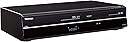
The Toshiba DVR670/DVR670KU is a versatile DVD/VHS recorder that combines multiple A/V components into one compact unit. With built-in tuners and support for various formats, it offers seamless recording and playback options, ensuring you never miss a moment of your favorite content.
| ASIN | B001TOD3KU |
| Analog Video Format | NTSC |
| Audio Output Mode | Surround |
| Best Sellers Rank | #208,676 in Electronics ( See Top 100 in Electronics ) #31 in DVD Recorders |
| Brand | TOSHIBA |
| Built-In Media | Remote Control, DVD Player |
| Color | Black |
| Compatible Devices | Television |
| Connectivity Technology | HDMI |
| Connector Type | HDMI, RF |
| Controller Type | Remote Control |
| Customer Reviews | 3.9 3.9 out of 5 stars (641) |
| File Format | JPEG, MP3, WMA |
| Global Trade Identification Number | 00022265002117 |
| Item Weight | 9.46 Pounds |
| Manufacturer | Toshiba |
| Media Type | CD, DVD, S-VHS, VHS |
| Mfr Part Number | DVR670 |
| Model Name | DVR670 |
| Model Number | DVR670 |
| Other Special Features of the Product | Compact |
| Resolution | 1920x1080 |
| Supported Audio Format | Dolby Digital, DTS |
| Surround Sound Channel Configuration | 5.1 |
| Total Number of HDMI Ports | 1 |
| UPC | 022265002117 777781914252 |
| Unit Count | 1.0 Count |
| Video Encoding | MPEG-2, Analog Video |
| Video Output Resolution | 1080p |
| Warranty Description | 1 year parts and 90 days labor |
W**C
Very Nice Product...it lives up to its promise
OK, first I must say after reading all the reviews of several DVD recorder/tuners, I was impressed mostly by the Toshiba model. Now that I have owned it for about 2 months, I can safely say this product definitely lives up to its reputation. I am very happy with its performance thus far. I originally got the recorder to transfer all my VHS home movies to DVD. VHS tapes have [at best] about a 20-25 yr life span IF you use them very infrequently. If you use them frequently, then you are lucky to get 10-15 years out of them. And it they are subjected to heat, humidity, then they go even faster. With a DVD on the other hand, you lose NO quality no matter how many times you play it over and over. Just dont scratch them!!! The recorder transfers the VHS to DVD very easily and is user friendly for anyone IMHO. The only thing I noticed is that you cannot pause the DVD recording when using the VHS to DVD transfer. But, you can pause the DVD recorder when using the tuner. Also, if you concerned the DVDs you make with the Toshiba will not work in another DVD players, you can relax. I tried the DVDs the Toshiba made in 4 other DVD players and all players played it just fine. Also, every DVD format I could find work perfectly in the Toshiba...DVD-R, DVD+R, DVD+RW and DVD-RW...all work just fine. I was recording a movie with the recorder and about 10 seconds into the recording, a box popped up and said...DISC ERROR. I tried several times and thought the recorder was the problem. But I tried recording another VHS movie tape and it did just fine. Apparently, some movies are copyrighted, so you cannot record them. Also, another good feature: You can delete titles that you dont want. So if you mess up, you can still salvage the disc if you choose to do so. Only thing is that you cannot use the disc space that you delete (on the DVD-R, DVD+R formats). But, you can reuse the space on the DVD-RW, DVD+RW DVD formats. All in all, the only drawback is not being able to pause the DVD recorder when transferring VHS tapes. But, if you use the DVD+RW format, you can delete portions of the recorder AFTER you have recorded what you want. Then you can go back and manually delete. If you want a good performing DVD recorder, this product definitely lives up to its reputation and name!!
S**N
Five Star Gem
I gave this DVD/VHS Recorder five stars as it has a digital tuner, it does not atomically break when it detects a stop when copying tapes to DVD, and it has worked great for me on both a newer TV that does have audio video inputs, and on my older TV that does not have audio video inputs. I tried copying a home movie from a camcorder on a different recorder, and every time I had stopped the camcorder, the DVD recorder stopped to write to the disc -- this recorder doesn't do that. So if you have old tapes to copy, this is the perfect recorder for you. As for playing VCR tapes, I haven't had any problem playing tapes recorded at different speeds. There is a learning curve to using this recorder, but I think it is well worth the effort. If you are still using your VCR to record, now is the time to switch to DVD recording, and copy your VCR tapes to DVD. Why switch to DVD recording? Once you get the hang of it DVD recording leaves VCR recording in the dust. One of the features of DVD recording is that you can record programs and cut out all of the commercials by using the "pause" button. Using the "pause" button, information will not be written to the disc until you stop recording. Therefore, everything you record is written to the disc in one title (page 49 of User Manual). When recording programs using the timer, be aware of the following: - Set the clock to manual (valuable tip from another review) - Turn the recorder off using the "Timer Set" button when you are using the timer record (valuable tip # 2 from another review) - If using a rewritable disc, make sure you delete from last item to first item or you will lose available disc memory. Basic hook up is not hard (see Quick Guide). As with all (I think) new players there are two separate hook ups for TVs that have audio video inputs. - Coaxial cable hook up ( 1 cable included with recorder) Step 1) TV cable to ant in on recorder Step 2) Ant out on recorder to ant in on TV. - Audio video cables (1 set included with recorder) Step 3) Audio video out on recorder to audio video in on TV. Basic hook up for older TVs is not that hard either (page 24 of User Manual): Note: you will need to buy (see my other reviews for the items I purchased) 1) RF Modulator 2) An extra coaxial cable Coaxial cable hook up - TV cable to ant in on recorder Step 1) Ant out on recorder to ant in on modulator Step 2) Ant out on modulator to ant in on TV - Audio video cables Step 3) Audio video out on recorder to audio video in on modulator. Still hesitating? Maybe my experience will help. I owned an older expensive DVD/VHS Recorder. The VHS recorder played tapes fine, but began having problems with recording. I found out that most repair shops no longer repair VHS recorders, but I found a repair shop that offered free estimates, so I took it there. Big mistake! After they had it a while, I was told the parts were not available, and it could not be repaired. When I took it home I discovered the VCR was worthless. I couldn't even play tapes. I was upset, but learned the following lessons: - Beware of Free Estimates! - The day of the VCR is coming to an end -- it's time to begin recording on DVDs and copy old VCR tapes to DVD! I recommend the following items to get started recording to DVDs (see my other reviews): - DVD-R - DVD-RW - CD Storage Box - CD DVD Paper Sleeves with windows - CD/DVD marker
D**B
Cannot give a full review because I really only use one feature of the machine .. making DVD's direct from a camera . One of the few machines with an IEEE input available .
Trustpilot
2 weeks ago
2 weeks ago