Buy anything from 5,000+ international stores. One checkout price. No surprise fees. Join 2M+ shoppers on Desertcart.
Desertcart purchases this item on your behalf and handles shipping, customs, and support to Nicaragua.
๐จ๏ธ Elevate your print game with the MegaTank MAXIFY GX2020 โ where productivity meets style!
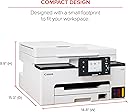
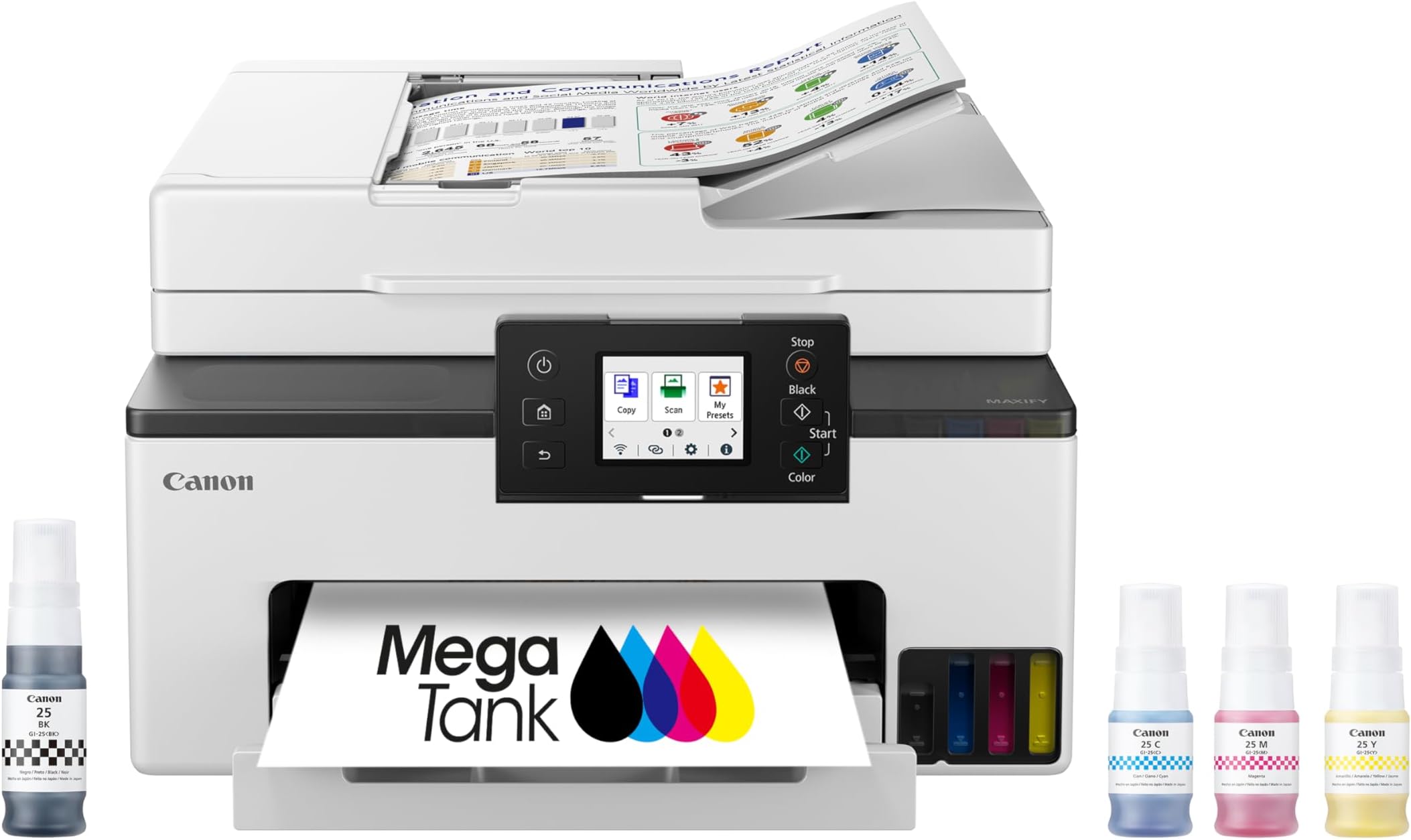
The Canon MegaTank MAXIFY GX2020 is a compact all-in-one wireless inkjet printer designed for home and office professionals. It delivers business-quality print, copy, scan, and fax functions with a high page yield of up to 3,000 black and color pages per ink set. Featuring dual-band WiFi, a 2.7-inch color touchscreen, automatic duplex printing, and a 35-sheet auto document feeder, it combines efficiency and convenience in a sleek footprint. Backed by a 3-year limited warranty, it supports versatile media types and offers reliable connectivity for a seamless hybrid work environment.


| ASIN | B0CHLHDHRT |
| Additional Printer Functions | All In One |
| B&W Pages per Minute | 15 |
| Best Sellers Rank | #5,406 in Office Products ( See Top 100 in Office Products ) #87 in Computer Printers |
| Brand | Canon |
| Built-In Media | Documentation & Power Cord, Fax Modular Cable, MAXIFY GX2020, MAXIFY GX2020 Wireless MegaTank Small Office All-in-One Printer, Set Up Ink Bottles (GI-25: BK, C, M, Y) |
| Color | White |
| Color Depth | 24 bpp |
| Color Pages per Minute | 10 |
| Compatible Cartridge | GI-25 Pigment-Based Ink Bottles (Cyan, Magenta, Yellow, Black) |
| Compatible Devices | PC |
| Connectivity Technology | USB, Wi-Fiยฎ (Wireless LAN, 2.4/5 GHz, IIEEE 802.11b/g/n/a/ac), Wired LAN 100BASE-TX / 10BASE-T |
| Control Method | Touch |
| Controller Type | Touch Screen |
| Customer Reviews | 4.0 out of 5 stars 874 Reviews |
| Display Type | LCD |
| Dual-sided printing | Yes |
| Duplex | Automatic |
| Global Trade Identification Number | 00013803359497 |
| Hardware Interface | USB |
| Ink Color | Cyan, Magenta, Yellow, Black |
| Item Dimensions D x W x H | 14.8"D x 15"W x 8.9"H |
| Item Type Name | Inkjet Printer |
| Item Weight | 17.8 Pounds |
| Manufacturer | Canon |
| Maximum Copy Resolution Black and White | 1200 x 2400 dpi |
| Maximum Copy Resolution Color | 1200 x 2400 dpi |
| Maximum Copy Speed Black and White | 14 ppm |
| Maximum Media Size | 8 x 10 inch |
| Maximum Print Resolution Black and White | 1200 x 2400 dpi |
| Maximum Sheet Capacity | 250 |
| Maximum print Resolution Color | Up to 600 x 1200 dpi |
| Model Name | MAXIFY GX2020 |
| Model Number | 6171C002 |
| Model Series | Canon MegaTank MAXIFY |
| Number of Drivers | 1 |
| Number of Trays | 2 |
| Other Special Features of the Product | Auto Document Feeder, Energy Star, Touch Screen |
| Output sheet capacity | 250 |
| Paper Size | Cassette: LTR, A5, B5, A4, 4" x 6", 5" x 7", 7" x 10", 8" x 10" Custom Size: 3.5โ - 8.5โ / Length: 5.0โ x 14.0โ |
| Power Consumption | 22 Watts |
| Print media | Envelopes, Glossy photo paper, High-resolution paper, Paper (plain) |
| Printer Connectivity Type | USB, Wi-Fiยฎ (Wireless LAN, 2.4/5 GHz, IIEEE 802.11b/g/n/a/ac), Wired LAN 100BASE-TX / 10BASE-T |
| Printer Output Type | Color |
| Printer Type | Inkjet |
| Printing Technology | Inkjet |
| Resolution | 600 x 1200 dpi |
| Scanner Type | Flatbed |
| Special Feature | Auto Document Feeder , Energy Star, Touch Screen |
| Specific Uses For Product | Multi-Purpose |
| Total Usb Ports | 1 |
| UPC | 013803359503 |
| Unit Count | 1.0 Count |
| Warranty Description | 3 year |
| Warranty Type | Limited |
| Wattage | 22 watts |
L**T
Best printer for the price point
Searched for days to find a 5 star printer that would print on both sides of a paper ("duplex"), not require me to use expensive cartridges, look good, FAX, perform well and be easy to set up. This one checks all the boxes! It was a little pricier than the other options but so worth it. Connected wirelessly easily (had a phone connector cord but my computer back has no jack for that so did not use it). Didn't have quality paper on hand to try it out but it printed seamlessly. No paper jam in sight. This will last for years! It arrived quickly & intact due to proper packaging. So happy with this purchase & a set up that took minutes (except for a 12 minute printer head alignment but there's no escaping that if you want great performance). Good job Canon! Farewell Hp & your price increase on the hp ink plan....
L**V
GREAT PRINTERโผ๏ธ
Look no further. This printer is absolutely perfect. I replaced my MX922 with this as it was much more economical. I I love everything about it. It accepts and prints copies very quickly. It is quiet, easy to set up. I especially am enjoying the liquid ink. It is VERY easy to fill, and absolutely not messy AT ALL (if you are a bit concerned about this like I was). I also appreciate the visual that you get on the ink levels. It prints multiple copies very quickly as wellโฆโฆ
S**E
I don't recommend this printer
I cannot express how much I do not like this printer. And note that, the only reason why it gets one โญ instead of none is because #1, we can't and #2 it does print black and white documents well and at a decent pace. I did research on photo printers and this one came up time and time again as a good quailty printer. For plain documents with no images, sure. But for it to boast that it does great photo printing, it absolutely does not. This printer is a terrible photo or image printer. And yes, I checked the types of paper that are compatible with it. Let me tell you why I dislike it so much... -Images are blurry and dull. (I tried the Canon print app, the Canon create app, just plain printing from the open photo, and from Publisher. The last was the best, but still not great.) - EVERY SINGLE TIME you load the paper, you have to select the paper size. For 8 1/2 X 11, standard size paper, you just have to click that setting each and every time. But outside of that, different names for the sizes without explanation are a hassle to figure out, and then when you're printing you have to select the size that you put in the paper tray. It doesn't seem complicated , extra yes, but complicated you wouldn't think so... until for instance you put 5x7 envelope paper in the tray and you choose the setting envelope (not D10), and then when you try to print on said envelope it won't print. Why?! why!? If the printer thinks that what you're printing isn't the same as what you put in the tray based on the settings, it won't print. So even though I put the envelopes in the tray, and I set it to envelopes, and then I tried to print envelopes, they still wouldn't print regardless of what app I used. I had this with several things I tried to print that we're not envelopes, and for the record, there are only two envelope settings. I tried printing on eight and a half by 11 cardstock and it wouldn't print because I didn't select the right option (but note, weight options aren't clear or specified), but heavyweight paper and cardstock weren't options on the printer so I couldn't get them to print and you can't choose plain paper for everything because that won't print either. You can't use plain paper and try to print photos because that won't print! It makes no sense! -Most of the paper settings aren't American standard, several of them are Japanese specific paper settings and sizes, that even though I looked them up, I still couldn't figure out how to make the printer print. I tried the Canon FAQs and help site, and it was not as helpful as they thought it would be. There were a few okay features: - The starter ink is a lot. More than an entire fill for each color. -It does print regular B&W documents well and pretty quickly. -After you connect the first device for wireless printing, it's really easy to connect other devices. Those were worth the 1 star. I would never recommend this printer to anyone. I don't even want to keep it myself. Even though I got a deal, it's not a deal if it doesn't do what you need it to.
A**Y
Great printer so far and easy setup.
Easy setup and connection to home wifi. Printer onscreen menu walks you thru each step. Was able to easily connect my new windows 11 laptop and even my ten year old windows 10 laptop to print. This is my first ink tank printer that replaced my 12 year old hp inkjet printer. Filling the ink tank was easy no mess and like the easy view of the ink levels. So far everything works great. My only criticism of this printer is the paper tray is thin plastic and not anywhere close as sturdy as the trays of my old printer.
D**X
Have a few issue's with it.
So far everything seems to work ok. Except the WiFi. With a 6G wireless tower sitting a foot away from the printer. It goes off line. And only way I have seen to get it to re-connect is to power it off. Then back on and use the repair utility it has you download to rec-connect it. Which is kind of pointless to having Wireless Printing. Touch screen works nicely. The inks that came with the printer holds more than the replacements. So replacements will not top the tanks off when you go to refill.
W**N
A true review
Iโve been using the Canon MegaTank MAXIFY GX2020 for a few months now, and Iโm genuinely impressed with how well it performs across the board. Setup was straightforward it walked me through each step right on the touchscreen, and within minutes, I had it connected to Wi-Fi and ready to print from my laptop and phone. The build quality feels solid, and the compact design fits nicely on my desk without taking up too much space. The print quality is excellent crisp text, deep blacks, and vibrant colors, whether Iโm printing business documents, marketing materials, or the occasional photo. The speed is surprisingly fast for an inkjet, and it handles double-sided printing automatically, which saves both time and paper. What really makes this printer stand out is the MegaTank system. The refillable ink tanks are a game-changer. Instead of constantly buying expensive cartridges, I just top off the tanks when needed and after hundreds of pages, Iโve barely made a dent in the ink levels. Itโs economical, eco-friendly, and ideal for anyone who prints frequently. The scanner and copier functions are equally smooth. The automatic document feeder is convenient for multi-page scans, and the quality remains sharp. Iโve used the Canon PRINT app for remote printing, and itโs intuitive I can print straight from my phone, even when Iโm not home. Overall, this printer delivers professional-grade performance for both home and small office use. Between the low cost per page, impressive quality, and reliable wireless features, the Canon MAXIFY GX2020 easily earns a solid five stars from me. Itโs one of those devices that just works efficiently, quietly, and consistently every time. Highly recommended for anyone tired of overpriced cartridges or unreliable printers.
K**H
Frustrating to work with.
I cannot recommend this printer. I suggest you avoid the GX2020, and all other printers in the Maxify GX series. Print quality is good, but overall, this printer is frustrating to work with. Too many little, but annoying quirks. Too much personal info required for setup. No USB port on the front panel on some models. To scan to USB, you have to plug the flash drive into your computer and scan to it there. The document feeder requires a firm shove to get the paper far enough in. The "beep" doesn't mean the paper is far enough in to reach the feed rollers. With the Power Control option turned ON, the printer doesn't wake up when you try to print. You have to go to the printer and touch the screen to wake it up, so leave that option turned OFF. Also it has a tendency to disconnect from wi-fi. It's too late for me to return the printer, so I'll just sell it for whatever I can get to cut my losses. I'm buying a Brother inkjet MFP, which some reviews have described as a workhorse.
T**N
Great Value, Reliable Performance, and Zero Cartridge Hassle
The Canon MegaTank MAXIFY GX2020 has been a fantastic addition to my home setup. Print quality is excellent across the boardโdocuments are crisp, photos look surprisingly good for an officeโfocused machine, and scanning is clean and accurate. What really sets this printer apart is the MegaTank system. The refillable tanks make ink costs dramatically lower than traditional cartridges, and itโs great knowing I wonโt be constantly buying replacements. Setup was straightforward, and Iโve had zero issues with connectivity. Mine is hardโwired to the router, and both my phone and laptop print over WiโFi without any hiccups. Paper handling has also been flawless so farโno jams, no misfeeds, just smooth operation. For anyone looking for a dependable allโinโone that delivers quality output and saves money on ink, the GX2020 is an excellent choice. Itโs compact, efficient, and a genuinely good value.
J**L
IT WORKS VERY WELL, great price
This printer is packed well! Pulling the printer out of the box is smooth and easy. Inside is the manual, couple with other items, the cord, the telephone connection and ground wire. The setup is so easy by following the direction on the printer screen. The setup direction was user friendly including the wifi setup. One feature I was very impressed with, while the printer is off. You can send a printing request, it turns itself on and prints the requested info.
C**S
Crap
Crap received in an open box was not new ink instaled and leaking all over
D**R
Nice printer !
The printer does his job where good .
R**S
Easy Setup phone app invasive.
Easy setup. I'm not a techy guy but this went very well even without wine. Used my laptop rather than my phone so I could read all the directions. Scary how quickly it went without having to enter any passwords to access my wifi or laptop. Ink cartridge install and ink fill went smoothly. Didn't even spill any ink. Filling the reseviours to about 80% left me with at least half a bottle of ink. In hindsight I might not have filled the colour ones so full in case they dry up. Time will tell. Chuckle to myself about all the fax features they go on about, we have cell phones so how do you send/receive a fax?๐ค So for the first day, all seems good but will update this review after using this printer more. FYI, we ditched a HP because of ink $$ and it wouldn't stay connected to my pixel 8. Update Aug 29, phone connection to printer sucks as the app wants to know everything but your sphincter size to print. I don't care if they know where the printer is but I can't print unless canon knows my location at all times.โน๏ธ
D**T
Great printer
Exactly as described
Trustpilot
1 week ago
2 months ago