Desertcart purchases this item on your behalf and handles shipping, customs, and support to Nicaragua.
🚀 Power up your home network with speed and style!
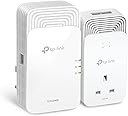
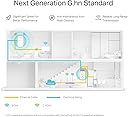
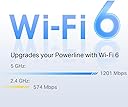
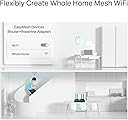
The TP-Link PGW2440 KIT leverages advanced G.hn2400 technology and AX1800 WiFi 6 to deliver ultra-fast, reliable internet over your home’s electrical wiring. Featuring an extra power socket, 2+1 gigabit Ethernet ports, and smart roaming capabilities, it ensures seamless 8K streaming and gaming across up to 300 meters. With plug-and-play setup and energy-saving mode, it’s the perfect upgrade for modern connected homes.


| ASIN | B0C9F23VYJ |
| Best Sellers Rank | 452 in Computers & Accessories ( See Top 100 in Computers & Accessories ) 3 in Powerline Network Adapters |
| Box Contents | 2 × Ethernet Cable, PGW2440+PG2499P, Quick Installation Guide |
| Brand | TP-Link |
| Brand Name | TP-Link |
| Compatible Devices | Desktop, Game Console, Laptop, Printer, Smartphone, TV, Tablet |
| Compatible Operating System Family | Windows |
| Compatible devices | Desktop, Game Console, Laptop, Printer, Smartphone, TV, Tablet |
| Country of Origin | China |
| Customer Reviews | 4.3 out of 5 stars 5,159 Reviews |
| Data Link Protocol | Ethernet, Gigabit Ethernet |
| Data Transfer Rate | 2400 Megabits Per Second |
| Data link protocol | Ethernet , Gigabit Ethernet |
| Data transfer rate | 2400 Megabits Per Second |
| Hardware Interface | Ethernet |
| Hardware interface | Ethernet |
| Item Dimensions L x W x H | 15.7L x 8W x 6.5H centimetres |
| Item Weight | 880 Grams |
| Manufacturer | TP-Link |
| Manufacturer Part Number | PGW2440 KIT |
| Minimum Required Operating System Version | Windows 10 |
| Model Number | PGW2440 KIT |
| Number of Items | 1 |
| Number of Packs | 1 |
| Product Warranty | 3 Years |
| Product dimensions | 15.7L x 8W x 6.5H centimetres |
| Unit Count | 1.0 count |
J**G
Next Generation Powerline network! (UPDATE March 2023)
** UPDATE ** My latest update after a month of use didn't alter my rating, but I have seen some other buyers experienced sudden drop out signals and I did indeed experience that too myself. Upon some researches, I found out that you need to check and update the firmware of the units. This can only be done via the utility software that you need to download from TP LINK website. This is frustrating as the packaging did nothing to mention this nor has an instruction to show how to update firmware. Yes, it's plug and play but I knew that these day an age, all 'connected' device would have the ability to enhance and repair any software faults. This is totally the case. My unit came with the original firmware 1.0 and the latest is 1.0.2 (two version up since its launch late 2022). Apparently they have fixed some problems and to be frank, I've in day three after updating, and there's no drop outs. So far, it's very consistent and the speed is as fast as before. So, before returning the units, check this first. ** At time of writing this review (Feb 2023), this is TP-Link's one and only G.hn Powerline network adapter. There are other brands out there but since I owned and used the previous and older generation TP-Lnk HomePlug AV 1000, I thought I should stick with the brand as it never gave me problem in terms of reliability. For those who haven't had much experience or knowledge about power line network adapter, it's pretty cool if you want to reach to dead spots around your house that even the latest Wifi network can't penetrate (i.e. thick brick walls or even out house or garage), as it's using the power line as if they are network cables. The problem I had with the original AV1000 was speed. While it worked, the speed is at best under 30mbs, and I have a 500mbs fibre broadband (and I do get 480 in the house wired). So that's less than 10% of the speed. I won't expect full speed anyway as my own MESH network can't reach near that inside the house. But having read about the newer standard G.hn (that also replaces HomePlug AV technologies, which they also declare that the old standards will be obsolete and won't be updated as of last year!), so I took the plunge and went with the new PG2400 model instead of the other faster TP-Link HomePlug AV2, since it's reaching the end of life by the sound of it. To my surprise, the speed is almost triple (see speed test in my pictures). Now, I can run livestreams in my office outside of my house, even though it's only 80mbs up and down, but it's more than sufficient for any high quality streams and remote work, as there's only one computer and one smartphone in my small office, unlike my main house, where there are more wireless devices connected at any one time. So this is awesome and well worth upgrade. Despite TP-Link didn't mentioned anything, I believe this is Wave 2 and not the original Wave 1 that has a speed limit of 1200mbs, this has a max theoretical 1500mbs (Wave 2 can go unto 2500!). Anyway, this is an awesome product and save me time to lay network cables (may be faster but a lot of work needed to route the cable from my router, around the house and to my office, on top of all the networking needs to be done in the office!). This is a plug and play solution and that extra power outlet allows me to plug other things on top too! Great stuff.
A**R
Wow. At Last!
After upgrading to the latest BT Superfast Fibre Broadband in my home (Single Story Bungalow), I still could not get acceptable coverage in the most important room in the house. My Games Room/Office. It's 19 metres from the main building with about 1.5 metre gap between it and the house and several solid brick walls. Total 25 metres from the main router which is located as far away as possible. The technician that installed it insisted that it was so fantastic that if there was a weak spot that he would leave me three repeaters to boost it. I'm no computer expert but if you try and install the repeaters in a link (3) number 3 ends up with barely more than you have without it. I absolutely did not want to run anymore wires! I phoned BT for technical advice luckily spoke to 'The Guy' that clearly knows what he's talking about. He said that BT doesn't sell anything like that but Amazon does. So, I researched the customer reviews and the only couple of problems (not for me) that customers might have with this setup is that you can't by an an additional extender without buying the full kit which could make this setup very pricey. However, my setup works far better than I imagined. I can't speak for how it might work in a multi story building but in my house (the two units are separated by 25 metres and a lot of masonry and there is ZERO degredation at the farthest end. Super Fast & Reliable. I highly recommend this setup!
A**R
Not quite perfect but probably the best.
Due to very dense brickwork I have one of these so I can get a signal in the other half of the house . TPLink has IMO the best software for these mains ethernet adapters with a utility that allows you to see which units are connected, what speed they are running and even reset them from the PC, this is handy because I have cronky old wiring and they occasionally freeze up. You do have to enter the password for each device to allow this so make a note of these before you plug them in the other end of the house. The passwords are only maintained on your PC so if you want to do it from anothe rdevice then you have to enter them all over again or be clever and work out where they are stored on the PC. The utility crashes every time it closes but does no harm so it's just an irritation. The unit is easy to pair with other units just by pushing a button at each end and the link is then encrypted but as far as I can tell if you set them up like that you can't reset them from the utility so I follow the instructions to remove them from any network and then just plug them in with the default network name set and they all seem to pick each other up, this also allows me to mix them with othe manufacturer's adapters. The wifi is not noticeably faster than the AV200 mpbs TPLink version I had before, but then Wireless N only goes up to 300 mbps anyway. The utility shows it running at about 175 even though one end is on an extension. The two wired connections are useful for TV and media box where you do notice a faster speed. There's a separate utility specific to this device to find it on the network and an on-board website so you can set the IP address , Wifi encryption channel etc. from your browser. I use a different name (SSID) from the main router's network because I like to know which one I am connected to, especially because windows is too stupid to connect to the best signal. A good tip is to make sure that the signal channel band on this and your main router are as far apart as possible e.g. set your router channel to 1 and this unit to 11 or 13 if you can, otherwise the signals interfere and you get lesser performance. If you are really keen get a copy of inSSIDer home and check that you are not clashing with a neighbour's wifi as well
M**W
Truly plug and play
These have worked well for me from first install. Successfully updated firmware from v1.03 to v1.1 on both units with no issues. Adapter 1 is plugged into a first floor socket at the hub end and Adapter 2 is plugged into a ground floor socket at the user end. First floor and Ground floor sockets are separately fused at the consumer unit on the same RCD. Resulting speeds are good but fluctuate (as expected) - generally between 200 Mbps and 300 Mbps on the same end points (320 Mbps is my current record). This is on a line 'rate' of 1000 Mbps with a cap of 500 Mbps by contract. The web interface holds a decent amount of information with a handy 'night mode' option to turn off the LEDs on the units for further savings on the energy bill. The only request/suggestion: some indication of the reduced power feature enabling (when no device is in use) by perhaps toggling the LEDs off/on accordingly - as an additional alternative to 'night mode'. But initial meter readings give every indication that these units are very energy efficient. Overall they're proving to be stable; reliable; flexible and useful. Genuinely pleased with the purchase so far.
T**E
Great replacement for AV2 Homeplugs
Excellent replacement for aging AV2 Homeplugs. Some things to note: 1. TP Link app is useless, not worth downloading. There is literaly zero functionality and configuration. Use Web UI instead. 2. To get to Web UI, after pairing, plug some device into the adapter. Without an active device the adapter will not get IP address from DHCP. 3. Once the device got IP address, go to UI (just type the address in browser), create a password and disable Sleep mode. If you won't do this, the device might go to sleep and overal G.hn network performance will be degraded 4. If you're getting a weak signal through those, put an additional one in the middle path; it'll act as a hopping point (but do remember to disable Sleep mode!) Overall, I am very pleased with these, I use it as a "wired" backhaul for my mesh system.
R**B
Provides a wired connection to my garden office
Easy to set up. I needed a way to get an internet connection to my garden office. WIFI was not strong enough based on the location of the router and the long ethernet cables I ran through the garden was continually getting damaged. This system works well. Admittedly, the electric circuit being extended to the garage through a fuse board and the 30m of armoured cables running to the office have decreased the speed compared to the speeds achieved inside the house. I was concerned that the fuse board in the garage might stop the system working, but in my case it just halved the speed. The 190mbs in the office (from a 500mbs) at the router is more than enough. I have matched it with a travel router (already owned) to give wifi in the office. I was achieving 400mbs on the internal house circuit using the system. So this would make a good solution for a house where wifi is not consistent. Just consider impact if running through extended circuits.
P**S
Wonderful WHEN they work (2 didn't, one did) - but remote wi-fi complicated to set up
Edit: 3 years later... Of the two that worked, one died almost completely after a couple of years (it transmits a wi-fi signal, but without data, and I can't get it connect, no matter what I try) and the other one appeared to do much the same a year or so later - although I did eventually get that one to work, but only with its original ID and password. So, somewhat reluctantly, I bought another one (I really wanted something more reliable, but was unable to find out if different manufacturer's ones would work with the original base unit that plugs into the router and transmits the signal over the mains - that, at least, is still working! I could NOT get this one to work. I tried everything but could not get it to pair - so it was returned. I gave them one last chance and asked for a replacement - and, to my surprise (and relief!) this one worked! Although it didn't pair itself automatically, but then I guess you can't have everything... The intructions for changing the ID and password have changed completely over the years, but are, if anything, even more confusing (the new app is an absolute nightmare - and even worse on a PC). And I failed completely to get them to work (the previous instructions were bad, but I did at least - after many days - finally suss them out). So, now I have a working internet/wi-fi network, covering both house and garden (with an old router in the garden shed running off one of the extenders). The routers and extenders/repeaters all have different addresses and passwords (!!!), but, once you've got them working, this doesn't matter too much - the transfer between transmitters as you move around the house and garden is hardly seamless, but then it wasn't much better when they all had the same name and password. So, you pays your money and you takes your choice. These thing DO work (mostly) and some of them keep working. The installation varies between impossible and fairly easy (just hope you're lucky!), and, even if you can't get it set up properly, it's still workable (although possibly not very easy to explain to your wife!). It's up to you - other products might work better. If I were starting from scratch, I wouldn't use this brand again, but at least I DO now have a working network - at least for now... ---------------------------------------------------------------------------------------------------------------- Original review (written 3 years ago): This does two things: it extends your internet connection over your house mains wiring (which it does very well and is dead easy to set up), and it extends your wi-fi (which it does in two different ways - one very easy to set up, but of limited use, and one much more useful, but a bugger to set up). As an internet extender, it's a wondeful product - mine works perfectly in the shed at the bottom of a 50m garden, with God knows how many connections/sockets/plugs inbetween the two ends. So, if you want to take the laptop down to the shed (or upstairs to the back bedroom) and plug it in to the extender with a bit of ethernet cable, it's a superb solution. However, if you want to use your laptop over wi-fi, the picture is more complicated. You can configure these adaptors as wi-fi repeaters, which is very simple (just press a button on you router and another on the extender). But this only gives you a decent signal if your extender plug is close enough to the router to pick up decent signal itself. So, great for the next room, but not so good for the back bedroom - and my shed remains wi-fi free. To get wi-fi from the extender plug itself, you have to configure it as a mini-router, and this is complicated (don't bother with the - very confusing - instructions, there is an excellent video on Youtube - the url of which Amazon won't let me give you!!). But it works - and wi-fi in your shed 70m away is yours for the having. So far, so good (except for the rubbish instructions). But then you have to deal with the quality of the product itself. And here the picture is far from rosy. I was so impressed with the original extender (which came with the base plug), that I ordered a second one. However, this wouldn't work, so was sent back. Its replacement worked OK, so for a few weeks I had wifi in my shed, whilst my daughter could do her homework in her bedroom. (It very cleverly uses the same address and password as your router, so devices can switch from one to the other fairly seamlessly.) But then both (BOTH!) units started playing up - providing intermitent wi-fi, or none at all. I reset both and followed the wonderful Youtube video once again - one came back to life, the other was fine with paired internet, but refused to do wi-fi. So now it's the daughter's homework or me listening to Radio Caroline in the garden. You can guess who won that one... It's taken me a while to get round to sorting this out, so I'm beyond a reasonable time limit for returning the faulty unit (without a lot of fuss), and I don't know if it's worth trying a fourth one. Or maybe I should get a cheap router and plug it in the shed? (edit - this is what I did in the end) Such a pity these are so unreliable, because, with better quality control (and much better instructions!) this would be a really ecellent product. But as things stand, all I can say is try it and see - but be ready to send it back if it doesn't work (and don't expect too much from the replacement). Good luck.
D**.
If this model works at all in your location, it usually works very well, fast and reliable
A difficult review to make really. I'm sure everyone has good and bad experiences with ALL Powerline adaptors using them in the real world. I've experienced both good and bad, but find the TP Link series better than the non branded cheaper ones and usually almost as good as the more expensive marques. You just have to buy it - plug it in - and see if it works in your location for you 🤷 This particular model offers the most robust connection of all the other TP Link models from my experience - if it works at all in your chosen location, it usually works very well
D**E
prises anglaise
attention prises anglaises
B**A
Under performed
Not as powerfull as expected for the price and is bulky
C**N
bon produit
fonctionne, mais je n'arrive pas a "étendre " le WIFI existant. Il y a donc un deuxieme réseau avec ses propres caractéristiques
C**O
Gutes WLAN-Signal
Die Installation ist sehr einfach. 1. Möglichkeit:Wenn schon ein Powerline Adapter in der Steckdose steckt und mit dem Router verbunden ist, braucht man nur dieses Gerät in eine andere Steckdose im der Wohnung oder dem Haus zu stecken und nach knapp einer Minute hat man eine neues WLAN-Signal. Der WLAN-Schlüssel für dieses Signal ist auf dem Gerät notiert. 2. Möglichkeit: Man steckt den Extender im Raum mit dem Router in eine Steckdose, drückt am Router die WPS-Taste und innerhalb von 2 Minuten am Extender die kleine unter den Lichtern befindliche Taste, übernimmt der Extender den WLAN-Schlüssel des Routers. Jetzt kann man wie zuvor den Extender in irgendeine Steckdose im Haus oder der Wohnung stecken und man hat ein neues WLAN-Signal mit demselben Schlüssel wie der Router. Den auf dem Extender notierten Schlüssel braucht man nicht. Beides sehr gut und einfach und bisher, seit ein paar Wochen, funktioniert es zuverlässig.
G**C
Its working but is bulky item
Its bulky but doing a job. Losing around 10-15% of internet speed compare to my GoMo router which i knew before buying. Very easy to setup. GoMo router and to link is on ground floor. Didnt test on first floor. Overall happy as i have my PC Connect with Ethernet cable.
Trustpilot
2 weeks ago
5 days ago