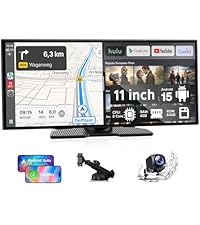
Desertcart purchases this item on your behalf and handles shipping, customs, and support to Nicaragua.
🚗 Upgrade your drive with smart tech and crystal-clear views!
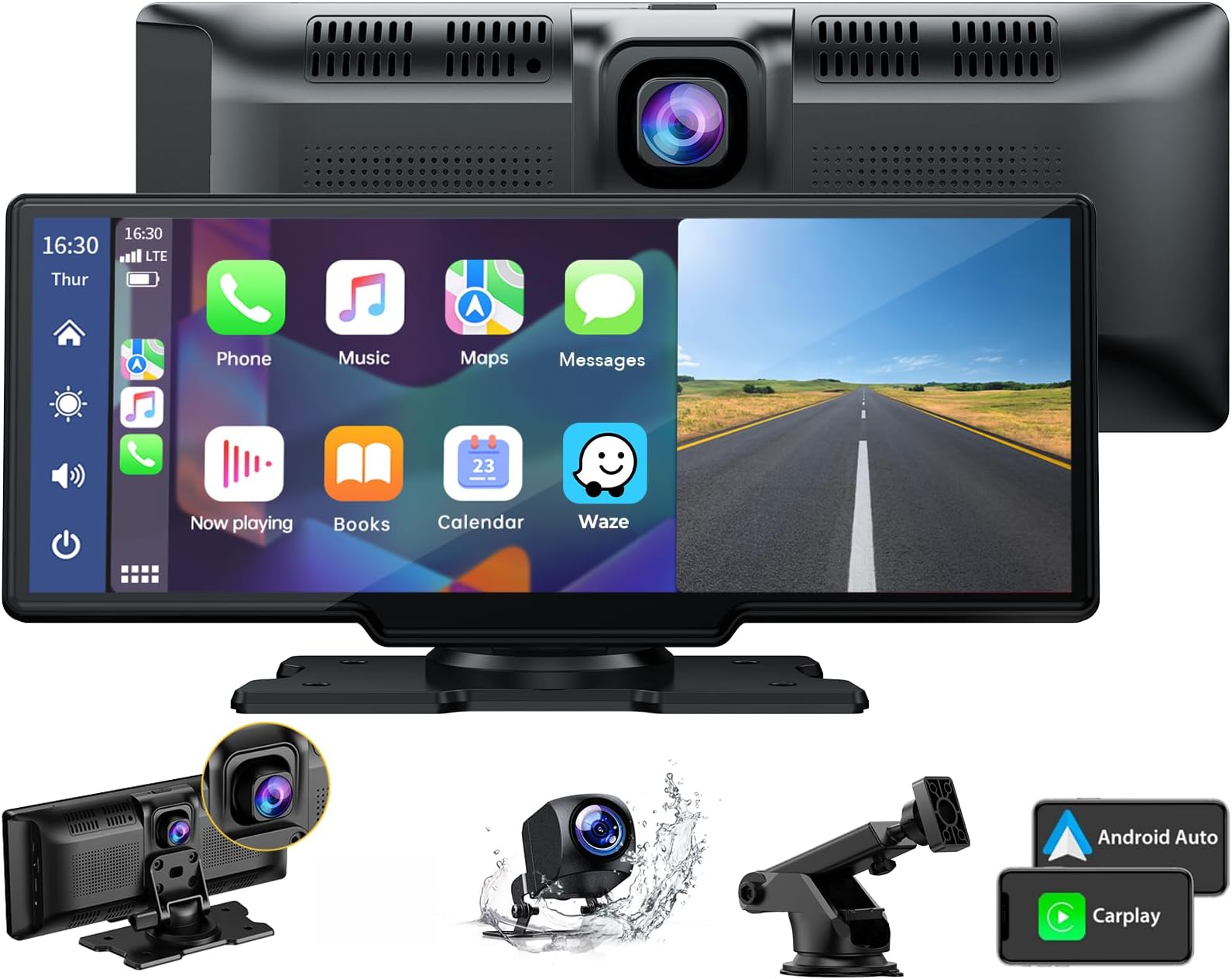
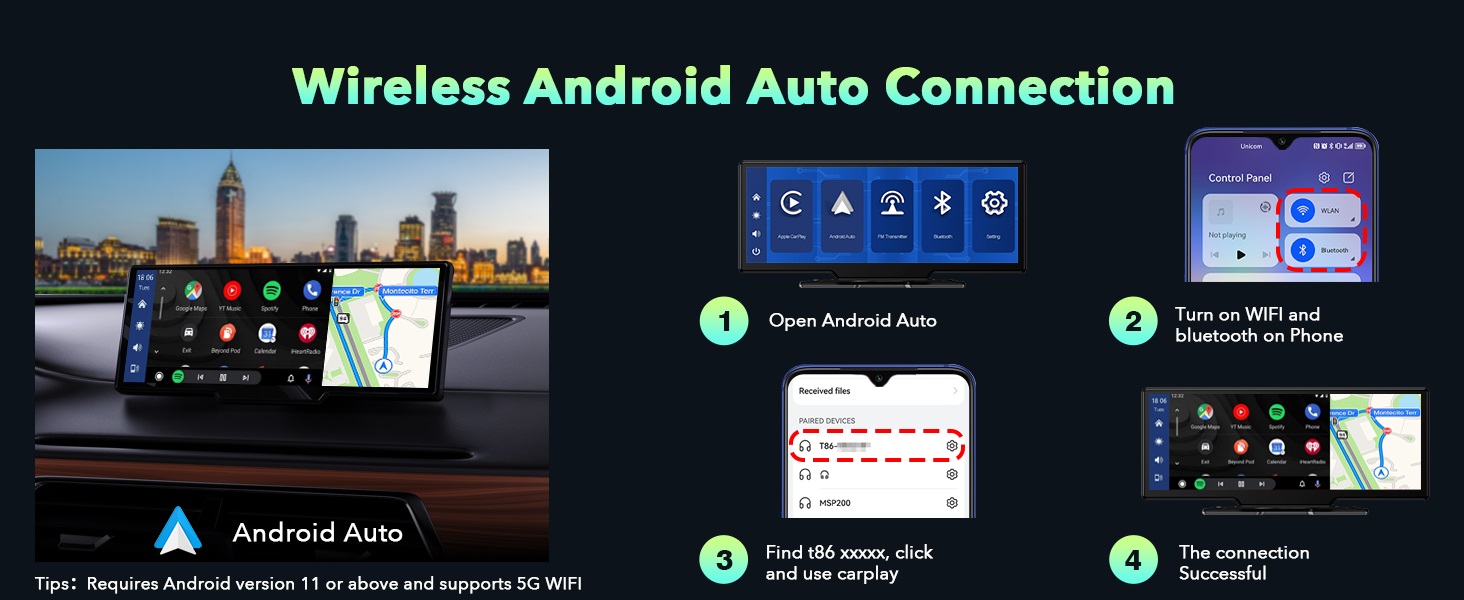
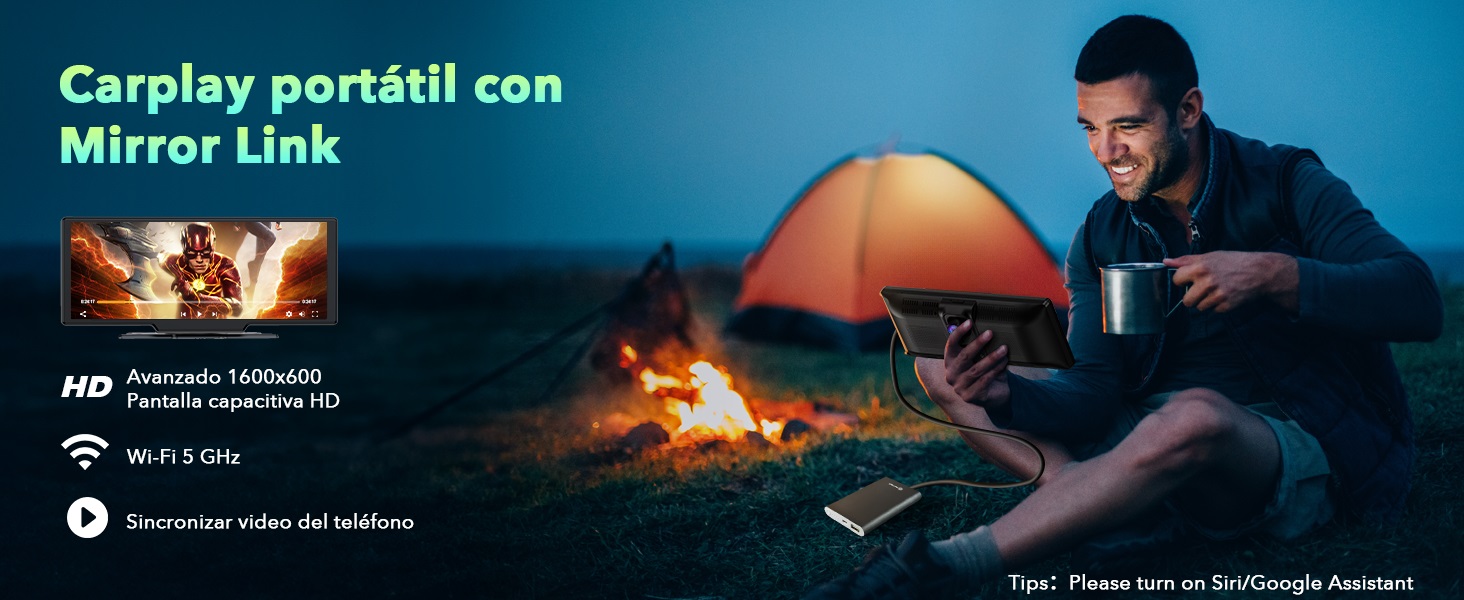
The LAMTTO 9.26" Carplay Screen is a portable touchscreen GPS and car stereo receiver that wirelessly connects to Apple CarPlay and Android Auto. It features a 2.5K front dash cam and 1080P waterproof backup camera with night vision, delivering dual-screen recording and wide-angle views. Enhanced Bluetooth audio output ensures lossless sound, while Siri and Google Assistant voice controls provide hands-free convenience. Designed for universal compatibility, it installs easily with a rotatable mount and powers via cigarette lighter, making it the ultimate upgrade for older vehicles.


| ASIN | B0C9L9JBWC |
| Audio Output Mode | AUX, Stereo |
| Audio Output Type | Speakers |
| Best Sellers Rank | #13,141 in Electronics ( See Top 100 in Electronics ) #71 in Car Audio Receivers |
| Brand | LAMTTO |
| Color | Black |
| Compatible Devices | For iPhone with CarPlay or Android phone with Android Auto |
| Connectivity Technology | Auxiliary , Bluetooth |
| Connector Type | 3.5mm Jack |
| Controller Type | Android, Google Assistant, iOS |
| Customer Reviews | 4.0 out of 5 stars 1,525 Reviews |
| Manufacturer | LAMTTO |
| Mfr Part Number | RC06 |
| Model Number | 9.26 Drive Mate Screen |
| Number of Channels | 4 |
| Number of Items | 1 |
| Other Special Features of the Product | Wireless Carplay & Android Auto with 2.5k +1080P Dashcam |
| Special Feature | Wireless Carplay & Android Auto with 2.5k +1080P Dashcam |
| Supported Internet Services | YouTube |
| Surround Sound Channel Configuration | 4 |
| UPC | 712109669476 |
| Unit Count | 1 Count |
| Video Encoding | MP4 |
| Wireless Technology | AirPlay, Bluetooth |
C**G
Very impressed, I was expecting this to be so bad that I would return it, I was wrong!
I bought an older Audi Q5 hybrid as a daily driver, and not having Carplay was driving me insane. There are a ton of units out there where I can change the screen in the car, which I will eventually do, but the research to pick the right one and the time to take the dash apart to do it isn't a priority. In steps this wonderfully cheap piece of tech, that gave me what I wanted. Let's start off with the dashcam. I won't drive without one anymore. We were hit once by someone on a scooter and they sued us. They didn't know we had dashcam footage of it happening, it saved us and our insurance from being held liable when under most instances they told us without it we would have been. One of the things I don't like about it is I wish there was just a hair more adjustability to the lens, but at this price point it isn't a deal breaker. The camera automatically turns on and records, and I didn't feel that it took away from the processor when using Carplay. On to Carplay. The screen is bright and has better resolution than I was expecting. I did have to buy a specialty cable to connect the Aux to the Audi MMI system, but I didn't even realize I never hooked it up and this little unit connected to the cars bluetooth on its own. What surprised me even more, I'll play videos when I'm driving quite often, not that I'm watching, but I did notice there was no lag. The wide screen is very nice in that it enables you to see more of the map while navigating. I haven't hooked up the rear camera, as this is only going to be a temporary solution for me, so I'll use the stock backup camera for now. Downsides, I was originally going to use the windshield mount as this is a temporary solution. You have to extend it so far it isn't really that stable. Also having to angle it to not block the dashcam was pretty tricky, so I pretty quickly gave up on that and just used the adhesive strip on the top of the dash. All of the connections are on the right side of the device, so routing of the wires away from the driver was easy, they even included a plastic trim tool for tucking the cables into crevices in the trim. Overall, great value for the money as I've spent more on just a dashcam for another vehicle. Carplay works as it should, and the device boots and connects very fast, actually faster than the wired factory Carplay in my Honda Ridgeline work truck. If you're on the fence, you can't beat this for the money.
F**N
Modernizing my old car
I have a 2012 Chevy Impala with no bluetooth, just an auxillary port. This thing is amazing! I mounted it on the dash, plugged it in, and connected to my phone's bluetooth, no sweat. It shows me my map, shortcuts for Spotify, my phone's homepage, the phone, notifications, and voice recognition. I can enter my map address from my phone or the touchscreen. It also lets me mirror my phone's screen right to it! Installation: I spent more time trying to find an installation video on the company's YouTube site than I did actually installing it. When I failed finding an installation video, I realized there isn't one because it couldn't be easier. I mounted the screen with the sticker and plugged it into my car's cigarette lighter. Then I tucked the cord between panels and under the carpet of the floor to make it seamless. That's it. (I haven't tackled the rear camera yet - stay tuned for that one.) The plug in has a USB port on the other side, so you can still charge your phone when it's plugged in. I didn't try a different one, but the instructions were adamant that you only use their power cable. Audio options: the screen can use bluetooth, aux, or an FM radio station. They are all super easy to set up. I went with the aux option, despite the additional cord, because I felt that the sound was fuller than the FM option. Usability: Couldn't be easier. As soon as the screen receives power (I.e. I turn on my car), it turns on and takes about 2 seconds to start up. My phone's bluetooth connects to it right away and the screen auto starts Android Auto. Everything I need is right there and ready to go. I'm seriously surprised it was this easy. Some other reviews and the instructions talk about using wifi, but I just use bluetooth, so I don't know what they're referring to. Other: the screen is easy to touch, no different than a phone. There are several nice settings, including a custom dim night mode and calibration for parking.
P**.
Very Useful Product
This screen is fantastic. Works well. Takes a few minutes to setup and connect, but once it does, you’re solid. Used it to move across the country. However, it doesn’t stand up to the heat. I left it in my truck for one day in El Paso and the screen died. Still powers up and connects, but you can’t see anything. If you buy this, and you live anywhere in the south, remove it from your vehicle each night to keep it cool.
L**E
Not the cheapest Carplay Screen you can find, but it has a key function advantage - SEE SEPT UPDATE
SEPT 2023 UPDATE - After a couple months experience, I can report that I still like the device but here are a few tips that may help others. First, while the unit always connects fine during a multi-stop trip when the last wifi connection was also to the unit, if my phone has connected to another wifi source since I was last in my car, it does not always connect automatically. For example, my car is parked close enough to my house that my iPhone 12 is still connected to my house wifi when I get in the car and the unit does not always connect. This is despite my phone wifi settings showing that the unit's short-range wifi and bluetooth connections are connected. What I found solves this is for me to turn off the wifi on my iphone before I walk outside and get in the car. Then get in and start the car. Then turn my phone wifi back on. Then wait for a pop up on my phone asking to connect Carplay wifi and click yes. If it still hasn't connected, briefly unplug the power cord to power cycle the unit and it will connect. My second tip concerns using the Sirius XM iOS app. Not the fault of the Carplay unit, but the Sirius XM iOS app has a bug where unless it has been fully closed (not just stopped) on your phone before launching it in Carplay, it will be playing the last station used but when you hit the Favorites button, nothing happens and your list of Favorite stations won't come up. To solve this, first launch the Sirius XM app directly on your phone and then swipe up to stop it. Then press near the bottom of the home screen on your iPhone and slowly drag upward to the middle of the screen, pause, and let go. You should now see the "tiles" of all of the apps that are still running. Swipe upward on each app to fully close them including the Sirius XM app. Now launch the Sirius XM app on the Carplay unit and everything works including the Favorites button and the arrow that lists the current songs playing on your list of Favorite stations. Original review: My 2014 E63 Mercedes had a fairly small screen for the Sirius XM/Nav/Backup Camera, and Mercedes stopped supporting the internet connectivity for new owners, so I decided to bypass it with one of these. As you can see from the photo, it is a good size fit and good appearance (I don't use the forward dash camera and didn't want it on top of the dash). Installation is fairly straightforward. I had to take the inner trunk liner off to connect the reverse camera wire to the reverse light wire and needed a trim pry tool and used an electrical tap that doesn't fully cut the factory wire--important. The supplied cable was just long enough to reach the dash from the trunk. I needed another USB power port for my phone mount/charger so instead of using the supplied lighter socket power cord I used a dual USB-A lighter socket and bought a 6-ft USB-C to USB-A cable (note-a dual USB-C socket charger doesn't seem to work). Operation is great with my iPhone 12, I turned on the microphone and use no touch voice commands with Siri and Google. Apple maps and Google maps work great for navigation either full screen or half screen. I use SiriusXM IOS app fine, Flacbox App to play local FLAC music files, and even Amazon Music app. In my case, the key was to get audio output via Bluetooth to play all sound through my car speakers because my car did not have an aux port and I didn't want to use an FM connection. The way to do it is after you complete the Bluetooth setup, go to Airplay function and set up the secondary Wifi connection between the device and your phone. After that, go back and do a second Bluetooth on your phone that connects to your car. Boom, you have sound via your car's audio system! I think some cheaper versions of this device don't do this and only give you audio output via aux port or FM connection. If you get a weird device unsupported message the first time or it doesn't connect to your phone immediately upon starting the car, just drive a few miles and it should suddenly start working. Hopefully a future firmware update will eliminate any such connection delays. I guess my only long-term concern is that you hear stories that after a periodic IOS update (IOS 17 is coming), Apple has been known to render certain third-party devices inoperative. Maybe Bluetooth devices are an exception and I shouldn't worry but I hope the seller can give some assurance that if this were to ever happen, new device firmware could be downloaded online to an SD card so that this device doesn't ever become a brick that is adhered to our dashboards. Overall, I am satisfied and a firmware update that eliminates any connection delay on start-up would make it even better!
R**O
Item might catch fire - Think twice before buying - Take all 1 star reviews seriously
I have had this product for quite some time and now I feel I can give a good review of its functions. During the first month, the item worked great! After the first month, I experienced several issues with the device turning off and resetting its memory (not keeping time, dates, connected phone, etc). So, I reached out to the seller asking for any available updates but didn't' hear back until I sent several requests to him/her. After 3 to 4 months, I was directed to a site to update the device. After the update, the item worked well for a month, but then it started flickering all over again. The item continued to turn off and on during times of operation and even had issues with the screes holding it to the bracket that would loosen up (it didn't matter how hard I set them up). I continued using it because it was over the 30-day return period. Today, I went out for a drive with my family and, as usual, I tried to power up the device. The device turned on, stayed on for 5-10 min, and then turned off again. This time, there was no way to turn it back on. After several minutes of being off, smoke started coming from the top of the device; it was burning on the inside. I unplugged it and immediately placed it outside the car hoping it was not going to catch on fire. Luckily, no fire was viewed, but the smell of burned electrical pieces was intense. The point of this review is to inform you that the idea of this item is great but it does not work. You will be happy with it for a couple of months and then you will have issues. The seller has poor communication. If you continue to use it, you will need to keep monitoring every time because it could catch on fire, and if this happens while you're driving, or the car is unattended, well, you can imagine the worst-case scenario. I don't recommend this item, I wasted over $100 on this device thinking it was a great way to get an Android Auto screen in my car but I almost lost my car due to it.
S**N
Good Screen, Weak Mount
The screen quality is good, Android Auto connects quickly, and the touch screen works well. It also handled the Arizona heat without any issues. However, the included mount is too weak for the weight of the screen and kept falling off the dashboard. If the mount were stronger, this would be a 5-star product.
1**L
Great solution for older cars.
Your car is old enough not to have Android auto or apple connect (or whatever iPhone version is)? That's okay! Just get this! Using Bluetooth works great for me with my Samsung phone. Its reliable and stays connected well. It was super easy to set up - it shows you what to do right there on the display. So it's definitely worth the money to add this as your heads up alternative to installing something into your dashboard. I did not use the permanent mounting, but it looked like it would hold well if I had. The adhesive for the base is 3M if im not mistaken. It is a little tricky to put it somewhere that it wont block your field of view though. I had mine down near the cup holders, because up on the dash would have drastically cut into the field of view when looking towards the passenger side of the vehicle through the dash. So keep that in mind if you already have a small windshield view...
C**N
Absolute Game-Changer for My Car – Feature-Packed, Easy to Use, and Worth Every Penny!
I've been using the LAMTTO 9.26" Wireless CarPlay screen for a few weeks now, and I am thoroughly impressed! If your car doesn’t have a modern infotainment system, this is THE BEST upgrade you can make at a minimal price. ✅ Seamless Wireless CarPlay & AirPlay This unit connected to my iPhone instantly. No lag, no fiddling—just plug it in for power and you're ready to go! Whether I’m listening to music, navigating with Google Maps or Apple Maps, or replying to texts or calls hands-free, everything works wirelessly and flawlessly. AirPlay is an unexpected bonus! Features, and I can also mirror my iPhone’s screen to the display for streaming YouTube while driving for Kids. 🚘 Backup Camera – Clear and Reliable The included 1080P backup camera is a total lifesaver. The image is sharp, even at night, and it auto-displays when I shift into reverse. And you can also calibrate according to your preferences. Installation was surprisingly simple, and I love the confidence this adds when backing into tight spaces and parallel parking on the curbside. 📷 2.5K Dash Cam – High-Quality Recordings The built-in 2.5K dash cam is another huge shout-out. It records automatically while driving, and the video clarity is exceptional. It gives me peace of mind knowing every drive is documented (with a 64 GB SSD card included). The wide-angle lens captures everything happening on the road without distortion and with better stability, which can be used as evidence in case of an Accident. 🔊 Sound Connection – AUX, Bluetooth, or FM: Your Choice! This is where the LAMTTO shines. Whether you're using Bluetooth, an AUX cable, or the built-in FM transmitter, the audio quality is excellent. No static or delay, just crisp sound from my car speakers. I ended up using the AUX Cable connection because I have an old car with no Bluetooth. 🔧 Easy to Set Up & Portable Setup took under 30 to 45 minutes, including the camera. I didn't use the Suction Cup mount; I used the taping mount (ProTip: After Installation, let it sit for 24 hours before using it for best adhesive results). It's pretty strong, and the unit sits securely on my dash. Because it's portable, perfect for road trips. The Cable Length is significantly long, so you can easily do the setup without any problems. Final Verdict: ⭐⭐⭐⭐⭐ The LAMTTO Wireless CarPlay Screen is a fantastic investment. Between the wireless CarPlay, dash cam, backup cam, and flexible audio output, it brings modern tech to any car, without the cost of a new head unit. Highly recommend for anyone looking to upgrade their driving experience!
B**E
Not good
Not good
G**.
Misleading product
The product says this is the Lamtto brand but it is not. It is a cheap China made product.
M**N
Great Tech, Few Tweaks Needed
Gotta say, this thing is mostly a win. The screen's bright enough to handle sunny days, and the thing boots up faster than my old radio! AirPlay via Bluetooth/WiFi is a breeze - connects fast and the sound quality's top-notch (in my case still Bluetooth from the phone to the car). The screen's shiny and smooth too, makes the whole dashboard look modern. But hey, it's not perfect. You can't flip the screen 180 degrees, which is a pain for some setups. Also, the double clock thing's annoying - can't hide the native one. And the multi-touch zoom? Couldn't get it to work, but maybe that's just me being clumsy. Overall it’s a total game changer for me - way better then spending $1200 on upgrading my head unit to support native CarPlay. Just a heads-up, you'll need the specific USB-C plug it comes with. Other ones won't work with it. Overall, pretty solid kit for the price. A few software tweaks and it'd be even more perfect.
B**K
I am IMPRESSED
This is the BEST smart screen / dash cam I've ever had! I am really impressed with it. * It has an amazing touch screen, a very light touch on the screen is enough to control it, just like your smartphones. You don't have to press hard on the screen! * Record quality is another strength it has! I am recording in 1080p and videos are very crisp! 2.5K will leave you speechless, very easy to read the plates of the cars in front or behind you! * Android auto is a life saver, it is very responsive and easy to use. You can also use Apple Carplay if you have an Iphone. * I think one of the strongest side is, It is NOT SLOW! I just touch an Android Auto, or settings, and it opens up very quickly. * You can connect it to your car's FM Transmitter, so it will play your music or let you have your phone calls through your car's stereo system! If your stereo is broken, do not worry because the dash cam has its own speaker as well! * You can MIRROR your screen! Yes that's right, you can literally mirror your phone's screen, and watch movies on it! * It comes with a 64GB SD card, so you do not have to buy one separately. * Easy to attach on your dashboard, or you can also use the suction cup and attach it on your windshield. I am really impressed with all the features this smart dash cam has... Some car manufacturers ask you to pay $4000 more to have a smart screen, and they do not have all of these features (especially ability to mirror your phone's screen is a big plus!) I highly recommend it, and will tell my friends about it... And thanks for the quick delivery!
L**L
Very good, but hopefully supports new IOS and android versions
Installed it today but haven’t done the rear camera yet. Screen is nice, big and clear, responsive to touch. Connected easily to both my IPhone and Android phone (but cannot be connected to both at same time). Sound through FM is adequate, as expected. No surprises. Mountings: windshield suction mount blocks dashcam so not useful. If this can be installed upside down, that may help. Size of screen may be too big for smaller cars like my Audi A5 as it blocks a lot of windshield visibility . Also, if your dash is sloping and not flat, this device may be on an angle which looks weird, so a sideways adjustment would be valuable. Not Lamtto’s fault but something to consider. Power cable is long and appears well made. How will this unit be upgraded to keep up with phone OS updates? Also, is there a way to customize the picture of the Bugatti that appears at startup? Ie to upload a custom file Overall, I’m happy for now, but have some long term concerns/room for improvement.
Trustpilot
1 month ago
1 month ago