Buy anything from 5,000+ international stores. One checkout price. No surprise fees. Join 2M+ shoppers on Desertcart.
Desertcart purchases this item on your behalf and handles shipping, customs, and support to Nicaragua.
🚀 Upgrade your speed, expand your space, and leave slow loading behind!
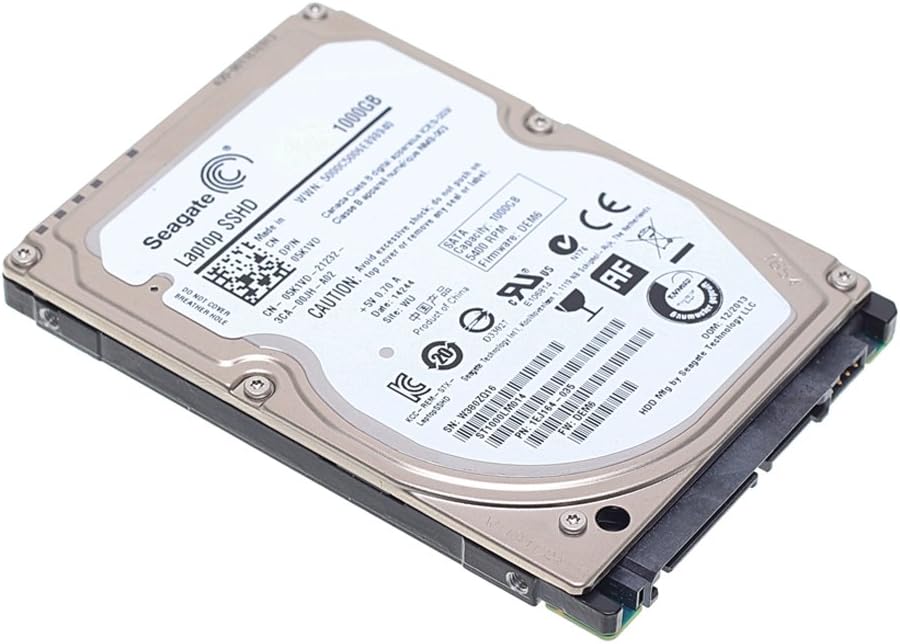
The Seagate 1TB Laptop SSHD is a cutting-edge hybrid hard drive combining the speed of solid state memory with the capacity of a traditional HDD. Delivering up to 4× faster performance than standard 7200 RPM drives and boot times under 10 seconds, it’s designed for professionals and gamers seeking rapid responsiveness without sacrificing storage space. Compatible with laptops and PS4 consoles, it installs easily via SATA 6Gb/s and requires no special drivers, making it the ultimate upgrade for seamless, reliable, and quiet performance.


| ASIN | B00B99JUBQ |
| Best Sellers Rank | 17,001 in Computers & Accessories ( See Top 100 in Computers & Accessories ) 1 in Internal Hybrid Drives |
| Box Contents | Solid State Hybrid Drive |
| Brand | Seagate |
| Brand Name | Seagate |
| Cache Memory Installed Size | 64 |
| Color | - black |
| Compatible Devices | Laptop |
| Compatible Video Game Console Models | Sony PlayStation 4 |
| Connectivity technology | SATA |
| Country of Origin | USA |
| Customer Package Type | Standard Packaging |
| Customer Reviews | 4.4 out of 5 stars 3,883 Reviews |
| Data Transfer Rate | 6 Gigabits Per Second |
| Digital Storage Capacity | 1 TB |
| Digital storage capacity | 1 TB |
| Enclosure Material | Nand Flash |
| Form Factor | 2.5-inch |
| Global Trade Identification Number | 04053162302105, 07636490041228 |
| Hard Disk Description | Solid State Hybrid Drive |
| Hard Disk Form Factor | 2.5 Inches |
| Hard Disk Interface | Serial ATA-600 |
| Hard Disk Rotational Speed | 5400 RPM |
| Hard disk form factor | 2.5 Inches |
| Hard disk interface | Serial ATA-600 |
| Hard-Drive Size | 1 TB |
| Hardware Connectivity | SATA 6.0 Gb/s |
| Hardware Platform | PC; Mac |
| Installation Type | Internal Hard Drive |
| Item Part Number | ST1000LM014 |
| Item Type Name | Hard Drive |
| Item Weight | 0.2 Pounds |
| Manufacturer | Seagate |
| Manufacturer Part Number | ST1000LM014 |
| Media Speed | 100-200 MB/s |
| Model Name | ST1000LM014 |
| Model Number | ST1000LM014 |
| Network Connectivity Technology | SATA |
| Number of Items | 1 |
| Product Features | Backward Compatible |
| Product Warranty | 1 year |
| Special feature | Backward Compatible |
| Specific Uses For Product | Personal |
| UPC | 951942465405 763649042670 763649034859 809185313611 804066532952 807034591180 |
S**R
REPLACED MY DODGY 250GB LAPTOP DISK , HUGE IMPROVEMENT IJN SPEED AND LOADS MORE SPACE
WAS GETTING DISK ERRORS ON MY LAPTOPAND ORIGINAL DISK (250GB) WAS NEARLY FULL, BOUGHT THIS TO SWAP OVER THEN BOTTLED OUT FOR MONTHS. EVENTUALLY I BIT THE BULLET AND USING A LOW COST DISK CLONE UNI T(LESS THAN £20 SATA TO SATA) I TOOK MY LAPPY TO BITS (AND IT WAS A FULL STRIP DOWN IN AN ACER ASPIRE)* USED THE CLONE GADGET AND IT SWOPPED THE CONTENTS OF MY DODGY DISK COMPLETELY TO MY NEW DISK AND WHEN REASSEMBLED I WAS ABLE TO ADD A NEW 650GB+ PARTITION IN SECONDS IN WIN7 NEW DISK IS FANTASTIC AND QUIET AS A MOUSE, QUICKER STARTUP AND SEARCH DUE TO HYBRID CONSTRUCTION.. *tip = check out "You Tube" for a How To Video if you have any concerns.. they are great!
M**K
This is a perfect PS4 hard drive replacement
This is a perfect PS4 hard drive replacement. It's only been in my system for 2 days and I have noticed quicker loading times and quieter running already. I did want a SSD but at the prices being quoted I thought "A massive nope". SSHD is a perfect blend of reliability and speed, and this particular drive is spot on. 6 month update. It has performed impeccably in my PS4. No dramas, no problems. Highly recommended.
B**6
Extra memory for a good price.
I bought this drive to upgrade my PS4 existing 500Gb drive. Easy to fit as Sony has made the PS4 HDD a quick swap item. (Instructions on how to do this can be found on the net). Firstly I backed up all my PS4 files before replacing the drive. Once this 1TB drive was fitted I powered up my PS4 and it asks for a software update....this is where I had problems. There are '2' types of update files for the PS4, one is the basic update (that Sony release every so often) the other update file (which is harder to find on PSN website) is quite a big file (think its about 8Mb) is the update file you will need to breath life back into your PS4. As for the performance of this Seagate drive all I can say is that its working fine, I haven't noticed any speed increases but then again I never timed my PS4 at doing tasks anyway.
T**T
A fantastic alternative if an SSD isn't in your budget
This hard drive caches frequently random-accessed parts of files. What this does is allow one to have the capacity of a hard drive, yet (after it's learned which data actually benefits from flash) have the low latency of flash-based storage. It's about five times slower in terms of sequential read performance than an SSD, but that's not what makes a pc fast. It's the latency that makes the biggest difference. In many ways, it's similar to the technology in Intel's Smart Response Technology, or Apple's Fusion Drive (which is probably just rebranded SRT), but it's on the hard drive itself and not on the motherboard. This then is a set-and-forget solution for tiered storage, ideal for platforms without SRT support, for people who prefer to spend money on other things than SSD's or simply don't want to bother with having a boot drive and a separate storage drive. This is what has saved mechanical storage from obsolescence.
G**H
Not as advertised - additionally, very poor aftercare upon return
The drive is listed on Amazon as being 1024GB. On arrival (and indeed, upon close inspection of thr 2nd image) it was noted that the drive was only 1000GB. This wasn't suitable for my needs. The reply I was given from the vendor was: Hi there, sorry to hear that You didnt like an item what You bought from us , but I believe the negative feedback is unfair . Your drive it was 1024gb , but You computer might showed 931 MB . The rest is not available as the manufacturers count 1GB=1000MB but in real 1GB=1024MB..... But ur Operating System or any other 3rd party software will calculate the HDD Space with 1GB=1024MB equation & show that u have 931GB of HDD..... [...] http://knowledge.seagate.S com/articles/en_US/FAQ/172191en?language=en_U So , I'm kindly ask You for removal of this negative feedback . King Regards Easy Godies Upon closer inspection, you will note that the reply is mostly a copy and paste from a poorly written Yahoo answers page: [...]
B**L
Drive appears to be fine in use - but - read on
I cloned my current 500GB laptop drive onto the new 1TB drive. As ever, being curious, I inspected the drive stats once I had installed it as my root C drive - and - rather oddly - the drive shows it had been "on" ( in terms of power-on hours ) for 78 days (the image above was taken a day later - yes - it HAD been on all night running a long needed de-frag - remember it was a cloned copy of my existing 500GB drive ). This sort of suggests to me that the drive had already been used - either physically "on" for 78 days, or, possibly, assuming an 8 hour day - 234 (8 hour) days.... Also the "power cycle count" runs to something in excess of 3000 power cycles, and there are a recorded 1.8 million command timeouts.... These numbers come from retained information within the drive itself, and, to the best of my knowledge, cannot be "fabricated". Although the drive appears to be functioning perfectly (the "command timeout" figure has never changed since it was fitted, and it has been running solidly for nearly 36 hours un-interrupted time now) In spite of the fact the drive appears fine, I'm still going to contact the seller regarding this, as it really does seem strange
M**H
Used for replacement PS4 Hard drive
I used this for a larger replacement hard drive in my PS4. I had seen reviews that said it was a very good option, that filled the gap between the large storage, but slow access of a standard type HD and the new, fast but expensive SSD type hard drive. While I did not have the PS4 long enough to say if it has reduced loading times, I can say they are certainly no longer. The swop was very, very easy. The only thing you need to ensure is that you get the latest software off the official Playstation website and that it is between 700 and 800mb. I downloaded the file a week before I changed over the hard drive. In between this time a new update had come out and the PS4 had updated itself. When I tried updating the software it kept giving me an error. I downloaded the new file and it worked perfectly. So as an upgrade for the PS4 I would recommend the unit as it is quiet, easy to fit, and doubles the storage.
K**Y
extremly Speed, and good capacity
Received in good condition, very fast, with large capacity, very good hard drive for installation in a tower. Very satisfied.
A**R
Good replacement for PS4 disk
Bought for my PS4 console as OEM was giving filesystem errors. I read reviews for the disk on Amazon.com and then went with the purchase. The disk was delivered in sealed anti-static pouch with packing material around it in a box. It was not in original box of manufacturer. I exchange the disk in PS4 and copied the data from backup. The initial boot was smooth and all seemed fine. Over time the disk logic seem to have optimized the data storage layout in SSD part as those games that I play often do have a low load/unload time. The console now does boot up fast and games load faster.
P**X
Great Product, install instructions if needed...
I'm writing this not only to give positive reviews for these two products, but to consolidate the hours of research and trial/error I did during install: OEM: HD - Fujitsu 320 GB HDD - mhz2320bh g2 ATA, 5400rpm RAM - 4.00GB (3.75 useable); 2x 2GB, 800MHZ, 200-PIN, PC2-6400, Sdram (Sodimm); DDR2 800, CL=6 NEW: HD - Seagate 1 TB SSHD, 6Gb/s, 64 MB Cache 2.5” RAM - Komputerbay 8 GB (2x 4GB) PC2 DDR2-800 SoDIMM Dual Channel Install of new hardware on HP dv7 1245dx: I installed the RAM and SSHD at same time. 1. Before opening up computer, I backed up my OEM drive to an external drive. Also, whenever opening up the laptop, be mindful of static electricity. I wear nitrile gloves to avoid any discharge. Doesn’t take much to cause issues. 2. RAM: Laptop recognized RAM automatically after restart and utilized right away. Showed up in System Information screen. Noticeably faster. Awesome. I also noticed that my fan, which usually runs at high speed about half the time, didn’t run high at all during all of this. 3. SSHD: This computer has two hard drive bays. You can install the new drive into either bay. The original bay (on left) will be labeled “0”, and the second one is “1” in the Disk Management program in Windows 7. Since having both hard disks in the laptop, I was able to do all the following from the same laptop. Did some internet searching, but here’s how I installed new SSDH: a. Start type, “Create and format”; should get a menu item that reads full, “Create and format hard disk partitions”. b. This will bring up the Disk Management program from which you can interface with the hard drives on your computer. My new SSHD was labeled default, “Disk 1”, and reading as, “Online”. c. Right click on Disk 1 New Simple Volume… This will allow you to copy files to that drive. d. Assign whatever letter and name you want. It will get changed by Windows later to C:. (I named mine “A:”). e. You should be able to now see the new drive show up in Windows Explorer. f. Now to install from OEM to new drive to become the primary. (If you simply want your new drive to be the secondary, then copy and paste whatever you want to the new drive – it does not need an OS to do this): i. I used Macrium Reflect Free. Install this or whatever mirroring software you choose. ii. My OEM drive has a C: partition and a D: Recovery partition. If you copy both these to the new drive, then the new drive will use only the amount of memory that is required for these drives, and deem the rest of the new drive as “Unallocated”. You can extend the memory range only for the partition that is physically next to this unallocated partition within Disk Management. If you copy both the C: and D: partitions of the OEM drive, then the D: Recovery partition will be the only one you can extend, as it will be physically next to the unallocated partition. So… iii. Using your mirroring program of choice, copy ONLY the C: partition. This will allow you to extend the memory space of this partition to all but a small amount of the new drive. May take a couple hours. (*Note: One of the options is to create a Dynamic partition. This will allow that partition to communicate with other separate drives. I didn’t find this necessary.) iv. Go back into Disk Management and make a New Simple Volume of this small space on the new drive. Label as, “Recovery”. (*Note: I was not able to copy the D: Recovery partition from the OEM to the new drive. When I tried through Macrium the last screen prior to initiating this move said it was going to format the A: drive. You may be able to get this work.) v. Go back to Disk Management (via, “Create and partition” in Start search bar). You should see a clone of your C: partition on your new drive, and a formatted, empty D: Recovery partition. g. (After some internet searching it was said that I would need to change the boot order within BIOS to read the new drive first during boot. However, I found this not to be necessary.) h. Shut down laptop and take the OEM drive out of the left bay and put the new drive into that bay. Leave the OEM out for now. i. Reboot. This may take a minute or so due to system reconfiguring. j. Check Windows Explorer. The new drive, now in the left bay, should show up as C: and D: Recovery. This is now the new boot disk for the laptop. It may even be a good idea to restart, just to make sure all is in order with the new drive. k. You can put the OEM drive into the right bay if desired. Windows will automatically label the partitions in the OEM drive. This is a nice alternative to having an external drive. You can use this as a backup or whatever. It’s nice to have immediate access to an old version of your files in case something happens within the new drive. 4. Hopefully this was helpful. I did a lot of trial and error using general guidelines found online, but didn’t find anything for my specific laptop. Good luck!
G**N
Hybrid SSHD for old Laptop connection.
Amazon sent selected item fast. Laptop now faster.
X**D
Fabuleux, absolument
(Original en Anglais en bas) Courte dire: beaucoup, beaucoup plus rapide et réactif ordinateur. Lisez les détails ci-dessous. J’ai été longtemps frustré par la lenteur de mon MacBook Pro (13 ", 2011) était - en particulier lorsque plusieurs applications Microsoft étaient ouverts simultanément. Lors de la commutation entre eux, le système serait accrocher – souvent 10s de secondes, et en lire les documents longs avec beaucoup des images était exaspérant lent. J’envisageais sérieusement l'achat d'un nouvel ordinateur. Heureusement, je suis tombé sur ce lecteur SDHD à la traîne sur le web pour des idées sur la mise à niveau de la mémoire - et ce est la meilleure chose que je aurais pu faire. L'ordinateur ne est pas plus vite quand je fais des calculs intenses - comme la manipulation de fichiers graphiques ou grandes modélisation mathématique. Mais tout ce qui accède au disque - l'ouverture des programmes, démarrage, et surtout de commutation entre plusieurs programmes (Microsoft) ouverts - est étonnamment rapide. Il est sensible sans retard notable ... presque comme avoir un nouvel ordinateur. Je recommande fortement ce disque si vous avez l'un des problèmes que je mentionne ci-dessus. (c'est le même disque: http://www.amazon.fr/gp/product/B00BHRWHNI/ref=olp_product_details?ie=UTF8&me=) Fabulous, absolutely Story short: much, much faster and responsive computer. Read details below. I’d been long frustrated by how slow my MacBook Pro (13”, 2011) was – particularly when several Microsoft applications were open simultaneously. When switching between them, the system would hang – often 10s of seconds, and reading long documents with lots of figures was exasperating when scrolling through them. I was seriously considering buying a new computer. Fortunately, I stumbled on this SDHD drive while trolling the web for ideas on memory upgrade – and it’s the best thing I could have done. The computer isn’t any faster when I’m doing intense calculations – like manipulating large graphics files or mathematical modeling. But anything that accesses the disk – opening programs, startup, and especially switching among several open (Microsoft) programs – is astoundingly fast. It’s responsive with no noticeable delay … almost like having a brand new computer. I highly recommend this disk if you’ve got any of the problems I mention above.
A**2
Ottima alternativa agli SSD per notebook
Comprato per sostituire il vecchio HDD meccanico del mio Asus N550JK, che lavorava e male a 5400rpm... L'idea era sostituirlo con un SSD da 500 gb, ma avendo bisogno di più spazio su disco ho voluto provare questo SSHD Seagate da 1Tb. Ero molto titubante e dubbioso all'inizio, ma poi... Un appunto...la clonazione di Win8.1 con il software di Seagate Disk Wizard è impossibile, ho provato box esterni di diversi tipi, niente, sempre errore. Disperato stavo buttando dalla finestra questo gioiellino pentendomi della non scelta di un bel SSD, quando un mio amico esperto di informatica è riuscito a installarmi Win8.1 da zero sul SSHD. Terminati gli aggiornamenti e l'installazione dei drivers...beh, mi sono ravveduto. Il notebook è ora molto più veloce nell'accensione, una scheggia direi! E anche i programmi sono nettamente più veloci nel partire. Attenzione! La velocità in generale non è quella di un SSD, sia in scrittura che in lettura (e soprattutto con i pacchetti 4K...) ma rispetto ad un HDD meccanico siamo su un altro pianeta! Batte sia i normali e lenti 5400rpm, che i più veloci ma rumorosi 7200rpm... PRO capienza del disco, costo, buone performance con l'avvio dei programmi più usati, nessuna particolare manutenzione da eseguire CONTRO valori di lettura e scrittura nettamente inferiori agli SSD, 8gb di NAND flash forse un po' pochi, supporto Seagate per la clonazione scarso... Per quanto riguarda montaggio, nessun problema, questa unita SSHD da 9,5mm si interfaccia alla SATA 3.0 benissimo e sfrutta fino a 6Gb/s di velocità, basta sostituire l'attuale HDD per notebook con questo, nessun problema di compatibilità! Consigliato agli utenti di notebook che non vogliono passare agli SSD per costo, capienza e uso folle del disco! Imballaggio di Amazon buono, la confezione con il disco era sigillata e incelofanata in modo da non subire urti e sbalzi. Beh dopo i dubbi iniziali, ora posso dire di essere soddisfatto!
Trustpilot
2 weeks ago
2 weeks ago