We remain fully operational. Our teams are working around the clock to ensure your deliveries continue safely.

DOWNLOAD THE APP


Customer Services
Copyright © 2025 Desertcart Holdings Limited
DOWNLOAD THE APP


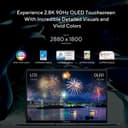


✨ Zenbook 14 OLED: Where sleek meets peak performance 💼
The ASUS Zenbook 14 OLED UX3402VA is a slim, lightweight 14-inch laptop featuring a stunning 2.8K 90Hz OLED touchscreen with PANTONE validation and HDR support. Powered by Intel's 13th Gen i5-1340P processor with 12 cores and 16 threads, combined with 16GB DDR5 RAM and a 512GB PCIe 4.0 SSD, it delivers robust multitasking and fast storage. Intel EVO certified, it offers reliable performance, a long-lasting 75Wh battery, and immersive Dolby Atmos audio, making it an ideal choice for professionals seeking a premium, portable productivity machine.


| ASIN | B0BMW4M83Z |
| Audio Output Type | Speakers |
| Audio features | Built-in speakers |
| Available Memory Slots | [1,2,3,or more] |
| Battery Cell Type | Lithium Ion |
| Battery Life | 18 Hours |
| Best Sellers Rank | 66,718 in Computers & Accessories ( See Top 100 in Computers & Accessories ) 1,181 in Traditional Laptops |
| Bluetooth support? | Yes |
| Box Contents | Charger, Laptop, User Manual |
| Brand Name | ASUS |
| CPU Model Generation | 13th Gen |
| CPU Model Number | core i5 |
| CPU Model Speed Maximum | 4.6 GHz |
| Colour | Ponder Blue |
| Compatible Devices | External displays, docking stations, external storage devices, USB devices, HDMI devices, Micro SD cards, Bluetooth devices, and Wi-Fi compatible devices |
| Control Method | Touch |
| Customer Reviews | 3.9 3.9 out of 5 stars (19) |
| Display Technology | OLED |
| Display Type | OLED |
| Form Factor | Laptop |
| Graphics Card Ram | 16 GB |
| Graphics Coprocessor | Intel Iris Xe Graphics |
| Graphics Description | Integrated |
| Graphics Ram Type | L2 cache |
| Hard Disk Description | SSD |
| Hard Disk Interface | Solid State |
| Hard-Drive Size | 512 GB |
| Hardware Interface | USB |
| Has Color Screen | Yes |
| Human Interface Types | Keyboard |
| Item Dimensions L x W x Thickness | 31.4L x 1.7W x 22.1Th centimetres |
| Item Weight | 1.39 Kilograms |
| Keyboard Description | Chiclet |
| Keyboard Layout | QWERTY |
| Lithium Battery Energy Content | 75 Watt Hours |
| Manufacturer | ASUS |
| Maximum Display Resolution | 2880x1800 Pixels |
| Microphone Form Factor | Integrated microphone |
| Model Name | Zenbook |
| Model Number | UX3402VA-KN113W |
| Model Year | 2023 |
| Native Resolution | 2880 x 1880 |
| Network Connectivity Technology | USB, Wi-Fi |
| Number of Ports | 3 |
| Operating Systems | Windows 11 Home |
| Other Special Features of the Product | Backlit Keyboard |
| Processor Brand | Intel |
| Processor Count | 8 |
| Processor Series | Core i5 |
| Product Warranty | 1 Year Manufacturer |
| RAM Memory Installed | 16 GB |
| RAM Memory Slot Total Count | 1 |
| RAM Memory Technology | DDR5 |
| RAM Type | DDR5 RAM |
| Ram Memory Maximum Size | 16 GB |
| Refresh Rate | 90 |
| Resolution | 2880 x 1880 |
| Screen Finish Type | Glossy |
| Screen Size | 14 Inches |
| Speaker Description | Built-in Speakers |
| Specific Uses For Product | Personal, Business, Multimedia |
| Supported Monitor Maximum Quantity | 1 |
| Total USB Ports | 3 |
| Touch Screen Type | capacitive |
| Video Output | HDMI |
| Video Processor | Intel |
| Voltage | 230 Volts |
| Warranty Type | Limited |
| Webcam Capability | Yes |
| Wi-Fi Generation | Wi-Fi 6 or previous |
| Wireless Compability | 802.11ax |
| Wireless Technology Type | Wi-Fi |
A**S
Excellent OLED screen. Good price
Very pleased. Great screen, lightning fast and Windows 11 Pro
F**N
Fantastic display, decent performance, still bloated
Firstly, despite the "evo" sticker, this still comes with lots and lots of Asus apps & services (always running) that come back even when fresh install Win 11 due to firmware hooks. Still best to wipe the disk and start afresh with a clean Win11 download from Microsoft using Media Creator. The display is OLED thus fantastic, but very glossy and thus prone to reflections; a matte overlay may be required depending on lighting. Pixel arrangement seems OK to be, the density is high enough that you don't see it unless you're 10cm from screen. 90Hz refresh is nice if you come from 60Hz laptops. The CPU is a P thus has 4 P(performance) cores and 8 E(fficient) Atom cores but is also 28W rated (64W turbo max) - rather than the usual U (ULV) CPUs that you'll find in 13-14" laptops (with only 2P cores but 15W rated). Thus for some tasks it will be faster but it will consume more and laptop will get hotter. Asus clearly goes for performance here - note there are even 14" variants with H processors that are 45W rated! Note these are 13th gen (Raptor Lake) in name only, with none of the improvements the desktop versions have. If cheaper, the 12th gen version is just about the same. Memory is decent at 16GB (LP-DDR5X 4800Mt/s) not the fastest but then again this is no gaming laptop. Naturally it is soldered so you won't be upgrading it. Graphics is your standard integrated "Iris XE" but at least with 80 EU that supports most modern graphics DirectX 12.1, DirectX ML, OpenCL, Vulkan - don't expect RTX though. I've not tried top-end games, but Fornite and the like do work at lower resolution - 1080p looks decent enough and 1440p is doable with some restrictions. SSD is PCIe 4 x4 (Samsung PM9B1) that is your standard OEM, again not fastest but decent speed. You can upgrade this and it has a heat-spreader also. Wireless card is AX211 that supports Wifi 6E (and thus 6GHz channels) and is socketed! - thus you should be able to upgrade to Wifi 7 (e.g. BE200/201 range that just came out). It does have 160Mhz wide channels with 2.4Gbps link (on paper and next to router) but usually 800mbps or so. Sound is pretty decent - no there is no bass naturally but basic frequencies sound pretty good to me. This is a great media machine - where movies, anime look fantastic. HDR is supported and with OLED screen it is really a treat. Support seems decent with Asus generally releasing both BIOS and firmware updates for 3 years or so, similar to Dell XPS but not quite Lenovo business range of 6-9 years or so. But again different price. Upgrading - you have your hex tiny screws but sadly some more screws under back feet ;( Please take care peeling those feed off as the rubber may break (mine did) and then it is a mess. In this respect the Dell XPS or similar Lenovo are much easier to service. BTW, the thermal paste of CPU seems OK thus you don't need to change it unless you got really expensive stuff. Better than what Dell / Lenovo usually put in. Overall it is still a pretty cheap middle of road non-gaming laptop. A similar Dell XPS or Lenovo Carbon X1 are at least 2x for same spec thus in these difficult times hard to justify. But if you have the money, naturally those are better.
A**R
Faulty product
PC doesn’t turn on. Can’t get past this blue screen.
A**U
Solid Laptop - Early Review
Reviewing the Zenbook 14 OLED UX3402VA variant here with i5 Core 1340P, 16GB DDR5, 512GB SSD, Touch OLED. It only arrived yesterday but wanted to drop an early review for anyone looking to buy it in the current Black Friday deal at 750 quid. I'll update again in a few weeks. In the box you'll find the Zenbook, USB-C power brick and some manuals (no carry case). It feels solid and well built apart from one thunderbird port that is mounted slightly wonky wrt the case. I ran diagnostics from BIOS (Power + F2) before setting up Windows 11 Home and everything passed ok. The OLED screen is the touch variant and has a very slight grainy effect to it when you look very close. Otherwise it is very pretty, blacks are obviously pure black etc. The default refresh is set to dynamic but you can change it to fixed 90Hz if you want. The touchpad feels really nice and mine has the built-in numpad that seems to be absent on some models. The keyboard is ANSI UK and feels ok to type on, decent feel and size. Some keys are half-size including Fn and arrow keys but this isn't much of a problem. Keyboard backlight is inconsistent but not really distracting. Too early to talk about overall performance but in balanced mode with light web browsing, the fans did not come on at all and everything was as smooth as you'd expect.
Trustpilot
3 weeks ago
1 month ago