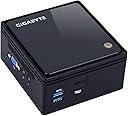
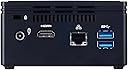
Challenging the essence of how we define a desktop PC, GIGABYTE engineers have developed an ultra compact PC with a stylish design based high polish surface chassis. Ideal for a broad range of computing applications at home or in the office, the BRIX expounds sheer simplicity and convenience, sets a new standard for desktop miniaturization that makes it perfect as a discreet HTPC / multimedia hub, an ultra-low power PC for the family, an office PC or as a digital signage unit. The BRIX is an ultra compact,versatile DIY PC kit that redefines the desktop PC in terms of miniaturization with a form factor that is small enough (56mm x 107mm x 114mm) to sit in the palm of your hand. Based on the Silvermot micro-architecture which utilises the 22nm process technology, these SoC feature significant improvements in computational power, energy efficiency, enhanced graphical and media performance making the BRIX ideal for thin clients, retail transactional clients, and digital signage. The BRIX is packed with wall mount adapter whether undergo rigorous testing for safety and reliability. The BRIX also bundled with a VESA bracket, it can easily be mounted behind a monitor or HDTV making it discreetly hidden from view. This offers a simple and elegant way to turn any VESA-compliant display or TV into a full-featured PC or digital signage unit. Review: Little box big ego. - Nice little unit, very compact and up and running with Linux Ubuntu 17.1 Server edition. While this isn't the fastest mini pc in the world, it does offer a nice platform that can sit being your 55in Smart TV (well that's my setup). Tried installing by Wifi - didn't allow that option out of the box. Used a cable to the 1Gb Ethernet port, rebooted and all was connected. Installation was slow, but that is a chunky bit of installing. One point to observe is the setting in the UEFI menu and set your operating system type. Typically this unit runs at about 40 degrees on each core of which there are 4. 1.6 Ghz speed. I chose the 4 GB and 1TB Sata HDD, and this is a quiet machine, just the faint sound of the hard drive. Using SSD would mean silence. This is a useful bit of kit, compact and plenty of ports, supporting both VGA port and HDMI. This will eventually be running my dating site software, with plenty of capacity for a small site. Should the site become very popular then I may have to look at hosting on an external server, still this is a nice hide-away box and suitable for development work. I may buy more and set another one up for my laser engraving hobby as a client to the machine. This isn't really suitable for high power gaming, but could fit the media streaming needs, small desktop pc, it does come with a mount so it can be attached to the back of a VESA mount capable screen. For my application I can't find any negatives as yet. From the hardware point of view it is well made, how it copes with Windows is something I haven't tested. For the cost all in I think it is a pretty good performer. Review: Good but runs hot - I use this as a server (headless, Ubuntu Server 18.04). A breeze to install, no issues. I administered it using SSH until I discovered Webmin. I do have the same problem as another reviewer: it won't reboot automatically - I have to shutdown and restart manually. Not a big deal considering how infrequently this is needed. However, I was surprised about how hot it ran. I have a BRIX 1900 which is never more than slightly warm. The N3000 runs hot; the CPU reported 62 deg C and I measured the external temp of the case at a toasty 40 deg C, so I was also concerned for the components I had added (SSD, memory). I checked the power draw - 6W, so no problem there. The system powered itself off a couple of time so I was concerned it might be unstable. I contacted Gigabyte who replied with some waffle about how they couldn't test the temperature characteristics because of variations in the users environment, namely the case and the fan. I pointed out to them that the case was standard and supplied by them, and there was no fan. When pressed, they eventually came back with 87 deg C as the max temp, and suggested I add a fan. Well, I'd already found an old case fan and stood it beside the computer, I can do this because it's a server tucked out of the way, but if I were using this as a mini computer on the VESA mount of a monitor, I'd not be too impressed by this suggestion. So it seems that hot is OK. The max operating temps for the SSD and memory are 70 and 85 respectively, also OK, but I still don't like it. With the fan next to the N3000 the CPU temp is in the 20-30 range which I prefer. I put the difference in temps between the N3000 and J1900 down to the chip technology - N3000 is 14nm technology. J1900 is 22nm. Regardless of all that, it works well.


| ASIN | B015EV086U |
| Available Memory Slots | 1 |
| Box Contents | Monitor |
| Brand | Gigabyte |
| Brand Name | Gigabyte |
| CPU Model Number | BRIX GB-BACE 3150 |
| CPU model | Celeron |
| Colour | Black |
| Customer Reviews | 3.7 out of 5 stars 179 Reviews |
| Global Trade Identification Number | 04719331251659, 05054629886847 |
| Graphics Ram Type | DIMM |
| Hard Disk Description | HDD |
| Hard Disk Interface | USB |
| Hardware Interface | Ethernet, SATA 6.0 Gb/s, USB 3.0 |
| Human Interface Types | Keyboard, Mouse |
| Item Dimensions | 10.8 x 11.4 x 5.6 centimetres |
| Item Type Name | CPU |
| Item Weight | 0.5 Kilograms |
| Manufacturer | Gigabyte |
| Model Name | Brix |
| Model Number | GB-BACE-3150 |
| Model Year | 2015 |
| Native Resolution | 1920 x 1280 |
| Network Connectivity Technology | LAN, USB |
| Operating Systems | Windows 10 |
| Operating system | Windows 10 |
| Personal Computer Design Type | Barebone |
| Personal computer design type | Barebone |
| Power Plug Type | Type G |
| Processor Brand | Intel |
| Processor Count | 4 |
| Processor Series | Celeron |
| Product Features | Compact |
| Product Warranty | 12 months |
| RAM Type | DDR3 SDRAM |
| Screen Size | 2.5 Inches |
| Screen size | 2.5 Inches |
| Specific Uses For Product | Multimedia |
| Specific uses for product | Multimedia |
| Style Name | BACE 3150 |
| Total USB Ports | 2 |
| Video Processor | Intel |
| Wireless Compability | 802.11a/b/g/n |
| Wireless Network Technology | Wi-Fi |
| Wireless Technology Type | IEEE |
M**.
Little box big ego.
Nice little unit, very compact and up and running with Linux Ubuntu 17.1 Server edition. While this isn't the fastest mini pc in the world, it does offer a nice platform that can sit being your 55in Smart TV (well that's my setup). Tried installing by Wifi - didn't allow that option out of the box. Used a cable to the 1Gb Ethernet port, rebooted and all was connected. Installation was slow, but that is a chunky bit of installing. One point to observe is the setting in the UEFI menu and set your operating system type. Typically this unit runs at about 40 degrees on each core of which there are 4. 1.6 Ghz speed. I chose the 4 GB and 1TB Sata HDD, and this is a quiet machine, just the faint sound of the hard drive. Using SSD would mean silence. This is a useful bit of kit, compact and plenty of ports, supporting both VGA port and HDMI. This will eventually be running my dating site software, with plenty of capacity for a small site. Should the site become very popular then I may have to look at hosting on an external server, still this is a nice hide-away box and suitable for development work. I may buy more and set another one up for my laser engraving hobby as a client to the machine. This isn't really suitable for high power gaming, but could fit the media streaming needs, small desktop pc, it does come with a mount so it can be attached to the back of a VESA mount capable screen. For my application I can't find any negatives as yet. From the hardware point of view it is well made, how it copes with Windows is something I haven't tested. For the cost all in I think it is a pretty good performer.
C**D
Good but runs hot
I use this as a server (headless, Ubuntu Server 18.04). A breeze to install, no issues. I administered it using SSH until I discovered Webmin. I do have the same problem as another reviewer: it won't reboot automatically - I have to shutdown and restart manually. Not a big deal considering how infrequently this is needed. However, I was surprised about how hot it ran. I have a BRIX 1900 which is never more than slightly warm. The N3000 runs hot; the CPU reported 62 deg C and I measured the external temp of the case at a toasty 40 deg C, so I was also concerned for the components I had added (SSD, memory). I checked the power draw - 6W, so no problem there. The system powered itself off a couple of time so I was concerned it might be unstable. I contacted Gigabyte who replied with some waffle about how they couldn't test the temperature characteristics because of variations in the users environment, namely the case and the fan. I pointed out to them that the case was standard and supplied by them, and there was no fan. When pressed, they eventually came back with 87 deg C as the max temp, and suggested I add a fan. Well, I'd already found an old case fan and stood it beside the computer, I can do this because it's a server tucked out of the way, but if I were using this as a mini computer on the VESA mount of a monitor, I'd not be too impressed by this suggestion. So it seems that hot is OK. The max operating temps for the SSD and memory are 70 and 85 respectively, also OK, but I still don't like it. With the fan next to the N3000 the CPU temp is in the 20-30 range which I prefer. I put the difference in temps between the N3000 and J1900 down to the chip technology - N3000 is 14nm technology. J1900 is 22nm. Regardless of all that, it works well.
A**R
Super (little) Computer
I purchased this for a computer build for a friend. The quality of the case is very high, it has a premium feel to it, with a glossy reflective top and all metal construction. Even thought the included processor is quite basic, it has more than enough power for basic computing. As my friend was new to desktop computing and an inexperienced user, he wanted something easy to use, small form factor and cheap, the Gigabyte fitted all these criteria and was small enough to mount on the back of a 24" led monitor (with the supplied mounting kit). I purchased a SSD hard-disk, Windows 10 licence and 16gb of RAM. With the addition of a wireless keyboard/mouse, I set up the Gigabyte to wake up upon mouse or keyboard press. My friend couldn't believe how quick the Gigabyte started, and I have to admit it shocked me as well. Needless to say he was very impressed with the setup and very happy with it. It really gave me pause for thought that you could have such a powerful little computer in such a small box (mounted at the back of a monitor!)
R**D
performance was a little down on what I expected as ...
performance was a little down on what I expected as I own 2 J1900 models I would say this is not as fast
K**L
Major Problems - Had to Return
I could not install Windows 10 from a USB3 pen drive despite setting the O/S to the 'flexible' system option in BIOS. Reformatted my hard disk and tried again failed. Decided to load Windows 7 with legacy and flexible BIOS settings. Both failed for Win 7 & 10. So decided to use a Win 10 ISO image burned to a DVD. 80% install achieved (best so far!) but despite ensuring correct BIOS setting on first reboot during install all the USB PORTS were disconnected so couldn't do anything. Powered down PC and rebooted again but still continued with USB ports problem. There is a BIOS upgrade from gigabyte to fix this USB problem, however I could get the PC to update the firmware. I have built, faulted and upgraded pcs for nearly 30 years and have never had problems of such magnitude with the gigabyte brand. Amazon have refunded me. Thank you Amazon.
G**A
Great value and build quality
I wanted a low cost basic PC for my Mum in law to just browse the web, email and Skype. This bare bones PC does the job. I am running Linux Mint and all is well. No more grinding Windows updates that slow your PC down to a crawl after they have installed. Note you need to add an SSD and DDR3 memory to this product, choose an operating system and you're good to go.
S**N
Great little box
I'm using this as my new Linux server. With a SSD it's totally silent. Easy to assemble and takes up almost no space
S**M
Hard to set up with Win 7/8, great with Windows 10.
It's impossible to review this item without talking about its massive faults. I bought the bare bones version with an additional 240gb SSD and 16gb ram. I initially installed windows 7. Unfortunately, the machine only has USB 3.0 ports (which win 7 doesn't initially support on install) so you cant use the keyboard and mouse after installation... slightly irritating. The "patcher" included didn't work. After3 reinstalls and 5 hours of pain I installed Windows 8.1. Unfortunately, due to driver issues this also didn't work (the screen fades to black after install). Finally, I installed windows 10 which... works surprisingly well! Sure browsing is a bit slow bit for £100 being able to run word and stream 1080p video on such a dinky, quiet box is amazing. Overall for the price this product is impressive, just don't install anything other than Windows 10!
C**N
Mini Pc para TV
Mini Pc perfecto para conectar a un TV y poder usarlo como centro multimedia. Necesita un SSD y un módulo de memoria RAM SODIMM. Muy buen producto.
A**E
Hervorragender ThinClient oder Mediaserver fürs Heimnetz
Ich habe den GB-BACE-3000 als Mediaserver im Heimnetz in Gebrauch. Da einer der Vorteile eines Streamers der ist, dass man Musik oder Video vor dem Einschlafen genießen kann, wollte ich unbedingt etwas, was ich mit moderaten Stromkosten 24/7 laufen lassen kann. Mein Setup basiert auf einem Ubuntu 16.04 Server mit mpd für Audio-- und Plex für Videostreaming. Die Aufrüstbaren Komponenten sind 8GB RAM ( Crucial 8GB DDR3L 1600 MT/s (PC3L-12800) SODIMM 204-Pin - CT102464BF160B ) und eine ältere 1TB 2.5'' Festplatte. Die Inhalte aktualisiere ich von einem Sambashare auf dem Desktop auf den Mediaserver (Client) mit dem Synchronisationstool Unison. Die Platte ist also kein Backup und speichert auch nicht alle Mediadaten. Letzteres ist wichtig, weil der Server auch unter leichter Last doch recht warm wird und ich mir nicht sicher bin, wie sich das auf die Lebensdauer der HDD auswirkt. Kritische Werte jenseits der 50° C. habe ich bislang aber auf Prozessor und Platte nicht gemessen. Zur Qualität der Ausgabe über Kopfhörer kann ich nur sagen, dass sie meinem Eindruck nach in etwa im Mittelfeld billigerer Notebooks liegt. Zum 4k-Video kann ich leider mangels 4k Display nichts sagen, Videoplayback über HDMI ist auf meinem QHD (2560x1444) Bildschirm jedenfalls nicht von der Ausgabe des Desktops mit Displayport zu unterscheiden. Wie die einzige andere Rezension zu diesem Barbone schon anmerkt, ist direktes Arbeiten mit GUI auf dem Würfel deutlich langsamer als wir es heute meistens gewohnt sind. Das hoch- und runterkopieren größerer Datenmengen mit USB3 geht aber relativ zügig. Testweise versucht: Auch ein mit Crypsetup-LUKS verschlüsseltes System auf einer kleinen SSD bootet fix, ist aber ähnlich langsam in der Bedienung. MicroSD Kartenleser habe ich noch nicht ausprobiert. Der größte Pluspunkt des Geräts ist mit Sicherheit, wie lautlos er ist. Mit SSD ist er unhörbar und mit einer gewöhnlichen HDD hört man nur gelegentlich aus unmittelbarer Nähe ein Zugriffsgeräusch. Bei uns steht er im Wohnzimmer neben der Stereoanlage (falls mal ein USB-DAC zum Setup dazu kommt). Deshalb ist die Geräuschentwicklung durchaus ein ausschlaggebender Faktor. Zusammenfassend: Ein sehr leises Gerät mit spürbarer aber immer noch moderater Wärmeentwicklung. Wer eine Art Microserver und Mediaplayer sucht, ist hier ebenso gut beraten wie für einen ThinClient. Lediglich das direkte Arbeiten am Gerät als Desktop-Ersatz kann ich mir nicht vorstellen. Bei einem Preis von derzeit 112.- mit Sicherheit eine der besten Lösungen dieser Preisklasse.
S**A
Mehr als Genug Leistung für meine Zwecke
Der Brix kommt in einer schicken Verpackung, ist recht ansehnlich und macht einen hochwertigen Eindruck. Er hat bei mir einen Raspberry Pi3 abgelöst, der für meine Anforderungen denn doch ein bisschen zu schwach war. Ausgepackt, 4GB Ram verbaut und eine 500GB Notebook-Platte die noch im Fundus lag. Installiert habe ich Ubuntu Ubuntu Server 16.04.1 LTS, das ging recht unkompliziert. 2 Dinge sind zu beachten: Headless funktioniert das nur wenn KEIN grafischer Desktop installiert ist. Ich hab Lubuntu nachgezogen, weil ich *dachte* damit habe ich das schneller konfiguriert und die Serverdienste eingerichtet. Als er denn an seinem Bestimmungsort platziert war wehrte er sich standhaft zu booten. Ich hab denn das BS neu aufgesetzt, ohne jeglichen Desktop - funktioniert sauber. Warum - wissen die Götter. neuestes BIOS ist geflasht, das scheidet aus. Ausserdem hatte ich Probleme mit dem Bluetooth. Bei Intel gibts die passenden neuen Treiber für den Chipsatz - alles kein Hexenwerk, aber wem eine Linux-Konsole fremd ist, der wird weniger Spaß haben. Der kleine Server hostet meine FHEM Installation, es läuft ein MySQL-Server und der Logitech Media Server. Reserven habe ich mehr als genug, die Kerne idlen überwiegen. Stromverbrauch in meinem Setup pendelt zwischen 8 und 9W, im Schnitt meist bei 8,4W (durch FHEM überwacht) - bei einem 24/7 Server ja keine uninteressante Kenngröße. Alles bestens. Ich kann den kleinen uneingeschränkt empfehlen, zumindest unter Linux.
C**T
Buy it new or used ones have missing SATA cable
I tried buying a used one for cheap it was like 118 bucks but when I received it it was missing the SATA cable insde when I was trying to install the hard drive so I had to return. I ordered another one but this time brand-new and it was only 15 bucks more so I would buy new if I were you.
J**E
Muy buen pc para lo que es y si sabes lo que estas comprando...
Excepcional pc, muy muy compacto y preparado para montar en monitor o tele pues dispone de VESA, por lo que siempre estara recogido, acompañado de una RAM y un SSD, montaje que tendras que realizar tu, super sencillo hacerlo. Esta montado para un TPV de un bar y la verdad que es excepcional, rendimiento acpetable con el SSD, y acompañado de sus 4GB de ram por en torno a los 200€ tenemos un pc que acompañado de un programa nos da la solucion compacta e ideal para una caja en un negocio. Decir que no se apaga salvo porla noches, por lo que tiene un uso diario de una 12 horas con disipacion pasiva, sin ventiladores ni nada, y en pleno verano hace calor, es la 3ra temporada con el por lo que su durabilidad pienso que es espectacular, tampoco ha habido problemas con su fuente ni otro tipo de contratiempos. Para tareas de ofimatica simples o lo comentado decir que va de cine. Sin duda lo veolveria a comprar.
Trustpilot
2 months ago
1 month ago