![SABRENT 2230 M.2 NVMe Gen 4 1TB SSD 4750MB/s Read PCIe 4.0 X4 Internal Solid State Drive Compatible with Steam Deck, surface pro, PCs, NUCs, and Laptops [SB-2130-1TB]](https://m.media-amazon.com/images/I/71BVLQNOlmL._AC_SL3840_.jpg)



🚀 Upgrade your gear, dominate your workflow — small size, massive power!
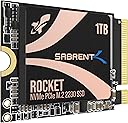
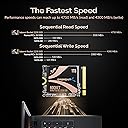
The SABRENT 2230 M.2 NVMe Gen 4 SSD delivers ultra-fast 4750MB/s read speeds in a tiny 2230 form factor, perfect for compact devices like Steam Deck and Surface Pro. With a spacious 1TB capacity and PCIe 4.0 x4 interface, it offers desktop-class performance and future-proof compatibility. Backed by retail support and cloning software, it’s the ultimate upgrade for professionals and gamers craving speed and space in tight setups.


| ASIN | B0BQG6JCRP |
| Best Sellers Rank | 52,525 in Computers & Accessories ( See Top 100 in Computers & Accessories ) 256 in Internal Solid State Drives |
| Box Contents | Internal Solid State Drive, User Manual |
| Brand | SABRENT |
| Brand Name | SABRENT |
| Cache Memory Installed Size | 1 |
| Color | various |
| Compatible Devices | Desktop, Laptop |
| Compatible Video Game Console Models | Valve Steam Deck |
| Connectivity technology | PCIe |
| Customer Package Type | Retail |
| Customer Reviews | 4.8 out of 5 stars 4,256 Reviews |
| Data Transfer Rate | 5000 Megabytes Per Second |
| Digital Storage Capacity | 1 TB |
| Digital storage capacity | 1 TB |
| Enclosure Material | fiberglass or epoxy composite |
| Form Factor | M 2 2230 |
| Global Trade Identification Number | 00840025259379 |
| Hard Disk Description | Solid State Drive |
| Hard Disk Form Factor | 2230 Inches |
| Hard Disk Interface | Solid State |
| Hard disk form factor | 2230 Inches |
| Hard disk interface | Solid State |
| Hard-Drive Size | 1 TB |
| Hardware Connectivity | PCIE x 4, Solid State Drive |
| Hardware Platform | PC/Mac/Linux |
| Installation Type | Internal Hard Drive |
| Item Dimensions L x W x Thickness | 30L x 22W x 2Th millimetres |
| Item Type Name | internal solid state drive |
| Item Weight | 20 Grams |
| Manufacturer | SABRENT |
| Manufacturer Part Number | SB-2130-1TB |
| Media Speed | 6000 |
| Model Name | Internal Solid State Drive |
| Model Number | SB-2130-1TB |
| Network Connectivity Technology | PCIe |
| Number of Items | 1 |
| Product Features | Fast Speed |
| Product Warranty | 2 |
| Read Speed | 4750 Megabytes Per Second |
| Special feature | Fast Speed |
| Specific Uses For Product | Multimedia |
| UPC | 840025259379 |
| Unit Count | 1.0 count |
C**G
Great storage...
Got this on a sale for my Steam Deck OLED in a sale, Works really well and now I have plenty of space for all my gaming needs. Loads fast and was an easy install too. Overall very happy with my purchase and would recomend.
B**X
Good upgrade to Steam Deck 64gb internal drive (if you don't mind opening up electronics)
Got a Steam Deck over the holidays a neat little device, had been primarily installing games on a micro sd but regardless of this found that games would install shader caches on the internal which was quickly filling up the free storage on 64gb drive, decided I would go down the route of an SSD swap, watched some youtube vids on procedure (Sabrent even have one on their channel) and played the waiting game for decent upgrade for a decent price that would ship to my address. SSD arrived quickly, again followed guides on youtube for swapping the ssd out and getting Steam OS Running, mostly painless procedure outside of slightly tearing the foil sleave that goes around the ssd, the sabrent drive is a tiny bit taller than the deck 64gb one, so it is a very tight fit to get that on the new drive so i would be mindful of that, so far so good doesn't seem to have impacted things yet. So far drives been working great, shuffled newer games off micro sd that make better use of nvme load speeds and shader cache barely makes a dent with 82 games installed between ssd and micro sd. micro sd is free to hold older games and emu-deck bits and bobs. In the end opting to go this route saved me money on just buying the Deck with the 512gb already installed that went to games in the steam sale.
D**.
Day and Night Difference for Steam Deck
I have used this in my original base 64GB Steam Deck. It was simple enough to install and works perfectly. The difference is day and night when compared to using an SD card and I find I use my Steam Deck far more since not having to pick and choose what I keep loaded on there. Games to load noticably faster but gamplay wise not much else changes other than it just being a smoother experience (again, thanks to the load times). My only regret is not having the money/confidense to get a larger capacity drive at the time. I have had this for many months now and put it though many many hours of play time and downloads from tiny games up to hard drive monsters like Red Dead Redemption 2, Honster Hunter World and Balders Gate 3. So far no issues what so ever!
S**M
Good SSD for steam deck
Swapped into my 64gb steam deck, works well and boots/Wakes much faster, comes In a little metal tin with a soft cushion to well protect the drive, no damage here, easy to swap into steamdeck especially if you have prior knowledge.
C**N
It's like a digital TARDIS!
So much room for films! Bought to be used in an enclosure, I've no complaints. Fast reliable and excellent value. Does everything I need it to and fast.
N**E
Flawless performance in the SteamDeck
I have a 65GB SteamDeck and had been eyeing this drive as an upgrade route. When it became available I pounced. I would highly recommend buying a cheap enclosure in addition to this drive as it allows you to rapidly clone the original 65GB drive from the Deck itself. I popped this 1TB drive into the cheap enclosure (that I had verified worked with 2230 size SSDs). Plugged the enclosure into the SteamDeck then went into the SteamDeck desktop mode, opened Konsole. If you haven't already created a sudo password go Google how to do that then proceed. I used the following command which I manually typed into Konsole using the on-screen keyboard: sudo dd if=/dev/nvme0n1 of=/dev/sda oflag=sync bs=128M status=progress Konsole will then show the progress as it copies across the contents of 64GB card to the external 1TB card. It took about 8 minutes for me. I then powered off the Deck, entered the Deck BIOS and switched on battery shipping mode (to reduce any risks). I then followed a YouTube video to take the Deck apart and installed this drive. The whole process took about 30 minutes. The SteamDeck started up first time with no problems, no migration issues and the Deck had automatically increased the partition size so I had over 800GB of SSD space to play with! Magic!
A**A
Perfect for Steam Deck upgrades
Tried out this SSD for my Steam Deck. The installation went smoothly without any glitches. The speed improvement is as fast as the stock one it replaced, and the added storage is practical for my game collection. Now I have much more room I managed to partition it for running both Windows and SteamOS. Overall, a decent upgrade if you're looking for a straightforward SSD replacement. It was a surprisingly easy process and no longer I have to clear the shader cache every couple of weeks. I've had it for a month now with no issues.
L**S
Good size for a very small form factor
Amazing how much storage on such a tiny SSD, saberent seems to be a very good manufacturer
P**T
Perfect Choice for Pi 5
Bought this for my Pi5 - was one of those to add on NVMe card and was fully compatible (unlike some other big name brands). Running thsi as my primary boot disk on Pi 5 - yep just look up how to do it on YouTube.
Y**I
اشتريته لجهازي Rog Ally
سعة التخزين 1.8 تيرا ، والجهاز مرتاح مع التخزين، والاداء فرق معي مع SSD حق شركة ASUS ، يستحق الشراء ولكن السعر مرتفع شوي
O**R
Thanks Amazon.
Its nice easy to install, easy to manage, really I love it. Thanks Amazon
Q**U
Très bons débits
Arrivé rapidement, le bundle est sympa avec sa petite boîte. Les débits sont tops, 2x plus rapide qu'avec mon vieux ssd SATA
B**K
Installed on Surface Pro 9 and works GREAT!!
Got this 512GB model to replace the 256GB ssd that came with my Surface pro 9. Easy to install (you'll need a number 3 torx bit to remove screw) and if you follow the instructions found online to create a recovery boot disk, installaton of Windows 11 on the new drive was easy peasy. No issues at all. No overheating, no freezing or lockups some other people are reporting with no name drives purchased on other sites. Great quality and gettting almost 4GB speeds both read and write. For 89 bucks, this was a no brainer upgrade..Thanks Amazon and Thanks, Sabrent.
Trustpilot
2 months ago
2 days ago