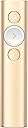
🎤 Own the room, from boardroom to Zoom — spotlight your brilliance with every click!
The Logitech Spotlight Wireless Presentation Remote combines advanced digital laser precision with dual wireless connectivity (USB and Bluetooth) and a 30-meter range, delivering seamless control over presentations on Windows, Mac, Android, and iOS. Featuring smart timer alerts and intuitive cursor navigation, it’s designed for professionals who demand flawless, distraction-free presentations both in-person and online.


| ASIN | B06VTVGSDW |
| Best Sellers Rank | 74,846 in Stationery & Office Supplies ( See Top 100 in Stationery & Office Supplies ) 46 in Presentation Pointers |
| Guaranteed software updates until | unknown |
| Item model number | 910-004862 |
| Language | English |
| Manufacturer | Logitech |
| Product Dimensions | 13.13 x 2.81 x 1.21 cm; 49 g |
N**Y
Best "clicker" I've ever had the pleasure of using.
I travel extensively with work (150 days a year) and present a couple of times a week. This device works well and flawlessly with no connectivity issues when using Bluetooth (don't use the attached dongle). I also work as an Instructor and it's nice to not be "tethered" to a computer when presenting. Light, simple, great battery-life and impressive functionality. Simple to use with minimum distractions with the 3 buttons, though with impressive features configured with the Logitech Spotlight application. The Spotlight feature is welcome for more than the obvious reason of highlighting a portion of the slide, I no longer have arguments with airport security over integrated laser pointers in previously owned devices (I avoid packing gadgets in checked in luggage as I've "lost" too many items when travelling). Easy to use software that's intuitive yet with powerful functionality. The price paid for this magical device on Amazon is almost half the price on some major vendors' websites.
D**Y
Useless Do not buy
This item is useless! It would not charge! Returned it! Do yourself a favour! It’s a waste of time
J**L
Superb!
This presentation remote really is excellent. I was looking for a non-laser type of presentation aid in case of difficulties at airport security when I came across this device by Logitech. I had no idea that things like this existed. Having studied the reviews I ordered one and it arrived the next working day. The software was a doddle to install on my MacBook and works well. The Bluetooth connection was established in seconds. Most settings are adjustable to suit your requirements using a nice, intuitive interface. The use of the "spotlight" and the magnifier provides a novel and quite slick way of controlling presentations and interacting with the audience. I'm very pleased with it and it works perfectly. Well done to Logitech for a novel and innovative product. Highly recommended.
D**O
It's different and it causes a surprise effect!
It is a simple remote with original features. I have other remotes and simply bought this because of its spotlight and amplification lens capabilities! When using spotlight over the web (on a webinar or online training) people get so surprised that they need to ask how did I do it! And that helps to create a unique presentation! The regular price is high although materials are of very good quality! I bought the gold one because it is much cheaper than the grey. Good option!
B**P
Best presenter I have ever used.
I give Talks to various groups. The content of the Talk often includes images of insects with specific identification features. The outstanding feature of this presenter is being able to magnify part of a photograph on screen. Nearly every audience I present comments on how useful this is. The USB Charging avoids needing to carry AA or AAA Batteries around.
P**C
Good if your presentations will benefit from being able to ...
Good if your presentations will benefit from being able to highlight and magnify parts of images or graphs or tables. Not everyone will need this. Especially for £119. There are other features which might make presentations slicker but could equally become tiresome to audiences. An interesting buy if you need to magnify stuff on screen.
J**N
Cool but...
Very cool gadget. The spotlight feature is great. I would have liked a laser pointer to have been included, for times that the Spotlight isn't the answer. Also, the cursor appears in the middle of the Spotlight which can be distracting.
D**N
Faulty
Item arrived with no charge. Would not charge with the supplied cable. will therefore not connect and is not useable.
M**O
Tiene funciones más diversas
P**F
Di fronte ad un oggetto del genere si può avere un atteggiamento spocchioso ritenendolo un normale puntatore con qualche funzione accessoria, ma di costo elevatissimo, ritenendolo pertanto, semplicemente voluttuario, oppure apprezzarne la bellezza e le eccellenti prestazioni. Personalmente faccio parte di quella categoria di persone che rimane affascinato davanti a simili oggetti. E’ un po' come avere una Montblanc per scrivere, oppure un Rolex al polso. Sono i dettagli a fare la differenza di questo Logitech Spotlight. Innanzitutto averlo tra le mani per una presentazione professionale è quanto di più comodo possa esserci. Presenta un’ eccellente linea e dei comandi semplicissimi da utilizzare, perchè dotati di ottima ergonomia. Sbagliare tasto durante una presentazione, risulta essere cosa molto improbabile , anche per i meno esperti. Appena inserita la chiavetta - incapsulata nella parte inferiore del telecomando- nella porta Usb del computer, parte la richiesta d’installazione del software specifico. Una volta installatolo, si ha la possibilità di seguire a video il tutorial interattivo di utilizzo. Dopo questa breve esperienza, tutte le sue funzioni appaiono chiare e limpide anche ai meno avvezzi all’utilizzo di tali accessori. Ecco un altro aspetto che fa la differenza tra prodotti di alto livello ed altri di uso comune, i primi caratterizzati, come in questo caso, da un’estrema semplicità di utilizzo. Questo telecomando presenta un raggio di azione di circa 30 m , come dichiarato dall’azienda produttrice. Ci sono i due pulsanti che mandano avanti ed indietro le slide, oltre al pulsante posto nella parte superiore che consente di mettere in evidenza parti della slide e/o ingrandirne un’area. Il tutto in maniera semplicissima ed intuitiva. E’ possibile impostare, tramite software, anche la funzione di avviso per mezzo di vibrazioni, quando si è a 5 minuti dalla fine della presentazione e/o quando è stata proiettata l’ultima slide. La ricarica avviene tramite un cavetto con presa type C/Usb. Funziona con sistemi Apple e Windows. Per quanto mi riguarda l’ho installato sul mio portatile con sistema operativo Windows 10 e tutto è filato liscio come l’olio . La periferica è stata riconosciuta immediatamente e l’installazione del programma è andata subito buon fine . Il telecomando funziona alla perfezione e non ho riscontrato finora alcun impuntamento. E’ possibile collegarlo tramite bluetooth con sistemi Android oppure Ios e naturalmente Windows. Anche in questo caso le prove effettuate hanno dimostrato un funzionamento impeccabile. Essendo un oggetto di pregio anche dal punto di vista estetico, la Logitech ha pensato bene di dotarlo di un’ ottima custodia che lo mette al riparo dai graffi durante il trasporto. Il color oro che caratterizza il corpo in alluminio, sebbene non sia quello che generalmente preferisco, trovo che si sposi perfettamente con la filosofia realizzativa di questo pregevole accessorio. L’unica nota dolente riscontrata finora, è il suo prezzo di vendita, che sono convinto sarà ritoccato verso il basso nel corso del tempo, grazie a qualche offertona particolare Amazon. I professionisti , che volessero acquistarlo a prezzo di listino, credo che comunque non rimpiangeranno quanto speso per l’acquisto. Con l‘utilizzo il costo si lascia ampiamente ripagare in termini di minore stress e maggiore produttività.
A**Z
This is a different tech than usual presentation laser pointers, hence requires a logitec software installed on the laptop. However, it offers the option of installing the software on a USB drive so the device can work on any PC/Mac. The device has three modes - a multicolour pointer, a spotlight, and a magnifier. It connects via Bluetooth or an included USB dongle. Well built and a nice design, and comes with a sleeve and charging usb-c cable.
B**.
Bon, soyons clairs, cet outil s’adresse aux pros. En tout cas, à ceux qui utilisent un pointeur tous les jours dans le cadre de leur travail. Et qui ont besoin de fonctionnalités que le plus grand nombre trouvera certainement « gadget ». Pour le plus grand nombre, donc, il existe notamment le pointeur Doosl, à 12,90€ (vendu sur le site). Je l’ai d’ailleurs acheté (pour en avoir toujours un sous la main -dans mon sac, plus précisément). Il « fait le job » (avancer, reculer, produire un laser qui fera plaisir à votre chat). Mais revenons à ce « spotlight ». 91€ pour la version dorée. C’est une petite somme pour un simple pointeur. Sauf que c’est plus qu’un simple pointeur. Beaucoup plus. Franchement, quand j’ai lu les caractéristiques du produit, j’ai eu du mal à y croire. Je l’ai d’abord vu en magasin (à 129€). Le vendeur qui s’est occupé de moi ayant été incapable de m’expliquer comment il fonctionnait, je suis allé sur internet pour vérifier. Pour info, c’est LE pointeur officiel des conférenciers de TEDX, une référence mondiale. Un outil pour les pros, je vous dis. Voyons ce que ce spotlight propose. Pour info, je l’ai testé successivement sur ma télévision et l’écran de mon vidéoprojecteur. Les deux essais ont été concluants : Déjà, il fait classe. Il est fin. Et très léger. -Contrairement à tous les pointeurs que j’ai testés avant (notamment le pointeur de chez Targus), il possède une interface personnalisable. Avec un petit logiciel à installer (qu’on trouve sur le site de logitech). Très simple à paramétrer. C’est d’ailleurs le seul hic que j’ai trouvé à ce produit. Impossible de le prêter à quelqu’un. Ses fonctions les plus intéressantes sont reliées au programme. Ses fonctions, justement, parlons-en. -mettre en évidence ou zoomer sur une partie de l’écran. Bluffant. Et surtout très utile. Bien plus probant qu’un simple laser en tout cas. Comment ça fonctionne ? Et bien, comme une manette Wii de la belle époque. Un giroscope intégré se charge de « trouver » le pointeur sur l’écran. Et pas besoin de capteur autre que celui que vous brancherez sur votre ordinateur. Vraiment incroyable. Pour ma part, ça fonctionne sans aucune latence et très naturellement. Pour info, je possède une Surface pro, et utilise Windows 10. Je ne sais donc pas comment le pointeur réagit avec les ordinateurs de la Pomme. -Deuxième fonction. Transformer le pointeur en véritable souris. Là, ça devient carrément génial. Il est possible, avec de la pratique (ça m’a pris personnellement à peine 10 minutes) choisir un lien hypertexte sur l’écran et cliquer dessus. Sur un powerpoint, bien entendu (une vidéo intégrée, par exemple, pour la lancer ou la mettre en pause). Également (et c’est encore plus intéressant) sur une page internet. Je travaille avec un outil collaboratif (klaxoon, pour ceux qui connaissent) et ça fonctionne très bien. -autres fonctionnalités (toutes programmables). Fonction écran noir, minuterie (entre autres). Bref, vous aurez compris que je suis totalement conquis. C'est le pointeur que j'attendais depuis des années. Je recommande chaudement. Et pour finir, non, je ne fais pas partie de Logitech, n’y ai été payé pour chanter les louanges de cet article 😊.
B**N
Habe das Gerät gekauft, weil mich zum einen die große Reichweite und das Spotlight reizten und ich dienstlich sehr viel ausbilde und Vorträge halte. Das Gerät hat einen stolzen Preis und im Nachhinein ist der Preis von meiner Seite aus gerechtfertigt für dieses Gerät. Das Einzige, was ich zu bemängeln habe, ist das die mitgelieferte Hülle nur den Presenter, nicht jedoch das Ladekabel aufnimmt und zum anderen das Gerät nicht mechanisch schützt. Daher habe ich es durch ein Hardcover ersetzt. Das Gerät selbst ist einfach an den Rechnern installiert. Schwierigkeiten zeigten sich hier nicht, weder in der Funktionszuweisung, noch in der Programmnutzung. Das Programm ist einfach und sehr übersichtlich. Der Dongle ist gut verstaut im Fuße des Gerätes. Die Rechnererkennung auch auf Fremdrechnern erfolgt unproblematisch und schnell. Der Präsenter benötigt für die Spotlightfunktion die eigene Software auf dem Rechner, ansonsten funktioniert er nur als normaler Präsenter. Das Gerät ist sehr zuverlässig. Die Spotlightfunktion ist für meine Zwecke hervorragend, zumal ich oftmals Details aus größeren Bildern verdeutliche. Die Reichweite habe ich noch nie überschritten, das Gerät funktioniert zuverlässig auf mehrere Meter. Für jemand, der regelmäßig dieses Gerät nutzt und Details in größeren Bildern hervorheben möchte ist es der ideale Präsenter. Dieses Gerät hat einen festen Platz in meiner Rechnertasche und ich möchte es nicht mehr missen. Nur wie gesagt zu empfehlen ist die Lagerung in einem größeren Etui zusammen mit dem Ladekabel. Insgesamt 5 Sterne, da das Etui nur ein minimaler Mangel ist. Tolles Produkt.
Trustpilot
1 month ago
2 months ago