


Buy anything from 5,000+ international stores. One checkout price. No surprise fees. Join 2M+ shoppers on Desertcart.
Desertcart purchases this item on your behalf and handles shipping, customs, and support to Nicaragua.
🌡️ Stay ahead of the curve—control your environment from anywhere, anytime!
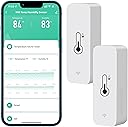
The Comboss WiFi Hygrometer Thermometer Sensor (2 Pack) offers precise indoor/outdoor temperature and humidity monitoring with 10% accuracy. Featuring 2.4G WiFi connectivity, real-time remote data access via Tuya and Smart Life apps, and instant push notifications for alerts, it fits discreetly in small spaces. Compatible with Alexa and Google Assistant, it enables voice control and smart home automation, powered by included AAA batteries for flexible placement.


| ASIN | B0B9BTG7XQ |
| Age Range Description | Adult |
| Age range (description) | Adult |
| Best Sellers Rank | 29,632 in Garden ( See Top 100 in Garden ) 129 in Hygrometers |
| Brand | Comboss |
| Colour | 2 Pack |
| Connectivity Technology | Wi Fi |
| Country Of Origin | China |
| Customer Reviews | 4.0 out of 5 stars 2,059 Reviews |
| Display Type | Digital |
| Included Components | WiFi Hygrometer Thermometer Sensor, |
| Included components | WiFi Hygrometer Thermometer Sensor, |
| Indoor Outdoor Usage | Indoor |
| Inner Material | Plastic |
| Item Length | 71 Millimetres |
| Manufacturer | Comboss |
| Manufacturer Part Number | TH01 |
| Model Name | TH01 |
| Model Number | TH01 |
| Number of Batteries | 2 AAA batteries required. (included) |
| Outer Material | Plastic |
| Outer material | Plastic |
| Power Source | Battery Powered |
| Product Care Instructions | Wipe Clean |
| Product Warranty | 1 |
| Reusability | Rechargeable |
| Special Features | Alarm, Low Battery Indicator |
| Special feature | Alarm, Low Battery Indicator |
| Style Name | Contemporary |
| Unit Count | 2.0 count |
| Upper Temperature Rating | 60 Degrees Celsius |
V**K
Accurate and Convenient Temperature and Humidity Monitoring!
I’ve been using the Comboss WiFi Hygrometer Thermometer Sensor (2-Pack) for a few weeks now, and I’m thoroughly impressed with its performance. It’s a fantastic tool for monitoring temperature and humidity both indoors and outdoors, and the integration with the Tuya SmartLife App makes it incredibly user-friendly. What I Loved: Simple Setup: Connecting the sensors to my WiFi network (2.4GHz) and syncing with the Tuya SmartLife App was quick and easy. The app guides you through the process step by step, and I had both sensors up and running in no time. Real-Time Monitoring: The ability to check temperature and humidity remotely from anywhere via the app is a game-changer. I can monitor my greenhouse and baby’s room without being physically present. App Notifications & Alerts: The customizable notification alerts are fantastic. If the temperature or humidity moves out of the preset range, I get an instant app notification. This feature is especially useful for my wine cellar and greenhouse. Compact and Versatile Design: The small size of the sensors makes them easy to place anywhere—whether it’s a potted plant, pet room, or even a cigar humidor. They’re unobtrusive yet highly functional. Integration with Alexa & Google Assistant: I love the voice control feature! With simple commands like "Alexa, what’s the temperature in the greenhouse?" I can get instant updates without even opening the app. Data Storage and Export: The two-year cloud data storage is a huge plus! I can track historical temperature and humidity trends and even export the data for detailed analysis. Battery Powered and Efficient: The sensors come with batteries included and consume very little power. The app also sends low-battery alerts, so you’re never caught off guard. Why It’s Worth It: For the price, you get two highly accurate and reliable sensors that are packed with features. The precision of the readings (temperature deviation of less than 1°C and humidity deviation of 5%) is impressive, and the ability to automate processes with Tuya Smart devices adds even more value. Final Thoughts: This is a must-have for anyone looking to maintain control over temperature and humidity in their home, greenhouse, or any other space. It’s easy to use, highly accurate, and integrates seamlessly with smart home systems. Highly recommended!
U**R
It does the job, good price
It does what is meant to do. The app is good, easy to setup and activate. These sensors need to be relatively close to the wifi router. Obviously with a single small battery and with so small size the transmitter is not too powerful. But it works fine.
C**Y
Battery hungry
Works but "eats batteries !!". Connects to mobile ok.
A**M
None existent support - avoid
I’m giving this a one star because there’s no product support from the company. The sensor seems to work, although I’d question the readings. I keep getting prompts about low battery, then when I check in the app, it tells me I’ve 70%, since the first day I’ve been messaging support in their own app, but haven’t had a single reply or acknowledgment.
G**D
Works on Alexa BUT it is NOT for outdoor use
Neat little unit. Connected easily with Smart life app. Alexa then picked it up automatically. BUT it says specifically not for outdoor use in the instructions and there are no sealing gaskets, so beware.
D**L
Brilliant and accurate
Brilliant. Works perfectly with the Smarlife app and is accurate
S**S
Painless, great little device
Update - Still easy to use, but the polling rate is very low on this, not updating very often. Accuracy wise, its a few points off my Thermopro on both temp and humidity, but its passable. Painless! I was not expecting much from this and was expecting a battle to get it working, but on iPhone, popped in the batteries, opened Smart Life and DING.... do you want to connect this device? I didnt even add anything it just did it all for me. Still in the process of testing it, but the automations are working and its easy to set up. For the price this beats the Tapo stuff hands down!
T**T
works in the fridge, steppy approximate temperature when it chooses to tell me
Some + and some -. This wifi bluetooth (red flash type) uses up one ipv4 address at my home internet to get a heavily rounded temperature point as often as it chooses; every few minutes if T changes quickly or less than once an hour if not. The supplied batteries lasted three weeks. T Points step by a few decimal tenths of a C, for example 0.4C or 0.6C steps. Rounding to that must have lost some precision from the internal representation of temperature. Even sending a twelve-bit integer would keep a lot more information than round-to decimal-tenths of a C and send extra-infrequently and have to send four characters of ascii text. My main 'wow' is that the rf engineering is so good that when I put it in the fridge, it still managed to get a wifi signal out through the cracks.
A**3
Simpele, strakke temperatuur- en vochtigheidssensor; goede app en integratie met o.m. Google Home
Een simpele, strakke temperatuur- en vochtigheidssensor die overal te plaatsen is. Eenvoudige integratie met goede app - met grafieken en redelijk veel opties - en Google Home.
R**R
Better than nothing, I guess
Bought two; one has a different temperature than the other The humidity doesnt get reported through or by Alexa, so you have to look in a second app (Tuya). In addition, I've had it for a day and the battery is down to 82% from 100%. I set one up on the 26th & the other on the 28th of April. It's now May 2nd and the battery levels are 77% and 79%. So the battery life is terrible. The battery level indicators shows the battery going up and down, I assume due to tempersture.
J**G
It works
The 4 meters were easy to set up and install. Adoption by the smartlife app without issues. Now i have constant feedback about temp and moistness in the house
J**N
Små enheter som går att placera överallt
Jag är väldigt nöjd med dessa. De var väldigt enkla att sätta upp och det är nu skönt att kunna följa temperaturen i lägenheten utan att behöva gissa vilken temperatur det är och mobil appen fungerar utan problem. Jag har inte provat att ha dem utomhus än, men funderar på att köpa en till för detta ändamål.
C**S
Démarrage difficile mais...
J'ai acheté ces sondes pour les utiliser avec Domoticz. A la mise en service avec l'application smart life, aucun souci, ca marche très bien du premier coup. La galère a été pour l'utilisation avec Domoticz. Il faut savoir que c'est assez simple en fait quand on connait la solution. 1/ inclusion a smart life 2/ ajout d'un plugin Domoticz TinyTuya. - pour cela faire une recherche sur google Tinytuya Domoticz. - vous assurer que vous avec un python 3.7 (au moins) par défaut sur votre serveur avec python --version - si ce n'est pas le cas, faire un upgrade via apt si possible. - utiliser pip3 pour installer la librairie tinytuya pour python (vous référer à la doc github trouvée avec google et attention que ca installe bien la librairie sur la bonne version de python. Moi j'ai installé manuellement la dernière version de python 3.12 et pip3 a installé tinytuya pour la version 3.7) - une fois cette librairie installée sur la bonne version de python, vous pouvez intaller le plugin Domoticz (aussi dispo via github). Il s'agit d'un script a cloner dans le dossier domoticz/plugins/ - une fois le plugin installé, je vous conseille de fouiller un peu et de trouver un tuto. Celui-ci indique +/- ce qu'il faut faire avec le compte tuya. - créer un compte développeur - créer un projet via le cloud (nom, smart home, smart home, dépôt "europe centrale" <-- hyper important... etc suivre le tuto jusqu'au bout ( A un moment, il faut relier l'appli smart life au compte développeur en flashant un qr code dans l'appli. Si ca marche pas c'est que le dépôt n'est pas le bon, il faut alors supprimer le projet et tout recommencer) : changer le type de mesure renvoyé. Bien noter les infos d'authentification générées et un id de périphérique lié dans le compte. - enfin dans le tuto on parle de wizzard, il s'agit en fait d'ajouter un périphérique à Domoticz - avant ça dans les préférences de Domoticz, assurez-vous que l'ajout de périphériques est autorisé - ajouter le périphérique de type Tinytuya et remplissez le formulaire - patientez peu de temps, au besoin redémarrez votre serveur Domoticz - les périphériques doivent être disponibles (moi dans Temperatures) et exploitables - le compte développeur Tuya vous donne un accès a l'api core (vous avez activé des apis plus tôt) pour 1 mois. Puis vous devrez le renouveler pour 6 mois. Ps: à Tuya, proposer un compte développeur Domoticz avec une durée d'accès illimité ou un mécanisme d'extension automatique ça serait cool.
Trustpilot
2 days ago
1 month ago