

Desertcart purchases this item on your behalf and handles shipping, customs, and support to Nicaragua.
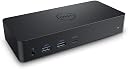
🚀 Elevate your workspace with Dell D6000 – where power meets precision!
The Dell D6000 Docking Station is a high-performance USB 3.1 Gen 1 Type-C hub featuring 11 ports including HDMI, Ethernet, and multiple USB connections. It supports 4K UHD displays at 3840x2160 resolution and comes with a robust 130W power adapter. Designed for professionals seeking seamless connectivity and a clutter-free workspace, it weighs just 380 grams and offers plug-and-play convenience with a sleek black design.
| ASIN | B072K6HJBN |
| Best Sellers Rank | 35,712 in Computers & Accessories ( See Top 100 in Computers & Accessories ) 332 in Docking Stations |
| Box Contents | docking station |
| Brand | Dell |
| Brand Name | Dell |
| Colour | black |
| Compatible Devices | Laptops |
| Compatible devices | Laptops |
| Customer Reviews | 4.3 out of 5 stars 919 Reviews |
| Global Trade Identification Number | 05397063961955 |
| Hardware Interface | 3.5mm Audio, Ethernet, HDMI, USB 3.0, USB Type C |
| Hardware interface | 3.5mm Audio, Ethernet, HDMI , USB 3.0, USB Type C |
| Item Dimensions L x W x H | 16.8L x 7.8W x 3H centimetres |
| Item Type Name | Docking Stations |
| Item Weight | 380 Grams |
| Manufacturer | QBS SOFTWARE LIMITED -- Dropship |
| Manufacturer Part Number | 091R112 |
| Minimum Required Operating System Version | Windows 7 |
| Model Number | 091R112 |
| Number of Items | 1 |
| Number of Ports | 11 |
| Product Warranty | 1 year |
| Product dimensions | 16.8L x 7.8W x 3H centimetres |
| Total HDMI Port | 1 |
| Total USB Ports | 5 |
| Total USB ports | 5 |
| Wattage | 4.5 |
J**L
Plug it in and it works
I bought this because my old hub failed after four years of continuous use. This is the fourth one of these hubs we have bought recently. They are not cheap but run large screens and lots of peripherals very well and are exceptionally easy to setup. They are connected to a variety of high spec Dell laptops, all running two, large, Dell screens in addition to standard peripherals. For all of them, I unpacked the hub, connected everything up and it all just worked. All that was required was to configure the Windows display settings for multiple screens. I particularly like the USB-C to USB built-in converter for the connection to the laptop. The only slight downside is the size of the large and chunky powerpack. The hub itself is neat and compact but you can end up with a rat's nest of cables if you don't have all wireless peripherals.
J**S
A single cable does it all
Great integration with my work's Dell Inspiron laptop. This dock charges, splits video with up to 3 screens, and has a USB/Network hub all from one USB-C cable. Don't get me wrong, you probably couldn't game on this setup, but to be honest, I'm not sure whether the laptop or the dock would be the bottleneck if I tried this! It's perfectly sufficient for office work though, I use two full hd (1920x1080) screens at 60hz, and I've had no stutters, heat or problems. I'd recommend this as a must for anyone with a Dell laptop to work on.
E**N
It works but
Purchased this as recommend by my employer. Works with my Dell PC and monitors, only issue I have is it sometimes disables my laptop's Bluetooth. I've found the fix which is to boot it up not plugged into the dock, then dock it once fired up. It does get quite hot, might be worth putting on a mouse mat to protect your surface of needed. Overall does what's needed so can't complain much really.
T**Y
It just worked!
Impressed - it just worked! I've now got 2 hot-swappable laptops each able to exploit the single USB C connection - charging, peripherals, and 2 external HD monitors. It works well so far with my MS Surface Book 2 (15in, i7 with NVIDIA graphics), and my powerful Dell 5530. The Dell complains about slow charge so I'd fully imagine that it, like the Surface Book, will slowly run down the battery charge if I run the GPU and hardware very hard. But, in that rare case, I can always connect the normal laptop supplied power units. On receipt I simply installed the latest DisplayLink drivers from dell.com/support (to each laptop). After then connecting the dock with the USB C (and nothing else connected) I then did the D6000 dock firmware update using the file at the Dell support site. Not a single issue - very happy :) so quite content to recommend.
M**D
So far so good
Recieved this today. I have installed Display Link driver for my 2020 macbook pro 15inch. I have the below connected. I will update this review in a year or write a new one with the status. 3x34inch monitors 1xAndroid phone 1xiOS phone 1xprinter 1xcamera 1xempty slot Still have an empty I bought a refurbished one for 51 pounds .. it was worth the risk of it not working or delivering what I want.
M**E
Looks good and does the job well
Docking station has been in use for about a year and for the most part has worked well. Sadly it has reached a point where once a day, it decides to stop passing through ethernet connection, so I have to remove the cable and plug it back in...? As a docking station for 2 monitors plus a macbook, it has worked well, keeping the laptop charged and streaming the video.
A**Y
Reliable for small office
I don't usually give reviews but owned 2 of these now for 3 years without real issues. Used in a home office where I do all of my work, one of them runs a laptop and 2x27" monitors and the other a single laptop with single screen. Minor issues that may not come as a surprise: 1 - about twice in a hot office or when I left something on top of it, I felt it was running too hot so I switched it off to cool down. 2 - with a work Windows 10 laptop, sometimes the laptop won't get a network connection through the dock when coming out of sleep. 90% certain this is a laptop issue and is fixed by unplugging the laptop from the dock (simple USB C connection) waiting a minute and then plugging it back in. A little pricey but I would seek this out again if only for the reliability that you need for an office.
E**S
Perfect!
Absolutely amazing product. One cable solution to plug on all peripherals and charge my MacBook at the same time! Such a wide array of ports is so helpful including the USB-C port on the front. All that whilst looking very aesthetic as well. My only possible criticism is making the USB C connector for the laptop was detachable.
N**N
Almost perfect dock
I have a stationary computer at home, with 2 monitors. I also have a laptop that I use for work. The idea was to have the monitors connected to the dock, so when I switch from my laptop to my stationary, I could only plug and unplug the dock from whatever computer im using. It was fine but the problem is that monitors have only one display port, so I have to connect the display port to the stationary computers GPU, if I want 144hz+ gaming. Not saying that its the docks fault, im just saying that im still looking to find a way where I can easily switch from my stationary and laptop and have 144hz on both, and this dock was not the answer. For the money you could probably get something cheaper that works exactly the same. But if you have the money then go for it!
S**Z
BİREBİR ORJİNAL ÜRÜN
Kesinlikte tavsiye ederim. 4K 60 fps yi 4k destekleyen monitörde test ettim. Amazon ailesine teşekkürler.
H**D
Parfait
Parfait, produit conforme et en parfait etat
P**H
Wonderful product by DELL works on MacOS M2
I bought this to support the purpose of Extending MULTI screen with M2 Chip MacBook Pro 2023 It worked well, could extend 3 more screens (total 4 with MacBook)
A**.
Geht völlig ohne Probleme am iMac5K/2019 mit mehreren Displays .....
....und getrennter Ansicht. An USB-C 3 Monitore, an USB-A 2 Monitore. Gott sei dank!!! Nach zig Versuchen mit TB3 Dockings und Adaptern und tagelang nur Theater und Mist war diese Docking die Rettung. Wo hundert Euro teurere TB3 Dockings bis zu viermal den iMac Monitor duplizieren (ja, es gibt welche mit schön vielen Anschlüssen, bis zu 2xDP + 1xHDMI + 1xDP an USB-C + 1xTB3 ...... aber bis auf TB3 zeigen alle Monitor dann nur das duplizierte Bild vom iMac .... bitte, wer braucht denn sowas??? ich nicht und am durchgeführten TB3 will ich auch keinen Monitor sondern eine TB3 SSD) gibt es hier je nach Wunsch 2 oder 3 externe Monitore und auf jeden ein schönes eigenes arbeiten. Mein Problem war das ich nur 2 TB3 Anschlüsse habe aber gern 2 TB3 SSD betreiben möchte + 2 externe Monitore und mit der D6000 ist das nach der Treiberinstallation von DiplayLink, die eine wunderbar übersichtliche Website haben, problemlos möglich. Docking hängt an einem der 4 USB3-A Anschlüsse und daran 2 Monitore zu meinem Glück reichen mir da einmal 1080p und einmal WUXGA. Bei mehr würde es ungünstig ;-) da dann die D6000 an einen USB-C Anschluss müsste, am iMac also an den TB3. Da ich persönlich aber weder 3 Monitore noch 2x4K brauche bin ich nun zufrieden. Wer also eine einfache 2 Monitorlösung ohne Probleme und ohne 4K sucht, mit etwas "Zugabe" kann hier zugreifen. Wer natürlich weniger Geld ausgeben möchte was ich gut verstehen kann darf gerne weitersuchen, mir sind inzwischen meine Nerven zu schade, sobald etwas funktioniert ist mir der Preise sowas von egal :-)
Trustpilot
2 weeks ago
4 days ago