🚀 Master your workflow, triathlon style!
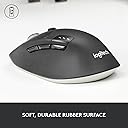
The Logitech M720 Triathlon is a versatile, durable wireless mouse designed for professionals who demand seamless multi-device connectivity and long-lasting performance. Featuring dual Bluetooth and USB Unifying receiver connectivity, 24-month battery life, 6 customizable buttons, and ergonomic design, it enables effortless switching between up to 3 computers with precision tracking and hyper-fast scrolling. Built to endure and crafted for comfort, it’s the ultimate productivity tool for the modern multitasker.


| ASIN | B01KZVQB42 |
| Antenna Location | Office |
| Are Batteries Included? | Yes |
| Are Batteries Required | Yes |
| Battery Average Life | 24 months |
| Best Sellers Rank | 1,619 in Computers & Accessories ( See Top 100 in Computers & Accessories ) 72 in Mice |
| Box Contents | Mouse |
| Brand | Logitech |
| Brand Name | Logitech |
| Button Quantity | 8 |
| Colour | Black/White |
| Compatible Devices | Personal Computers, Laptops |
| Connectivity technology | Bluetooth, USB |
| Customer Reviews | 4.4 out of 5 stars 5,259 Reviews |
| EU Spare Part Availability Duration | 2 Years |
| Enclosure Material | Plastic |
| Hand Orientation | Right |
| Hardware Platform | Linux, Mac, PC |
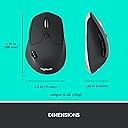
| Item Dimensions L x W | 11.4L x 7.4W centimetres |
| Item Weight | 4.76 Ounces |
| Manufacturer | Logitech |
| Model Name | M720 Triathlon |
| Model Number | 910-004791 |
| Mouse Maximum Sensitivity | 1000 Dots per Inch |
| Movement Detection | Optical |
| Movement detection technology | Optical |
| Network Connectivity Technology | Bluetooth, USB |
| Number of Batteries | 1 AA batteries required. (included) |
| Number of buttons | 8 |
| Operating System | Windows, macOS, Linux, Chrome OS |
| Power Source | Battery Powered |
| Product Features | Wireless |
| Product Finish Type | Smooth or Matte |
| Product Warranty | 2-year Limited hardware warranty |
| Range | 10 meter |
| Special feature | Wireless |
| Style Name | Wireless Mouse Multi-Device - M720 |
| Theme | Computer Accessory |
| Unit Count | 1.0 count |
A**R
Unbreakable and highly productive
Fantastic and surprised it has not breaked after nearly 4 years of dropping this down. Sturdy you will not regret buying this plus it's 3 in one as you do not need to buy another to connect to another device just click the button and voila. Seriously though it should broken by now but it's not. Great value and quality like battery life can last months and weight is also perfect not too light like other mice. Size too.
M**E
One of the best mice on the market
My favourite mouse, has become the only choice for me and have now had 3 of these. Two are still in rotation, when one gets badly worn out I replace the housing with parts I get from China and its like new all over again. I love this mouse because the device switching button is on the side, near the thumb rather than underneath like the newer models. Battery life is great on this mouse and it takes a single AA battery. Weight is goof and feels great in the hand, moves smoothly on most surfaces. The size is perfect, fits in the palm nicely, not big, not small, just right.
J**9
Excellent bluetooth mouse - with one caveat
The Logitech M720 is an excellent mouse overall and one of Logitech's better efforts. Quality of construction is great and has a nice weight and balance to it. Ergnomics are fabulous for anyone wanting a full sized mouse - these seem to be a rarity these days as manufacturers seem so keen to make mice smaller and smaller for the sake of portability. Buttons have a positive click and the scroll wheel is a dream to use. The mouse can connect either with the USB nano receiver or directly via Bluetooth (the mini receiver has a storage slot next to the battery if not used). The one major caveat is that it does not work well with my Dell XPS 13 9300 (2020) under bluetooth. Essentially, the mouse enters power saving mode when not moved for 10-15secs. It does wake in a split second on movement, but the on screen pointer will skip a full inch or more at the initial movement. This might not bother everyone, but the big jerky jump at initial movment really puts me off. It is especially noticeable when filling in forms where one has to do some typing, then move the mouse to the next data entry box. The unpredictable intial jump as the mouse wakes up makes for an annoying workflow day. I've tried to reduce the overly-agressive power saving feature of the mouse by changing drivers, changing bluetooth settings in Windows 10 (disabling its power management), altering registry settings to change the polling rate etc. No help. Weirdly, this erratic jumpy wake-up does not affect any of the other three laptops in my household (all Dell laptops, too; but larger variants than the XPS13). So it appears to be a problem isolated to my laptop. Shame, because I really like it and if all I was doing was continually moving it browsing web pages, this jerky issue wouldn't be an issue at all. Update 30.07.20 - I've now given the M720 to my son who uses it with his XPS15 (no jerky power managment lag issues) and says it's the finest full sized multi-button & feature mouse he has ever used. I currently use this: https://www.amazon.co.uk/gp/product/B07WJSB6RH It is very similar in shape to the M720 which is my ergonomic preference. It is less than half the price of the M720, and the construction, features, feel and overall quality are also less than half, in keeping with its lower price. However, it does not have the same deal-breaking jerky bluetooth lag, so is a very reasonably priced reasonable alternative with the caveat that it is no where as luxurious as the M720. Such a shame that I couldn't get the M720 to work well with my XPS13. If Logitech could release an updated driver that was less agressive with its power saving (I don't really mind changing my mouse batteries every couple of weeks if it means great useability), I'd never use any other mouse!
P**K
Perfect work mouse for multiple devices and easy switching too.
The Logitech M720 Triathlon Multi-Device Wireless Mouse is a game-changer for anyone seeking seamless productivity across multiple devices. From its ergonomic design to its effortless connectivity, this mouse is a true powerhouse that enhances efficiency and comfort during long hours of work or play. One of the standout features of the M720 Triathlon is its versatility. As someone who juggles between multiple devices throughout the day, I greatly appreciate the ability to seamlessly switch between three devices with the touch of a button. Whether I'm working on my laptop, desktop, or tablet, this mouse adapts effortlessly to my needs, streamlining my workflow and minimizing clutter on my desk. The ergonomic design of the M720 Triathlon is another highlight. The mouse fits comfortably in my hand, with contoured curves that provide ample support during extended use. The rubberized grips ensure a secure hold, reducing fatigue and allowing for precise control with minimal effort. Plus, the durable construction means that this mouse can keep up with even the busiest of workdays without missing a beat. Connectivity is where the M720 Triathlon truly shines. With both Bluetooth and 2.4GHz wireless options, this mouse offers unparalleled flexibility in how it connects to your devices. Setup is quick and hassle-free, with no drivers or software required. I've experienced no latency or connectivity issues, even when using multiple devices simultaneously, ensuring a smooth and uninterrupted user experience. In terms of functionality, the M720 Triathlon delivers on all fronts. The hyper-fast scrolling wheel allows for lightning-fast navigation through documents and webpages, while the customizable buttons provide quick access to frequently used commands. Whether you're tackling a demanding work project or engaging in intense gaming sessions, this mouse offers the precision and responsiveness you need to stay ahead of the game. In conclusion, the Logitech M720 Triathlon Multi-Device Wireless Mouse is a must-have for anyone seeking ultimate productivity and versatility in their computing setup. With its ergonomic design, effortless connectivity, and advanced functionality, it's a worthy investment that will enhance your productivity and comfort for years to come. Highly recommended.
Z**H
Quality and comfortable bluetooth mouse
This is a quality and comfortable mouse. The Bluetooth connection is brilliant. Got a lot of function but did not make the product too complex and confuse to use. I was a bit worried about the middle wheel as some of the review mentioned it is too sensitive while using CAD. As an engineer I am using CAD and other design software along with the normal PDF, MS office and internet browsing. So the experience of using it in CAD is a bit of concern. However, I decided to give a try and prepared to send it back if it does not work well with CAD or other design software. It ends up works very well. I figured out that the issue about the middle wheel zooming the CAD window randomly is due to a mis-setting up. The middle wheel has two different setting by simply clicking the little black button behind it. One mode is for fast exploring which will help the internet or long document reviewing as each rolling movement of the wheel will move the document or internet page with a good 'distance'. The other setting is to switch this function to get back to the normal motion which is just like the normal mouse. You can clearly notice the different modes - one is very smooth rolling with very little resistance and the wheel will not stop until you put your figure on it or taking a bit while without touching it. The other mode is with some resistance and you can feel the 'click' when you roll the wheel. When I am using CAD, the 2nd mode works very well. I hope that explains the concern for CAD user and I do recommend to give it a try. I love it for a week of using. Cheers
A**H
good
Good mouse, average size and very portable. Highly resposnive, although cannot give details on long-term use since I eventually upgraded to the MX Master 3 due to requiring use of the logi bolt receiver for my device. Otherwise I would have kept this
N**R
Great mouse for pairing between different computers
Fabulous mouse. Bought it to pair with MAC and Windows 10 (got fed up of switching between mice). The scrolling button is so smooth!!!!. It doesn't pair seamlessly as you have to select an option on the mouse but I think that's probably the case for all of them.
T**N
A nicely designed mouse that works flawlessly
Last year I was given a new work laptop. When working from home it proved impractical to keep switching my mouse and keyboard between my home desktop computer and the laptop so I bought a very cheap Logitech mouse and keyboard. These were fine for occasional use but since I've been working at home full time since the first lockdown I decided to treat myself to something a bit better. The laptop has only three USB-C ports,one of which is used by the dock, and wireless mice with USB-C receivers are as rare as hen's teeth. So after looking around I decided to try a Bluetooth mouse. I'm happy to report that it works flawlessly. Obviously it doesn't work in the BIOS screen but I was relieved to find that it works as soon as Windows boots; the old keyboard and mouse combo wouldn't work until I'd logged in if it was plugged into the dock. The mouse itself has a reassuringly solid feel to it, very like the M705 mouse I have on my desktop PC. It moves very smoothly with no hesitation at all. There is a button next to the scroll wheel which turns click-scrolling on and off. Personally I like it off so that I can scroll through code quicker. It is slightly asymmetric but not enough to prevent it being used left-handed, as I do and it can be paired with up to three devices. In short, I can find nothing wrong with it.
Trustpilot
1 month ago
2 months ago