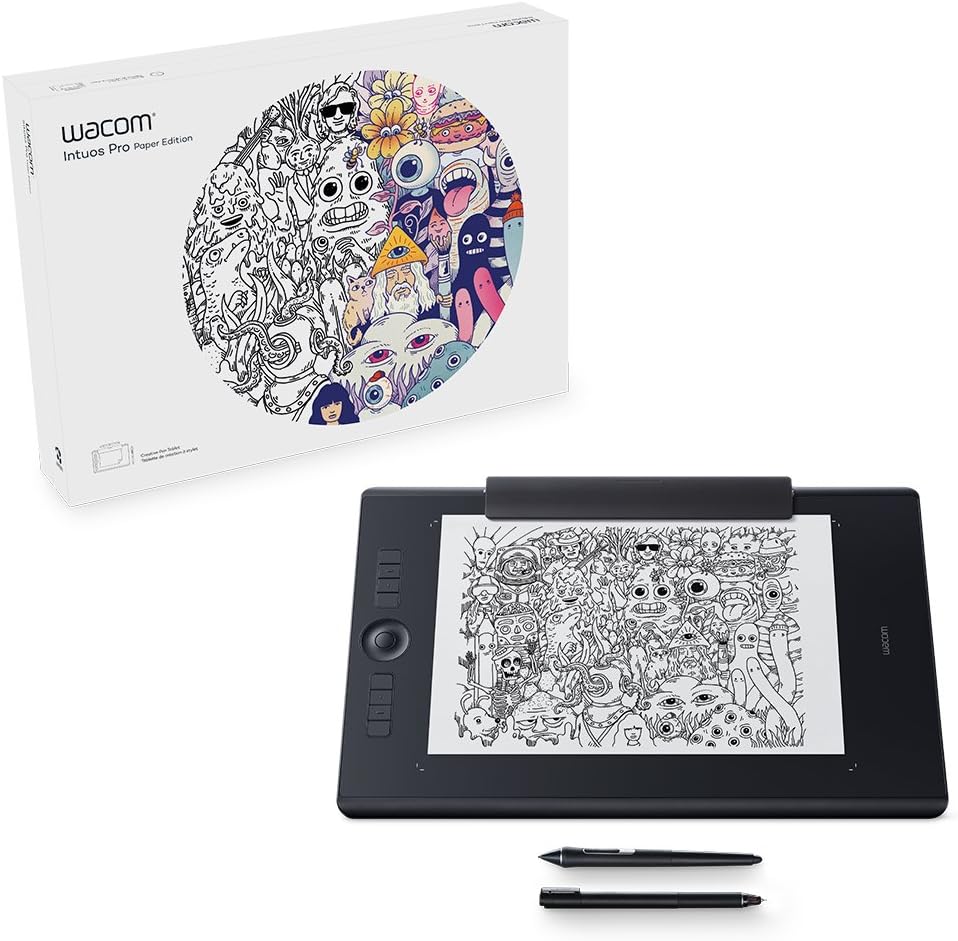
Intuos Pro Paper Edition Large Pen Tablet, Black, L
Product ID: 48686075
⚡Lag-free tracking
📏Super-slim design
🖊️8192 pressure levels
Buy anything from 5,000+ international stores. One checkout price. No surprise fees. Join 2M+ shoppers on Desertcart.
Desertcart purchases this item on your behalf and handles shipping, customs, and support to Nicaragua.
🎨 Transform Ideas into Art with Every Stroke!
The Wacom Intuos Pro Paper Edition Large Pen Tablet combines exceptional pen performance with innovative features, allowing users to seamlessly transition from paper to digital. With 8192 levels of pressure sensitivity, customizable controls, and a sleek design, it’s the perfect tool for creative professionals looking to enhance their workflow.
A**O
The most natural connection between pen and screen I've tried
I use this mostly with Lightroom for editing and masking photos but I also use Illustrator and Photoshop.Lightroom's amazing new masking features (in 2022) make it more obvious to use a graphic tablet rather than a mouse. It encourages you to use masking more and do a better job of it. I'm impressed with how totally natural this feels. The connection between pen and screen is pretty much real as far as I'm concerned, and you soon don't think about it – you just use it. Things like pressure sensitivity are perhaps less important for photo editing, but it's still very useful to be able to brush on a less dense mask in some areas just varying pressure.I'm happy I chose the smaller size. I'm mostly working on detail in photos so don't need a huge expanse of tablet to make sweeping brush strokes. It means I don't have to move my hand as far, but I never feel like I've lost any sort of fine control.I had a cheaper Wacom tablet years ago and gave up on it because it felt a bit crude. This is light years ahead. I really like that it's wireless (and it makes no difference to how well it works, wired or wireless) and the programmable buttons and touch sensitive wheel (like the scroll wheel on an old iPod) will be more useful once I've decided what to use them for and developed muscle memory. The option to use the tablet as a touch pad with your fingers is nice to have too and works well. The pen is very nicely balanced and I really like the weighted stand for the pen (separate to the tablet so you can place it where you won't knock it over all the time – something that drove me mad with my last Wacom) that has a bunch of spare nibs inside it. It's a nice, quality package that feels worth the money. The software is pretty easy to use and highly customisable – you'll probably need a few weeks of experimentation though. You have to download it from the Wacom website to set the tablet up but it was easy enough.The feel of the pen (you get two types of nib) is mostly just perfect for me – smooth and silky with a perfectly judged amount of drag that makes it feel like a great pencil on smooth, expensive paper. But if you get the slightest amount of dust or grit on it, it suddenly feels scratchy and awful, so if you're like me you'll spend a lot of time wiping the tablet surface and the nib. I don't know how you'd avoid this but it is a bugbear.Another slight downside for me is that the battery life isn't as good as I expected. It doesn't come close to my wireless keyboard or mouse, but I suppose it's doing more. You can use it while it's charging though so it's not a huge problem unless you like to use it on your lap. Occasionally, Bluetooth doesn't connect automatically and I have to select the tablet manually in the Bluetooth menu of my Mac. This can be quite irritating.I'm not a graphic artist so I can't tell you what this is like for drawing, but for photography it's something of a game changer and a good purchase despite a couple of niggles.
S**S
Small but powerful
Great size for limited desktop space. However it covers my large monitor adequately enough. Simple set up and customisable buttons and centre wheel. Takes a little practice to draw accurately or retouch small areas. very important to hold pen correctly and set pressure sensitive settings to individual style.
M**Y
Wow, excellent product best Magic Trackpad or mouse Alterntative
Absolutely love it. I do some light photo work so it is so much better than a mouse and just the perfect size. But this has also been a joy to use for daily use of my Mac. It gives me so many options to interact with all software, it has completely replaced my mouse. It has also been brilliant to work with while editing Word documents. I cannot recommend this enough even if you don't draw/ edit images. Way more versatile than a Magic Trackpad or any mouse I have used.
M**E
Great tablet, if dated
Bought this for my daughter. Works well with her MacBook Pro and is nice and portable. Lovely build quality as expected from Wacom. The first one we received had a battery charging issue but was replaced swiftly.
S**T
Great product, terrible support - BEWARE
After receiving the tablet and installing the latest driver on 21 Feb 2022 (Version 6.3.45-1) on a top spec Windows 11 PC, configuring Photoshop functionality I tried to edit a mask using the pen tool with catastrophic results – the tablet was behaving erratically, you’d get one brush stroke, a loooong freeze, then 10 strokes will pile up on the wrong locations. Gestures didn’t work, every time you select a different tool you have to click on another application and then select back PS but this did not work every time. Same result with or without Windows Ink, cable or Bluetooth. Basically I tried every combination of options possible before ringing Wacom support. In a rude manner the first guy did everything in his power to convince me it’s my fault the brand new device is not working, something I did not see coming. Hung up, second support person (Alex) was very polite but only suggested to tick/untick Windows Ink before the line got disconnected from his end this time.Enough calls to support, time to do some digging until the end of the day before returning the tablet and exchanging it for a cheaper brand/option which I was hoping to at least perform basic tasks. I really need a tablet as I edit tons of furry animals and have to refine the edges, an impossible task to achieve with a mouse. Found a guy on Youtube who was requesting a donation for a fix, paid, this didn’t work but the last search got me on Adobe forum where someone suggested downgrading the driver. I immediately downloaded and installed a 2020 issued version (6.3.41-1), which worked straight out of the box minus brush size & softness correction, for which I had to apply a tweak again found on Adobe forums.My conclusion: all in all the tablet is very well built & worth every penny. I am giving it 4 stars because of the useless support and attitude received over the phone and also the fact that when you buy a peripheral device for your PC you should be able to connect/install/use and not have to search for underground knowledge to make it do what it’s supposed to from the start. 2 days wasted running around in circles while work is piling up by the minute, not cool.I was hesitating between S and M size and I am glad I chose S as I am using only about ¼ of its surface, anything larger than this would be uncomfortable for photo retouching as your hand will be moving too far to cover the screen area, but I guess you’ll prefer the bigger one for drawing.Would I buy another Wacom product? The build quality is really tempting, but if this one breaks I will definitely try another brand first and if they don’t live up to my expectations I will have no other choice but to come back to Wacom. In all fairness, the uncertainty this whole procedure has given me is not something I’d like to go through again.
Trustpilot
2 weeks ago
2 months ago