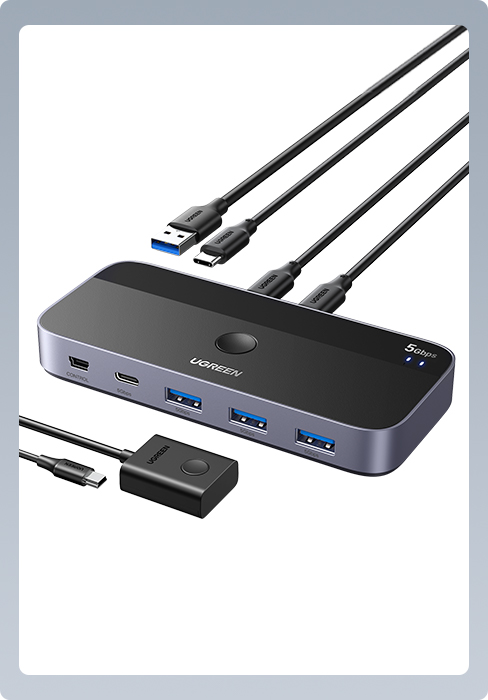
🔄 One Button. Two PCs. Infinite Productivity.
The UGREEN USB 3.0 Switch is a compact, high-speed peripheral sharing hub that lets professionals seamlessly toggle 4 USB devices between 2 computers at 5Gbps. Its plug-and-play design supports all major OS platforms without drivers, powered directly via USB for a clutter-free setup. Ideal for multitasking managers and remote workers seeking efficient device control and workspace minimalism.


| ASIN | B01N6GD9JO |
| Batteries Required? | No |
| Batteries included? | No |
| Best Sellers Rank | 2,669 in Computers & Accessories ( See Top 100 in Computers & Accessories ) 4 in KVM Switches |
| Colour | Black |
| Customer Reviews | 4.3 4.3 out of 5 stars (8,903) |
| Date First Available | 10 Jun. 2017 |
| Included components | 2 In 4 Out USB Switch |
| Item Package Quantity | 1 |
| Item Weight | 150 g |
| Item model number | 30768 |
| Light source | LED |
| Manufacturer | Ugreen Group Limited |
| Part number | 30768 |
| Product Dimensions | 10.4 x 5.1 x 1.5 cm; 150 g |
| Size | One Size |
| Special Features | USB 3.0 KM switcher box, USB 3.0 switch with 2pcs 1.5M USB A to A cable, printer sharing switch hub |
| Style | Tribal |
| Switch Type | 1-way |
| Voltage | 5 Volts |
| Wattage | 10 watts |
L**D
Perfect as a Wireless Keyboard/Mouse switch!
I'm writing this review to serve as 'support' for others that might find themselves in a similar situation to me (because I couldn't find this answer when I was looking). My needs were simple. I had a set up consisting of 1x Samsung Ultrawide screen display, 2x PC's/Lap Tops, 1x Logitech MX Keys keyboard and 1x Logitech MX Master 3 mouse. I wanted the be able to quickly flip the keyboard and mouse from serving one of my systems to server the other. Samsungs built-in KVM nor Logitechs 'Flow' solution were options for me because one of my systems was my work Lap Top connecting to the internet via a VPN - so neither the Samsungs KVM or Logitechs 'Flow' recognised that system as being on the same network as my other (personal) system. I could have used the '1, 2, 3' switch keys found on both the keyboard and mouse to flick from one system to the other but, in practise, this always stopped the natural flow of things because of the conscious effort required to (a) select the relevant switch key on the keyboard followed by (b) turn the mouse upside down to then select the relevant switch key there too. I wanted a 'switch' that would house the Logitech Unifying Receiver to which both the keyboard and mouse had been assigned and would quickly and easily allow me (i.e. one button, one press) to toggle backwards and forwards between my 2 systems. I wanted this switch to be discreet in size and I wanted it to take it's power from the two systems it was server (ie.. not require a plug/AC/power socket connection). And I wanted it to be USB3.0 compatible for both performance and future-proofing reasons. This compact switch, that takes it's power from the machines its connected to, has given me exactly what I wanted. One button, one toggle, up to 4 devices shared. Quick, easy, trouble-free and instantaneous switching. I've stuck it to the side of my desk so neither it or its cables are visible but the recessed button is so easily found without having to consciously go looking for it, the transition from one system to the other is seamless and effortless. I can't recommend this device highly enough but must also mention UGREENS customer service support. If you post a question here about the device, they'll reply within minutes during office hours. 5 Stars all round. If your display has built-in KVM or you can utilise Logitechs 'Flow' software then, of course, that's the way to go... but those services are impeded, perhaps by something like VPN, then this is the Switch for you.
S**M
Cheapest option for KVM, great for WFH with monitor(s) that have multiple inputs
This device allowed me to connect a keyboard, mouse, USB webcam and a wireless receiver for a headset to 2 computers at the same time. I mounted it behind one of my screens with double sided tape to keep the massive amounts of wires out of sight. With 1 button, I can switch between the machines easily. I still need to switch my monitors to the other inputs manually if both machines are running simultaneously, but most modern monitors will just switch to the correct input automatically when one or the other machine are first powered on. Unfortunately this UGreen switch doesn't have an autoswitch feature, but that suits me and its literally one button press to switch. I've previously bought usb extension cables form UGreen and the quality is always top notch. Even the USB cables provided with this switcher are thick, sturdy cables that should last and work for a long time to come once treated properly. For those using this for working at home, one small bonus for me was that this passes through keyboard input to the laptop even before Windows has booted, so I can use my external keyboard to enter a Bitlocker pin and not have to pull out the laptop to use the built in keyboard. There's a lot of variables with this setup and it won't work for everyone, I'm just noting it here that the UGreen switcher did NOT cause any issues for me. If entering bitlocker pin with an external keyboard works for you now, including this switcher into the mix shouldn't change that.
I**T
Makes life so much easier!
Hybrid working means I have a laptop for in office days and a PC for working from home days when I need the extra graphics power. Some days I need to use both. This little box has made that so much easier. No more having to unplug a keyboard or mouse dongle from the laptop and crawl around on the floor to put it in the back of the PC and vice versa. They're all pluged into this little box, and with the press of a button it swaps between the 2 devices. For me, this is the height of convenience. I even have a little fan plugged in, so even if you're just using the one machine, you can still use it as a hub. You can power this externally, but it doesn't come supplied with a cable or plug. But it's there as an option if the devices you're wanting to power are needing too much energy. It works fine for most uses without. The one thing I'd change and the reason for dropping a star, is the cable ports. You have the ports to connect to the 2 devices on the back, and the other ports on the front. This means it doesn't look the tidiest as you'll have cables poking out of both sides. With my set up, it means it doesn't sit flush on the desk because of this, but it's a small price to pay for the convenience of it.
J**.
Works great, but needs to be taped down
Works great, fantastic for switchability from my work laptop to personal pc, it doesn’t impact the speed, or connectivity of any devices. retains sound quality and all my custom buttons still work. Only criticism, the cables provided are VERY thick and weigh more than the device itself, which required a bit of double sided tape to fix else it will want to twist and constantly move, especially if you use a sit stand desk like I do.
N**L
Great switch
Great switch! Does exactly what I needed it for. No issues at all.
R**Y
Easy setup
Works as described and doesn't need to be powered to work either great.
R**N
Awesome time saver
This little gadget allows me to connect my work laptop and gaming pc to the same USB devices without having to annoyingly rewire everything behind my desk. Excellent tool for those in a similar situation, and great value for money. Has 4 USB ports which is just right for me.
Trustpilot
2 weeks ago
2 months ago