⚡ Unlock lightning-fast, wired connectivity anywhere you go!
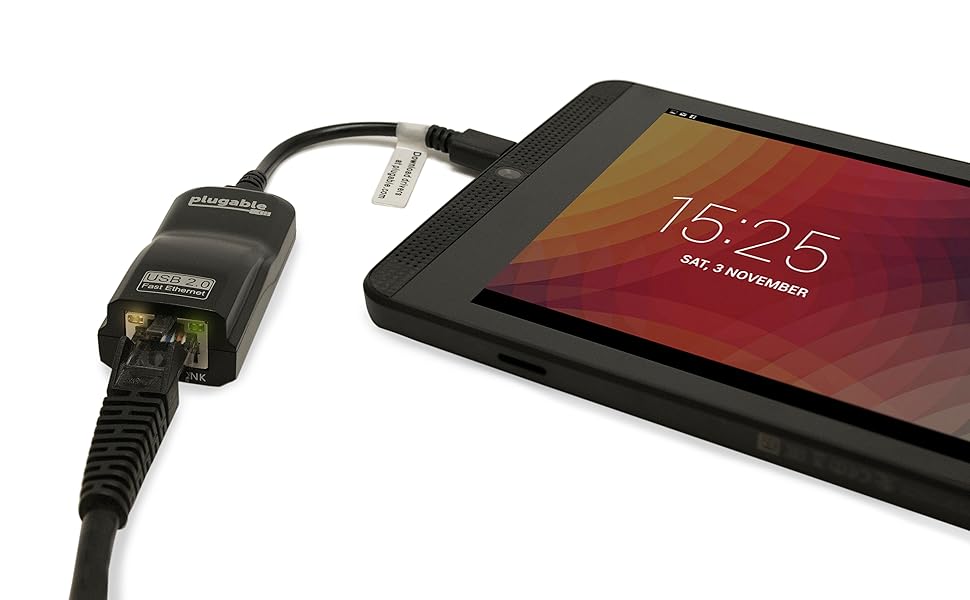
The Plugable USB 2.0 OTG Micro-B to 100Mbps Fast Ethernet Adapter delivers reliable wired network speeds up to 100Mbps via a Micro USB 2.0 OTG port. Compatible with Windows tablets, Raspberry Pi Zero (with Raspberry Pi OS), and select Android devices, it offers effortless plug-and-play setup with built-in drivers for Windows. Ideal for professionals and tech enthusiasts seeking stable, low-latency connections for gaming, streaming, and productivity on the go.


| ASIN | B00RM3KXAU |
| Best Sellers Rank | 256,549 in Computers & Accessories ( See Top 100 in Computers & Accessories ) 3,781 in USB to USB Adapters |
| Box Contents | Network adapter |
| Brand | Plugable |
| Brand Name | Plugable |
| Color | Black |
| Colour | Black |
| Compatible Devices | Windows tablets, Raspberry Pi Zero with Raspberry Pi OS, some Android devices, but not compatible with Windows phones, devices by Amazon, LG, or Apple iOS devices (iPhone/iPad) |
| Compatible Operating System Family | Windows |
| Compatible devices | Windows tablets, Raspberry Pi Zero with Raspberry Pi OS, some Android devices, but not compatible with Windows phones, devices by Amazon, LG, or Apple iOS devices (iPhone/iPad) Compatible devices Windows tablets, Raspberry Pi Zero with Raspberry Pi OS, some Android devices, but not compatible with Windows phones, devices by Amazon, LG, or Apple iOS devices (iPhone/iPad) See more |
| Customer Reviews | 4.4 out of 5 stars 2,152 Reviews |
| Data Link Protocol | Fast Ethernet |
| Data Transfer Rate | 100 Megabits Per Second |
| Data link protocol | Fast Ethernet |
| Global Trade Identification Number | 00819927010708 |
| Hardware Interface | Micro USB 2.0 Type B |
| Hardware interface | Micro USB 2.0 Type B |
| Item Dimensions L x W x H | 16.5L x 11.5W x 3H centimetres |
| Item Type Name | Plugable OTG Ethernet Adapter (USB2-OTGE100) |
| Item Weight | 0.6 Ounces |
| Manufacturer | Plugable |
| Manufacturer Part Number | USB2-OTGE100 |
| Minimum Required Operating System Version | Windows 8 |
| Model Number | USB2-OTGE100 |
| Product dimensions | 16.5L x 11.5W x 3H centimetres |
| UPC | 819927010708 |
| Unit Count | 1.0 count |
G**S
Wonderful device for Nvidia Shield and Nexus 5 - but note micro USB simultaneous charging
This is a great Ethernet adapter that has surpassed my expectations certainly in terms of performance and the range of devices it has supported. The adapter is professionally packaged in a plastic moulded case and would make a nice present for an Android gaming fan who wants to reduce wireless ping times. It's easy to install and for supported Android devices it's simply a case of plugging it into the micro USB port on the phone or tablet - the LED network activity lights flash after a couple of seconds and the Ethernet connection icon (see attached photo) should appear in the Android status bar. I bought the adapter for an Nvidia Shield tablet so that ping lag when using Geforce Now would be reduced. The adapter works well in this regard and, clearly, makes a difference to both network stability and gaming performance including support for higher resolution game streams. You should note however that the micro USB standard does not support multiple use of the Android phone or tablet micro USB port for data and charging at the same time. Using a micro USB Y cable with two micro USB inputs - one for a charger and one for the Ethernet adapter - will not help you. You will not be able to charge the tablet or phone using a micro USB charger whilst using the Ethernet adapter connected via micro USB. This is not a fault of the Ethernet adapter - it's part of the micro USB standard. I found that the adapter also worked with my old and retired Nexus 5 which, courtesy of the adapter, is now working well as an Android media steamer with fast access via a wired connection to my router to a shared media hard drive. Incredible performance on the LAN and great internet performance too. I've attached a screenshot that shows the wired connection with the Nexus 5 and this adapter - it's maxing out my internet connection and there's a ping of 8ms. With the Nexus 5, wireless charging is an option. With the Nvidia Shield only wired charging is available and, as above, you can't use this adapter and a micro USB charger with a Y cable at the same time. It just doesn't work. So the Shield will run down its battery pretty quickly if the display and GPU are working too hard. There is a workaround however. The workaround is to use a Y cable that has a full sized USB input for the Ethernet adapter. You then need to buy a micro USB female to male USB adapter (not many choices available) to plug the Ethernet adapter into the Y cable's full sized USB female input. It's just an oddity of the micro USB standard. The much better alternative would be to go for the full sized USB version of this device and use a Y cable that supports full sized USB and micro USB for charging. If you are going to be using the adapter with an Android device that doesn't support wireless charging (very few devices now do support wireless charging) I would recommend going for the full sized USB adapter and using a Y cable. I can confirm that the full sized USB adapter works with the Shield and with the Nexus 5 when using a Y cable. As to which Android devices support this Ethernet adapter, it's trial and error. I had been told that this adapter worked with Nvidia Shield but I was very pleasantly surprised that it worked with my Nexus 5 too. They key issue when selecting an Android compatible Ethernet adapter is to look for Asix support. Even then it's a gamble as to whether or not your device will support it but you may be surprised and it could be worth a try.
G**T
Pleasantly surprised! and works with my OPO!
I was amazed that this turned up early (always nice when that happens). Initial impressions were really good, nicely packaged item, looks really well-made. Micro USB has a very firm connection, no danger of this falling out - I have had slack connectors but this is reassuringly firm, with a satisfying 'click' on connect. Some have mentioned it gets warm (it is supposed to) - it does, but not significantly hot. OK so the test, I plugged it into the micro USB slot on my Linx 10 Windows tablet, plugged in an Ethernet cable, and bam! connection straightaway. No messing about, no connection issues, no software issues, works straight out the box. I was connected to my works' network and the connection was super-fast. Didn't do a speed-test but wow! definitely did what it was supposed. LEDs flash and show it is connected and working. The biggest surprise was that it also works with my (rooted) OnePlus One phone (Cyanogen 13 Android 6) which I wasn't expecting. I checked the Plugable website, and it said it wouldn't. I have attached a screengrab showing it connected and upgrading some apps from Google Play Store, and photos of the adapter plugged in with lights glowing (apologies for quality). I checked this was definitely connected by switching it to airplane mode before doing so; our WiFi is restricted at work so can't really log in for more than 10 seconds anyway. It definitely works. Can't comment about whether a non-rooted example would work, just that mine did. I am now considering buying another for my phone! Speeds looked really good too, very fast connection.Again, didn't test it but hope this helps. I decided to buy this on the strength of the reviews, I'm glad I did. Definitely worth it.
O**T
Internet through a wire!? The future is wired!
It let's you quit the WiFi! Although! Not on every device. On some makes and modules it just won't work with it and that's just down to the device. I have a Huawei, it works a treat. Only down side is that it will munch your battery! Like a lot! And remember if this is in then you can't charge. It would be cool if you could plug in your charger at the same time.
A**T
Perfect for Shield Portable
As a user of the shield tablet K1’s GeForce now game streaming service this works perfectly. Once you plug the adapter into the tablet with an Ethernet connected it automatically bypasses the WiFi and starts working off an Ethernet connection. This is a game changer for GeForce now as there is a fair amount of packet loss through WiFi. I haven’t noticed any whilst GeForce now is the only thing streaming through the bandwidth. Does what it says on the tin and provides an Ethernet outlet for your usb 2.0 device. Speedtest verifies 72 Mbps download and 19mbps Upload through this adapter with 0% loss and 5ms ping. Outside of the shield tablet K1 I cannot say if this will work as well for you. But works perfectly with the shield.
M**S
Cuts in and out
Good product but it keeps cutting out on my laptop, have tried on another device but still does the same. Shame as it’s the perfect size and ideal for commuting
P**G
Solved a lot of Wifi issues with Pi Zeros
This is now a fairly IoT specific item - do NOT buy for an android phone, tablet or laptop - there are much better options. I rated this product in the context of Raspberry Pi Zero. Raspberry OS has support for this so its plug and play. Speed is as you 100Mbps as you would expect, so much of the point of this is to reduce packet drops and improve latency, which does very well. Its a little pricey, but I would buy this again knowing full well that it works every single time rather than gambling on unknown brands which could be packaged e-waste.
R**T
Broke after a few uses
Junk. Worked OK the first few times I used it, then it died 31 days after I bought it - just outside of the returns window. Buy from somewhere that will let you return faulty junk to them.
C**N
Setup the ethernet on the tablet manually ideally
This works on a galaxy tablet Samsung no problem dies need setting up and to set it up. Turn off WiFi plug adaptor into tablet connect network cable then go into setting if ethernet on the tablet and turn the ethernet off go into ethernet settings then choose manual or dhcp dependant on your network. Setup once you've made the settings changes and saved it then turn the ethernet back on this should. Work as mine is running on ethernet
K**I
XperiaZ4で使うために購入しました。追記:使えなくなりました!泣
質問欄でXperiaZ4でも使えるとの回答があったので購入しました。 が、最初は使えず、、泣 いろいろやって今は使えています。 ちなみに、語学学習用のタブレットでは(中華タブレットくらいのスペック) 差し込むだけで簡単に使えました。 以下、XperiaZ4での接続方法を記載します(私の場合はこれで使えています) ポイントは2点。 1 モバイル回線の切断(auで購入) 設定→データ使用→モバイルデータ通信をOFF 念のためネットにアクセスして「オフライン」になっているか確認 2 設定→Xperiaの接続設定→USB接続設定→USB機器を検出→検出中 念のため再び[USB機器を検出]をタップ→下段に「USBを検出しました」と表示がでる これで、ネットに接続できると思います。 ただ、、、 電池の消耗が信じられないくらい早いです(涙) 追記 タブレットが故障してauで無償交換してもらって以降、 接続が出来なくなりました 語学ラーニング用のタブレットは今まで通り接続出来るので こちらの商品の不具合ではないと思います Android version7.0になったのが原因かもしれません (それまでは5.0で使えていました) ほぼ毎日使っていたのでかなりショックです(泣)
A**R
Raspi Zero / piCore : recognized and drivers pre-installed
I purchased this adapter to add connectivity to my piZeroW running piCorePlayer (based on piCore - based on tinyCoreLinux) as I had coverage issues with WiFi. The ASIX drivers were already loaded. By simply adding the net-usb-(kernel)-pcpCore.tcz from the PiCorePlayer library through the pcP GUI and rebooting, the adapter was recognized and activated, and assigned an IP Address by DHCP. So from a tech / usability standpoint, easy and efficient solution, simple to install. From a cost prospective, the adapter is more expensive than the board itself ... If I had anticipated wifi issues I would have used a pi3B+ or any other model with onboard LAN ETH . There are cheaper alternatives using GPIO but for my usage GPIO is already used by two stacked hats so usb adapter was my only solution.
M**L
Exelente
Buena calidad
F**H
Presque parfait
Cet adaptateur marche parfaitement avec ma tablette Samsung Galaxy Tab S2 mais pas avec mon téléphone Galaxy S5. C'est facile de le mettre en route (Autre connexions, Ethernet) et nul besoin de télécharger de pilote. Ca a l'air de consommer pas mal de batterie (on ne peut pas charger en même temps) et n'est pas reconnu par toutes les applications. Netflix ne le reconnaît pas et demande une connexion wifi, par exemple. Je l'utilise surtout quand j'ai de gros transferts à faire (vidéos, photos...). On peut s'en servir sans branchement sur le secteur, contrairement à l'adaptateur Samsung, qui lui, charge en même temps mais qui ne marche pas du tout sans branchement secteur.
E**N
Excellent customer service
I bought it to use with Android tablet (also works with number of phones). Pros: 1. Works as advertised. It does get little warm in use but I was informed by manufacturer that is normal for this kind of device. (heat dissipation). 2. Light indicators on device help in knowing whether connected to internet or not. 3. Excellent customer service. They promptly reply to concerns. Cons: None. Been using for over six months and faced no issues till date. Uses of this adapter: 1. Work well with window tablets (not used with RT but full windows version). 2. Work with Android devices provided - (a) The device has OTG port (ie usb host facility) and (b) The manufacturer has installed the ethernet drivers. If the device only has OTG port but no ethernet drivers then it will not connect. (A) Tablets that support ethernet connection: 1. Asus Zenpad S 8 inch tablet. 2. Lenovo A10 (latest 10 inch tablet). 3. Samsung Tab 4 (8 inch version, 10 inch version and 12 inch version but 7inch version does not support it). 4. Samsung Tab 8.4 5. Samsung Tab A series. 6. Samsung Tab S series. 7. Nexus 7 inch 1st generation on Android 4.4 8. Nexus 9 inch tablet (B) Phones that support this adapter: 1. Motorola G 1st generation, 2nd generation and 3rd generation. 2. Motorola X 1st generation, 2nd generation and 3rd generation. 3. Motorola E 2nd generation (but not the first generation). 4. Samsung Galaxy Nexus 5. Nexus 5 (Nexus 4 does not support ethernet connection) 6. Nexus 6. 7. Nexus 5X and 6P. 8. Asus Padfone X 9. Asus Padfone X mini (only the phone , the tablet portion does not as the micro usb socket is not OTG). 10 Asus Padfone 4.3 11. Sony Z3 , Z5. 12. Asus Zenfone Go. Other Devices - 1. Google TV Box 2. Nvidia Android tablet generation 1 and 2. Example of devices which have OTG port but do not support ethernet as there are no ethernet drives include - Samsung Galaxy S4, S5, S6 (infact most Samsung phones), Xiaomi Redmi 1S, Redmi 2, Chromecast. Following brand phones are not supported - 1. LG phones 2. Samsung Phones 3. Xiaomi phones 4. ZTE phones 5. HTC phones 6. Acer phones 7. Huawei phones 8. Windows 8.1 phones and following Windows 10 phone - Lumia 550. 9. Blackberry all models 10 Unnecto phones Following brands support this device with built in ethernet drivers - 1. Motorola 2. Sony 3. Asus 4. Nexus Devices Update Marshmallow has introduced usb ethernet under the developer settings. However still Samsung, LG and HTC phones running Android 6.0 do not support this adapter. Hope the review is helpful for someone planning to buy this adapter for an android device. Update: Samsung S8 / S8 Plus phones have ethernet settings in the settings menu and it works with type C to ethernet adapter. Update (25 Aug 2017): Works with Lenovo Phab 2 Works with Moto G 5th Gen
Trustpilot
4 days ago
2 months ago